
ChatGPT can be a patient practice partner. It never tires of the same question. It repeats a sentence as often as you ask. But a plain request gives you something closer to a phrasebook. You get translations, lists of useful phrases, and ready answers to copy. Copying is not building sentences, and building sentences is the part that makes a language stick.
A short set of rules changes that. State your level. Ask for one question at a time. Forbid example answers. Require a correction line after every reply. We tested this approach and counted what came back. The rules prompt removed the copyable answers in every run.
This guide uses Spanish as the example language. The prompts work for any language. Swap the language name and your level, and the structure stays the same. Writing careful instructions like this is prompt engineering in plain terms, and we have a plain explanation of prompt engineering if you want the background.
What level should you tell ChatGPT?
Start with your level. The model does not know it. Once it knows, it can match sentence length and vocabulary to what you can actually handle.
Use the CEFR levels. The Council of Europe publishes the Common European Framework of Reference for Languages. Its global scale has six levels in three bands:
- A1 and A2: Basic User
- B1 and B2: Independent User
- C1 and C2: Proficient User
Two levels cover most self-learners:
- A2: can understand sentences and frequently used expressions related to areas of most immediate relevance, such as very basic personal and family information, shopping, local geography and employment. Can communicate in simple and routine tasks.
- B1: can deal with most situations likely to arise whilst travelling in an area where the language is spoken.
If you are not sure where you sit, say A2 or B1 and adjust. If replies feel too hard, drop to A2. If they feel too easy, move up. One line is enough: "My level is A2 (basic)."
What happened when we tested these prompts
We tested four prompt styles and counted what came back.
Method: we used DeepSeek V4.1 Flash, a cheap hosted chat model, not ChatGPT itself, running through OpenRouter. We made 16 calls: 4 prompts, 4 runs each, single turn, on November 9, 2026. These results show patterns, not guarantees for ChatGPT.
Test 1: A plain correction request
We sent "Correct my Spanish:" followed by three sentences. Two had planted errors: "dos manzana" (should be "dos manzanas") and "Mi hermana es más alto" (should be "más alta"). The text also used the word "cansado."
Results across 4 runs:
- Fixed both errors: 4 of 4
- Changed a correct part of the text: 0 of 4
- Noted that "cansado" becomes "cansada" if the speaker is a woman: 4 of 4
- Explained in English: 3 of 4
- Explained in Spanish: 1 of 4
The explanation language varied. Say which language you want explanations in, or you may get Spanish grammar notes in Spanish before you are ready for them.
Test 2: The same request on correct text
We sent the same prompt with three correct sentences.
- Said the text was already correct: 4 of 4
- Added optional suggestions anyway: 3 of 4
One example: it suggested "Me gustó" instead of "Me gusta" if you mean that one weekend. That is a style note, not an error. Lesson: optional style notes are not errors. Ask the model to label them, so you know what to fix and what to consider.
Test 3: A plain conversation request
We sent: "Let's practice Spanish conversation. I'm a beginner. Topic: ordering at a café."
- Started a waiter role-play: 4 of 4
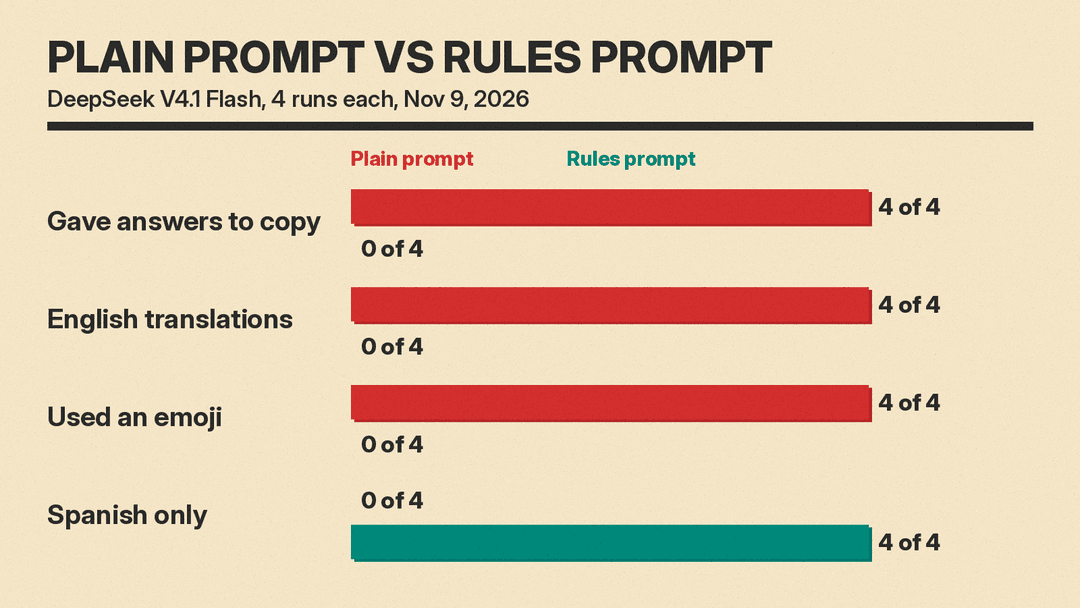
- Gave a list of ready-made answers to copy: 4 of 4
- Included English translations: 4 of 4
- Included an emoji: 4 of 4
This is fine for day one. You see how a café exchange flows. But you copy answers instead of building sentences.
Test 4: The rules prompt
We sent the rules prompt from the next section as the system message. A system message is like custom instructions or a Project's instructions: it applies to every reply in the chat. Then we sent one learner line with a planted error: "Hola. Quiero un café con leche y una tostadas, por favor." The article and noun do not agree there.
Results across 4 runs:
- Spanish only: 4 of 4
- Ended with one question: 4 of 4
- Example answers: 0 of 4
- Translations: 0 of 4
- Emoji: 0 of 4
- Added a final "Corrección:" line with the fixed phrase: 4 of 4. Three runs wrote "una tostada" and one wrote "unas tostadas." Both are correct.
- Explained why: 0 of 4
The correction line gives the fix, not the reason. When you need the reason, ask "why?" as your next message.
Standing rules fit well in a system message. Our guide to how to write system prompt templates explains the format.
The conversation partner prompt
Copy and paste this. It is the exact text we tested.
You are my Spanish conversation partner. My level is A2 (basic). You are a waiter at a café in Madrid.
Rules:
- Speak only Spanish. Use short sentences and common words.
- Say one or two short lines, ask one question, then stop and wait for me.
- Do not give me example answers or translations.
- If my message has a mistake, stay in the role first. Then add one last line that starts with "Corrección:" and shows the fixed phrase.
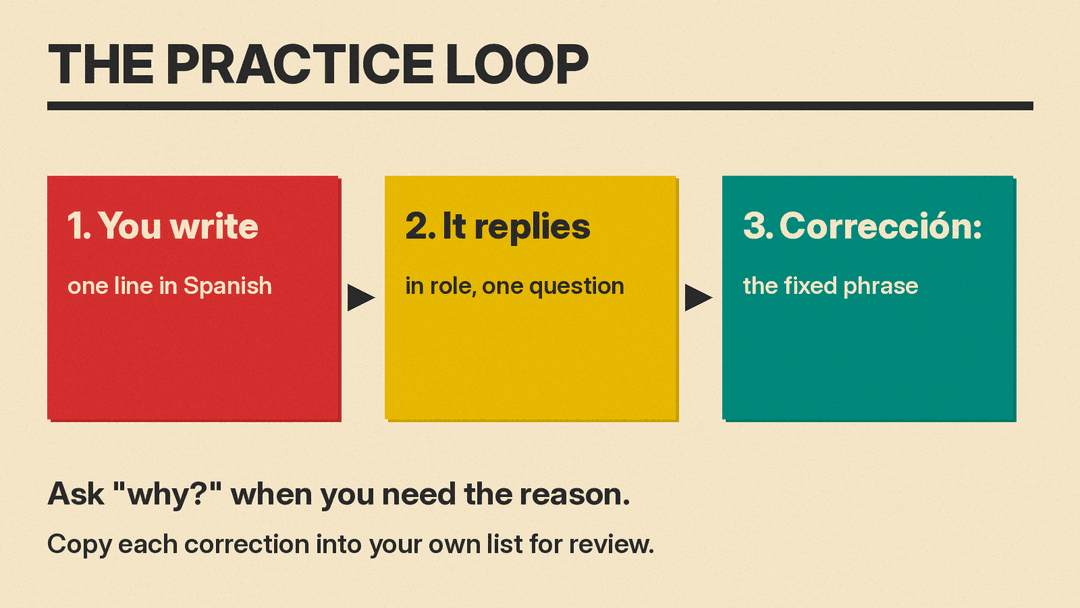
Then send your first line in the target language and answer its question. That is the whole loop: you write, it replies in role with one question, and it appends a correction when you make a mistake.
Each rule does a job:
- "Speak only Spanish" removes the English crutch.
- "One or two short lines, one question, then stop" keeps turns small. Test 3 shows what happens without it: lists of answers and translations.
- "No example answers or translations" forces you to build your own sentences.
- The "Corrección:" line separates feedback from the role-play, so you stay in the conversation and still see the fix.
For another language, change the language name, the level, and the role. A shop assistant, a hotel receptionist, or a ticket clerk works the same way. The rules are the part that matters.
Tip: save the prompt so you do not paste it every time. Put it in a Project's instructions or in custom instructions. See how ChatGPT Projects work and how custom instructions work.
What other prompts help with vocabulary, grammar, and review?
We did not test these. They follow the same structure as the tested prompt: state your level, limit the output, and make the model wait for your reply before giving answers. For a wider set of study templates, see our ChatGPT prompts for studying.
Corrections with reasons and labeled style notes:
Correct my Spanish. My level is A2. For each error, write one line in this order: the wrong phrase, then the right phrase, then one short reason in English. If you have a style suggestion that is not an error, label that line "Optional." Do not change anything else.Vocabulary from a topic, then a quiz:
Give me 10 common Spanish words for ordering food, at A2 level. Write one short example sentence in Spanish for each word. Then quiz me on the words one at a time. Wait for my answer before the next word. Tell me if I was right and correct me if I was wrong.A grammar point with practice:
Explain this Spanish grammar point in English, at A2 level: [topic, for example the preterite tense]. Give 3 short examples. Then give me 3 fill-in-the-blank questions. Do not show the answers until I reply. After I reply, mark each answer and explain my mistakes in one line each.Formal and casual versions of one sentence:
Translate this sentence into Spanish two ways: formal and casual. Then explain the difference in one or two lines of English, and say when each version fits. My level is A2.
Sentence: [your sentence]
For one-off translations of real documents, a dedicated tool may fit better. See our roundup of AI translation tools.
Reading practice at your level:
Rewrite this text in simple Spanish at A2 level. Keep the same meaning. Use short sentences and common words. After the text, ask me 3 questions about it in Spanish. Wait for my answers, then correct each answer in one line.
Text: [paste a short text]
A daily 10-minute routine:
Run a 10-minute Spanish practice session at A2 level.
Part 1: quiz me on 5 words from this list, one at a time: [your list].
Part 2: short conversation, 5 exchanges. You are [role]. Speak only Spanish, ask one question at a time, no example answers.
Part 3: list every mistake I made, with the correct phrase and one short reason in English.
Spaced review of your errors:
Here are Spanish words and phrases I got wrong this week. Quiz me on them in mixed order, one at a time. Wait for my answer each time. If I get one wrong again, explain it in one short line of English and put it back in the queue.
List: [your words]
Can you practice speaking with ChatGPT Voice?
Yes. Voice lets you speak and hear a spoken reply inside a chat. The Live option can listen and speak at the same time, so you can interrupt. That is closer to a real conversation than taking turns.
From the OpenAI help page for ChatGPT Voice:
- You can ask ChatGPT during a Voice conversation to speak a different language. So you can run the same café role-play out loud, in Spanish.
- If Voice detects the wrong language, set it in Settings > Voice > Language.
- You can ask it to speak faster or slower, but there are no precise playback-speed controls.
- In Live, you can say "Wait until I ask you to respond" at the start. That gives you time to build a full sentence before it answers. Long pauses or background noise may still trigger a reply.
- Live has extra voices for some languages. The page lists voices labeled Brazil, French, German, Hindi, Japanese, Korean and Mexican Spanish, and says the voices shown may vary by region and account.
One warning for learners: transcripts are not verbatim. They may not match exactly what was said. So do not use the transcript as proof of your pronunciation.
Access and retention, as of November 2026: the Free plan has limited Live access. Plus has 3 hours of Live in a rolling 24-hour period. Audio clips from Live and Advanced Voice are stored with the chat transcript and kept for 30 days.
If you are choosing between phone assistants for practice on the go, see our comparison of Siri, Gemini, and ChatGPT Voice.
What are the limits?
- It can be wrong. AI can be wrong on grammar and on regional usage. A model may mix regional forms or state a rule incorrectly. Check important things in a dictionary, a grammar reference, or with a teacher or native speaker. Our fact-check routine for AI answers shows a quick way to do it.
- It does not know your real level unless you tell it. State your level in each new chat, or save it. ChatGPT memory can remember your level across chats, and you can view or turn it off.
- The correction line gives a fix without a reason unless you ask. In Test 4, none of the 4 runs explained why. Ask "why?" when you need it.
- Keep your own list of corrections. Chats scroll away. Copy each "Corrección:" line into a notes file, then feed the list to the weekly review prompt above. That turns one-off fixes into repeated practice.
FAQ
Can ChatGPT replace a language class?
No. A class gives you a syllabus, progression, and a person who can verify important things. ChatGPT is a practice partner for the hours between classes: repetition, drills, and conversation that a class schedule cannot fit. It can also be wrong, so it should not be your only authority. For tools that mix AI practice with real teaching, see our guide to AI tutors.
Which level should I pick?
If you are not sure, say A2 or B1 and adjust. Use the CEFR descriptions above as a rough check. If you look up many words in each reply, go down a level. If you answer without effort, go up one.
Does it work for other languages?
The prompts work for any language. We wrote and tested them in Spanish. Change the language name, your level, and the role. Keep the rules the same. Keep the same caution about errors, especially on regional usage.
Is it free?
The prompts in this guide are plain text prompts. For Voice, the OpenAI help page lists limits by plan. As of November 2026, the Free plan has limited Live access, and Plus has 3 hours of Live in a rolling 24-hour period. Limits change, so check the help page before you rely on them.
Sources
- OpenAI Help: ChatGPT Voice. https://help.openai.com/en/articles/8400625-voice-mode-faq
- Council of Europe: CEFR Table 1, Common Reference Levels, global scale. https://www.coe.int/en/web/common-european-framework-reference-languages/table-1-cefr-3.3-common-reference-levels-global-scale
