
An AI tutor is a chatbot set up to teach instead of just answer. You ask a question, and it asks one back, gives a hint, or checks what you already know before it explains. Several big AI apps now ship a mode built for this, and a few learning companies sell their own.
This guide covers seven options from six providers, as of October 2026: what each one does, what it costs, and who can use it. Every detail below comes from the provider's own page unless we say otherwise. Features and plans change often, so check the linked page before you pay for anything.
If you want quick answers to homework questions (photo solvers and step-by-step math apps), see our separate guide to AI homework helpers. This page is about tools that try to make you do the thinking. For a wider list that also covers research, writing and lecture notes, see our best AI tools for students.
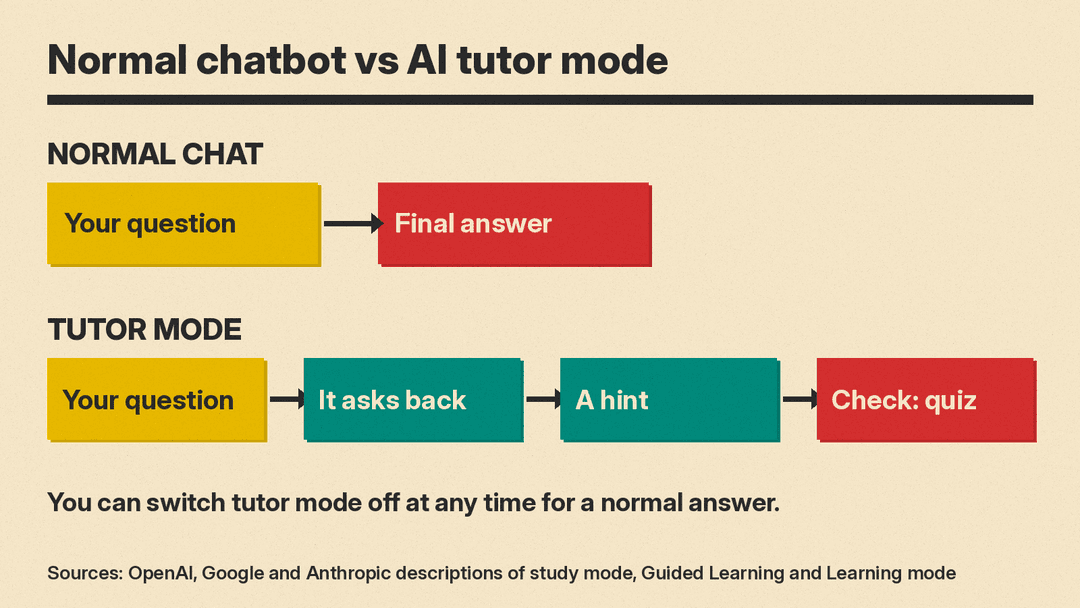
How AI tutor modes differ from a normal chatbot
A normal chat answers the question you typed. A tutor mode changes how the model responds. At launch, OpenAI said its study mode used "custom system instructions" written with teachers, scientists and pedagogy experts, and that it offers "step by step guidance instead of quick answers" (OpenAI). Google says Gemini's Guided Learning used system instructions to "guide you to a homework answer rather than providing it directly" (Google). Anthropic says Claude's Learning mode "guides students' reasoning process rather than providing answers" (Anthropic).
In practice, the three general apps share a pattern:
- They ask what you already know, or what you want to learn, before they explain.
- They use questions and hints instead of handing over the final answer.
- They can quiz you or make practice questions.
- You can switch the mode off and get a normal answer.
The seven options at a glance
- ChatGPT study mode (OpenAI): included on all ChatGPT plans, including Free.
- Gemini Guided Learning (Google): built into the Gemini app.
- Gemini immersive explorations (Google): a library of clickable visual lessons in the Gemini app.
- Claude Learning mode (Anthropic): a Socratic response mode in the Claude app.
- Khanmigo (Khan Academy): free for teachers, $4 a month or $44 a year for learners and families.
- Quizlet Learn (Quizlet): adaptive flashcard practice, part of Quizlet Plus.
- Duolingo Max (Duolingo): AI conversation practice for language learners, a paid tier.
1. ChatGPT study mode
OpenAI launched study mode on July 29, 2025. Its launch post says students using it "are met with guiding questions that calibrate responses to their objective and skill level" (OpenAI). The listed features are interactive prompts with Socratic questioning and hints, scaffolded responses, personalized support based on "questions that assess skill level and memory from previous chats," and knowledge checks with quizzes.
Who can use it. OpenAI's help center says study mode "is available across ChatGPT plans globally on web, iOS, and Android, and is available for all ChatGPT models" (OpenAI Help Center). The ChatGPT pricing page lists study mode on the Free, Go, Plus and Pro plans.
How to turn it on. On the web, type @study in the message box, or select + and search for Study. You can also go to chatgpt.com/studymode. On iOS and Android, tap + and choose Study. The help center says the Study option "is not available in Temporary Chats, GPTs, or Projects."
Limits to know. The same help page says study mode "uses the same ChatGPT plan, model, message, and rate-limit rules that apply outside study mode," and that "there may be times when it gives a direct answer." It also tells students to follow the AI-use policies of their school or instructor for graded work.
For ready-made prompts to use with it, see our ChatGPT prompts for studying.
2. Gemini Guided Learning
Google added Guided Learning to the Gemini app in August 2025. Google describes it as "an interactive study partner that helps you build a deeper understanding of any topic" that "can even do your homework with you. But it won't do it for you." (Google). Google says Gemini can lay out a study plan for a topic, then walk you through each step and check in along the way. It pulls in diagrams and images from a database and finds relevant YouTube videos.
Google says Guided Learning is powered by LearnLM, which it calls "our family of models specifically fine-tuned for learning."
Who can use it. Google's Workspace Updates post says Guided Learning and integrated visuals "are available to Gemini app users of all ages," while quizzes, flashcards and study guides "are available to users 18+ at this time" (Google Workspace Updates). That post dates from August 2025. Google's current help page for quizzes, flashcards and study guides says you must be signed in and does not state an age limit (Gemini Apps Help).
How to turn it on. Google's help page says you must be signed in. On a computer, go to gemini.google.com, click Add files, then More tools, then Guided Learning, and type your question. The same page has steps for Android and iPhone (Gemini Apps Help). Google notes it releases these features "gradually" in the mobile app, so the web version may show them first.
3. Gemini immersive explorations
This one is newer and works differently. Google describes immersive explorations as a library of interactive, visual lessons that you explore layer by layer, such as the inside of a jet engine or the physics of lightning (Google). Android Authority reports that you pick a topic from the library and cannot make your own (Android Authority). We covered the launch in detail in our Gemini immersive explorations explainer, including who can use it and how to open it.
If you want to be tested on the topic afterward, you can switch to Guided Learning or ask Gemini for a quiz.
4. Claude Learning mode
Anthropic introduced Learning mode in April 2025 as part of Claude for Education. Its announcement lists what the mode does (Anthropic):
- "Guiding rather than answering," for example asking "How would you approach this problem?"
- "Using Socratic questioning," such as "What evidence supports your conclusion?"
- "Emphasizing core concepts" behind specific problems.
- "Providing useful templates" for research papers, study guides and outlines.
Who can use it. At launch, Learning mode was only for Claude for Education users. In August 2025, Engadget reported that Anthropic made it available to everyone, as a "Learning" option in the style menu on Claude.ai, and that you can turn it off at any time (Engadget). Claude's menus have changed since then. Claude's help center now lists instructions, project instructions and skills as its personalization features and does not mention styles (Claude Help Center). If you do not see a Learning option where Engadget described it, search the skills directory: in Claude, go to Customize, then Skills, select +, then Browse skills (Claude skills directory).
Engadget also reported a separate Learning style for coding in Claude Code, where Claude leaves parts of the code for you to write.
5. Khanmigo (Khan Academy)
Khanmigo is Khan Academy's AI tutor. Its learner page calls it "your always-available tutor on just about every topic" and says it is "built to help you learn" (Khanmigo). Khan Academy states that Khanmigo "never gives you the answer." That is Khan Academy's own description, not something we tested.
The learner plan lists tutoring on Khan Academy content, writing and debate practice with feedback, career coaching, and coding feedback. The learner page says you can speak to Khanmigo and it will read its responses aloud.
Price. The Khanmigo pricing page lists:
- Teachers: free.
- Learners: $4 a month or $44 a year.
- Families: $4 a month or $44 a year, with child accounts added from a parent account, plus chat history and moderation alerts for parents.
- Districts: priced on request.
Sales tax is not included, the page says.
Who can use it. Khanmigo's learner page says that to use it as a parent or learner you must pay monthly or annually, be 18 or older, live in the United States and have a US billing address. Students under 18 need a parent or guardian to sign up and add them to the parent's account.
Khanmigo is built into Khan Academy's content library, so you can get tutoring on Khan Academy exercises, videos and articles. That fits a student who already uses Khan Academy for math or science.
6. Quizlet Learn
Quizlet Learn is not a chatbot. It turns a flashcard set into an adaptive practice session. Quizlet's help center says Learn "creates a personalized study path based on your goals and how familiar you are with the set's content" and is "powered by machine learning" (Quizlet Help Center).
Who can use it. Learn is available to Quizlet Plus and Quizlet Plus for teachers subscribers. Others can start a free study session to try it. The help center also says students in a teacher's class get free access to Learn and Test for the sets in that class.
Use Quizlet when the job is memorizing terms and definitions. Use a chat tutor when you need a concept explained.
7. Duolingo Max (for languages)
For language learners, Duolingo's top tier adds AI conversation practice. Duolingo's help center says Max includes all Super Duolingo benefits plus two AI features: Roleplay and Video Call with Lily (Duolingo Help). Video Call lets you practice spoken conversation with the Duolingo character Lily.
Who can use it. The help center says Max is available on iOS and Android and "cannot be purchased on web." Some AI features are limited to certain courses. Video Call is listed for learners of English, French, Spanish, Italian, German and Portuguese.
One AI feature is now free: on January 1, 2026, Duolingo said Explain My Answer, which gives personalized grammar and vocabulary explanations after a mistake, is now free for all learners. Its post says the feature is available for most learners in its courses that teach Spanish, French, German, Japanese, Portuguese, Italian and Korean (Duolingo blog).
How to pick one
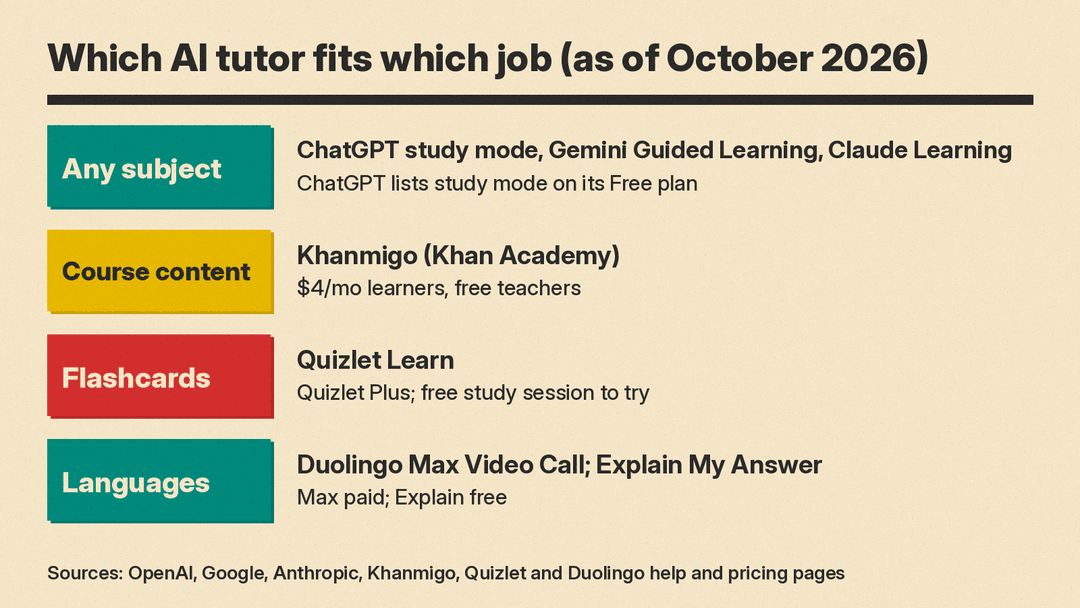
Match the tool to the job:
- You want a free tutor for any subject: start with the study or learning mode in the chat app you already use. ChatGPT study mode is listed on the Free plan, and Guided Learning is in the Gemini app.
- You want a tutor tied to course content: Khanmigo works on top of Khan Academy's lessons.
- You need to memorize terms: Quizlet Learn is built for flashcard practice.
- You are learning a language: Duolingo's Explain My Answer is free; Video Call needs Max.
- You want a visual overview first: Gemini immersive explorations, then a tutor mode for questions.
Using an AI tutor well
The providers' own pages include a few cautions worth repeating:
- Check important facts. OpenAI's help center says study mode "can make mistakes" and tells users to double-check important information, especially for homework and exams.
- Follow your school's rules. OpenAI says that for graded work, students should follow the AI-use policies of their school, instructor or organization.
- Ask for the style you want. OpenAI says that if study mode gives a direct answer, you can ask it to use hints, quizzes or step-by-step guidance instead.
- Watch age limits. Khanmigo requires learners to be 18 or older, and younger students need a parent account, which lists chat history and moderation alerts for parents. Google's August 2025 post limited Gemini's quizzes, flashcards and study guides to users 18 and older at that time; Google's current help page for those tools does not state an age limit.
If you are a parent looking for structured courses rather than a chatbot, see our list of free AI courses for kids and teens. For research with your own notes and readings, our Gemini Notebook explainer covers Google's notebook tool, which Google says added flashcards and quizzes for students in 2025 (Google).
Sources
- OpenAI: Introducing study mode
- OpenAI Help Center: Using study mode in ChatGPT
- ChatGPT: Plans and pricing
- Google: How Gemini's Guided Learning can help you study more effectively
- Google Workspace Updates: New study tools in the Gemini app
- Gemini Apps Help: Use learning tools in Gemini Apps
- Gemini Apps Help: Create quizzes, flashcards, practice tests and more in Gemini Apps
- Google: Dive into new topics with immersive explorations in the Gemini app
- Android Authority: Gemini's new immersive explorations turn it into an interactive encyclopedia
- Anthropic: Introducing Claude for Education
- Engadget: Anthropic brings Claude's learning mode to regular users and devs
- Claude Help Center: Understanding Claude's personalization features
- Claude Help Center: Browse skills, connectors, and plugins in one directory
- Khanmigo for learners
- Khanmigo pricing
- Quizlet Help Center: Studying with Learn
- Duolingo Help Center: What is Duolingo Max?
- Duolingo: Explain My Answer is now free for all learners
