
AI can write a product description in seconds. The catch is that it also writes things you never told it. Shopify says this plainly in its own help page for AI descriptions: generated text "can include things such as product benefits even when you didn't list any explicitly, and facts based on other published content related to similar products," and you are responsible for the accuracy of what you publish (Shopify Help Center).
So the useful question is not "which prompt writes the best copy" but "which prompt writes good copy that stays true." We tested four prompts on a real model to find out. Below are the results, the prompts that held up, and a simple three step workflow you can use in ChatGPT, Claude, Gemini or a store tool such as Shopify's Sidekick.
What we tested
We wrote a fact sheet for a made-up product, the Harbor 600 insulated water bottle: 600 ml, double-wall stainless steel, cold up to 18 hours and hot up to 8 hours in our own lab test, 340 g, a screw-on lid with a carry loop that is leak-proof when closed, a lid that is top-rack dishwasher safe, a body you wash by hand, a 7.2 cm base that fits most car cup holders, and three colors. The sheet said nothing about a warranty, BPA, or clips.
We sent each prompt 4 times to DeepSeek V4.1 Flash through OpenRouter on November 9, 2026, with reasoning effort set to low. That is 16 calls in total. Then we read every reply and counted.
What we found
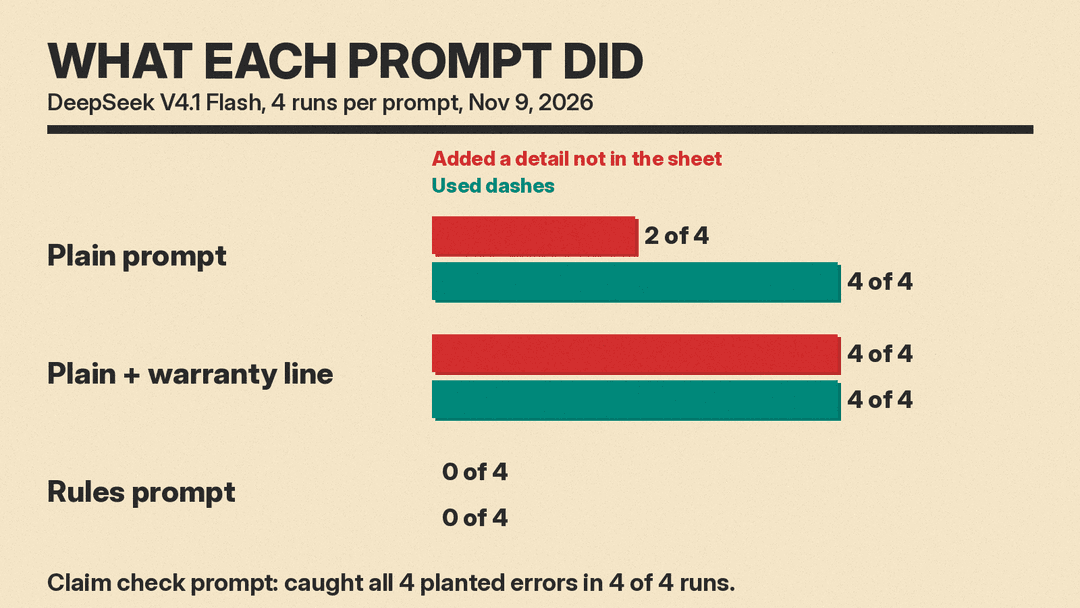
- A plain prompt was mostly accurate, but not fully. "Write a product description for this water bottle" plus the fact sheet kept the lab test note and got the dishwasher split right in 4 of 4 runs. But 2 of 4 runs added a detail that was not in the sheet: one said the carry loop takes "a clip," another said the bottle "won't sweat on your desk" and can "clip to a pack." Three of four opened with the same phrase, "built for the long haul."
- Asking for something you did not supply makes it worse. When we added "End with a line about the warranty," the model did not invent a warranty length. It left a placeholder such as "[X-year]" in 4 of 4 runs and told us to fill it in. But 3 of 4 still wrote promise language around the gap ("against manufacturing defects," "if it fails, we make it right"), and 4 of 4 described the carry loop as something that clips to a pack, strap or carabiner. One gave a reason the sheet never stated: hand wash "to protect the vacuum seal."
- A rules prompt fixed it. A prompt with a buyer, a word range, a fixed format and three rules (use only the sheet, write [ASK ME] for gaps, keep every qualifier) added a new feature, material or use in 0 of 4 runs. One reply still said the bottle "sits steady while you drive," a small stretch worth editing. All four paragraphs landed inside the 60 to 90 word range (75, 79, 87 and 88 words). The three replies that finished each wrote an [ASK ME] placeholder for the warranty instead of a promise. It used dashes in 0 of 4 runs, against 8 of 8 for the plain prompts.
- The rules prompt cost more thinking. The plain replies used 20 to 377 reasoning tokens. The rules prompt used 823 to 1,269, and one reply hit our 1,500 token cap partway through the bullets. If you use an API, leave room in your output limit.
- A separate claim check caught every planted error. We gave the model a bad description with four planted problems: "BPA-free," "24 hours" cold (the sheet says up to 18), "the whole bottle is dishwasher safe," and "lifetime warranty." It found all four in 4 of 4 runs. It also flagged the dropped "up to" on the hot claim in 4 of 4 runs and the dropped "when closed" in 3 of 4 (the fourth mentioned it as optional). It flagged no supported claims by mistake.
One model and 16 calls is a small test, not a benchmark. Other chatbots will behave differently. But the pattern matches Shopify's warning, and the fix is cheap: give the AI a fact sheet, tell it what to do with gaps, and check the result.
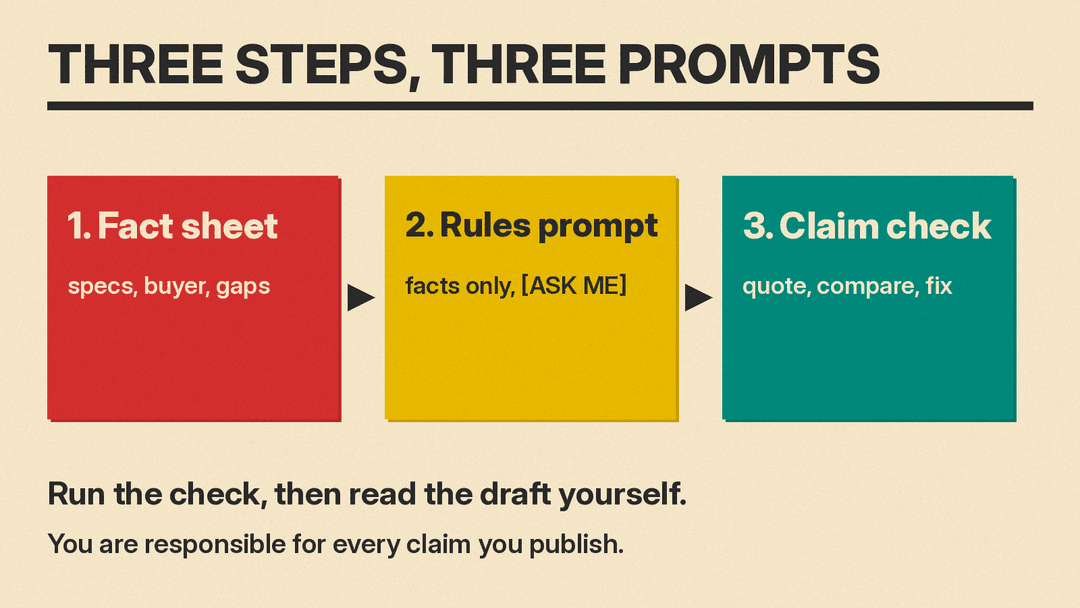
Step 1: Build a fact sheet
The fact sheet does most of the work. Shopify's advice for its own tool is the same: include the product type, who the customer is, and specific details about materials, fit and intended use, and give at least a product title and two features or keywords (Shopify Help Center). Its general guide lists specifications such as size, material and weight, suggested uses, and "benefits of the product, including evidence" (Shopify Help Center).
Copy this and fill it in:
Product name and type:
Who buys it and why (1 line):
Specs (size, weight, materials, capacity):
Performance claims and how you know (test, supplier sheet):
Care and cleaning:
What is in the box:
Variants (colors, sizes):
Warranty and returns (or "none stated"):
Words to keep (brand terms):
Words to avoid:
Write each claim as a full line with its qualifier. "Cold up to 18 hours (our lab test, 22 C room)" is safer than "18h cold," because a model can drop the parts you leave vague. If you do not know something, write "unknown." That gives the model nothing to fill in.
Step 2: The rules prompt (tested)
This is the prompt that held up in our test (our test version listed one more hype word). Replace the buyer, tone and fact sheet with your own.
You write product descriptions for a small online store.

Buyer: [who buys it and what they use it for].
Tone: plain, friendly, specific. No hype words (premium, ultimate, perfect). No dashes of any kind.

Rules:
1. Use only the facts in the fact sheet. Do not add features, materials, uses or reasons that are not listed.
2. If you need a fact that is missing, write [ASK ME: what you need] instead of guessing.
3. Keep every qualifier in the sheet (for example "up to" and how a number was tested).

Format:
- One paragraph of 60 to 90 words that leads with the benefit for this buyer.
- Then 4 bullets, each one fact plus why it matters to this buyer.
- Then one line about the warranty.

Fact sheet:
[paste your fact sheet]
Why each part is there:
- The buyer line gives the model something real to write about, so it does not reach for generic openers. In our test, the rules prompt wrote about coffee on the drive and water at a desk, because that was the buyer we named.
- A number range beats "keep it short." OpenAI's own prompt guide uses product descriptions as its example: instead of "fairly short, a few sentences only," say "Use a 3 to 5 sentence paragraph" (OpenAI Help Center).
- [ASK ME] tells the model what to do instead. Both OpenAI and Anthropic advise saying what to do rather than only what not to do (OpenAI, Anthropic). "Do not guess" alone leaves a gap. A placeholder fills it.
- The qualifier rule protects the claims that matter most: test conditions, "up to," "most," "when closed."
Step 3: The claim check prompt (tested)
Run this on every description before it goes live, including ones you wrote by hand or got from a store tool.
Check this product description against the fact sheet. List every claim in the description that the fact sheet does not support, or that changes a number or qualifier. For each one, quote the words from the description, say what the fact sheet says (or "not in sheet"), and suggest a fix. Do not rewrite the whole description. If a claim is supported, do not list it.

Description:
[paste the description]

Fact sheet:
[paste the fact sheet]
Asking for a quote from the description makes the reply easy to check: you can find each flagged phrase in seconds. "Do not rewrite" keeps the model from handing you a new draft with new problems. Then read the list yourself. The check is a second pair of eyes, not proof.
More prompts for common jobs
These follow the same pattern. We did not run these in our test, so read the output with the same care.
Marketplace bullets.
Using only the fact sheet below, write 5 bullets for a marketplace listing. Start each bullet with the feature in 2 to 4 words, then one sentence on why it matters to [buyer]. Keep every qualifier. Write [ASK ME] for anything missing.
[fact sheet]
Three lengths at once.
Using only the fact sheet below, write three versions of the description: 25 words for a product card, 60 words for a category page, and 120 words for the product page. Same facts in each, no new ones.
[fact sheet]
Rewrite an old description.
Here is my current product description and my fact sheet. Rewrite the description for [buyer] in under 100 words. First list any claim in the old description that the fact sheet does not support, and leave those claims out of the rewrite.
[old description]
[fact sheet]
Match your store's voice. Paste two descriptions you like and add: "Match the tone and sentence length of these examples, but use only the facts in the new fact sheet." Anthropic's guide calls examples "one of the most reliable ways to steer Claude's output format, tone, and structure," and suggests marking them clearly, for example with <example> tags (Anthropic). For more on this, see our guide to few-shot prompting.
Keywords for search. Add one line: "Use the phrase [main keyword] once in the first sentence, and do not repeat it." Google says AI use is fine when the content is helpful, but using automation "with the primary purpose of manipulating ranking in search results" breaks its spam policies (Google Search Central). One natural mention beats ten.
Using these in ChatGPT, Claude, Gemini or Shopify
The prompts above are plain text, so they work in any chatbot. A few practical notes:
- In a chatbot, put the rules in the first message and paste the fact sheet below them. If you write many descriptions, save the rules as custom instructions or a project so you only paste the fact sheet each time.
- In Shopify, Sidekick can write descriptions from the product page: open a product, click the icon in the description text box toolbar, enter a prompt and submit it. Shopify says this works from a desktop computer, not on iPhone or Android, and that the more details you add, the more relevant the result (Shopify Help Center). You can paste the rules prompt and fact sheet into that box. Then run the claim check in a chatbot.
- For many products, keep one fact sheet per product in a spreadsheet, one column per field. That way the inputs are consistent and you can check any description against its row.
For more marketing prompts, see our 30 ChatGPT prompts for marketing and ChatGPT prompts for small business. For photos to go with the copy, see AI product photo prompts, and for store tools, the best AI tools for Etsy and Shopify sellers.
Common mistakes
- Giving a name and nothing else. With only a product name, the model has little to work with, which invites the kind of text Shopify warns about: benefits you never listed and facts drawn from similar products.
- Asking for a section you have no facts for. A warranty line, a sizing chart or a "what's in the box" list with no data invites promise language or placeholders. Leave it out or supply the facts.
- Writing shorthand. "18h cold" can lose its test note. Write the full line.
- Trusting the tone. Confident copy is not true copy. Our plain replies read well and still added claims.
- Skipping the check because the draft looks fine. The claim check took one extra call and caught every planted error. Use it, then read it.
FAQ
What is the best AI prompt for product descriptions? One that gives the model a fact sheet, a named buyer, a word range and a fixed format, and tells it to write [ASK ME] for missing facts. In our test that version added a new feature, material or use in 0 of 4 runs.
Can ChatGPT write product descriptions? Yes. ChatGPT, Claude, Gemini and store tools such as Shopify Sidekick can all draft them. The risk is the same in each: the model can add benefits or facts you did not give it, so check every claim before you publish.
How long should a product description be? It depends on the page. Give the model a range rather than a word like "short," and ask for more than one length if you need a card, a category page and a product page.
Will Google penalize AI-written product descriptions? Google says it rewards helpful, original content however it is produced, and treats AI content made mainly to manipulate rankings as spam (Google Search Central).
How do I stop AI from making things up in my descriptions? Supply the facts, tell the model what to do when a fact is missing, and run a separate claim check. For a general routine, see how to fact-check AI answers. To learn more about why prompts like these work, read what prompt engineering is.
Sources
- Shopify Help Center: Automatically generating product descriptions
- Shopify Help Center: Product descriptions
- OpenAI Help Center: Best practices for prompt engineering with the OpenAI API
- Anthropic: Prompting best practices
- Google Search Central: Google Search's guidance about AI-generated content
- llms.blog test: DeepSeek V4.1 Flash via OpenRouter, 16 calls, November 9, 2026
