
ChatGPT can play an interviewer, turn your rough notes into a practice answer, and point out weak spots before the real call. It can also invent details that you never gave it. This guide gives copy-paste prompts for each stage of interview prep, a short privacy check before you paste your resume, and the results of a small test of two prompt shapes.
The prompts below are written for ChatGPT, but they are plain text. We did not run them in ChatGPT itself. We tested close versions of the mock interview and STAR answer prompts on a small local model, and we report those results in the test section.
Before you paste your resume: a privacy check
Interview prep means sharing personal details: your work history, employers, results, and sometimes salary numbers. Read how ChatGPT handles that data first.
OpenAI's help page on how your data is used to improve model performance says: "When you use our services for individuals (Free, Plus, Pro), we may use your content to train our models." The same page says you can opt out: "turn off Improve the model for everyone under Settings > Data controls in ChatGPT, or select Do not train on my content in our Privacy Portal."
Two more points from that page matter for interview prep:
- "Temporary chats are not used to improve OpenAI models while they remain temporary." The page adds that they "do not appear in your chat history or create or update memories."
- Feedback can still count. Even after you opt out, "If you choose to provide feedback, the entire conversation associated with that feedback may be used to train our models."
We suggest you remove your phone number, home address, and email from a resume before you paste it. The prompts below need your skills and stories, not your contact details. If you use a work account on ChatGPT Business or Enterprise, the same page says OpenAI does not use those inputs to improve its models "By default", but check your employer's own rules before you paste anything about a current job.
How to write an interview prep prompt
OpenAI's prompt engineering best practices for ChatGPT page lists three general rules. Each one maps to interview prep:
- "Be clear and specific." The page says to give "enough context for the model to understand what you are asking." For interviews, that means the job title, the company, and the job description.
- "Iterative refinement." The page says to "Start with an initial prompt, review the response, and refine the prompt based on the output." Treat a first practice answer as a draft.
- Tone. The page suggests "descriptive adjectives to indicate the tone", such as formal or friendly. Use this to match the style of the company.
Our test, below, adds a fourth rule: tell the model exactly what to leave out. "Do not answer the question yourself" and "Write nothing except the question" changed the output more than anything else. For more on the basics, see our plain explanation of what prompt engineering is.
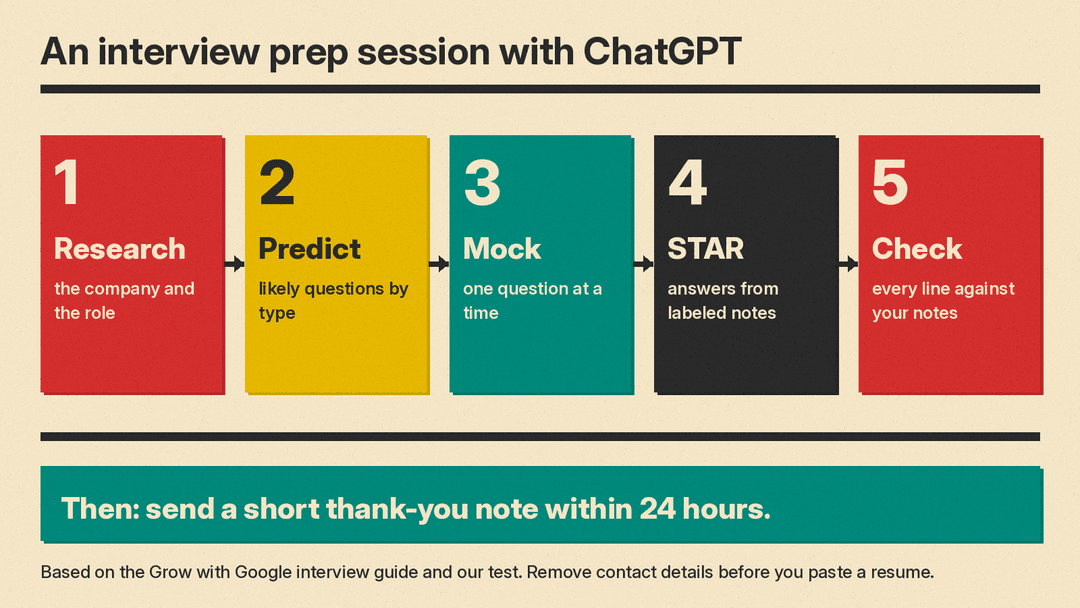
Step 1: Research the company and the role
The Grow with Google guide on how to prepare for an interview splits prep into three parts: "conducting a deep dive into the company's current strategy, clearly understanding the specific role's expectations, and developing a set of thoughtful questions for the interviewer." It suggests looking at a company's "recent press releases, industry reports, social media posts, or even their customer reviews."
ChatGPT can help you organize that research, but it can be wrong about recent company news. Paste the facts yourself.
I have an interview for [job title] at [company].
Here is the job description:
###
[paste job description]
###
Here are notes from the company's website and recent press releases:
###
[paste your notes]
###
Using only the text above, list:
1. The 5 skills the job description stresses most, in order.
2. Three company priorities I can mention, each with the line it comes from.
3. Any part of the job description that is unclear, so I can ask about it.
The phrase "using only the text above" and the request for the line each point comes from make it easier to check the reply against your notes.
Step 2: Predict the questions
The same Grow with Google guide names four broad question types: "tell me about yourself" questions, behavioral questions, situational questions, and "more general or personality-based questions."
Here is the job description for a [job title] role:
###
[paste job description]
###
List 12 interview questions I am likely to get for this role.
Give 3 in each group: tell me about yourself, behavioral, situational, and general or personality-based.
For each question, write one line on what skill from the job description it tests.
Do not write answers.
Step 3: Run a mock interview, one question at a time
This is the prompt we tested most. A short request such as "Interview me for a customer support team lead job" made our test model write a whole interview script in one reply. A spelled-out version made it ask one question and stop.
You are a hiring manager interviewing me for a [job title] job at [company].
Ask me one interview question. Then stop and wait for my answer.
Do not answer the question yourself. Do not give tips yet. Write nothing except the question.
After I answer, give me two strengths and one thing to fix, then ask the next question.
The last line is our addition for a full session. We tested only the first three lines (a close version, with no company name). Grow with Google also notes that AI tools can give "on-demand feedback" for mock interviews, and it names Gemini Live in the Gemini mobile app as one option for spoken practice.
Step 4: Write a 30 to 60 second pitch
Grow with Google says "Tell me about yourself" is often one of the first questions, and that a common mistake is to "tell your entire professional or personal history." It suggests "a succinct 30-60 second professional pitch that is well-practiced but doesn't feel scripted."
Write a "tell me about yourself" answer for a [job title] interview.
Use only the facts below. Do not add skills, employers, or results.
Keep it between 80 and 130 words, so I can say it in under a minute.
Lead with the strengths that match the job description.
My facts:
###
[current role, years of experience, 2 or 3 key skills, one result, why this job]
###
Job description:
###
[paste job description]
###
We suggest you read the reply out loud with a timer. Word counts from a model are often off, so count the words yourself.
Step 5: Turn your notes into a STAR answer
Grow with Google calls the STAR method "your go-to strategy" for behavioral questions: Situation, Task, Action, Results. It also says to "include specific details and data" where you can.
Give the model your facts in labeled lines. In our test, labeled notes kept the key numbers in 4 of 4 replies, while the same story written as plain sentences, with the same prompt, kept both numbers in 1 of 4 replies.
Write my answer to the interview question "[question]".
Use the STAR method. Use four short paragraphs that start with "Situation:", "Task:", "Action:" and "Result:", in that order.
Use only the facts in my notes. Do not add numbers, names or results that are not in my notes.
Keep the whole answer under 150 words. Write it in the first person, as I would say it out loud. Write nothing else.

My notes:
###
Role I am applying for: [job title]
My employer at the time: [company]
Year: [year]
Customer or team involved: [who]
Problem: [what went wrong]
What I did: [action 1]; [action 2]; [action 3]
Result 1: [result with a number if you have one]
Result 2: [second result]
###
Then check every sentence against your notes. In our test, every STAR reply added or changed at least one detail.
Step 6: Get feedback on your own answer
I am preparing for a [job title] interview. Here is the question and my answer.
Question: [question]
My answer: [paste your answer]
Give me:
1. Which STAR part (Situation, Task, Action, Result) is weakest, and why, in one sentence.
2. One place where a number or specific detail would help. Do not invent the number; ask me for it.
3. One sentence I could cut.
Do not rewrite the whole answer.
"Do not invent the number; ask me for it" matters. A model that fills a gap with a made-up figure gives you a claim you cannot back up in the interview.
Step 7: Practice situational questions
Grow with Google describes situational questions as "hypothetical situations" and suggests you "point to specific actions you would take", including how you would "measure success, set milestones, determine roles and responsibilities."
Ask me one situational interview question for a [job title] role, based on this job description:
###
[paste job description]
###
After I answer, tell me whether I covered: the actions I would take, how I would measure success, and who would do what. List anything I missed.
Step 8: Prepare questions for the interviewer
Grow with Google says "The best interviews are two-way conversations" and gives two sample questions: "What does success look like in this role during the first 90 days?" and "What are the biggest challenges the team is currently facing, and how would this role help solve them?"
Here is the job description and my research notes:
###
[paste]
###
Suggest 6 questions I could ask the interviewer. Each must connect to a specific line in the job description or my notes. Show the line next to each question.
Avoid questions the job description already answers.
Step 9: Draft the thank-you note
Grow with Google suggests a short thank-you note "within 24 hours" that mentions something you enjoyed about the conversation, and says you can use it to add anything important you forgot.
Draft a thank-you email after my interview for [job title] at [company] with [interviewer name].
Keep it under 120 words.
Mention this point from our conversation: [detail].
Add this point I forgot to say: [point], in one sentence.
Use a warm, professional tone. Do not add anything else about the interview.
What our test showed
We ran a small test on November 9, 2026, with Gemma 3 1B, a small open model, served locally by llama.cpp at temperature 0.7. Each prompt ran 4 times (seeds 0 to 3). Gemma 3 1B is much smaller than the models in ChatGPT, so treat these results as a check on prompt shape, not as a ChatGPT score.
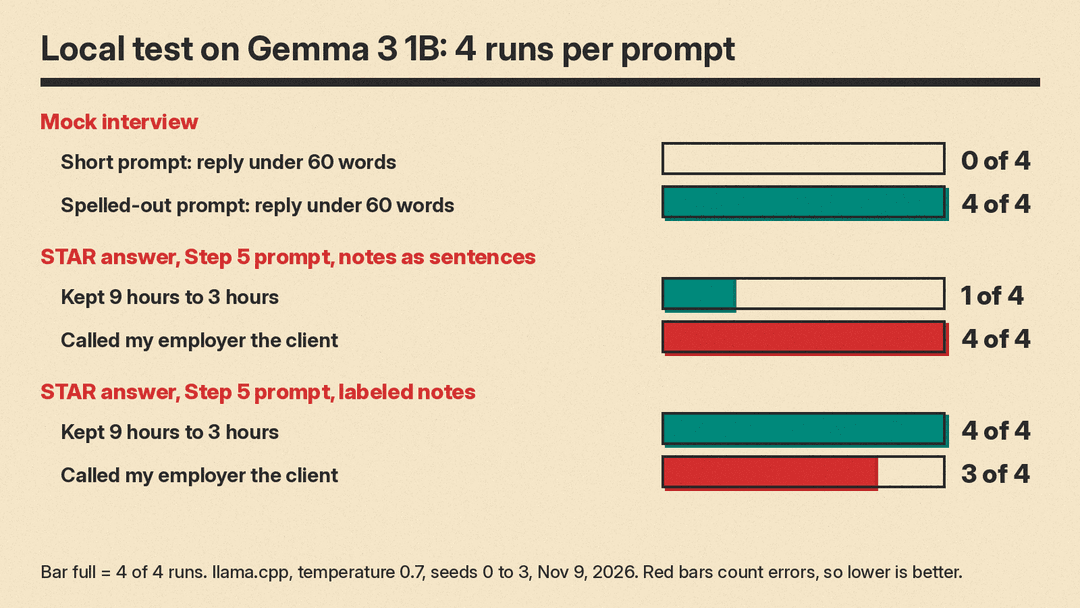
Mock interview. The short prompt was "Interview me for a customer support team lead job." The spelled-out prompt was the Step 3 prompt without the last line or a company name.
- Short prompt: 0 of 4 replies stayed under 60 words (321, 326, 100 and 314 words). 3 of 4 asked more than one question, and 3 of 4 went on to assume or skip past my answer, with lines such as "(After you answer - let’s assume you say something like...)".
- Spelled-out prompt: 4 of 4 replies stayed under 60 words (25 to 38 words), and 0 of 4 asked more than one question. Only 1 of 4 obeyed "Write nothing except the question" fully; the other three opened with a line like "Okay, let’s begin." One full reply read: "Tell me about a time you had to deal with a particularly difficult customer. Walk me through the situation, what you did, and what the outcome was."
STAR answers. We gave the model one story: at Brightline Software in 2024, a hospital client threatened to cancel after three missed callbacks; I called their IT manager the same day, set a daily 15-minute check-in for two weeks, and moved their tickets to a priority queue; they renewed, and my team's first reply time dropped from 9 hours to 3 hours. We tried three prompts:
- Plain request with the notes as sentences ("Write an answer to ... using my notes"): 0 of 4 used the four STAR labels, 0 of 4 stayed under 150 words (351 to 377 words), and only 2 of 4 mentioned the renewal. One reply gave three options instead of one answer.
- Step 5 prompt with the same notes as sentences: 4 of 4 used the four labels in order and 3 of 4 stayed under 150 words. But only 1 of 4 kept "9 hours to 3 hours", and 4 of 4 called Brightline Software the client, when it was my employer. One reply began: "I received a call from a hospital client, Brightline Software". Another invented a discount: "I also proactively offered a small discount on their next month’s service."
- Step 5 prompt with labeled notes ("My employer at the time: Brightline Software", "Customer: a hospital"): 4 of 4 used the labels in order, 3 of 4 stayed under 150 words, 4 of 4 kept the renewal and the 9 to 3 hours drop. The employer mix-up fell to 3 of 4.
No STAR reply added a new figure to the story. But when we read every reply by hand, 12 of 12 across the three STAR prompts added or changed at least one detail, such as "every two weeks" instead of daily for two weeks, or an apology that was not in the notes. All 12 also opened with a preamble line such as "Okay, here’s a response using the STAR method, based on your notes:" even when told to "Write nothing else."
What this means for your prep
- Spell out what the model must not do. "Do not answer the question yourself" and "Write nothing except the question" turned a 300-word script into a single question in our test.
- Label your facts. Labeled notes kept the numbers and results in every run. They did not fully stop the model from mixing up who was who.
- Check every line. A practice answer that says you gave a discount or fixed a system glitch could hurt you if an interviewer asks a follow-up. Grow with Google's advice to "be generally honest" applies to AI drafts too.
- We suggest you use AI drafts as a starting point and then say the answer in your own words. Grow with Google says practice helps keep answers from sounding "too scripted."
If you want a tool built for mock interviews instead of a general chatbot, see our list of the best AI interview prep tools. For technical roles, our guide to AI and ML interview questions covers what employers ask.
Sources
- OpenAI Help Center: Prompt engineering best practices for ChatGPT
- OpenAI Help Center: How your data is used to improve model performance
- Grow with Google: How to prepare for an interview
- llms.blog local test, November 9, 2026: Gemma 3 1B via llama.cpp, temperature 0.7, 4 runs per prompt
