
Machine translation used to mean pasting a sentence into a box and hoping for the best. Today the useful tools split by what you need to translate: a document or email, a live conversation, a video, or a steady stream of company content in many languages. Each job has a different best fit, and the wrong pick means extra cleanup work.
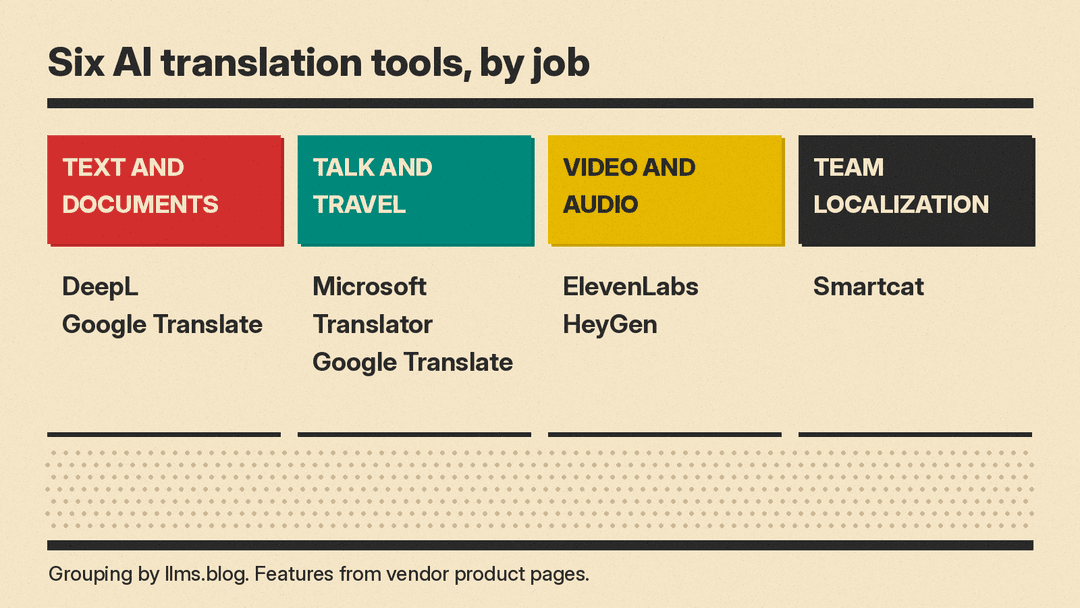
This guide covers six real tools, grouped by job. Every feature below comes from the vendor's own product and pricing pages, checked on October 28, 2026. Plans and limits change often, so check the vendor page before you pay. If you make videos, our best AI tools for YouTubers guide covers editing and captions too. If you run a small team, see best AI tools for small business owners.
How to choose an AI translation tool
Answer three questions before you compare tools:
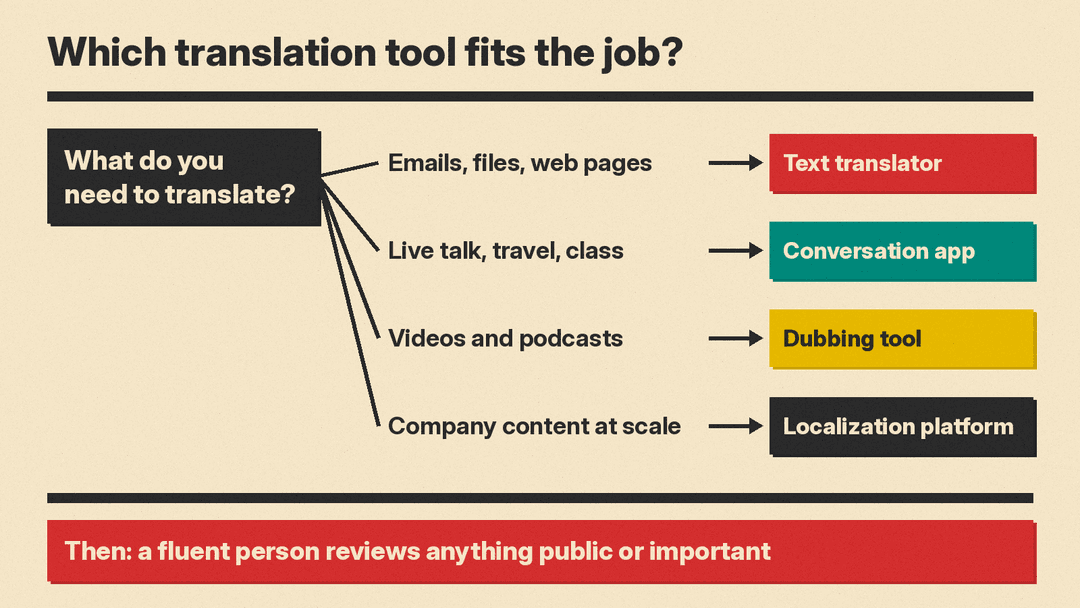
- What are you translating? Text and files, live speech, and video need different tools. A text translator will not dub your video, and a dubbing tool is a slow way to translate an email.
- Who reads the result? A rough translation is fine for a menu or a quick reply. A contract, a product page or an ad needs a human review, whichever tool you use.
- Do you need the same terms every time? Teams that translate product names, brand phrases or technical words want glossaries, so the tool uses the same translation for a term in every file.
Also decide what you can paste in. Do not put private customer data or confidential files into any tool until you have read the vendor's data terms for your plan.
Text and documents: DeepL
DeepL Translator is a text and document translator with a free version and paid Pro plans. The DeepL Pro page lists file translation, glossaries, a formal or informal tone setting and full-page translation, with higher limits on higher plans. The Team plan adds team administration, analytics and single sign-on, and the Business plan adds unlimited glossaries and translation memory. Each paid plan has a 30-day free trial.
On data, the same page's FAQ says that for Pro subscribers, DeepL "temporarily stores both original content and processed results only as technically needed to provide its services and deletes it afterward unless otherwise specified," and that this content is "never used to train DeepL's AI models." That statement is about Pro plans, so read it before you use the free version for work files.
The page also says the DeepL browser extensions for Chrome, Firefox and Edge let you use DeepL "directly in Gmail, Google Docs, and Google Slides."
Good for: people and teams who translate emails, documents and web pages and want control over terms and tone.
Everyday text, camera and travel: Google Translate
Google Translate is the free option most people already have. Its about page lists a wide set of input methods: translate with your camera, type, speak or handwrite, and copy text in any app and tap to translate. You can "Download a language to translate without an internet connection," which helps when you travel.
For longer work, the page says you can upload files to translate them "in place without losing their formatting," and enter a URL to translate a whole webpage. A conversation mode lets you talk with someone who speaks a different language, and a Transcribe mode helps you follow what is being said.
Good for: travel, quick lookups, signs and menus, and a first pass on a document at no cost.
Conversations, classrooms and business apps: Microsoft Translator
Microsoft Translator covers three groups. For personal use, its apps translate "real-time conversations, menus and street signs while offline, websites, documents, and more." The Translator apps page says you can download offline translation packs and translate a live conversation from the app with "real-time, translated captions."
For schools, Microsoft says Translator supports "live captioning, cross-language understanding," and multilingual conversations to help with student integration. For businesses and developers, it offers the Translator API and Speech service in the Azure AI Services family, so an app or website can add text and speech translation.
Good for: live multilingual conversations, classrooms with parents who speak other languages, and teams that want to build translation into their own apps.
Video and audio: ElevenLabs and HeyGen
Video needs more than translated words. The voice, the timing and sometimes the lip movement must match. Two tools focus on that job.
ElevenLabs Dubbing
ElevenLabs Dubbing translates and dubs audio and video. ElevenLabs says its dubbing model works "from the original audio, not the transcript," so tone, emotion and delivery carry across languages. Each translation is "delivered in a voice clone of the original speaker," and the page says the full pipeline of translation, cloning, dubbing and sync "runs automatically with no manual intervention."
You can upload a file or paste a URL. The page also says API access is available, and that studios and broadcasters can order a managed service with human translators, voice casting and professional mixing. The free plan includes a small amount of dubbing, under half a minute a month with the newest Dubbing v2 model. Paid plans start at $6 a month and include more minutes, according to the pricing page.
Good for: podcasters, course creators and marketers who want their own voice in other languages.
HeyGen video translator
HeyGen's video translator translates a video with "realistic AI voices, lip sync, and subtitles." You upload a file or paste a YouTube link, pick the target languages, and HeyGen clones the speaker's voice and syncs lip movements. An Edit and Review step lets you proofread the translated script before you finalize it. HeyGen's pricing page lists script proofreading on the Pro plan.
For brands, HeyGen says its brand glossary supports "forced translations, protected terms, and correct pronunciation." Videos in a collection get a multilingual player that you can embed on a page or in an LMS. HeyGen also lets you create avatar videos in several languages from one script. The free plan allows 3 watermarked videos a month, each up to 1 minute long, and paid plans start at $29 a month.
Good for: on-camera creators, trainers and marketing teams who want the speaker's lips to match the new language.
For live speech translation, see our post on Tencent's open real-time speech interpreter, an open model for live speech translation.
Team localization: Smartcat
When a company translates websites, software, training courses and marketing into many languages at once, a single translator app is not enough. Smartcat is a translation platform for that work. It covers websites, files, software, eLearning, video, eCommerce and design files.
Smartcat says it "supports 80+ file formats including DOC, JPEG, PDF, JSON, XLIFF, and more," and that its AI translation "learns from your edits." It integrates with tools such as Google Docs, WordPress, Figma, Contentful, Jira, Slack and Salesforce, and its Website Translator "works with any CMS." For work that needs people, it has an integrated marketplace of translators, editors and agencies, so you can mix AI translation with human editing. Smartcat's pricing page lists a free trial, paid plans from $1,200 a year, and marketplace access on its higher Accelerate plan.
Good for: marketing, learning and product teams that publish the same content in many languages and need review workflows.
Tips for better AI translations
- Write clear source text. Short sentences without slang or idioms translate better in every tool.
- Set up a glossary early. Add product names, brand terms and words you never want translated.
- Check the tone. Some languages use formal and informal forms. DeepL lets you choose, and you can ask a native speaker which one your audience expects.
- Keep a human in the loop. Use AI for the first draft, then have a fluent speaker review anything public, legal or important.
- Test with a back translation. Translate the result back into your language to catch big errors. This does not prove the translation is good, but it shows obvious problems.
Which tool should you pick?
- You translate emails, documents and web pages: start with DeepL or Google Translate.
- You travel or need to talk with people face to face: Google Translate or Microsoft Translator, with offline packs downloaded first.
- You run a classroom or a meeting with mixed languages: Microsoft Translator's live captions.
- You publish videos or podcasts: ElevenLabs for voice-first dubbing, HeyGen if lip sync on camera matters.
- Your company localizes a lot of content: Smartcat, with human review for the pages that matter.
Most people need two tools at most: one free text translator for daily use, and one specialist tool for the job they do most often.
