
An AI chatbot can give you a wrong date, a made-up quote or a citation to a paper that does not exist, and it might sound confident even when it is wrong. OpenAI's own help page says so plainly: ChatGPT "may express high confidence even in incorrect answers." The fix is not to stop using AI. It is to check the parts of an answer that can be checked, quickly, before you rely on them.
This guide gives you a five-step routine that aims to fit in about five minutes for a typical answer, copy-paste prompts for ChatGPT, Claude, Gemini or Grok, and the results of a small test we ran to see whether a chatbot can check itself. Short version of the test: it could not.
What AI gets wrong, according to the companies that make it
OpenAI's help article "Does ChatGPT tell the truth?" lists the usual failures it calls hallucinations:
- Incorrect definitions, dates, or facts
- Fabricated quotes, studies, citations or references to non-existent sources
- Overconfident answers to ambiguous or complex questions
The same page adds that models have a knowledge cutoff, may not be able to read a site because of paywalls or robots.txt, and can "present a single perspective as absolute truth." Its advice is to use ChatGPT "as a first draft, not a final source" and to "always verify quotes, data, technical information or references to external documents."
Anthropic says something similar in its guide to reducing hallucinations: its techniques reduce hallucinations but "don't eliminate them entirely," so you should "always validate critical information, especially for high-stakes decisions."
That gives you a simple rule. The things to check are the things an AI is known to invent: names, numbers, dates, quotes, citations and links.
The 5-minute routine
The routine borrows from SIFT, a method for checking online information that Mike Caulfield published under that name on his blog Hapgood in June 2019. SIFT stands for Stop, Investigate the source, Find better coverage, and Trace claims, quotes and media to the original context. An AI answer is a source with no reputation of its own, so the last two moves do most of the work.
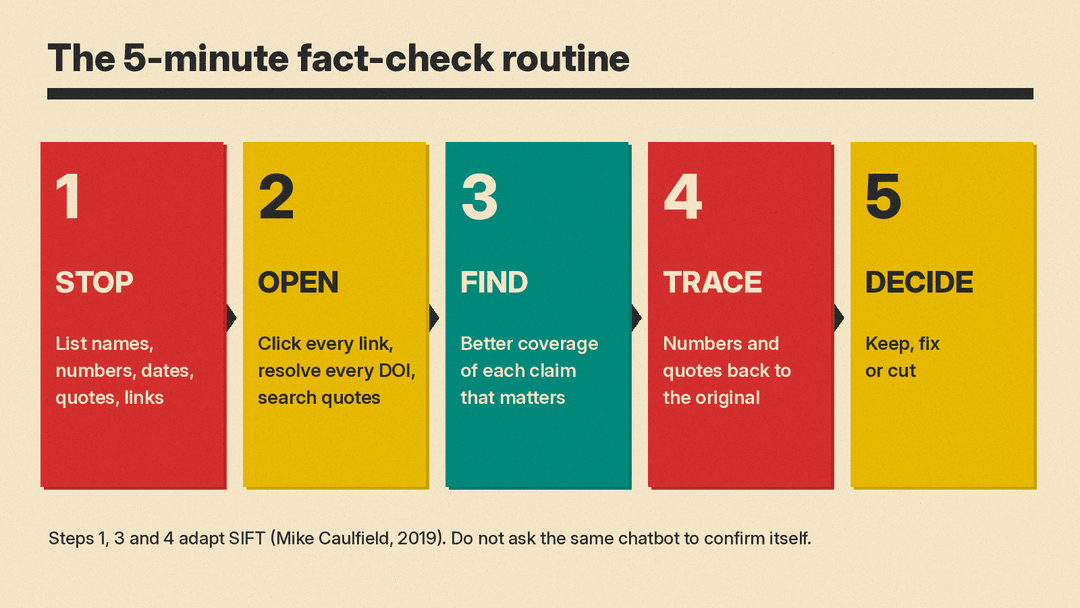
Step 1: Stop and list the claims (1 minute)
Before you copy anything, decide what you are using the answer for. Caulfield's post makes the same point about the web: a quick check is enough for some purposes, and deep research needs you to verify individual claims. A dinner recipe and a number going into a client report need different levels of care.
Then pull out what can be checked. You can do this by eye, or paste the answer back to the chatbot with this prompt:
List every factual claim in your last answer as a numbered list: each name, number, date, quote, citation and link. Do not add new information. Do not rate or defend the claims. Just list them so I can check each one.Asking for a plain list matters. In our test (below), when we asked the model to rate its own confidence, it rated invented facts as high confidence. The list is useful. The self-rating is not.
Step 2: Open every link and citation (1 to 2 minutes)
This is the fastest check and it catches the worst errors.
- Links: click each one. A page that does not load, loads a different topic, or does not contain the claim is a failed check. A real page on a real site still has to say what the AI says it says.
- DOIs: paste the DOI after https://doi.org/ in your browser. If the DOI does not resolve, treat the citation as invented until you find it another way.
- Papers and books: search the exact title in quotes in Google Scholar or a library catalog. Check that the authors, year and journal match.
- Quotes: search a distinctive phrase from the quote in quotes. If you cannot find the words anywhere, do not use the quote.
OpenAI's page makes the same point for ChatGPT's search feature: check sources "by visiting links directly." A citation next to a sentence is a lead, not proof.
Step 3: Find better coverage (1 minute)
For any claim that matters, ignore the chatbot and look for a better source on the same claim. This is SIFT's "find better coverage" move: search the claim itself and see what reliable sources say. For a law, find the government page. For a product feature, find the company's help page. For a health or money question, find the official body or a professional, not another chatbot.
If two good sources agree with the AI, keep the claim. If you only find the claim on pages that look copied from each other, keep looking or drop it.
Step 4: Trace numbers and quotes to the original (1 minute)
Numbers and quotes drift as they get repeated. SIFT's last move is to trace a claim to its original context and see whether the version you got was accurate. For an AI answer, that means:
- A statistic: find the report or dataset it came from, and check the year, the group measured and the exact figure.
- A quote: find the original interview, speech or post, and check the words and who said them first.
- A "study shows": find the study and read at least the abstract. Check that it says what the AI says, in the same direction.
Step 5: Keep, fix or cut
Go down your list from Step 1 and mark each claim:
- Keep: you found it in a good source.
- Fix: the real source says something different. Use the source's version.
- Cut: you could not find it. Do not use it, and do not ask the same chatbot to "confirm" it.
If many claims failed, start again with a grounded prompt (below) or do the research yourself. If most passed, you are done.
What happened when we let the AI check itself
We wanted to know whether the shortcut works: can you ask a chatbot to fact-check its own answer? We tested this on October 21, 2026 with Gemma 3 1B, a small open-weight model from Google, running locally on our own machine with temperature 0. A small local model is not ChatGPT, Claude, Gemini or Grok, and larger models may do better on questions like these. But the failures we saw are the kinds the vendors list, and a small model shows them clearly. We capped each answer at 500 tokens, so some outputs stop mid-list. (If you want to try this yourself, our guide to running an AI model on your own laptop covers the setup.)
Test 1. We asked: "Who created the SIFT method for checking online information, and on what date was the blog post introducing the name SIFT published? Include a link to the original post."
The model answered that SIFT "was developed by David Foster Wang" in a blog post "published on September 12, 2006," and linked to blog.stanford.edu/david-wang/sift/. It then explained SIFT as an image technique, "Scale-Invariant Feature Transform." Every key fact was wrong. SIFT for checking information comes from Mike Caulfield, and the post we link above is dated June 19, 2019. The model had mixed it up with a computer vision algorithm that shares the acronym. The Stanford link did not load when we tried it.
Test 2. We asked for "three peer-reviewed studies on lateral reading by professional fact-checkers" with authors, year, journal and DOI. The first result it gave was "Lateral Reading: A Systematic Approach to Fact-Checking" by "David D. Mears, 2018, Journal of Information Science," with DOI 10.1007/s13296-1703-0073-x, which it called "arguably the foundational study on lateral reading." That DOI returned a 404 error at doi.org and at Crossref, the DOI registry. Crossref also had no record of the DOI for its second study. Real research on this exists: Wineburg and McGrew's "Lateral Reading and the Nature of Expertise: Reading Less and Learning More When Evaluating Digital Information" appeared in Teachers College Record in 2019 (DOI 10.1177/016146811912101102, confirmed in Crossref). The model did not name it.
The self-check. We then sent the model the Step 1 prompt in a stricter form: list every claim, rate your confidence high, medium or low, and mark any link, DOI or citation you are not sure exists as UNVERIFIED. For Test 1, it listed "SIFT stands for 'Scale-Invariant Feature Transform'" with "Confidence: High" and gave the broken Stanford link as the "primary source." For Test 2, it gave its invented study as the "Source to Check" with a link built from the same fake DOI. None of its outputs used the word UNVERIFIED.
The "say I'm not sure" instruction. Last, we reran both questions with an instruction to say "I'm not sure" instead of guessing and to never invent a source. On Test 1, the answer began "I'm not sure." and then, in the next line, credited SIFT to "David J. Anderson" with a different made-up link, which returned a 404. On Test 2, it listed a study titled "Lateral Reading for Misinformation Detection" with a garbled author list and no real names. We could not find that title in Crossref.
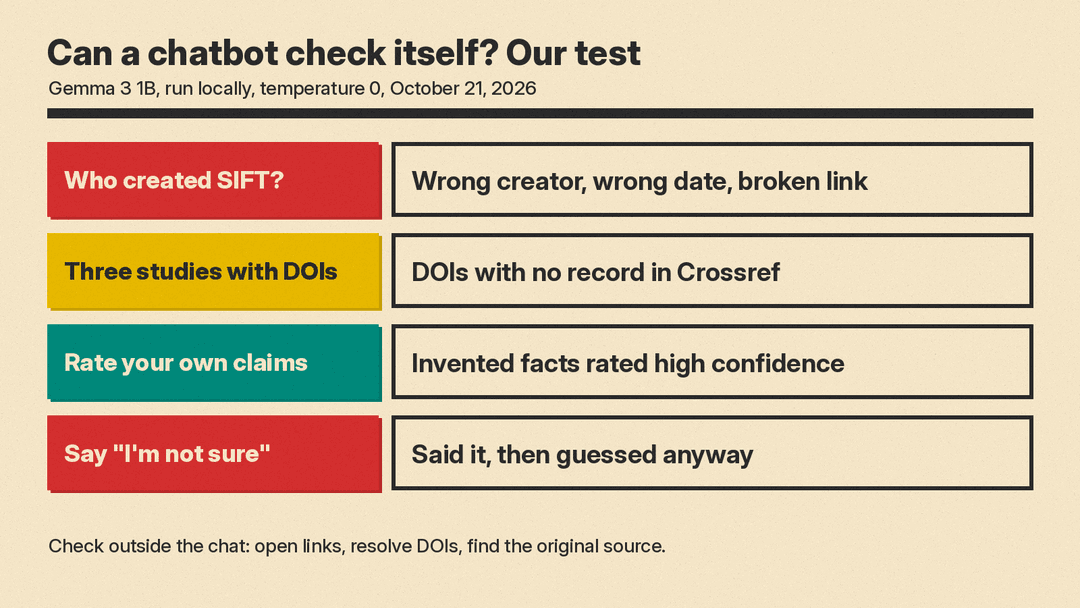
What this shows: a chatbot's own review cannot replace Steps 2 to 4. It reads its own answer the same way it wrote it. Anthropic's guide suggests a related check, running the same prompt several times and comparing, because "inconsistencies across outputs could indicate hallucinations." That fits what we saw: across the two versions of the SIFT question, the model named two different made-up creators. But a consistent answer can still be wrong, so the check that settles it is the one outside the chat.
Use the tools the chatbots already have
These do not replace the routine. They make Step 2 faster.
- ChatGPT: OpenAI says search and deep research can give cited answers from the web, and that you can tell search was used if the search or deep research icons are on or the answer cites web sources. OpenAI says code interpreter enables accurate calculations, so use it for math and data. Click the citations.
- Gemini: Google's help page on sources says Gemini "sometimes" shows sources. When they are available, a Sources button appears at the bottom of the answer or inline, and opens a side panel of links.
- Claude: Anthropic's guide recommends giving Claude permission to say it does not know, asking for word-for-word quotes from documents you provide, and asking it to retract any claim it cannot support with a quote. The quote techniques need a document to quote from, so paste or upload the source yourself.
Copy-paste prompts for more checkable answers
These prompts make answers easier to check. None of them makes an answer true. For general prompt-writing basics, see our beginner's guide to writing better AI prompts.
1. Ask for sources up front (use with search on)
Answer this using web search: [question]
For every fact, put the source link right after the sentence it supports. Use original sources (official sites, the original report or study) over articles that repeat them. If you cannot find a source for something, leave it out.
2. Give permission to not know (adapted from Anthropic's guide)
[Your question]
If you are unsure about any part of this, or you do not have enough information, say "I don't have enough information to answer this confidently" for that part instead of guessing.
3. Ground the answer in your own document (adapted from Anthropic's guide)
Using only the document below, answer: [question]
First, copy the exact quotes from the document that are relevant. If you find none, say "No relevant quotes found." Then answer using only those quotes, and refer to them by number.
<document>
[paste text]
</document>
4. Make it remove what it cannot support (adapted from Anthropic's guide)
Review each claim in your answer. For each one, find a direct quote from the documents I gave you that supports it. If you cannot find one, remove the claim and mark where it was with empty [] brackets.5. Build your checklist
From your last answer, make a checklist for me to verify by hand. For each item, give: the exact claim, what kind of source would confirm it (for example a government page, the company's help page, the original study), and a search phrase I could use. Do not tell me whether you think it is true.6. Second opinion, used correctly
Paste the answer into a different chatbot and ask:
Here is an answer from another AI. List the claims in it that you would most want a human to verify before relying on them, and say why. Do not rewrite the answer.This is a way to find weak spots, not a verdict. Two chatbots can repeat the same error.
When to skip the shortcut
Some questions are not a five-minute job. For medical, legal, tax or financial decisions, use the AI to understand the vocabulary and prepare questions, then get the answer from a qualified professional or the official source. Anthropic's guide says to validate critical information "especially for high-stakes decisions," and OpenAI's page warns that models can oversimplify complex issues. Students should also check their school's rules before using AI answers in work they hand in. Our guide to AI homework helpers covers that in more detail.
The routine on one card
- Stop: what will you use this for? List the names, numbers, dates, quotes, citations and links.
- Open: click every link, resolve every DOI, search every quote.
- Find better coverage: look for a good source on each claim that matters.
- Trace: follow numbers and quotes back to the original.
- Decide: keep, fix or cut. Never ask the same chatbot to confirm its own claim.
Sources
- OpenAI Help Center: Does ChatGPT tell the truth?
- Anthropic: Reduce hallucinations (Claude Platform Docs)
- Google: View related sources from Gemini Apps
- Mike Caulfield, Hapgood: SIFT (The Four Moves), June 19, 2019
- Wineburg and McGrew, Lateral Reading and the Nature of Expertise, Teachers College Record, 2019 (DOI)
- Wikipedia: Scale-invariant feature transform
- llms.blog test: Gemma 3 1B run locally, temperature 0, 500-token cap, October 21, 2026. Prompts and outputs as quoted above.
