
Prompt engineering means writing instructions for an AI model so it gives you the result you want, and gives it again next time. OpenAI's guide defines it as "the process of writing effective instructions for a model, such that it consistently generates content that meets your requirements."
That is the whole idea. You do not need to code, and you do not need a special tool. A prompt is the text you send. Prompt engineering is the habit of making that text clear, checking the reply, and changing the text when the reply is wrong.
This page explains what the term means, which parts of a prompt matter, how the work differs for an everyday user and for a developer, and what we saw when we tested a vague prompt against two clear ones on a small local model.
What prompt engineering is
A language model predicts text from the text you give it. It does not know your goal, your audience or your facts unless the prompt says so. A short, vague prompt leaves the model to guess, and it will guess differently each time.
Prompt engineering narrows the guessing. You state the task, supply the facts, set limits, and show the shape of the answer you want. Then you read the result and adjust.
Vendors use different words for the same work. Google's guide is titled "Prompt design strategies" and defines prompt design as "the process of creating prompts, or natural language requests, that elicit accurate, high quality responses from a language model." The same Google page carries a note that "Prompt engineering is iterative." Anthropic's documentation uses the term prompt engineering. In this article the terms mean the same thing.
OpenAI also says that "prompting to get your desired output is a mix of art and science." Model output is not fixed, so a prompt that works once is not proof that it works every time.
The five parts of a clear prompt
The three vendor guides differ in detail, but they point at the same few parts. OpenAI describes a developer message with identity, instructions, examples and context, "usually in this order" though "the exact optimal content and order may vary by which model you are using". Google's guide covers clear instructions, constraints, response format, few-shot examples and added context.
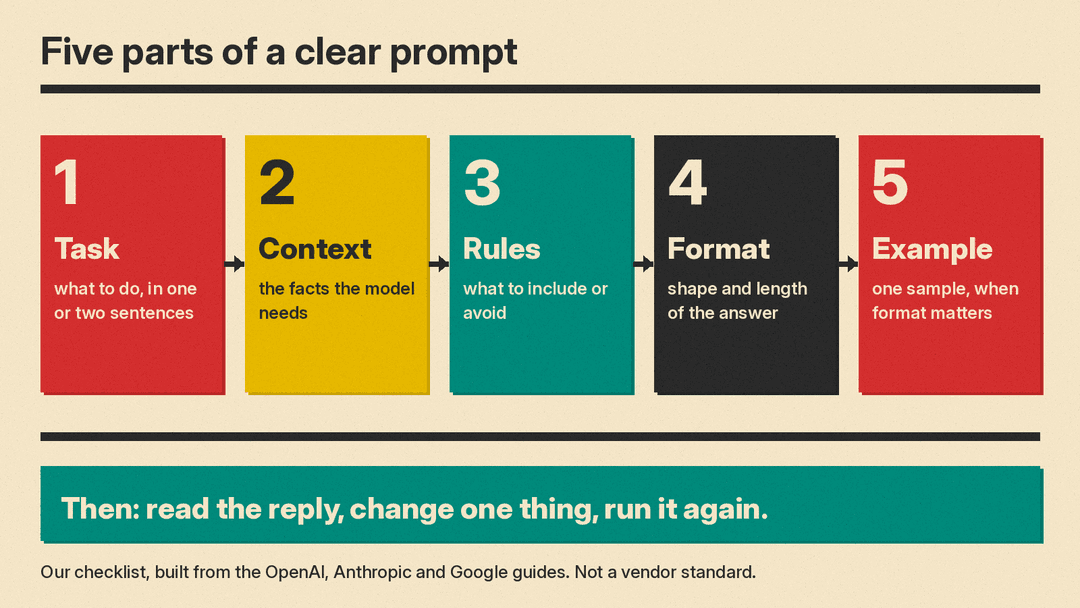
We suggest this five-part checklist, built from those sections. It is our summary, not a vendor standard. For a step-by-step beginner workflow with fill-in templates, see How to Write Better AI Prompts: A Beginner's Guide (October 2026).
- Task: say what you want done, in one or two plain sentences.
- Context: give the facts the model needs. Do not assume it knows them. Google's guide shows a router question that got a generic answer until the troubleshooting text was added to the prompt.
- Rules: say what to include and what to avoid, such as "use only the facts in the text".
- Format: name the shape and length, such as "exactly 3 bullets, 15 words or fewer each".
- Example: show one sample of a good answer when the format matters.
You will not need all five every time. A simple question needs only a task. A reply you will reuse, or send to a customer, needs more.
Common techniques
Each technique below fixes one kind of problem.
- Examples in the prompt. This is called few-shot prompting. We cover it in Few-Shot Prompting: How to Use Examples in Prompts. Google's guide says to keep the examples in a consistent format and warns that "if you include too many examples, the model may start to overfit the response to the examples."
- Roles and system instructions. They set the model's behavior for a whole chat. See How to Write a System Prompt: 7 Templates and Tips. OpenAI's guide says developer messages are "prioritized ahead of user messages".
- Splitting a big task. Instead of one huge prompt, run a short chain of prompts where each answer feeds the next. See Prompt Chaining: How to Split a Big Task Into Prompts. Google's guide lists "Chain prompts" under breaking prompts into components.
- Asking for reasoning steps. See What Is Chain-of-Thought Prompting? Explained Simply.
- Asking for a fixed output format, such as JSON, so another program can read the reply. See How to Get JSON From ChatGPT, Claude and Gemini.
- Delimiters. Markdown headings or XML-style tags mark where instructions end and pasted text begins. OpenAI says "XML tags can help delineate where one piece of content (like a supporting document used for reference) begins and ends."
Everyday use and developer use
For an everyday user, prompt engineering is a short routine: write the five parts you need, read the answer, then fix the prompt rather than arguing with the reply. Name the problem. "Too long" and "you added a date I did not give you" are better edits than "try again".
For a developer, the prompt sits inside software, so more care is needed. OpenAI recommends pinning production applications "to specific model snapshots" because "even different snapshots of models within the same family could produce different results." It also recommends "building tests and evaluation suites that measure prompt behavior so you can monitor performance as you iterate, or when you change and upgrade model versions."
Anthropic's overview makes a similar point from the other side. It lists three things to have before you start: "a clear definition of the success criteria for your use case", "some ways to empirically test against those criteria" and "a first draft prompt you want to improve". It also says: "Not every success criterion or failing eval is best solved by prompt engineering." Its example is that "you can sometimes improve latency and cost more easily by choosing a different model."
The model type matters too. OpenAI's guide compares the two kinds: "A reasoning model is like a senior co-worker" that you can give a goal, while "a GPT model is like a junior coworker" that performs best "with explicit instructions to create a specific output." So the same prompt may need more or less detail depending on the model.
Our test: vague prompt against clear prompt
We tested the idea on a small model, Gemma 3 1B, run locally with llama.cpp at temperature 0.7. Each prompt ran 6 times with seeds 0 to 5 on November 5, 2026. The task was to turn a five-line project update into a note for a busy manager. The update said the new home page passed review, the checkout page was two days behind, and the March 27 launch was at risk until Dana unlocked a test account. Sam would retest checkout on Monday, March 16.
We used three prompts:
- A vague prompt: "Summarize this update:" followed by the text.
- A clear prompt with a role, a rule not to add facts, an exact format and a length limit.
- The same clear prompt plus one example of the style we wanted, from a different project.
This is the clear prompt:
You write status notes for a busy manager who reads for ten seconds.
Use only the facts in the update. Do not add facts.
Write exactly 3 bullets, each starting with "- ":
1. Progress.
2. Risk.
3. Next step, with the owner's name and the date.
Each bullet must be 15 words or fewer. Write nothing else.

Update:
###
(the update text)
###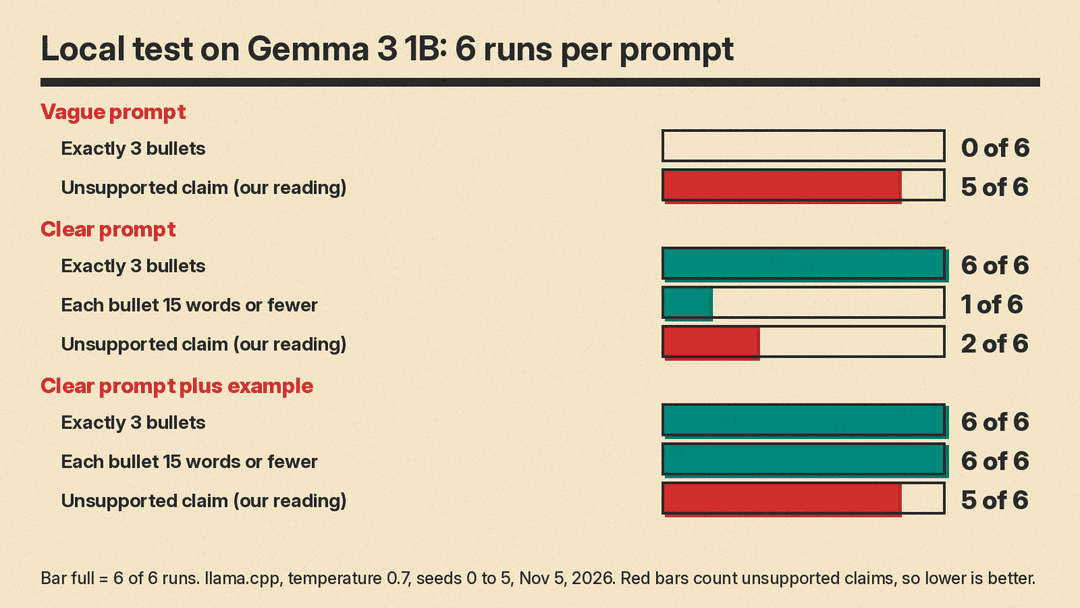
Here are the results. Format checks were counted by script. The "unsupported claim" count is ours, from reading every reply, so treat it as a judgment.
- Vague prompt: 0 of 6 replies had exactly 3 bullets. All six gave 5 or 6 bullets, and all six added a closing line. 5 of 6 contained an unsupported claim. Five said the home page was "live", and one said the launch was on track. The update says the home page passed review and the launch is at risk.
- Clear prompt: 6 of 6 had exactly 3 bullets and named Sam and March 16 in the last bullet. 5 of 6 had nothing outside the bullets, and only 1 of 6 kept every bullet at 15 words or fewer, because the risk bullet ran 15 to 19 words. 2 of 6 contained an unsupported claim. One said "The risk is a two-day delay in the March 27 launch date", which mixes up the checkout delay with the launch date.
- Clear prompt plus example: 6 of 6 passed all four format checks: 3 bullets, nothing else, 15 words or fewer, owner and date. But 3 of 6 had a stray "- :" at the start of each bullet, and 5 of 6 contained an unsupported claim. One said "Website redesign is complete, ready for launch." The update does not say that.
The lesson is that the clear prompt fixed the shape of the reply, and the example fixed the length. Neither fixed accuracy on this small model. A reply can follow every format rule and still state something the source does not say. Check the content, not only the layout.
This was one task, one small model and six runs per prompt. It shows a pattern. It does not measure how ChatGPT, Claude or Gemini would score.
A routine you can reuse
- Write the task in one sentence.
- Paste the facts the model needs, inside delimiters.
- Add rules: use only these facts, do not guess, say "not stated" when unsure.
- Name the format and the length.
- Run it. Read the reply against the source, not only against the format.
- Change one thing, then run it again.
If you reuse a prompt every week, save it and keep two or three test inputs. That is a small version of the evaluation suite OpenAI recommends for developers.
Is prompt engineering a job?
Sometimes, but few postings use the title. Prompting more often appears as a required skill inside other AI jobs. For hiring data, pay and courses, see How to Become a Prompt Engineer: Jobs, Pay, Free Courses.
