
If you talk to your phone more than you type into it, the choice of voice assistant matters more in October 2026 than it has in years. Apple shipped a rebuilt Siri in September, Google finished replacing Google Assistant with Gemini on Android phones, and OpenAI moved ChatGPT Voice to a new model on October 15. All three now hold a real back-and-forth conversation. They differ in where they live, what they can reach on your phone, and what they cost.
This guide compares Siri AI, Gemini Live, and ChatGPT Voice as of October 2026, using each company's own help pages and release notes. Every feature below is linked to its source. Rollouts are staggered, so check the linked page if something is missing on your phone.
The short answer
- You have a recent iPhone and want help with your own stuff (messages, mail, calendar, what is on screen): try Siri AI first. It is the only one of the three built into iOS with access to your personal data across Apple's apps.
- You use Android, or you live in Gmail, Calendar, and Drive: use Gemini. On Android it is now the system assistant, and Gemini Live can act in Google's apps during a voice chat.
- You want the best open-ended conversation on any phone: use ChatGPT Voice. Its Live mode listens and talks at the same time, and paid plans get hours of daily use.
Many people will end up using two: the built-in assistant for phone tasks, and a chatbot app for long conversations.
Siri AI: the new built-in iPhone assistant
Apple released Siri AI on September 14, 2026 with iOS 27. It is labeled a beta and replaces the old Siri once you opt in.
What it can do. According to Apple's setup guide, Siri AI can:
- Answer general questions using "broad world knowledge" and the web.
- Find things across Messages, Mail, Calendar, Notes, Reminders, and other apps ("personal context understanding").
- Answer questions about what is on your screen and act on it.
- Take actions in apps, such as sending messages and creating events.
- Keep a conversation history in a new Siri app that syncs through iCloud to your Mac, iPad, Apple Watch, and Vision Pro.
- Draft or edit text almost anywhere you type ("Write with Siri").
- Use the camera through a Siri mode in the Camera app, for things like reading a menu or splitting a bill.
Who can use it. You need an iPhone 15 Pro, iPhone 15 Pro Max, any iPhone 16 or later, or iPhone Air, running iOS 27. To turn it on, go to Settings, tap Siri, then tap Try Siri AI (Beta). Apple's guide says this adds you to a waitlist, and wait times vary.
Languages and regions. At launch Siri AI worked only in English. Apple promised French, Japanese, Korean, Portuguese, and Spanish "next month," meaning October. Those languages are in the iOS 27.2 beta; MacObserver reported that beta 4 arrived on October 13 and that Apple had not yet announced a release date. Siri AI is not available on iPhone in the EU, and it does not work with a mainland China Apple Account.
Voices. The new expressive voices, where you can set pace and expressiveness, need Apple's larger on-device model. Apple lists iPhone Air, iPhone 17 Pro, and iPhone 18 Pro models for that.
Cost. Siri AI is free with iOS 27, but Apple says server-backed features including Siri AI are subject to daily usage limits and that "expanded access to such features will be available for a fee in the future." Apple has not published those limits or the price.
Where Gemini fits in. Apple says its new models were "custom-built in collaboration with Google and its Gemini models" and run on the device or on Apple's Private Cloud Compute servers. That does not mean Siri sends your questions to the Gemini app. 9to5ai's explainer collects Apple executives' WWDC comments that Siri uses none of the models Google offers its own customers. If you want Google's Gemini on an iPhone, you still install the Gemini app.
What about ChatGPT inside Siri? The older ChatGPT extension still exists. MacStories found that you can reach it in the Siri app by tapping the input field, choosing Ask, and picking ChatGPT, but Apple has made it hard to find. For a real ChatGPT voice conversation, the ChatGPT app is the better route.
Best for: iPhone owners who want hands-free help with their own messages, schedule, and apps, and who are comfortable with a beta.
Gemini Live: Google's assistant on Android and iPhone
On Android, Gemini is no longer optional. 9to5Google reported on September 28 that Google Assistant was gone on the phones it checked, and the "Switch to Google Assistant" setting had been removed. Long-pressing the power button now opens Gemini. Assistant remains on Nest and Google Home speakers and displays for now.
Gemini Live is the voice conversation mode inside the Gemini app. Google's release notes describe the current version as built into chat, so you can switch between talking and typing in the same thread, rolling out globally on Android and iOS.
What it can do. Per Google's Gemini Live help page:
- Hold an interruptible voice conversation. You can turn interruptions off.
- Share your camera or your full screen and talk about what Gemini sees.
- Use connected Google services during the chat: Calendar, Drive, Flights, Hotels, Keep, Tasks, Gmail, image generation, Shopping, Spotify, YouTube, and YouTube Music. It can also use public Google Maps information.
- Keep running in the background while you use other apps, and continue after you lock the phone (you cannot start a new Live chat from the lock screen).
- Show captions and visual cards, such as maps and weather, while it talks.
On Android, Google added Guided Vision on October 1, a camera mode built with blind and low-vision users that gives spoken descriptions and tells you how to reframe the shot. Google warns not to rely on it for navigation or obstacle detection.
Limits. Live needs the Gemini mobile app; it is not in the Gemini web app. Users must be 13 or older (or the local minimum age). Gems do not work in Live. With a work or school account, only Calendar, Keep, and Tasks work in Live chats.
Cost. Gemini Live is in the free Gemini app. Paid Google AI plans add higher limits on Gemini's models, and Google advertises that college students get "more access to Gemini Live" with a free year of Google AI Pro in the US. That offer can be redeemed until December 31, 2026, per Google's release notes. Google AI Ultra starts at $100 a month.
Best for: Android users (it is the default either way) and anyone whose life runs on Google accounts.
ChatGPT Voice: the conversation specialist
ChatGPT Voice runs in the ChatGPT app on iPhone and Android and on the web. OpenAI's help page lists three modes under Settings, then Voice:
- Live, powered by GPT-Live-1.1 or the smaller GPT-Live-1.1 Quip depending on your plan. It listens and speaks at the same time, can search the web, use memory, show visual widgets, take text and images in the same chat, and use the plugins and connected apps on your account. It does not support video or screen sharing.
- Advanced, the previous real-time voice. Use it if you want to share live video or your screen on mobile.
- Standard, which transcribes what you say and then replies, one turn at a time.
OpenAI rolled out GPT-Live-1.1 on October 15 with more natural accents and new voices for French, German, Hindi, Japanese, Korean, and Mexican Spanish. Voice also works in Apple CarPlay, keeps running in the background or with the phone locked, and can start automatically when you open the app if you turn on Start with Voice.
Daily limits. Live usage is counted over a rolling 24 hours. As of October 2026, OpenAI lists:
- Free: limited access to GPT-Live-1.1 Quip ("limits may change")
- Go: 3 hours with GPT-Live-1.1 Quip
- Plus: 3 hours with GPT-Live-1.1
- Pro ($100 a month): 15 hours with GPT-Live-1.1
- Pro ($200 a month): unlimited GPT-Live-1.1, subject to abuse guardrails
What it cannot do. ChatGPT is an app, not the phone's system assistant, so it does not get the system-level access Siri has on iPhone or Gemini has on Android. It reaches your accounts only through the plugins and connected apps you add, and when a plugin action needs approval, you have to tap to approve on screen; spoken approval is not supported.
Privacy notes. OpenAI says audio clips from Live and Advanced conversations are kept with the chat transcript and retained for 30 days, and that it does not train on audio or video clips unless you opt in to sharing them. Transcripts can be used for training if "Improve the model for everyone" is on.
Best for: long talks, brainstorming, language practice, and anyone who wants the same assistant on iPhone, Android, and the web.
Side by side
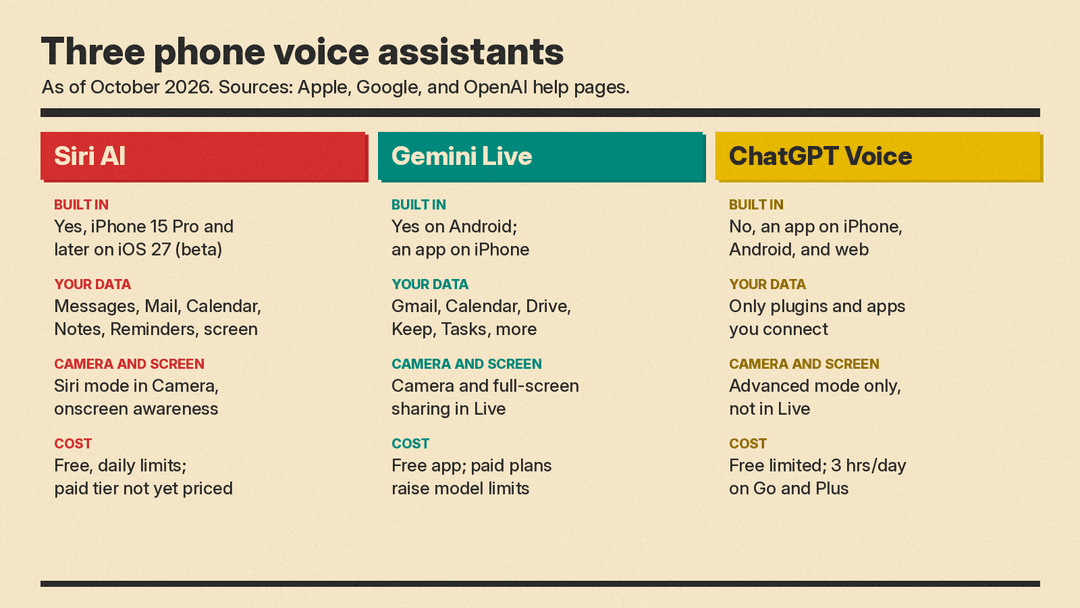
Built into the phone
- Siri AI: yes, on iPhone 15 Pro and later with iOS 27
- Gemini: yes on Android (replaced Google Assistant); an app on iPhone
- ChatGPT Voice: no, it is an app on both
Access to your personal data
- Siri AI: Messages, Mail, Calendar, Notes, Reminders, and on-screen content
- Gemini Live: Gmail, Calendar, Drive, Keep, Tasks, and other connected Google apps
- ChatGPT Voice: only the plugins and connected apps you add
Camera and screen
- Siri AI: Siri mode in the Camera app, plus on-screen awareness
- Gemini Live: camera and full-screen sharing in Live
- ChatGPT Voice: video and screen sharing in Advanced mode only, not in Live
Languages
- Siri AI: English; five more languages in the iOS 27.2 beta
- Gemini Live: many languages, though voice choice is limited in some
- ChatGPT Voice: many languages, with new native voices added October 15
Cost
- Siri AI: free with daily limits; paid expanded access promised, not priced
- Gemini Live: free app; paid Google AI plans raise model limits
- ChatGPT Voice: free tier limited; 3 hours a day on Go and Plus; more on Pro
How to set each one up
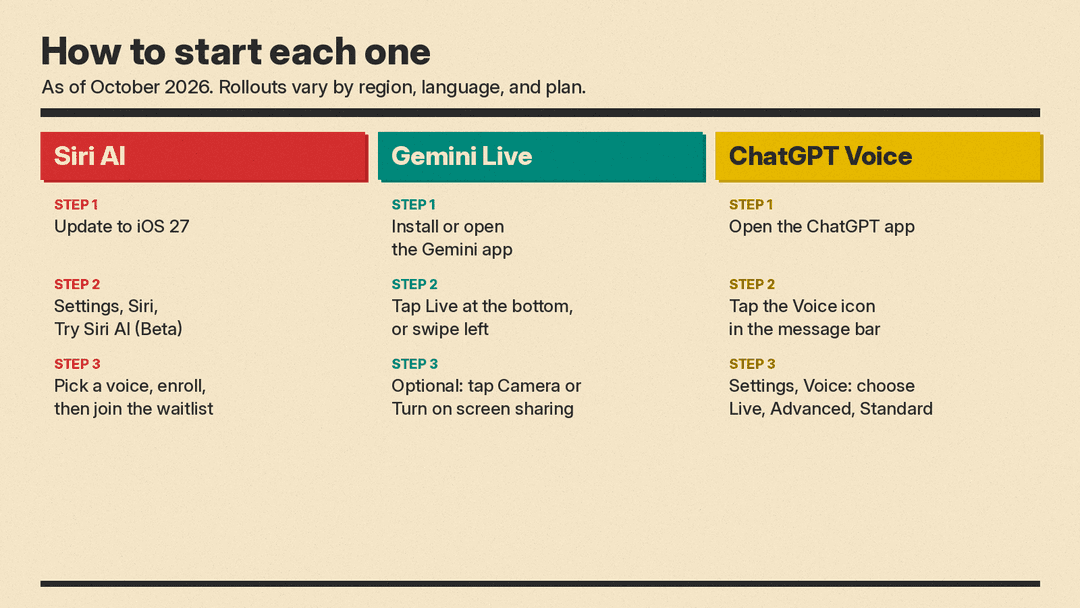
- Siri AI: update to iOS 27, open Settings, tap Siri, tap Try Siri AI (Beta), pick a voice, and finish voice enrollment. You then wait for your turn on the waitlist.
- Gemini Live: install or open the Gemini app, then tap Live at the bottom (or swipe left). On Android, long-pressing the power button also opens Gemini.
- ChatGPT Voice: open the ChatGPT app and tap the Voice icon in the message bar. To pick Live, Advanced, or Standard, or to change the voice, go to Settings, then Voice.
Which should you choose?
The question is less "which is smartest" and more "what do you want it to touch."
If the job is on your phone, such as finding the address a friend texted, moving a meeting, or replying to an email, the built-in assistant wins because it has permission to see those apps. On a supported iPhone that is Siri AI. On Android that is Gemini. On an older iPhone that cannot run Siri AI, or in the EU, Gemini and ChatGPT can only reach what you connect to them.
If the job is the conversation itself, such as thinking through a decision, rehearsing a presentation, or practicing Spanish, ChatGPT's Live mode is built for that and publishes clear daily limits per plan. Gemini Live is the better fit when you want to point your camera at something or share your screen mid-conversation, which ChatGPT's Live mode does not do.
All three change often. Siri AI is still a beta waiting on more languages and an unpriced paid tier, Gemini's Live interface is being redesigned in testing, and OpenAI updated its voice model four days before this guide. Check each linked help page before you pay for anything.
Sources
- Apple Newsroom: Siri AI is here (September 14, 2026)
- Apple Support: How to get Siri AI
- Apple Support: About iOS 27 updates
- MacObserver: iOS 27.2 beta 4 expands Siri AI languages
- MacStories: iOS and iPadOS 27 review, ChatGPT extension
- 9to5ai: Gemini-powered Siri, where it stands
- 9to5Google: Gemini fully replaces Google Assistant on Android
- Google Help: Talk naturally with Gemini Live
- Gemini Apps release notes
- Gemini Live overview
- Google: Guided Vision in Gemini Live
- Android Authority: Gemini Live redesign in testing
- OpenAI Help: ChatGPT Voice
- OpenAI Help: ChatGPT release notes
