
Yes, an AI chatbot can turn your class notes into a study guide. It will summarize them, pull out key terms, and write practice questions. The catch is that a plain prompt like "make me a study guide" also adds things your notes never said. In our small test, that happened in all four runs.
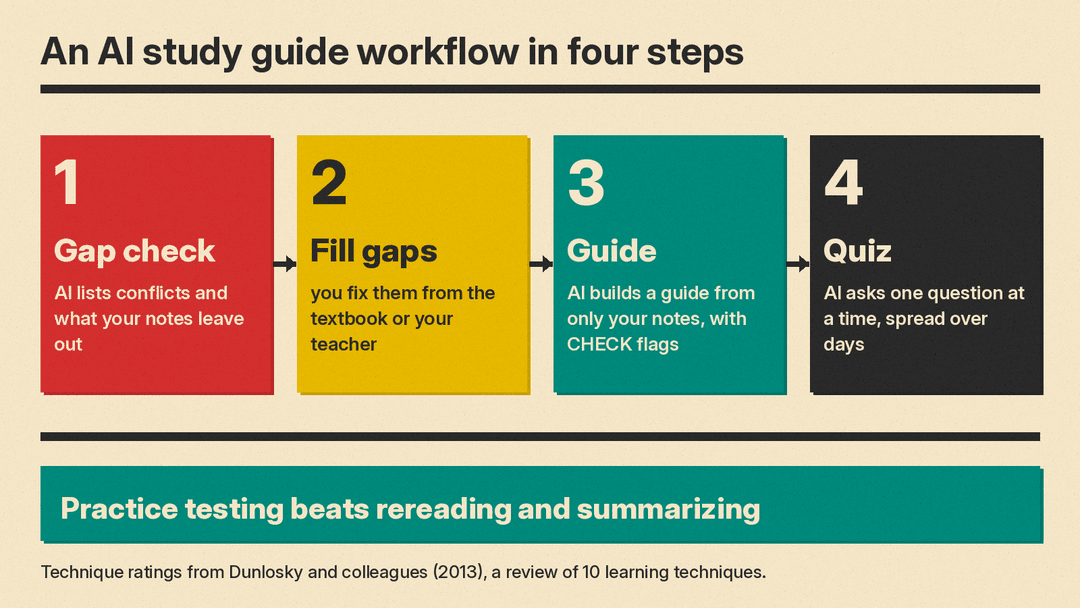
Here is a workflow that fixes most of it. Clean up your notes, run a gap check, fill the gaps from your textbook or teacher, then ask for a strict study guide that uses only your notes. Quiz yourself one question at a time and spread the sessions over several days. The study guide matters less than the practice questions inside it, because research finds practice testing works better than rereading or summarizing.
Can ChatGPT make a study guide from my notes?
Usually yes, with two conditions. First, your notes have to be readable text. Second, you have to tell it what to leave out.
Two things go wrong when you skip that. The model adds outside facts that sound right and are not in your notes. And it can paper over gaps, so a topic your teacher said is on the exam gets a confident answer instead of a blank space you can go fill. In our test, the plain prompt did flag a conflict we planted in the notes, but it still added claims the notes never made.
None of that is a reason to avoid the tool. It is a reason to write a better instruction. Our plain explanation of prompt engineering covers why wording changes output this much.
What makes a good study guide?
A study guide is a summary. That is worth knowing, because summaries are not the strongest study method.
Dunlosky, Rawson, Marsh, Nathan and Willingham reviewed 10 learning techniques in Improving Students' Learning With Effective Learning Techniques (2013, Psychological Science in the Public Interest). Practice testing and distributed practice got high utility ratings. Elaborative interrogation, self-explanation and interleaved practice got moderate ratings. Summarization, highlighting, the keyword mnemonic, imagery use for text learning and rereading got low ratings. The authors write that rereading and highlighting "do not consistently boost students' performance" and suggest "practice testing instead of rereading."
So treat a study guide two ways. It is a map of what you have to cover. And it is a source of practice questions you answer from memory. The reading part is the weaker half.
Step 1: How do I get my notes ready to paste?
Paste the notes as text if you can. Fix garbled words. Group the notes by topic or lecture.
Add three lines at the top:
- Test date.
- Exam format, such as multiple choice, short answer or essay.
- What the teacher said is on it, in the teacher's words if you wrote them down.
That last line matters. In our test, the notes had no causes for a railroad being built, but the exam line asked for causes. A gap check can only catch that if the exam line is in front of it.
Step 2: Should I run a gap check first?
Yes. Do this before you ask for the study guide. It is one extra prompt and it tells you what your notes cannot support.
Tested
Read my class notes below before I study them. List (1) any facts that conflict with each other, (2) any terms or events that are mentioned but not explained, and (3) anything the exam line says I need that the notes do not fully cover. Do not add outside facts. Use three numbered lists.

NOTES
[paste notes]
Read list 3 carefully. Those are the topics where any study guide will be guessing.
Step 3: How do I fill the gaps?
Use your own sources. Go to the textbook chapter, the slides, or the teacher. Write the missing lines into your notes in your own words, then paste the updated notes into the next step.
Do not let the model fill the gap for you. It has no way to know which source your course uses, and a confident wrong answer is harder to catch later than a blank one. If you do accept an AI answer for a gap, run our five minute fact-check routine before you study it.
Step 4: How do I make a strict study guide from my notes?
Use fixed sections and an explicit ban on new facts. Ask for a [CHECK] tag when two notes disagree, so the conflict stays visible instead of getting resolved for you.
Tested
Make a study guide from my class notes below. Use only what is in the notes. Do not add any fact, date, name or number that is not in them. Use these sections in this order: Key Terms (term: one-line definition), Main Ideas (5 bullets), Practice Questions (5 questions), Answer Key (answers to the 5 questions, at the end). If two notes disagree, write [CHECK: what disagrees] instead of picking one.

NOTES
[paste notes]
Expect simple recall questions. That is a real limit, not your fault. Ask a follow-up for harder ones.
Not tested
From the same notes, write 5 "why" or "how" questions that link ideas together, such as cause and effect. Use only what is in the notes. No answer key yet.Step 5: How do I get the AI to quiz me one question at a time?
Ask for one question, a wait, and no answer until you reply. If you get a full list of questions with the answers right under them, you end up reading the answers instead of recalling them.
Tested
Quiz me on my notes below. Ask me one question at a time and wait for my answer before you ask the next one. Do not give the answer until I reply. Start with question 1 now.

NOTES
[paste notes]
When you answer, do not just check right or wrong. Ask what your answer missed and make it quote the note.
Not tested
Here is my answer. Tell me what is missing compared to my notes, and quote the note line that supports each point.More ways to word these requests are in our copy-paste study prompts.
Step 6: How do I space the review over several days?
Distributed practice, which means spreading study sessions out over time, got a high utility rating in the Dunlosky review. So plan the days before you plan the content.
Not tested
Make a review plan with short sessions spread over the days until my test on [date]. Each session starts with a quiz on earlier topics, then adds one new topic. Use only my notes.Keep one running list of questions you got wrong. Start each session with that list.
What we found when we tested these prompts
This is a small check, not a benchmark. We used one made-up set of notes and one model. We tested 4 prompts on DeepSeek V4.1 Flash through OpenRouter at low reasoning effort, 4 runs each, 16 runs total, on Nov 9, 2026.
The notes were invented history class notes about a fictional Marrow Lake Salt Works: founded 1872, a railroad in 1881, output about 2,000 to 9,000 tons a year, an 1894 strike over scrip pay, closed 1911. We planted a conflict. The notes say "about 300 workers" by 1890 and also "Prof said 450 people by 1890 (check?)". We also left out the causes of the railroad, even though the exam line asked for them.
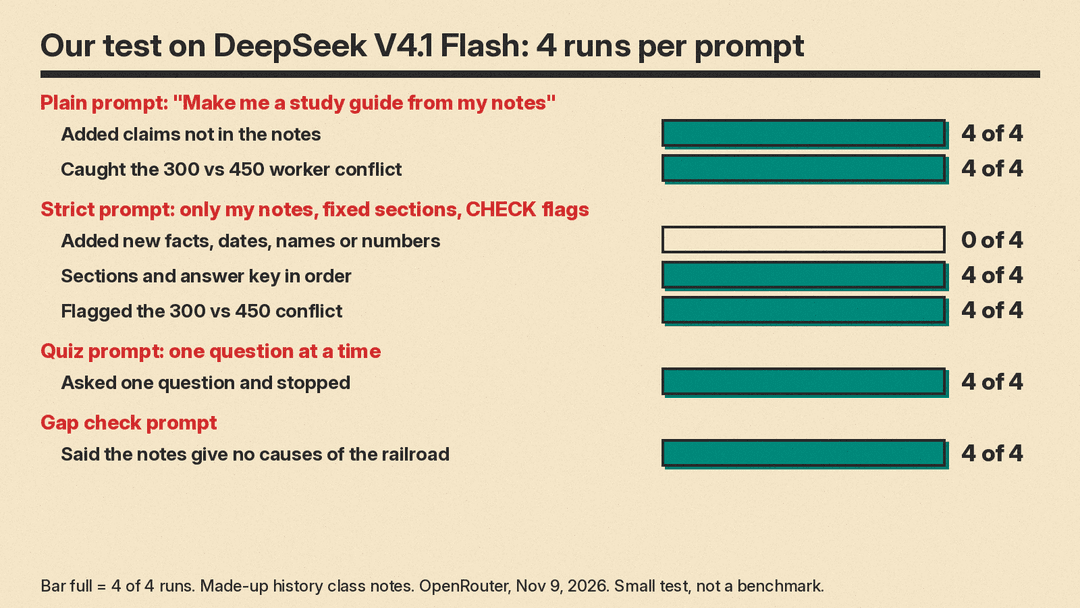
Plain prompt. "Make me a study guide from my notes." It caught the 300 versus 450 conflict in 4 of 4 runs. It also added claims the notes never made in 4 of 4 runs, including "regional rail expansion in the early 1880s", "debt-peonage", the workforce "tripling", and the works as a "profitable operation". It used tables in 4 of 4 runs.
Strict study guide prompt. Sections in order 4 of 4. Five main ideas 4 of 4. Five practice questions 4 of 4. Answer key at the end 4 of 4. [CHECK] on the worker numbers 4 of 4. New facts, dates, names or numbers in 0 of 4 by our reading. Downside: the practice questions were mostly simple recall, and it could not supply the missing causes of the railroad, because the notes do not have them.
Quiz prompt. It asked exactly one question and stopped in 4 of 4 runs, and gave away no answer in 4 of 4. The first question was simple recall in 3 of 4. We tested only the first turn, not how it grades answers.
Gap check prompt. It found the 300 versus 450 conflict 4 of 4, said the notes have no causes for the railroad 4 of 4, and returned three lists 4 of 4. Outside facts appeared in 0 of 4 by our reading. One of 4 runs listed a second "conflict" that was really a gap. It used the most hidden reasoning, about 1,850 reasoning tokens on average against about 70 for the quiz prompt.
The lesson is that the plain prompt reads better but hands you claims you might memorize for the exam. The strict prompt is safer and only as good as the notes. Run the gap check first.
How do I make a study guide with ChatGPT study mode?
Study mode is available across ChatGPT plans globally on web, iOS and Android, for all models, per the OpenAI Help Center. To turn it on in the web composer, type @study, or select + and search "study", then select Study. You can also go to chatgpt.com/studymode. It is not available in Temporary Chats, GPTs or Projects.
You can upload class notes, a syllabus, slides, a textbook excerpt, PDFs and photos. The help page says you can ask it to "quiz you one question at a time, wait for your answer, and explain what to review next". Its example first message is "I uploaded my class notes. Help me turn them into a study plan for a test on Friday."
The page also lists what to include in a first message: your level, the subject and exact topic, what you are trying to do, what you already understand, any deadline or test date or format, and your course materials. That matches Step 1 above.
If it misses something in a file, paste the most important text, tell it which page or section to use, or ask it to summarize what it sees before it answers. The page says study mode "can make mistakes" and to double-check important information. For graded work, follow your school's AI-use policies. For a wider look at tools, see our AI tutors for students rundown.
How do I make a study guide with Gemini Notebook?
Gemini Notebook is Google's tool for working with your own sources. Google's help center and its education page both use the name Gemini Notebook. The tool was formerly called NotebookLM, and some Google web addresses still use that name.
Per Google's help page Create a notebook in Gemini Notebook, you create a notebook and upload sources. A notebook is a collection of sources for one project. Each notebook is independent, and it cannot access information across notebooks. So put the notes, syllabus and textbook excerpt for one class in one notebook.
The Studio panel makes outputs based on your sources, including Reports. The help page says you can "create your own, or choose from FAQ, study guide, briefing document, or an AI suggested report type." Studio also makes Flashcards or Quizzes. You can see the instructions behind an output with "View custom prompt" in its three dots menu. Reports can be exported with the three dots menu, then "Export to Docs". Edits in the exported Doc do not sync back to the notebook.
Google says answers and outputs are generated by AI based on user-provided sources and instructions. The Google for Education Gemini Notebook page says study guides can include "key terms, sample quizzes (with answer keys), or a list of essay questions".
Mistakes to avoid
- Asking for a study guide before checking your notes for gaps.
- Letting the model settle a conflict between two notes. Ask for a flag instead.
- Studying a guide with facts you never wrote down and cannot trace.
- Reading the guide twice instead of answering questions from memory.
- Ten questions at once with the key attached.
- One long session the night before, instead of sessions spread over several days.
- Uploading a long file without saying which page or section to use.
- Skipping your school's AI-use policy on graded work.
FAQ
Is using AI to make a study guide cheating?
It depends on your school and the assignment. ChatGPT's help page says to follow your school's AI-use policies for graded work. Using it to quiz yourself on your own notes is different from using it to produce work you hand in. If you are unsure, ask before the test, not after.
Which tool is best for making a study guide?
We are not ranking them. It depends on what you have. A notebook tool is convenient when you have several sources for one class and want flashcards and quizzes from the same material. A chatbot is convenient when your notes are short and you want to control the wording of the prompt. The workflow above works in either one.
Can AI read my handwritten notes?
The ChatGPT study mode help page says you can upload photos among other materials. If it misses something, the page suggests pasting the important text, pointing it at a page or section, or asking it to summarize what it sees before it answers. Checking that summary against your notes is the fastest way to catch a misread word.
Should I keep the AI's study guide or rewrite it?
Rewriting the map in your own words takes longer, and summarization got a low utility rating in the Dunlosky review. The time is better spent answering the practice questions and fixing the gaps the check turned up.
