
Many students use AI the fast way: paste the question, copy the answer. That finishes the homework but skips the learning. The fix is in how you ask. A good study prompt tells the AI to act like a tutor: ask you questions, give hints, check what you know, and hold back the answer until you have tried.
This guide gives you 25 copy-paste study prompts for ChatGPT, Claude and Gemini, shows the built-in study modes the three apps have announced, and shows what happened when we tested the "tutor" style on a small local model. If you are new to prompting, start with our beginner's guide to writing better AI prompts.
Why "explain it to me" is not enough
OpenAI built its study mode around this exact problem. In its July 2025 announcement, the company says study mode is meant to help students learn something, not just finish something. It lists the behaviors it wrote into the mode with teachers and pedagogy experts: encouraging active participation, managing cognitive load, building metacognition and self-reflection, fostering curiosity, and giving actionable feedback.
You can ask for the same behaviors in any chat app. Each prompt below asks for at least one of them:
- Active participation: the AI asks you questions instead of lecturing.
- Small steps: one idea at a time, so you are not buried in text.
- Knowledge checks: quizzes and practice problems with feedback.
- Reflection: you explain your own thinking and spot your gaps.
The built-in study modes
All three big chat apps have announced a mode that does some of this for you. Menus change, so check the current app if you can't find them.
- ChatGPT study mode. OpenAI says it uses Socratic questioning, hints, scaffolded responses and knowledge checks, and that you turn it on by selecting "Study and learn" from tools in ChatGPT. At launch it was available to logged-in users on Free, Plus, Pro and Team (OpenAI). OpenAI also says it is powered by custom system instructions, which can lead to "some inconsistent behavior and mistakes across conversations."
- Gemini Guided Learning. Google says Guided Learning "breaks down problems step-by-step" and adapts explanations to your needs. Google also says you can ask Gemini to create flashcards and study guides from your quiz results or class materials (Google).
- Claude learning mode. Anthropic introduced learning mode as part of Claude for Education, its version of Claude for universities. It works inside Projects and guides reasoning with questions such as "How would you approach this problem?" instead of giving immediate solutions (Anthropic). In August 2025, Anthropic also brought a Learning style to all Claude app users, which you pick from the style menu in a chat (Engadget). The tutor prompts below work either way.
A study mode is a good start, but a prompt still helps. It tells the AI your level, your deadline and how you want to be tested.
How to set up a study chat
Before you paste a template, give the AI three facts. They take a few seconds and shape the whole session:
- Your level. "I'm in 10th grade," "first-year nursing student," or "I have never taken a stats class."
- Your goal. "A quiz on Friday," "understand the idea, not just pass," or "explain it to my study group."
- Your material. Paste your notes or upload the chapter, so the AI works from what your class actually covers.
Then put the rules in the prompt: "one question at a time," "don't give me the answer," "wait for my reply." Without them, the AI may jump straight to the full solution, as our test below shows.
25 study prompts you can copy
Replace the text in [brackets]. You can paste each prompt into ChatGPT, Claude or Gemini.
Learn a new topic
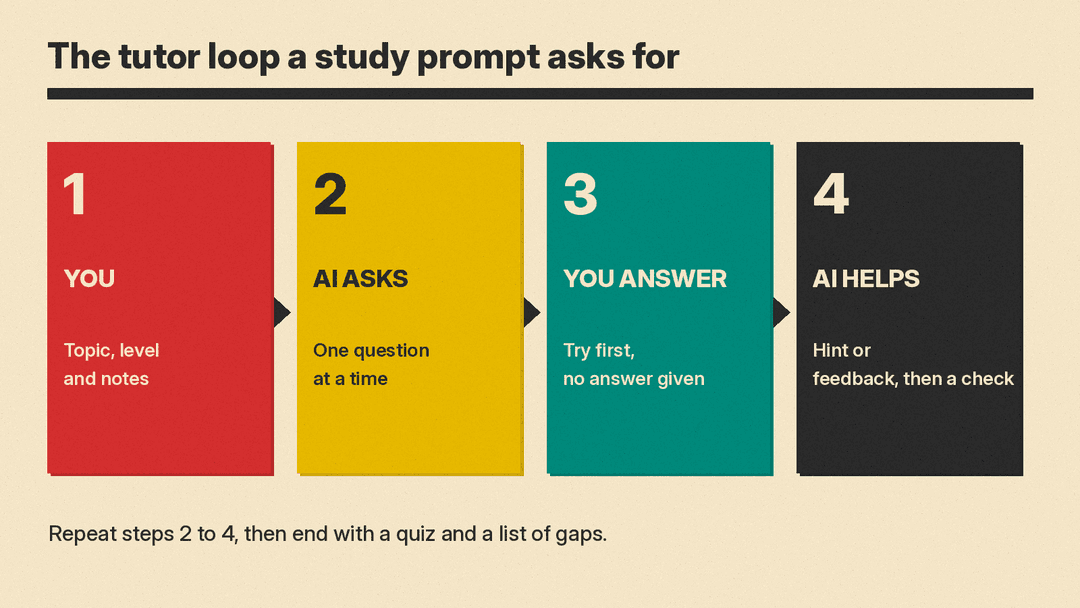
- The tutor. "Act as my tutor for [topic]. I'm [your level]. Don't give me answers. Ask me one question at a time, give a hint only if I get stuck, and wait for my reply before you go on."
- Find my starting point. "Before you explain [topic], ask me 3 short questions to find out what I already know. Then start from there."
- Explain it at my level. "Explain [concept] as if I'm [age or grade]. Use one everyday example. Then ask me to explain it back in my own words."
- The big picture first. "Give me a 5-step learning plan for [topic], from basics to harder ideas. Keep each step to one line. We'll do step 1 now."
- Why, not just what. "I know the rule [rule or formula]. Explain why it works, in plain words, and give me one case where it does not apply."
- Connect it. "How does [new topic] connect to [topic I already know]? Give me 3 links between them."
Practice problems
- Hint ladder. "Here is a problem: [problem]. Give me the smallest possible hint. If I'm still stuck, give a bigger hint. Show the full solution only if I type 'show me'."
- Check my work. "Here is my answer and my steps: [paste]. Don't fix it for me. Tell me which step has the first mistake, and ask me a question that helps me find it."
- More like this. "Make 5 practice problems like this one: [problem]. Start easy and get harder. Give answers only after I've tried all 5."
- Worked example, then my turn. "Solve this example step by step and explain each step: [problem]. Then give me a similar problem to solve on my own."
- Common mistakes. "What are the 3 most common mistakes students make with [topic]? Give me one short problem that tests each one."
Test yourself
- Quick quiz. "Quiz me on [topic]. Ask [number] multiple-choice questions, one at a time. Don't show the answers until I reply."
- Quiz from my notes. "Here are my notes: [paste]. Write 10 quiz questions using only these notes. Ask them one by one and tell me if I'm right after each."
- Flashcards. "Turn these notes into 15 flashcards, with the question on one side and a short answer on the other: [paste]."
- Exam simulation. "Give me a 20-minute practice test on [topic] in the style of [exam type, e.g. short answer]. Grade it after I'm done and tell me what to review."
- Mixed review. "Mix questions from [topic A], [topic B] and [topic C] in random order. Don't tell me which topic each question is from."
- Spot my gaps. "Based on my answers in this chat, which 2 ideas do I understand least? Give me one more question on each."
Reading and writing
- Reading guide. "I'm about to read [chapter or article]. Give me 5 questions to keep in mind while I read. Don't answer them."
- Check my summary. "Here's my summary of [text]: [paste]. Tell me what important point I missed and what I got wrong. Don't rewrite it for me."
- Argue the other side. "My thesis is: [thesis]. Give me the 3 strongest objections a critic would raise, so I can answer them."
- Feedback, not a rewrite. "Give me feedback on this paragraph: [paste]. Point out the 3 biggest problems and ask me how I'd fix each one. Don't rewrite it."
Plan and remember
- Study schedule. "My exam on [subject] is in [number] days. I can study [hours] a day. Make a day-by-day plan that mixes new material with review of earlier topics."
- Memory aid. "Help me remember [list or facts]. Suggest 2 memory tricks and then quiz me on the list."
- Teach it back. "I'll explain [topic] to you as if you're a classmate who missed the lesson. Ask follow-up questions like a curious student, then tell me what I explained badly."
- End-of-session wrap-up. "Sum up what we covered in this chat in 5 bullet points, list what I still got wrong, and give me 3 questions to try tomorrow."
If you study with a class or teach one, see our ChatGPT prompts for teachers as well.
What happened when we tested the tutor prompt
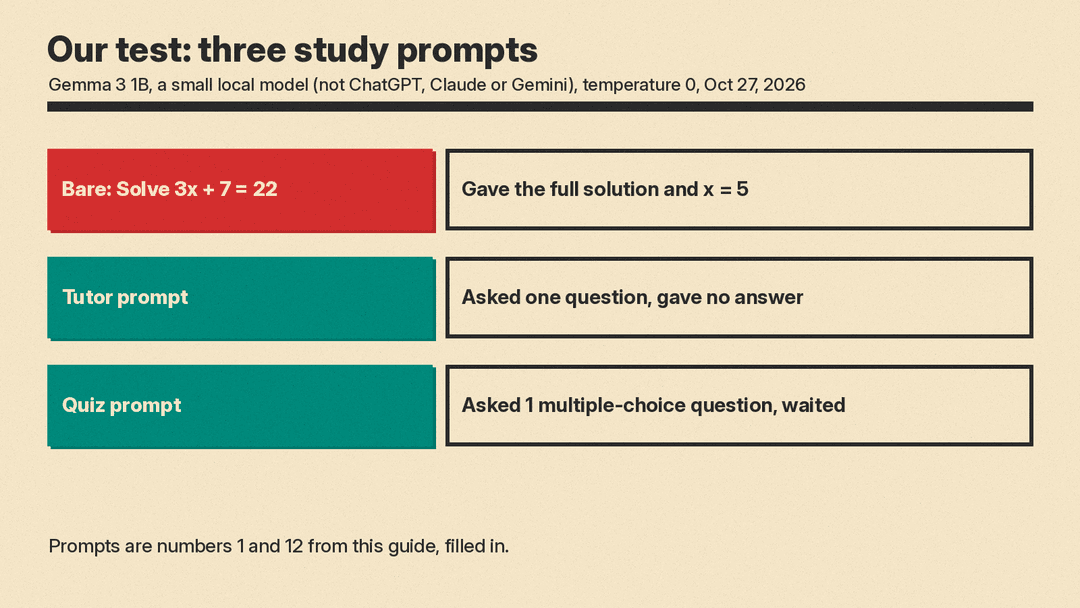
We ran three prompts on Gemma 3 1B, a small open model running on our own computer (not ChatGPT, Claude or Gemini), with temperature 0, on October 27, 2026.
- Bare prompt. "Solve 3x + 7 = 22." The model gave the full solution in two steps and the answer, x = 5. That is correct, but you learn nothing by reading it.
- Tutor prompt (number 1 above, filled in). "Act as my tutor. I want to learn how to solve 3x + 7 = 22 myself. Do not give me the answer. Ask me one question at a time, give a hint only if I get stuck, and wait for my reply before you go on." The model did not solve it. It replied with one question: "What is the first thing you should do when you're faced with a simple equation like this?"
- Quiz prompt (number 12 above, filled in). "Quiz me on photosynthesis. Ask 3 multiple-choice questions, one at a time. Do not show the answers until I reply." The model asked one question about the main function of photosynthesis, gave four choices, and waited for an answer.
Same math problem, very different session. The only change was the rules in the prompt: no answer, one question at a time, wait for my reply. We did not test ChatGPT, Claude or Gemini here, so try your own app on one problem before you rely on it.
Check the AI's facts
A tutor that is confidently wrong is worse than no tutor. OpenAI itself notes that study mode can make mistakes. Check key facts, formulas and dates against your textbook or class notes, and be extra careful with math answers and citations. Our 5-minute routine for fact-checking AI answers works for study chats too.
Also check your school's rules. Some classes allow AI for practice but not for graded work. If you need a tool that reads photos of problems, see our list of AI homework helpers and the best AI tools for students.
The short version
- Tell the AI your level, your goal and your material.
- Ask it to question you, not to answer for you.
- Put the rules in the prompt: one question at a time, hints before answers, wait for my reply.
- Finish every session with a quiz and a list of what you still got wrong.
- Check facts against your class material.
