
ChatGPT can turn a rough note into a calm, clear customer service reply in seconds. It can also promise a refund you never approved, drop a key number, or hand you three drafts when you needed one. This guide gives copy-paste prompts for the replies support teams write most often, a privacy check before you paste a customer's message, and the results of a small test of what changes when you give the model your facts.
The prompts are written for ChatGPT, but they are plain text. We did not run them in ChatGPT itself. We tested close versions of two of them on a small local model, and we report those results below.
This post is about one-to-one replies by email or chat, written by a person with AI help. For a wider look at help desk tools and chatbots that answer customers on their own, see our guide on how to use AI for customer support. For public replies on Google and other review sites, see how to reply to customer reviews with AI.
Before you paste a customer's message: a privacy check
A support ticket often holds a name, an email address, an order number, and sometimes a home address or payment details. Check how ChatGPT handles your inputs before you paste one.
OpenAI's help page on how your data is used to improve model performance says: "When you use our services for individuals (Free, Plus, Pro), we may use your content to train our models." To opt out, it says to "turn off Improve the model for everyone under Settings > Data controls in ChatGPT, or select Do not train on my content in our Privacy Portal."
For work accounts, the same page says: "By default, we don't use inputs or outputs from ChatGPT Business, ChatGPT Enterprise, ChatGPT Edu, or our API to improve our models."
We suggest three habits for support work:
- Replace the customer's name, email, phone number and address with placeholders before you paste. The prompts below need the problem and your options, not the person's contact details.
- Never paste card numbers, passwords or account logins.
- Check your company's own rules on AI tools before you paste anything from a real ticket, whatever plan you use.
How to write a customer service reply prompt
OpenAI's help page on best practices for prompt engineering with the OpenAI API gives several rules that fit support replies well. The page is written for the API, but OpenAI's prompt engineering best practices for ChatGPT page says of its resources: "Though some may reference our API, the recommendations themselves are relevant for ChatGPT."
- Separate your instructions from the customer's text. The API page says to "Put instructions at the beginning of the prompt and use ### or """ to separate the instruction and context." Every prompt below puts the customer's message between ### lines.
- Give an exact length. The page suggests replacing "fairly short, a few sentences only" with "Use a 3 to 5 sentence paragraph".
- Say what to do, not only what to avoid. The page's own example is a support chat: instead of "DO NOT ASK USERNAME OR PASSWORD", it tells the agent to refrain "from asking any questions related to PII" and to "refer the user to the help article".
- Name the tone. The ChatGPT page suggests "descriptive adjectives to indicate the tone", such as "formal, informal, friendly, professional".
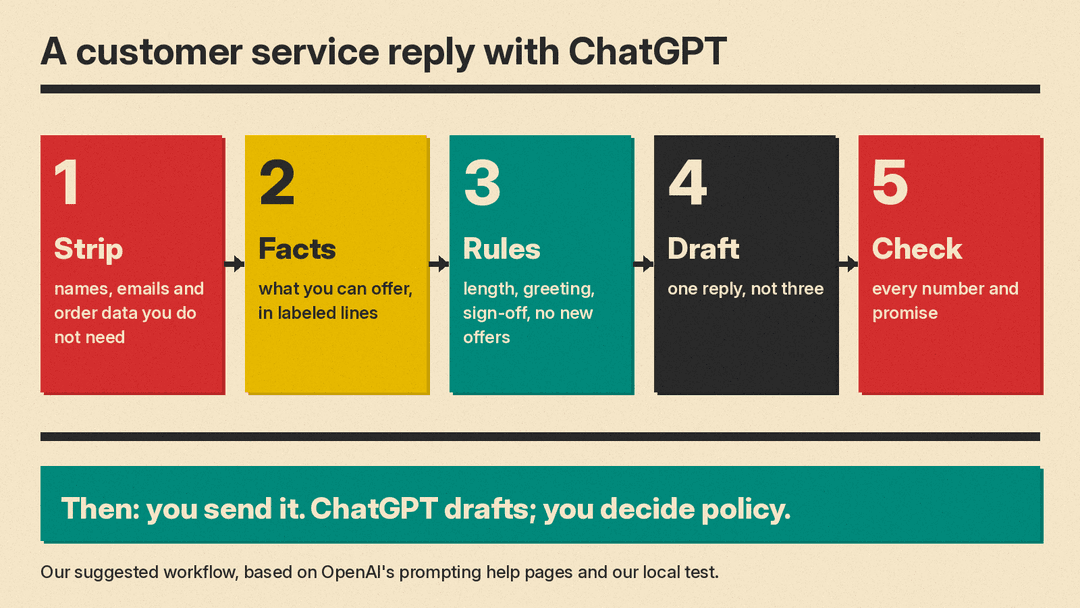
Our test, below, adds one more rule: give the model your facts in labeled lines, and tell it not to offer anything that is not in them. For the basics behind these rules, see our plain explanation of what prompt engineering is.
Save your house rules once
If you write replies every day, you do not need to paste your tone rules each time. OpenAI's help page on ChatGPT Custom Instructions says they "allow you to share anything you'd like ChatGPT to consider in its response" and are "applied immediately to all chats." It says "Free and Go users can save up to 1,500 characters in custom instructions. Plus, Pro, Enterprise, Business, and Education users can save up to 5,000 characters."
Note that custom instructions apply to all your chats, not only support work. The same page says information from your use of custom instructions "will also be used to improve model performance" and links to the opt-out settings, so keep customer details out of them. A short block like this one fits well under the smaller limit:
When I ask for a customer service reply:
- Write one reply, not several options.
- Use a friendly, professional tone. Plain words, short sentences, no exclamation points.
- Use only the facts I give you. Do not offer refunds, discounts, credits, gifts or free shipping unless my facts say so.
- If a fact you need is missing, write [ASK] in its place instead of guessing.
- Start with "Hi [first name]," and end with my name.
The [ASK] line is our own addition. We suggest it because a placeholder is easy to spot before you send, and a guessed date or amount is not.
Prompt 1: Reply from your facts
This is the core prompt. Every other prompt in this guide is a variation of it. We tested a close version (with a sample damaged order email and sample facts).
You are a customer service agent for [type of business]. Write a reply to the customer message below.
Use only the facts in the Facts block. Do not offer anything that is not in the Facts block: no discounts, coupons, gifts, credits or free shipping.
Keep the reply under 120 words. Start with "Hi [first name]," and end with "[your name]". Write nothing except the reply.

Customer message:
###
[paste the message, with contact details removed]
###
Facts:
###
Customer first name: [name]
Agent name: [your name]
What we can offer: [option 1]; [option 2]
What we need from the customer: [photo, order number, etc.]
What to ask them: [for example, choose one option]
###
Prompt 2: A late or damaged order
Write a reply to this customer about a [late / damaged] order.
Open by naming the problem in one sentence. Do not blame the carrier or the customer.
Then give the next step and the date from my facts. If my facts give no date, write [ASK] instead of a date.
Keep it to 3 to 5 sentences.

Customer message:
###
[paste]
###
Facts:
###
Order status: [for example, shipped on [date], tracking shows a delay]
What we will do: [resend / refund / wait for tracking update]
###
Prompt 3: Saying no politely
Refusals are where a model is most likely to soften the facts. Put the rule and the reason in the facts, and ask the model to keep both.
Write a reply that declines this customer's request.
State the decision in the first two sentences. Give the reason from my facts in plain words.
Then give the alternative from my facts, if there is one. Do not suggest exceptions, managers or future changes to the policy.
Keep it under 100 words. Friendly, professional tone.

Customer message:
###
[paste]
###
Facts:
###
Decision: [for example, we cannot refund this order]
Reason: [the policy line, with its numbers]
Alternative: [for example, store credit for 50% of the price]
###
Prompt 4: Ask for missing information
The customer message below does not give me enough to help yet.
Write a short reply that thanks them and asks for exactly these items, as a numbered list: [item 1], [item 2].
Say why we need each item in five words or fewer.
Do not try to solve the problem yet. Do not ask for passwords or card numbers.

Customer message:
###
[paste]
###
This prompt follows the "say what to do" rule from OpenAI's API page: it names what the reply must ask for, and then it names what it must not ask for.
Prompt 5: Calm an angry customer
This customer is upset. Write a reply that:
1. Repeats their main complaint in one sentence, in their own words where possible.
2. Apologizes once, for the specific problem, not in general.
3. Gives the next step from my facts, with a date.
Do not argue with any of their points. Do not use the phrases "valued customer" or "we apologize for any inconvenience".
Keep it under 120 words.

Customer message:
###
[paste]
###
Facts:
###
[what happened, what we will do, by when]
###
We suggest you read an angry-customer reply out loud before you send it. A warm rewrite can still sound wrong next to a serious complaint. For review replies, product copy and other jobs beyond support, see our ChatGPT prompts for small business.
Prompt 6: Fix the tone of your own draft
You may write the facts fast and then want a friendlier version. This is the second prompt we tested. A plain "Make this customer service reply more friendly" request changed the facts in our test. This stricter version did better, but it still dropped one number.
Rewrite this customer service reply in a friendly, professional tone.
Keep every fact and number exactly as written. Do not add any offer, promise or exception that is not in the draft.
Keep it under 80 words. Write nothing except the rewritten reply.

Draft:
###
[paste your draft]
###
After the rewrite, put your draft and the new version side by side and tick off each number.
Prompt 7: Summarize a long thread before you reply
Below is a customer support thread, oldest message first.
Summarize it in this format:
Problem: [one sentence]
What we already tried: [list]
What we promised, and when: [list, with dates as written in the thread]
What the customer asked for last: [one sentence]
Use only what is in the thread. If something is unclear, write "unclear".

Thread:
###
[paste the thread, with contact details removed]
###
The "What we promised" line is the one to check against the thread. If you miss a promise from earlier in the thread, the customer may have to write in again.
Prompt 8: Turn a good reply into a saved reply
Turn this reply into a reusable template for our help desk.
Replace every customer-specific detail (name, order number, dates, amounts) with a placeholder in square brackets, such as [first name] or [order number].
Keep the wording of everything else. List the placeholders at the end.

Reply:
###
[paste a reply you were happy with]
###
Prompt 9: Reply in the customer's language
The customer wrote in [language]. Write my reply in [language].
Use only the facts below. Keep the tone friendly and professional.
After the reply, give an English translation of your reply so I can check it.

Customer message:
###
[paste]
###
Facts:
###
[facts]
###
We suggest you ask a fluent colleague to check replies in a language you do not read well, at least for refund and policy messages.
What we tested
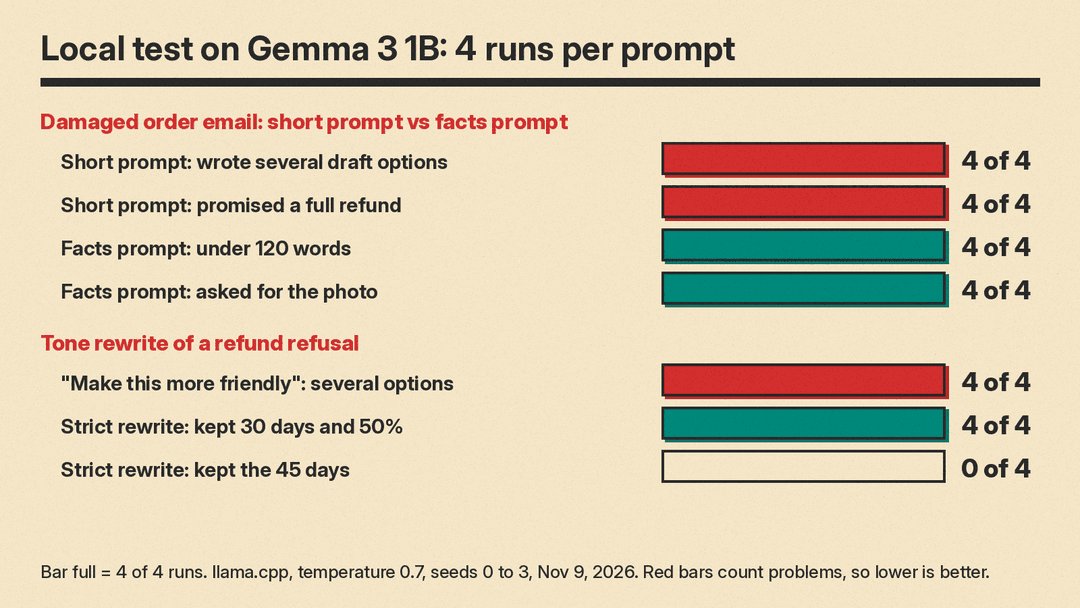
We ran two pairs of prompts on Gemma 3 1B, a small open model, on our own machine (llama.cpp, temperature 0.7, four runs per prompt, November 9, 2026). A small model makes more mistakes than ChatGPT, so treat these results as a picture of the failure types, not of ChatGPT's error rate.
Test 1: a damaged order email. The customer wrote: "My order #48213 arrived today with a cracked mug. This is the second time this has happened. I want a full refund now."
- Short prompt ("Write a reply to this customer email:" plus the email, no facts): 4 of 4 replies gave several draft options, and all 4 were cut off at our 400-token limit (277 to 284 words). All 4 used a "[Customer Name]" placeholder. All 4 promised a full refund, a policy decision we never gave the model. One added: "We will be issuing a full refund for your order, including the original shipping cost."
- Facts prompt (a close version of Prompt 1, with sample facts: a free replacement that ships within 2 business days or a full refund in 5 to 7 business days, the customer to choose, a photo needed): 4 of 4 started with "Hi Jordan," and ended with "Sam", 4 of 4 stayed under 120 words (56 to 88 words), 4 of 4 asked for the photo, and 0 of 4 added a discount, coupon, gift, credit or free shipping.
The facts prompt was not perfect. Only 3 of 4 replies gave both options, only 2 of 4 asked the customer to choose, and 0 of 4 mentioned the 2-business-day shipping. One reply dropped the replacement and went straight to a refund. Another tied the offer to the photo and moved the refund timing onto both options: "We will review the photo and then offer you a replacement mug, or a full refund to your original payment method, in 5 to 7 business days."
Test 2: a tone rewrite of a refund refusal. The agent's draft: "no refunds after 30 days, your order was 45 days ago. we can give store credit for 50% of the price. reply if you want it."
- "Make this customer service reply more friendly:" plus the draft: 4 of 4 replies gave several options (239 to 268 words). All 4 kept the 50%, and 3 of 4 kept the 30 days and the 45 days somewhere in their options. When we read every reply, all 4 changed or added a fact in at least one option. One said "We’ve processed a store credit for 50% of the price", when the credit was only offered. Others added a "delay" that was not in the draft. One reply used emojis.
- The stricter rewrite prompt (Prompt 6, tested as written): 4 of 4 gave a single reply of 50 to 52 words, and 4 of 4 kept the 30 days and the 50%. But 0 of 4 kept the 45 days, and 2 of 4 changed "no refunds" into no full refund, for example: "As per our policy, we are unable to provide a full refund after 30 days." A customer could read that as a hint that a partial refund is possible. All 4 wrapped the reply in quote marks.
What this means for your replies
- Give the model your options. With no facts, our test model decided the refund policy itself in every run.
- Ask for one reply. Several options tempt you to pick the warmest one without checking it.
- Name what it must not offer. With the line "Do not offer anything that is not in the Facts block", no facts-prompt reply in our test added a discount, coupon, gift, credit or free shipping.
- Check numbers and policy words line by line. Even the strict rewrite dropped a number in every run and softened "no refunds" in half of them.
- We suggest you keep refund, legal and safety replies in human hands, and use ChatGPT for the wording only.
If you plan to let a chatbot answer customers directly rather than draft for an agent, also read our explainer on NYC's proposed AI chatbot rule. For more on showing a model an example reply, see our guide to few-shot prompting.
Sources
- OpenAI Help Center: Best practices for prompt engineering with the OpenAI API
- OpenAI Help Center: Prompt engineering best practices for ChatGPT
- OpenAI Help Center: How your data is used to improve model performance
- OpenAI Help Center: ChatGPT Custom Instructions
- llms.blog local test, November 9, 2026: Gemma 3 1B via llama.cpp, temperature 0.7, 4 runs per prompt
