
Google AI Studio is Google's free, browser-based workspace for trying Gemini models and turning those experiments into working software. You type a prompt, pick a model, change a few settings, and see the answer. When something works, you can copy the code, get an API key, or ask AI Studio to build a full app around it.
It sits between two other Google products. The Gemini app is the consumer chatbot. The Gemini API is what developers call from their own code. AI Studio is the workbench where you test the models before you commit to either. Its landing page says: "Google AI Studio is the fastest way to start building with Gemini, our next generation family of multimodal generative AI models."
This guide covers what AI Studio does, the main parts of the interface, how Build mode makes apps from a description, what is free and what is not, and when you should use something else.
What Google AI Studio is for
Google's quickstart puts the purpose plainly: AI Studio "lets you quickly try out models and experiment with different prompts. When you're ready to build, you can select 'Get code' and your preferred programming language to use the Gemini API."
That makes it useful for three kinds of people:
- Curious users who want to try Gemini models with more control than the Gemini app gives, such as setting a system instruction or turning tools on and off.
- Builders without much coding experience who want to describe an app in plain English and get a working version, a practice often called vibe coding.
- Developers who want to test prompts and settings, then export code that calls the Gemini API.
You sign in with a Google account at aistudio.google.com. There is nothing to install.
The Playground: where you test prompts
The Playground is the screen that opens by default. Per Google's quickstart, it starts with a new chat prompt, and you can type a message, press Run, and read the reply.
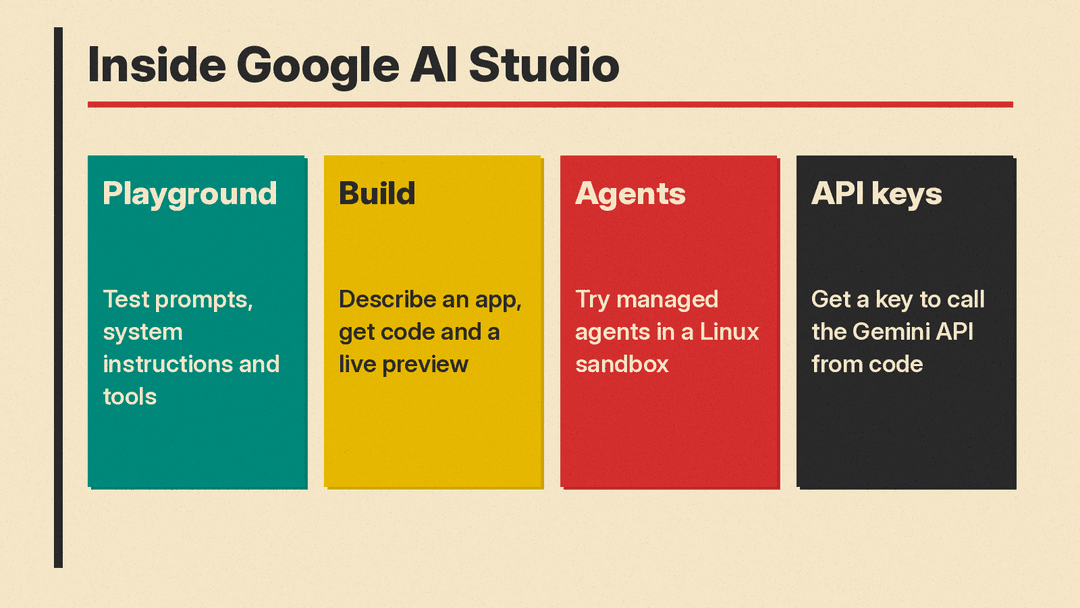
The main controls sit in the Run settings panel. The quickstart says this panel lets you adjust model parameters and safety settings, and turn on tools such as structured output, function calling, code execution and grounding with Google Search.
In plain terms:
- System instructions tell the model who it is and how to behave for the whole conversation. Google's own example turns the model into a cheerful alien who lives on Europa and keeps answers under three paragraphs.
- Model parameters are the dials that change how the model generates its answers.
- Structured output asks the model to answer in a fixed format, such as JSON, which is easier for software to read.
- Function calling lets the model ask your code to run a specific action, like looking up an order.
- Code execution lets the model write and run code to work something out.
- Grounding with Google Search lets the model check the web before it answers.
The quickstart also lists other prompt types besides chat, including Realtime streaming and Video gen. Google's docs index describes the wider Gemini API as a way to "build apps and agents with Gemini, Nano Banana, Gemini Omni, and Lyria," and lists speech models as well. On November 11, 2026, Google added the Gemini Decisions API, which scores yes/no, choice and rubric questions instead of writing text.
The habit Google teaches in its quickstart is simple: write an instruction, test it, see where the answer drifts, and tighten the instruction. In its example, a single instruction gave answers that the guide says tend to be "very long, and can take on a mind of its own." The fix was a longer instruction: "You are Tim, an alien that lives on Europa, one of Jupiter's moons. Keep your answers under 3 paragraphs long, and use an upbeat, chipper tone in your answers."
Get code: from experiment to software
When a prompt works the way you want, the Get code button shows the same request as code in your chosen language. You can paste that into your own project.
To run it outside AI Studio, you need a Gemini API key. Google's API key guide explains that every key belongs to a Google Cloud project, which handles billing, collaborators and permissions. The guide says: "If you are a new user, Google AI Studio automatically creates a default Google Cloud project and API key after you accept the Terms of Service." If you already have a Google Cloud account, AI Studio does not create a default project, and you import an existing one instead.
The same guide says Google is moving the Gemini API from standard API keys to "authorization keys", which are bound to a Google Cloud service account. Per the guide, new keys created in AI Studio have been authorization keys by default since May 28, 2026. Google says these keys let it quickly stop the use of leaked keys that its systems detect. The practical advice is the usual one: treat an API key like a password, keep it out of public code, and delete any key you think has leaked.
Build mode: describe an app, get an app
Google's Build mode guide says Build mode lets you quickly build, or vibe code, and deploy apps through natural language prompting. It supports web apps with full-stack runtimes and native Android apps. For a step-by-step walkthrough with a tested first prompt, see our guide on how to vibe code an app in Google AI Studio.
You can start in four ways, according to the guide:
- Start with a prompt. Describe what you want. You can add "AI Chips" for features like image generation or Google Maps data, or speak your request with the speech-to-text button.
- "I'm Feeling Lucky". Gemini writes a project idea for you.
- Remix a gallery app. Open a project from the App Gallery and select Copy App.
- Import from GitHub. Bring in code you already have.
When you run the prompt, the guide says, the code and files are generated and "a live preview of your app" appears on the right. For web apps, AI Studio creates a React frontend by default and a Node.js server, which the guide says allows "secure API calls, database connections, and npm package usage." For Android, it creates a Kotlin and Jetpack Compose project that you can preview in a browser-based emulator.
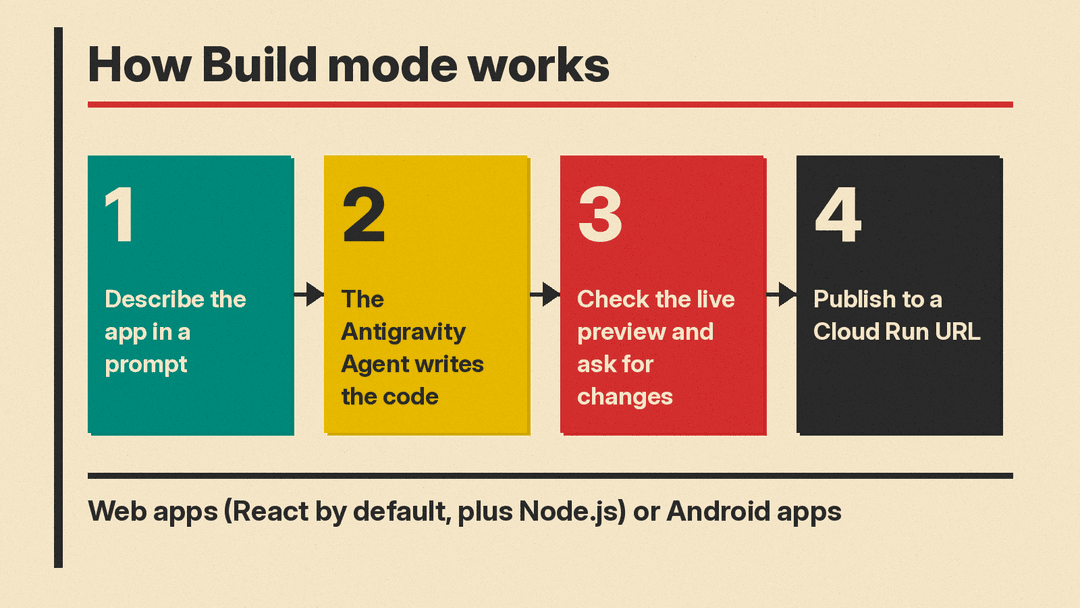
The work is done by what Google calls the Antigravity Agent. The Build mode guide says the core components of the agent harness from Google Antigravity, Google's agentic development platform, now power Build mode. The guide says the agent keeps the context of earlier prompts, manages changes across many files, and "verifies code updates to reduce hallucinations."
Per the guide, Build mode also handles several setup jobs:
- Secrets. API keys go in the Settings menu and stay on the server side, out of reach of the browser.
- Databases and sign-in. The guide says AI Studio can "automatically provision and set up Firebase," including a Firestore database and "Sign in with Google."
- Multiplayer. The server side can manage state so several people can use an app together.
- Packages. The agent installs npm packages it needs, or ones you ask for.
Publishing your app
Google's deployment guide describes two ways to put an app online. Each deployment creates a service in Google Cloud Run.
- Starter Tier. Eligible accounts can publish a limited number of full-stack apps without setting up a Google Cloud project or billing account. Not every account qualifies. The guide says an account may be ineligible if it is a Google Workspace account, has an active or prior paid Google Cloud billing account, or if Google does not have enough evidence from its activity to grant access.
- Standard deployment. Link a Google Cloud project with billing turned on.
Published apps can use a custom address under ai.studio, such as your-app-name.ai.studio. The guide says names are assigned first come, first served, and an address is released if you unpublish or delete the app.
If you want to compare Build mode with other tools that do this job, see our guide to the best vibe coding tools.
AI Studio can also set up Google Maps Platform and its API key for apps that need maps, as our post on the Maps demo key explains.
Agents in the Playground
AI Studio also has an Agents toggle in the Playground. Google's Agents guide says it gives "a visual interface to prototype and learn how to build managed agents without having to create and write API calls."
Per the guide, these managed agents run in a secure, temporary Linux sandbox with tools you switch on: Google Search, URL Context for reading web pages, Code Execution for Bash and Python, and filesystem tools for reading and writing files. You shape its behavior with an AGENTS.md file for its instructions and persona, and SKILL.md files for specific tasks. You can add your own files, a Cloud Storage bucket, or a GitHub repository to its workspace.
Google ships open-source templates in its managed agent templates repository. The guide flags one cost risk: when you run a template, the agent inside the sandbox can call the Gemini API with your configured API key. In the guide's words: "It will execute calls using your configured API key, which can incur additional token charges on your account."
Is Google AI Studio free?
As of November 9, 2026, using the AI Studio website is free to start, with limits. The Gemini API pricing page lists "Google AI Studio access" in the Free tier, along with "Limited access to certain models" and free input and output tokens.
There are three separate ways you can pay, and they are easy to confuse:
- Gemini API billing. Linking a billing account and prepaying moves a project to a paid tier, with higher rate limits and more models, per Google's billing guide. This is what you use for apps and code that run outside the AI Studio website.
- Google AI Pro and Ultra subscriptions. Google's AI plans page for AI Studio says these give "greater model access and increased rate limits in AI Studio." The same page says these benefits "apply only within the Google AI Studio web interface" and that Gemini API usage is billed separately.
- Cloud services for published apps. A standard deployment runs on your own Google Cloud project with billing enabled.
The AI plans page also notes that subscriptions do not include agents such as Deep Research or Antigravity Preview, which it says "require a paid API key." (Deep Research in the Gemini app is a different product; our Deep Research guide covers that one.)
Privacy: the free tier difference
Google's pricing page lists "Content used to improve our products" under the Free tier, and "Content not used to improve our products" under the Paid tier. The billing guide says the same: linking a billing account and moving to a paid tier is how you make sure your prompts and responses are not used to improve Google products. The full rules are in the Gemini API terms of service.
In practice, keep private, client or company data out of free-tier prompts unless you have read the terms and are comfortable with them.
AI Studio vs the Gemini app vs Google Cloud
- Gemini app: Google's consumer AI assistant, covered in our Gemini explainer. It is a separate product from AI Studio.
- Google AI Studio: a workbench for testing models, building prototypes and apps, and getting API keys.
- Google Cloud: Google's pricing page points enterprise deployments to the Gemini Enterprise Agent Platform for optional extras such as dedicated support channels, advanced security and compliance, and provisioned throughput.
If you want open models you can run on your own hardware instead, Google's answer is Gemma, not AI Studio.
How to get started
- Go to aistudio.google.com and sign in with a Google account.
- In the Playground, open Run settings and write a short system instruction.
- Ask a few test questions, then tighten the instruction until the answers look right.
- Click Get code to see the same request as code, or open Build to describe an app.
- Before you share or publish anything, check which tier you are on and what that means for your data.
The short version
Google AI Studio is the place to try Gemini models with full control and to turn a working prompt into code or an app. The Playground is for testing, Build mode is for making apps from a description, and the Agents tab is for trying sandboxed agents. It is free to start, but the free tier allows Google to use your content to improve its products, and anything that runs outside the website is billed through the Gemini API.
