
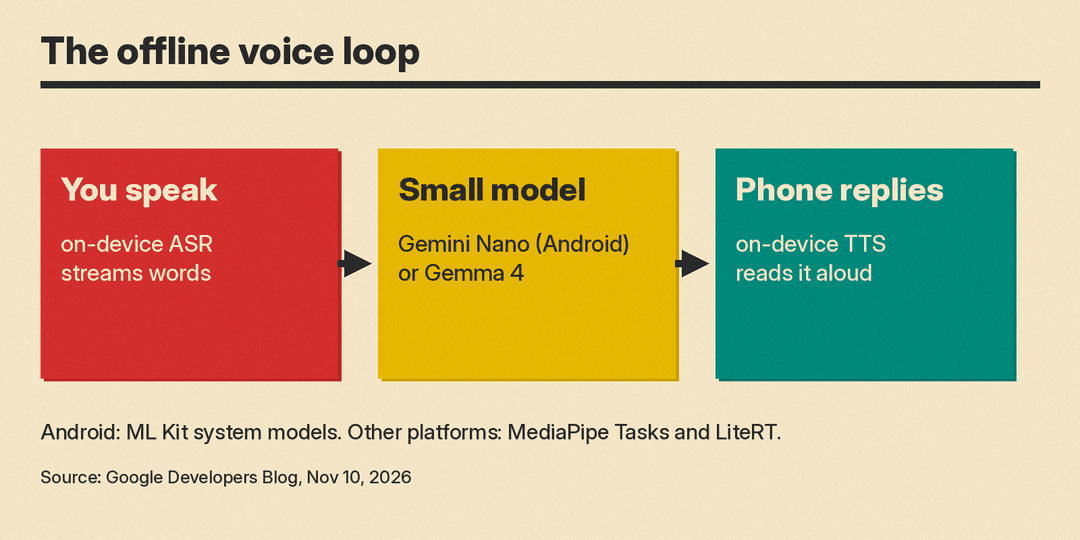
Google has added on-device speech recognition (ASR) and text-to-speech (TTS) to Google AI Edge Gallery, its showcase app for running AI models locally on phones. The Google AI Edge and Android ML teams announced it on the Google Developers Blog on November 10, 2026. The pitch is a full voice loop with no network: you speak, a small language model such as Gemini Nano or Gemma 4 answers, and the phone reads the reply aloud, "completely offline," in Google's words.
The app is the demo. The bigger news for builders is the set of APIs and model bundles behind it, which Google says are "available today."
What changed in the app
Google describes two new voice features in AI Edge Gallery, available in the latest version of the app on Android and iOS.
- XR Language Teacher. You point the camera at a menu, sign or object and ask a question out loud, for example "What is that, and how do I ask for one?" On-device ASR streams your question, together with the camera frame, to Gemini Nano on Android devices or Gemma 4 on other platforms. The model answers in your language and tags the foreign phrases separately, so the TTS voice can switch accents mid-sentence for the pronunciation. Google says the same setup extends to smart glasses when inference runs on a paired phone.
- Voice in AI Chat. The app's main chat now takes spoken input and can read answers back. An "Auto-play TTS" setting, or a speaker button on any response, opens a playback bar that highlights each sentence as it is spoken. ASR and TTS choices, preset voices and downloaded language packs sit in Model Management.
Google says the open-source code shows how to strip Markdown, skip code blocks and tables, and schedule speech one sentence at a time, so voice synthesis does not fight the language model for compute while it is still generating tokens.
Two routes for developers
Google splits the stack by platform.
Android: ML Kit system speech models. The ML Kit GenAI Speech Recognition and Text-to-Speech APIs use speech models that are part of the OS and managed through AICore, so Google says they add "0 MB" to your APK. Google's numbers for these models:
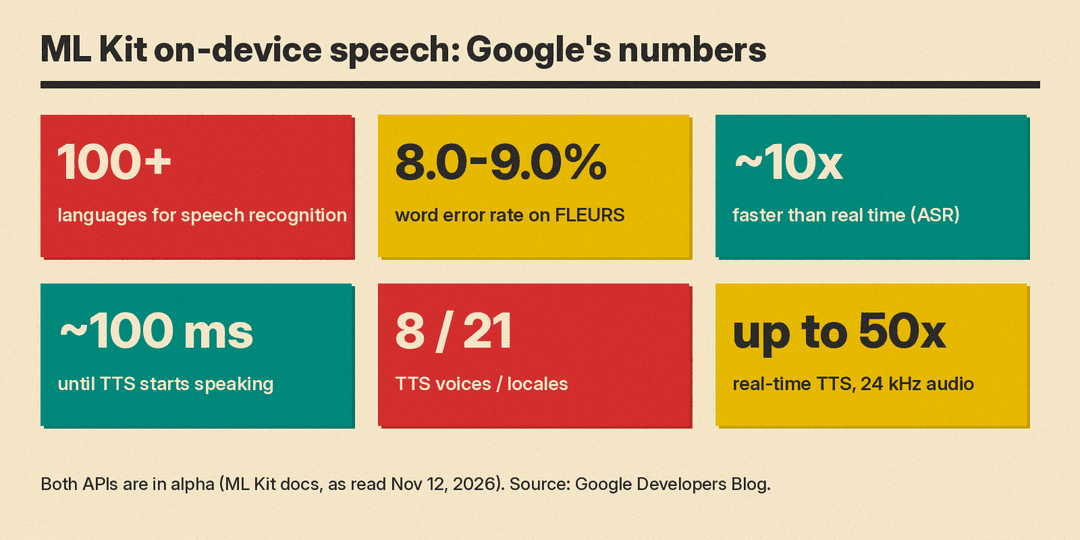
- Speech recognition across 100+ languages, at 8.0% to 9.0% word error rate on the FLEURS benchmark, and about 10x faster than real time (roughly 300 ms per 3 seconds of speech).
- End-to-end speech translation wait times cut by 35% to 44% (Google does not name the baseline in the post).
- A few-step diffusion TTS model that starts speaking in about 100 ms, produces 24 kHz audio at up to 50x real time, and offers 8 voices across 21 locales.
- A 27-second paragraph synthesized in about 500 ms, with active device power cut by over 50% compared with "traditional autoregressive TTS models."
Everything else: MediaPipe Tasks and LiteRT. For iOS, macOS, Windows, Linux and the web, Google offers MediaPipe ASR and TTS Tasks that handle audio framing, voice activity detection and decoding. Both run open-weight models packed into single .litertlm files. The app ships with four:
- Parakeet-TDT-0.6B-v3 (multilingual ASR)
- PocketTTS 100M (multilingual TTS)
- Kokoro-82M (multilingual TTS)
- Phonon 31M (lightweight English TTS, which Google says reaches first audio in under 100 ms on most devices and platforms)
Both MediaPipe Tasks can also be tried in the browser, per the post. Developers who want more control can build on LiteRT directly, Google's on-device inference runtime that sits under both ML Kit and MediaPipe. Google points to the Hugging Face LiteRT Community for more open speech models, naming Whisper, Qwen3-ASR and Moonshine for ASR and Qwen3-TTS and Matcha for TTS. Google's post does not name Phonon's maker; Gradium's Phonon lineup includes an English-only 31M-parameter model, which we covered in our Phonon TTS explainer.
Limits to check first
The blog post reads as ready to ship. The ML Kit docs add caveats a builder will hit early (as read on November 12, 2026):
- Alpha status. The GenAI Speech Recognition API page says the API "is offered in alpha, and is not subject to any SLA or deprecation policy," and changes "may" break backward compatibility. The GenAI Text-to-Speech API page also says it is offered in alpha (package version 1.0.0-alpha1).
- Device support for the best mode. Speech recognition has a Basic mode, on Android API level 31 and higher, and an Advanced mode that uses the on-device Gemini model. Advanced mode is listed for the Pixel 10 and Pixel 11 series plus devices with Gemini Nano on specific Qualcomm, MediaTek and Exynos chipsets, including the Samsung Galaxy S26, Z Flip8 and Z Fold8 series.
- Unlocked bootloaders are not supported, per the same page's troubleshooting table.
- Raw audio rules. Audio passed through a file descriptor must be headerless 16-bit PCM, mono, at 16 kHz. Google recommends the microphone source for most cases.
The headline speed numbers in the post are for the ML Kit system models. The cross-platform open models are described as "real-time streaming" and "low-latency," without the same benchmark figures.
Why it matters
Voice has been the weak spot of local AI apps. Text models like Gemma 4 run on phones, but speech usually meant a cloud call or a heavy extra model. Google is now offering both halves locally: system models on newer Android phones, and packaged open models for other platforms. That matters for apps that need to work in a subway, abroad without roaming, or anywhere audio should not leave the device.
It also fits a wider pattern of small models moving onto phones, from EmbeddingGemma 2 for on-device search to tiny voice models. If you only need a cloud voice for content, our guide to the best AI voice generators covers that side.
How to try it
- Install the latest Google AI Edge Gallery on Android or iOS and open XR Language Teacher or AI Chat.
- Read the reference code in the Google AI Edge Gallery GitHub repository.
- On Android, start with the ML Kit GenAI Speech Recognition docs. For other platforms, use MediaPipe Tasks or the LiteRT guide and the .litertlm bundles on Hugging Face.
Sources
- On-Device Speech Recognition and Text-to-Speech in Google AI Edge Gallery, Google Developers Blog, November 10, 2026
- GenAI Speech Recognition API, ML Kit docs (as read November 12, 2026)
- GenAI Text-to-Speech API, ML Kit docs (as read November 12, 2026)
