
If you have read about AI models you can download and run on your own computer, you may have seen the name Gemma. Gemma is Google's family of open models. It sits next to Gemini, the model family behind the Gemini app, but it works in a different way and is meant for different people.
This guide explains what Gemma is, how it relates to Gemini, what "open model" means in practice, what the different Gemma variants are for, how people actually run it, and what the license lets you do. It uses Google's own Gemma documentation, model pages and terms. You do not need to be a developer to follow it.
What Gemma is, in one paragraph
Google's Gemma overview describes Gemma as "a family of lightweight, state-of-the-art open models built from the same research and technology used to create the Gemini models." The same page says Gemma was "developed by Google DeepMind and other teams across Google," and that the name comes "after the Latin gemma, meaning precious stone."
The key word is "open." With Gemma, Google publishes the model weights: the large files of numbers that make up a trained AI model. Anyone who accepts the license can download those files and run the model. Google's overview says the models are "available to run in your applications and on your hardware, mobile devices, or hosted services."
Gemma vs Gemini: what is the difference?
Google's overview says Gemma models "draw inspiration and technological lineage from the Gemini family of models, and are made for the AI development community to extend and take further."
For an everyday user, the practical difference is how you reach the model:
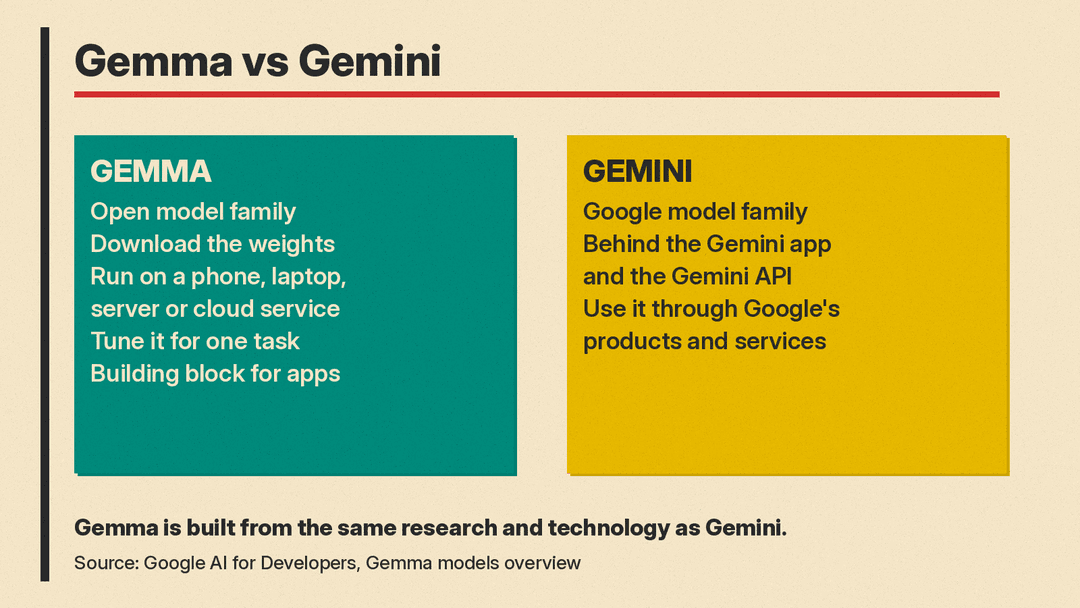
- Gemini is the model family behind the Gemini app and the Gemini API. You use it through Google's products and services. For one recent Gemini model, see our Gemini 4 Argon explainer.
- Gemma is a family of models whose weights you can download. You (or an app you install) run the model yourself, on a phone, a laptop, a server or a cloud service of your choice.
There is also a difference in size and purpose. Google calls Gemma "lightweight." The Get started guide lists Gemma sizes meant for "mobile devices," "laptops," "desktop computers and small servers," and "large servers or server clusters." Smaller models need less memory and power, so they can run on ordinary hardware.
Google's Intended Use Statement is clear about who Gemma is for. It says "Gemma is intended to be used by developers and researchers as a starting point for building and customizing their own model-based solutions." It also says: "Gemma itself is not a finished product and does not perform specific tasks directly. It is a tool for building applications, and users are responsible for training and adapting Gemma to their specific intended use."
In short: Gemini is a product you use. Gemma is a building block that people use to make products.
What "open model" means here
"Open" can mean different things in AI. In Gemma's case, it means three practical things, all described in Google's docs:
- You can download the weights. The Get started guide links to Gemma on Kaggle and Hugging Face, and says "you can download official Google Gemma model variants and community-created variants from Kaggle Models and Hugging Face."
- You can change the model. Google's overview says "you can also customize these models using tuning techniques so that they excel at performing specific tasks that matter to you and your users." This process is often called fine-tuning.
- You can run it where you want. On your own hardware, in your own app, or on a hosted service.
Open does not mean "no rules." Gemma comes with a license and a prohibited use policy, covered below. If you want a wider look at this trade-off, our explainer on how to run an AI model on your own laptop covers the general idea for all open models, not only Gemma.
Why would anyone run their own model?
Google's Gemma pages point to a few reasons that matter to non-developers too.
Privacy and offline use. Google's guide to its AI Edge Gallery app says that in the app, every inference happens on the device, with no network and no account, and nothing leaves the hardware. That is one reason to use a local model: your prompts do not travel to a company's servers.
Working without a connection. The Google DeepMind Gemma page highlights a project called Lentera that "runs an offline AI microserver for educators and students."
Custom models for a language or a field. The same page features Crane AI Labs, which "improves Swahili language understanding in a lightweight model," and DolphinGemma, which the page says marine biologists and AI engineers developed together under the heading "Unlocking interspecies communication." For a newer example aimed at schools, see our post on Google DeepMind and Fab AI backing Gemma teacher tools in Africa.
Lower hardware needs. Google's Ollama guide for Gemma says that with tools like llama.cpp and Ollama "you can run versions of Gemma on a laptop or other small computing device without a graphics processing unit (GPU)." It also explains the trade-off: these tools use quantized versions of the model, and "using less precise data in quantized models to process requests typically lowers the quality of the models output, but with the benefit of also lowering the compute resource costs." Our plain-English guide to Q4 and Q8 quantization explains what those labels mean.
The Gemma family: core models and variants
Gemma is not one model. It is a family with several generations and a set of special-purpose variants. Google's docs group them like this.
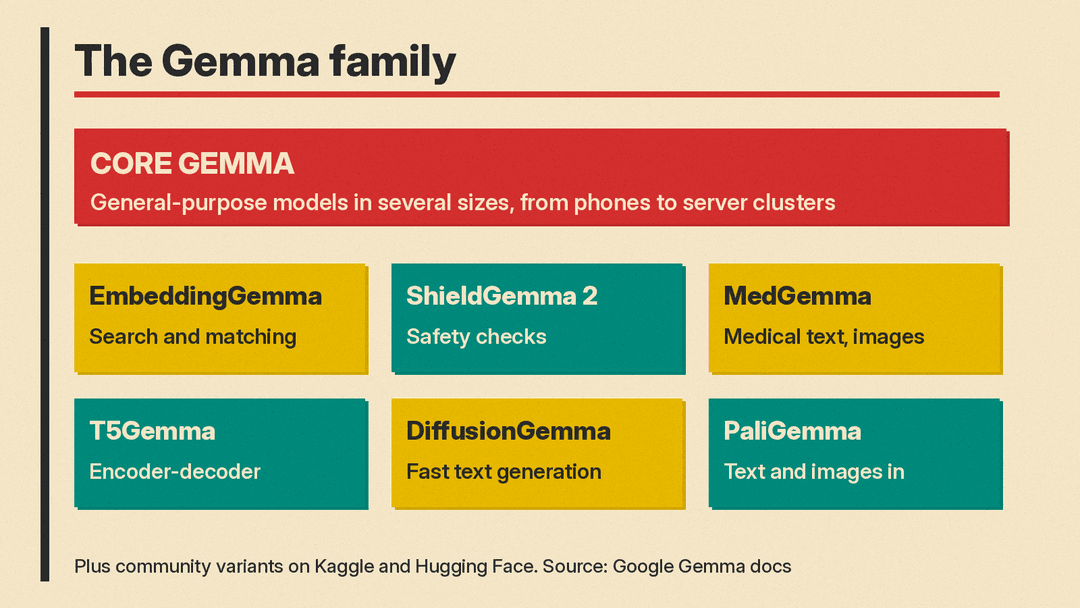
Core Gemma models. These are general-purpose models that read input and write text. The Get started guide lists each generation with its sizes and the hardware each size is meant for. Newer generations accept more than text. For example, the guide says the Gemma 4 family features "multimodal (text, image, audio) inputs," and the overview page says it supports "over 140 languages."
Special-purpose variants. Google publishes versions of Gemma trained for one job. From the Gemma overview and the DeepMind Gemma page:
- EmbeddingGemma turns text and other content into numbers that software can compare, for tasks like search and grouping similar items. We covered the latest version in our EmbeddingGemma 2 explainer.
- ShieldGemma 2 is described as "a modular classifier model for detecting policy-violating content and upholding safety standards." In plain terms, it checks whether content breaks a set of rules.
- MedGemma is "a collection of models trained for medical text and image comprehension."
- T5Gemma is a set of "flexible encoder-decoder models that excel at deep contextual understanding." This is a different internal design from the core models.
- DiffusionGemma is "a text diffusion model designed to maximize generation speed."
- PaliGemma models take text and images as input and write text, according to the Get started guide.
- CodeGemma is listed in the guide as a coding-specific variant of the original generation.
Google's Terms of Use appendix lists many more names, including FunctionGemma, TranslateGemma, VaultGemma, DataGemma and Gemma Scope. Google's Get started guide calls some of them, such as DataGemma and Gemma Scope, special-purpose and research models.
Community models. Google's overview says "many more Gemma variants are available from Google and our AI developer community," and calls the community side the "Gemmaverse." These are versions that other people have fine-tuned and shared.
How people actually use Gemma
You do not have to write code to try Gemma. Google's docs describe several ways in.
In a browser. The Gemma documentation home page has a "Try in Google AI Studio" link. The link opens a new chat with a Gemma model in Google AI Studio, in your web browser.
On a phone. The AI Edge Gallery guide describes it as "Google AI Edge's app for running open models directly on a phone or laptop." It lists Android 12 and up through Google Play, iOS 17 and up through the App Store, and a macOS download. Features listed include AI Chat, "Ask Image," which lets you "point the camera or pick a photo and ask about it," and "Audio Scribe" to "transcribe and translate voice recordings in real time."
On a laptop or desktop. Google's LM Studio guide describes LM Studio as "a desktop app for running local models, with a GUI, a CLI and a local server." The guide says you can search for "Gemma" in the app, and "LM Studio suggests the variant that fits your hardware." Ollama, covered in Google's Ollama guide, is another option.
In an app or service. Developers can build Gemma into their own apps, or run it on cloud hardware. The Get started guide describes two main paths: "select a model and deploy it as-is in your application," or "select a model, tune it for a specific task, and then deploy it in an application, or share it with the community."
A practical tip from Google: the guide says that "tuning a model requires a dataset of inputs and expected responses of sufficient size and variation to guide the behavior of the model," and that you "need significantly more computing and memory resources to complete a tuning run compared to running a Gemma model for text generation." In other words, running a Gemma model takes far fewer resources than tuning one.
What the license lets you do
This part matters if you plan to build anything with Gemma.
Different generations have different licenses. Google's Gemma Terms of Use say: "The terms below apply to Gemma models listed in the Appendix at bottom of this page. For Gemma 4 terms, see the Gemma 4 license." That link goes to the Apache License 2.0, an open source license. So, as of October 2026, Gemma 4 uses Apache 2.0, while the models in the terms' appendix, including Gemma 1, 2, 3 and 3n, use Google's own Gemma Terms of Use. Check which license applies to the exact model you use.
Under the Gemma Terms of Use, a few points stand out:
- Outputs are yours to handle. The terms say: "Google claims no rights in Outputs you generate using Gemma. You and your users are solely responsible for Outputs and their subsequent uses."
- Use restrictions travel with the model. If you share Gemma or a modified version, you must include the use restrictions in your own agreement and give recipients a copy of the terms. Distributions (other than through a hosted service) must include a notice that reads: "Gemma is provided under and subject to the Gemma Terms of Use found at ai.google.dev/gemma/terms".
- Google can restrict misuse. The terms say Google "reserves the right to restrict (remotely or otherwise) usage of any of the Gemma Services that Google reasonably believes are in violation of this Agreement."
The prohibited use policy. The Gemma Terms of Use refer to a separate Gemma Prohibited Use Policy. It bans, among other things, using Gemma to generate content that infringes others' rights, to facilitate illegal activities, to generate spam or content "for deceptive or fraudulent activities, scams, phishing, or malware," and "attempts to override or circumvent safety filters." It also bans "engagement in the illegal or unlicensed practice of any vocation or profession including, but not limited to, legal, medical, accounting, or financial professional practices."
This article is a plain-English summary, not legal advice. If you plan to ship a product, read the full license for your model.
What Gemma is not
A few points to keep straight, based on Google's own descriptions:
- Gemma is not the Gemini app. It is not a chatbot you sign in to. It is a model you or an app run.
- Gemma is not a finished product. Google's Intended Use Statement says it "is not intended for any specific use case and is a general purpose starting point."
- Gemma can still be wrong. The DeepMind Gemma page carries the warning that large language models "such as Gemma, may sometimes provide inaccurate or offensive content that doesn't represent Google's views." Running a model locally does not make its answers more accurate.
Who should care about Gemma
- Everyday users who want to try a private, offline AI on their phone or laptop. AI Edge Gallery and LM Studio are two paths Google documents.
- Small businesses and schools that want an AI tool that keeps data on their own machines, or works with no internet connection.
- Developers and researchers who want a model they can tune for one task or one language, and ship inside their own product.
If you just want to ask an AI questions, the Gemini app is built for that, while Gemma, in Google's words, is "a tool for building applications." If you want control over where the model runs and what it is trained to do, Gemma is the part of Google's AI lineup built for that.
Sources
- Google AI for Developers: Gemma models overview
- Google AI for Developers: Get started with Gemma models
- Google DeepMind: Gemma
- Gemma documentation home
- Gemma: Intended Use Statement
- Gemma: Try Gemma on your phone with AI Edge Gallery
- Gemma: Run Gemma with LM Studio
- Google AI for Developers: Run Gemma with Ollama
- Gemma Terms of Use
- Gemma 4 license (Apache License 2.0)
- Gemma Prohibited Use Policy
