
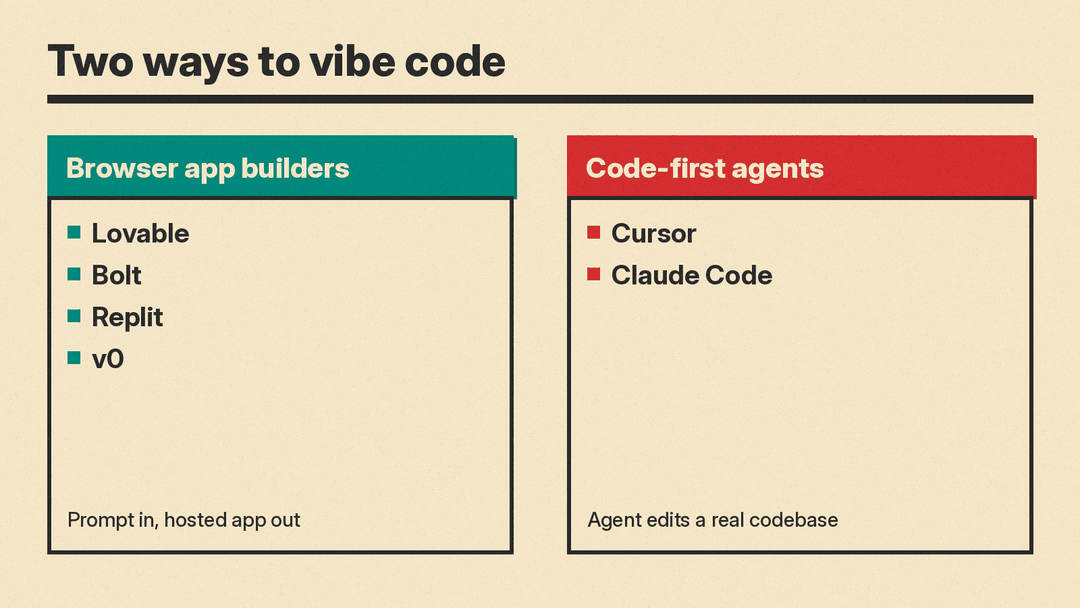
Vibe coding means describing what you want in plain language and letting an AI agent write, run and fix the code. In 2026 the tools for it split into two camps. Browser app builders such as Lovable, Bolt, Replit and v0 take a prompt and return a hosted app. Code-first agents such as Cursor and Claude Code work inside a real codebase on your machine or in the cloud. This guide covers six of them: what each does, what the free plan gives you, what the paid plans cost, and the main limit to know before you start.
All plans and prices below are as of October 2026, read on each vendor's own pricing page or docs on October 19, 2026. Prices change often, so check the linked page before you pay.
How we picked
- Real, available products only. Each tool links to its own site, and every price comes from the vendor's pricing page or help docs.
- Built for prompt-first building. Each tool can take a plain-language request and produce or change working code.
- Different starting points. Four tools suit people who do not want to touch code. Two suit people who already have a codebase.
- No invented numbers. Where a vendor does not state something, such as a monthly price for an annual plan, we say what the page shows and stop there.
If you are new to the idea, our guide to vibe coding with Claude walks through a full prompt workflow, and our list of vibe coding courses for beginners covers where to learn.
Quick picks
- You want a working web app and have never coded: Lovable or Bolt.
- You want an app with a database and hosting in one place, plus room to grow into code: Replit.
- You build front ends and already deploy on Vercel: v0.
- You have a codebase and want an AI editor: Cursor.
- You want an agent in the terminal, IDE, desktop app or browser, and already pay for Claude: Claude Code.
Browser app builders
These tools run in a browser tab. You type what you want, the agent builds it, and you get a preview you can publish. They charge in credits or tokens, so the real cost depends on how much you ask the agent to do.
Lovable
Lovable describes itself as "an AI software engineer, which enables anyone to build for the web." You chat to build websites and web apps, and the same credit balance pays for building, hosting through Lovable Cloud and AI features inside your published app.
Free plan. The free plan includes a daily grant of 5 build credits, up to 30 a month, plus a monthly grant of 20 Cloud credits, according to the pricing page.
Paid plans. Pro and Business come in monthly credit tiers from 100 to 10,000 credits. Per Lovable's subscription plans docs, Pro starts at $25 a month for 100 credits ($250 a year billed annually), and Business starts at $50 a month for 100 credits. Annual billing gives two months free compared with monthly. Verified students and teachers get 50% off the 100-credit Pro plan, billed monthly, for up to 12 months.
How credits work. A Plan mode message costs 1 credit, plus any subagent research it runs. Build mode is usage-based. Lovable's own examples on the credits docs put "Make the button gray" at 0.50 credits and "Add authentication" at 1.20 credits, and it says those figures are illustrative. Pro top-ups cost $15 per 50 credits.
Main limit. Editing and downloading code, custom domains and removing the "Edit with Lovable" badge are not on the Free plan. They start at Pro. If your balance reaches zero, building stops, AI features in deployed apps stop working and apps that rely on Lovable Cloud can pause.
Bolt
Bolt is an AI website and app builder that starts free with no credit card.
Free plan. Per the Bolt pricing page, Free includes 1M tokens a month with a 300K daily token limit, public and private projects, unlimited databases and website hosting, with Bolt branding on your sites.
Paid plans. Pro is listed at $18 a month, billed as a yearly total of $216. It adds your own domain with no Bolt branding, 10M tokens a month with rollover, connectors and MCPs, and access to the newest AI models. Teams is listed at $27 a month per member ($324 a year), with centralized billing, admin controls and private NPM registry support. Enterprise is a custom annual contract billed by consumption.
Main limit. Bolt says most token usage comes from syncing your project's file system to the AI, so "the larger the project, the more tokens used per message." A large app can burn through a monthly token allowance faster than its size on the pricing page suggests.
Replit
Replit runs its Agent, databases and publishing in one cloud workspace. We covered the company's recent model change in Replit shifts its default AI coding provider to OpenAI.
Free plan. The Starter plan docs say Starter users get daily credits for Agent up to a monthly cap, monthly credits for cloud usage, Lite build for quick edits, and one free published app. That published link "will automatically go down after 30 days," and it carries a "Made with Replit" badge.
Paid plans. The Replit pricing page lists Core at $20 a month, or $18 a month billed annually, with "$20 towards more powerful models." The next plan, Pro, is $100 a month, or $90 a month billed annually, with "$100 towards most powerful models," up to 15 collaborators and database rollback of up to 28 days. Replit's Pro docs say Pro has no per-user fees: builders share pooled credits.
Main limit. Per the Starter plan docs, Full build "requires Core or Pro," and Plan Mode, third-party connectors and Replit AI Integrations require Core. The free tier is a trial, not a place to keep an app running.
v0
v0 is Vercel's app builder. It deploys to Vercel and syncs with GitHub.
Free plan. Per the v0 pricing page, Free includes access to v0, deploys to Vercel, visual editing with Design Mode and GitHub sync, with a 7 message per day limit.
Paid plans. Plus starts at $30 per user per month and includes $30 of monthly credits per user plus $2 of free daily credits on login. Business is $100 per user per month with training opt-out by default. Enterprise adds SAML SSO and role-based access. v0 also lists per-token model rates: v0 Mini at $0.20 per million input tokens and $1.20 per million output tokens, up to v0 Max Fast at $10 input and $50 output.
Main limit. Usage is metered in tokens against your credits, and v0's own FAQ includes the question "Why do messages use so many input tokens? My prompts are short." Expect each message to cost more than its length suggests.
Code-first agents
These tools assume you have, or want, a real codebase. They are a better fit once an app outgrows a browser builder, or if you can read code even when you do not want to write it.
Cursor
Cursor is an AI code editor with an agent, and its plans now share one usage pool with Grok.
Free plan. The Cursor pricing page lists Free at $0 with limited agent and chat requests.
Paid plans. Plus is $8 a month, and on that plan "only Grok models are available." Premium is $30 a month with 4x the usage of Plus, cloud agents and automations, code hosting, AI code reviews and third-party models at API list price. Super is $100 a month (15x Plus) and Ultra is $200 a month (50x Plus). Teams starts at $30 per user per month. Cursor says the allowance "refreshes weekly."
Main limit. Paid tiers do not include an allowance for third-party models. Cursor's page says third-party model usage "is not included in the monthly prices shown and must be purchased separately," billed at API list price. If you want Claude or GPT models inside Cursor, budget for that on top of the plan. Our Cursor vs Claude Code vs Codex comparison goes deeper on this trade.
Claude Code
Claude Code is Anthropic's agentic coding tool. Its docs say it "reads your codebase, edits files, runs commands, and integrates with your development tools," and it runs in the terminal, VS Code and JetBrains, a desktop app and the web at claude.ai/code. It reads a CLAUDE.md file in your project for standing instructions and connects to other tools through MCP.
Free plan. None for Claude Code. The Claude pricing page lists Claude Code as "No" on Free.
Paid plans. Pro is $17 a month with the annual discount ($200 billed up front) or $20 billed monthly, and it includes Claude Code. Max starts at $100 a month, with a choice of 5x or 20x more usage than Pro. Anthropic says Claude Code "is included in all paid plans" and "shares the same usage limits as the rest of your plan," so chats and terminal work draw from one pool. Limits reset on a rolling five-hour window, with weekly limits on top for paid plans.
Main limit. There is no fixed message count, and heavy coding sessions can hit the limit. Anthropic says you can turn on usage credits at standard API rates, or "switch to pay-as-you-go API credits through a Console account." The desktop app also needs a paid subscription.
How the pricing units differ
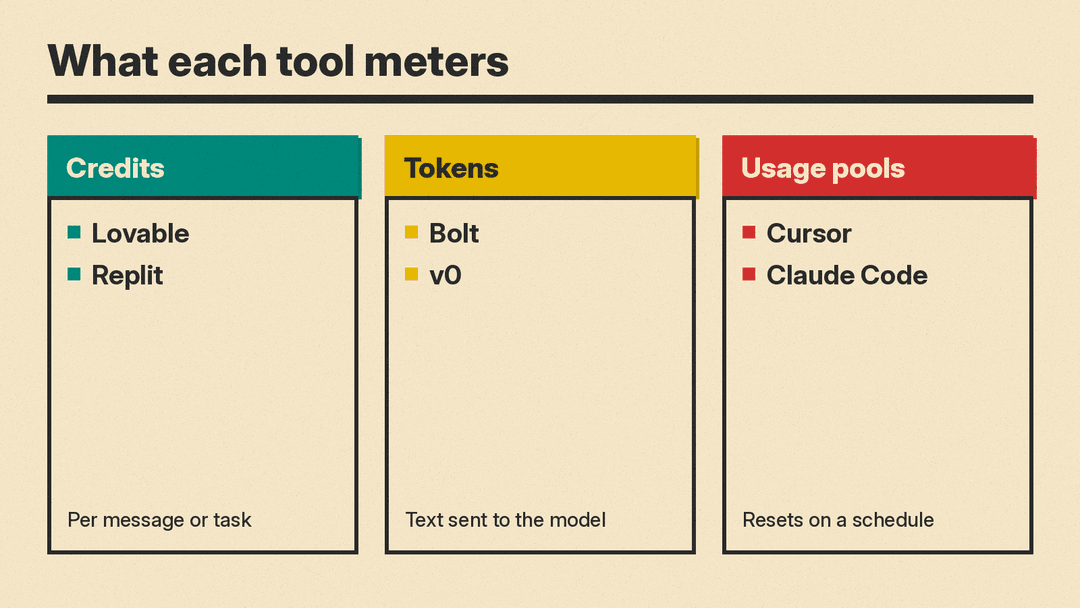
The headline prices are not comparable on their own, because each vendor meters work differently.
- Credits per action (Lovable, Replit). You pay per message or task, and bigger requests cost more. Lovable shows the cost of each message in the message history.
- Tokens (Bolt, v0). You pay for text sent to and from the model. Bolt says syncing your project's files drives most of its token use, and v0's FAQ addresses why short prompts still use many input tokens.
- Usage pools (Cursor, Claude Code). A subscription buys a share of usage that resets on a schedule: weekly for Cursor, a rolling five hours plus weekly caps for Claude.
A practical test: build the same small app on two free plans and watch how fast each meter moves. That tells you more than the price table.
Safety basics before you ship
Vibe coding makes it easy to ship code you have not read. A few habits lower the risk.
- Keep secrets out of prompts. Use each platform's secrets or environment settings for API keys, not the chat.
- Watch keys you hand to third parties. If a tool stores your own model provider key, a breach on its side can bill your account. The OpenCode Console breach is a recent example. Set spend limits with the provider and give each tool its own key.
- Sandbox local agents. Agents that run commands on your machine can do damage if a prompt goes wrong. Our explainer on GitHub Copilot local sandboxing covers what a sandbox restricts.
- Use spend controls. Lovable has per-member credit limits and usage alerts on paid plans, and Cursor lets you set spending caps on third-party model usage.
How to choose
Start with where your project lives. If there is no code yet and you want a link to share by the end of the day, pick a browser builder. Lovable and Bolt are the most direct. Replit makes sense if you want a database and hosting in the same place. v0 fits if your team already deploys on Vercel.
If you already have a repository, or your browser-built app has outgrown the builder, move to a code-first agent. Cursor suits people who want an editor with the agent built in. Claude Code suits people who want to work in a terminal or across several surfaces, and who already pay for Claude.
Whichever you pick, start on the free plan, build one small real project, and check the usage meter before you upgrade.
