

Google announced on Nov. 9, 2026 that developers can build apps with Google Maps Platform directly inside Google AI Studio, the browser tool for creating apps with Gemini. The pitch is simple: describe an app idea in plain language, and AI Studio sets up Google Maps and the API key for you. Google's post says: "Jump in and try it at no cost." The default setup needs no credit card.
What changed for Maps developers
Google's announcement post on its Keyword blog says the change means you no longer need to leave your AI Studio workspace to configure billing and credentials for Google Maps Platform.
The documentation page for the feature (last updated Nov. 5, 2026) describes how it works on the technical side. AI Studio detects geospatial prompts, such as requests involving nearby places, interactive maps, or routes. When it does, it automatically configures Google Maps Platform recommendations and skills for the project. It also provisions credentials and stores them in the app's secrets settings.
How the setup works in three steps
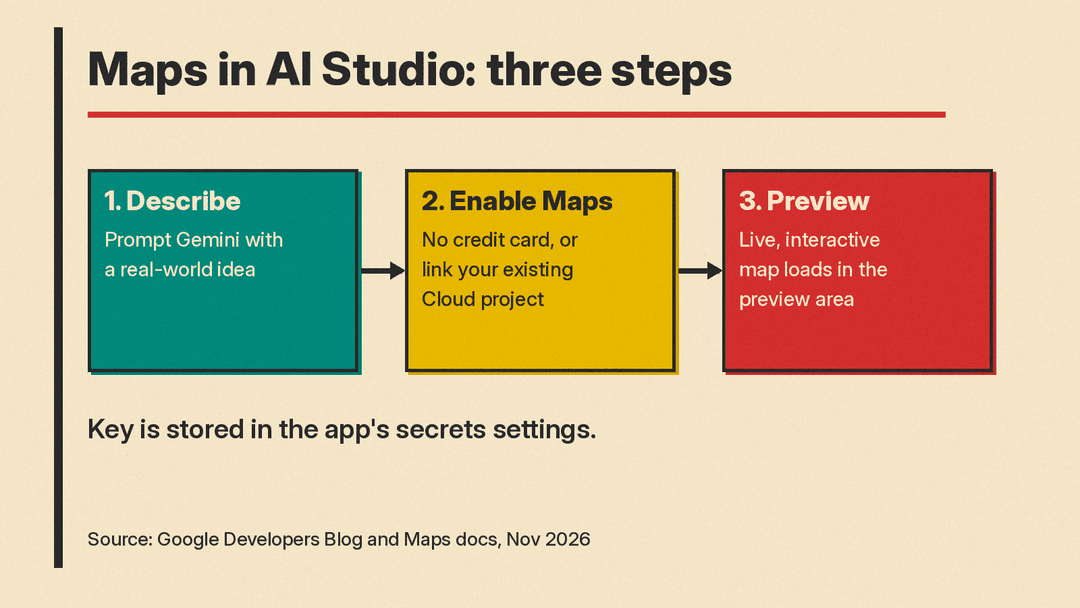
Google describes the process in three steps:
- Describe your idea. Google's example prompt is "Build an interactive 3D tour of NYC showcasing iconic landmarks."
- Enable Maps. You can do this with no credit card required, or AI Studio can auto-connect your existing Google Cloud projects if you already have them.
- AI Studio adds Google Maps to the app and loads a live, interactive map in the preview area.
What you can build with it
Google lists four groups of APIs available through AI Studio:
- Maps: custom styled maps, photorealistic 3D cityscapes, and data overlays.
- Places: conversational local search, place profiles, photo galleries, and recommendations.
- Routes: multi-stop road trip itineraries, commute calculators, and transit-aware day planners.
- Environment: clean-air route finders, live pollen alerts, and local environmental monitors.
There are also ready-made examples in the AI Studio gallery that you can remix. Google highlights three: City Immersive Tour, which builds 3D city maps with flyover camera paths; Pet Grooming Route Optimizer, which uses the Routes API to plan multi-stop routes for mobile service fleets, including appointment times and driver shift limits; and Store Locator & Near Me Finder, which uses the Places API and lets users filter locations by distance and check opening hours.
What the free tier includes, and its limits
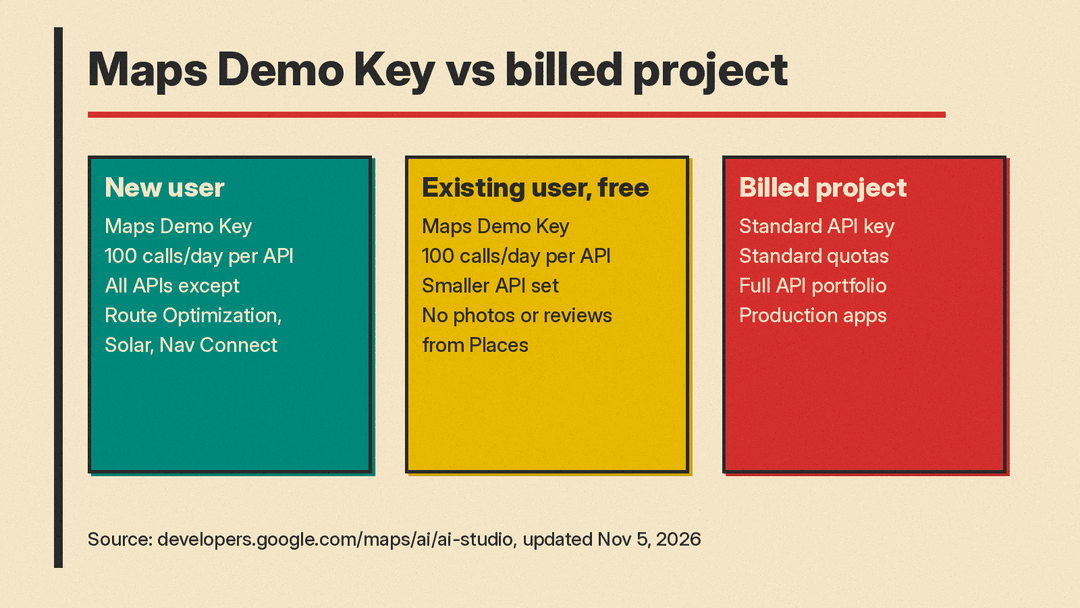
If you do not connect a billed Cloud project, your app runs on a credential Google calls a "Maps Demo Key." It comes with a daily quota of 100 calls per day per API, resetting every 24 hours, and no credit card is required. Google's developer post says: "Built-in sandbox quotas help protect against unexpected charges while experimenting."
The Maps Demo Key page adds two details worth knowing. First, when you hit the daily limit, usage pauses until the next day, with no risk of charges. Second, Google says those usage limits are subject to change.
Which APIs you get depends on your setup
The documentation describes three paths:
- New to Google Cloud: AI Studio creates a free project and a Maps Demo Key for you. This covers all Maps Platform APIs except Route Optimization, Solar, and Nav Connect.
- Existing Google Cloud user prototyping for free: you get a Maps Demo Key with a smaller set of APIs: the Maps JavaScript API (including the Places UI Kit), the Places API (excluding user-generated content such as photos and reviews), the Routes API and Compute Routes Matrix, the Geocoding API, the Weather API, and Maps Experience agent tools.
- Existing user connecting a billed Cloud project: you get a standard API key, the full API portfolio, standard quotas, and monthly free usage.
What is the catch
The free setup is for experimentation, not for launching a real product. The documentation lists demo keys for "prototyping, testing, and AI Studio web apps," and lists "production web and mobile apps" under the billed Cloud project option. To move to production, you link a Cloud Billing account. The docs note that "your existing demo API key continues to work, so there's no need to update your app code." Google's developer post says this connects to standard Google Maps Platform pricing, which includes recurring monthly free usage.
There is also an account restriction to be aware of. The separate Maps Demo Key page says a Demo Key requires a personal Google Account, such as an @gmail.com address, and that Google Workspace (corporate) accounts are not eligible. It also says demo keys are not available in prohibited territories, and that the key is "intended for testing and prototyping purposes only, and is not designed for production use." The announcement posts do not mention the Workspace limit, so it is not clear whether the same rule applies inside AI Studio. If you plan to prototype at a company, that is worth checking before you rely on it.
Why this matters
Google says the integration removes the need to leave AI Studio to configure billing and credentials. Google's developer post puts it this way: "Simply describe your idea for a new app and allow Google AI Studio to handle the configuration and API key management."
For people who build apps by describing them, often called vibe coding, it means a map, place search or route planner can show up in the first preview instead of after a trip to the Cloud console. It is also one of several recent changes aimed at Gemini developers, alongside updates such as the Gemini API Computer Use release. The limits still matter: demo keys allow 100 calls per day per API and are meant for prototyping and testing, and Google says production apps need a billed Cloud project.
