
Google is previewing a multi-agent feature called /swarm in Google Antigravity. The Antigravity team's November 10, 2026 post says /swarm turns a single prompt into a coordinated team of specialized agents that plan, build, and verify in parallel. Our Gemini 4 Carbon availability post already mentioned /swarm. The product docs and the blog add the detail below. The feature is in preview, as read on November 11, 2026. The blog says /swarm "is rolling out today in preview across the Antigravity App and the Antigravity CLI." The changelog lists /swarm in App v2.31.0, dated November 9, 2026, as a way "to coordinate multiple subagents over a message board to complete long-horizon tasks." The CLI changelog lists the swarms preview in CLI v1.5.5, dated November 10, 2026.
How /swarm works
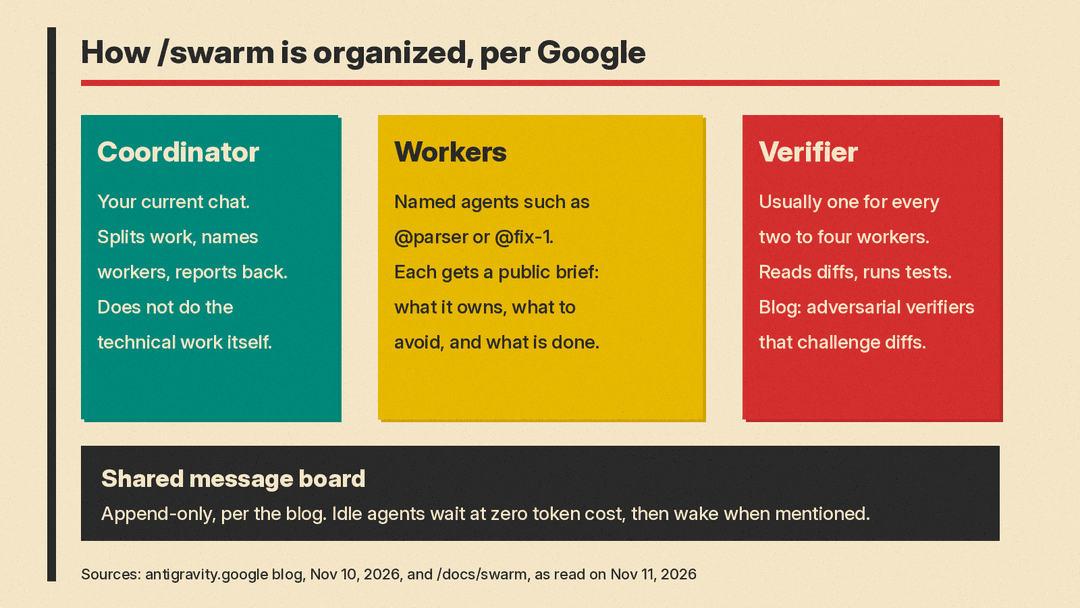
When you run /swarm, the docs say, your current conversation becomes the coordinator. It names the swarm, splits the work into pieces that should not collide, and adds named workers such as @parser or @fix-1. Each worker starts with a clean context and a public brief on the board that says what it owns, what it must not touch, and what "done" looks like. The coordinator usually adds a @verifier for every two to four workers, the docs say. The verifier reads the diffs, runs the tests, and reports problems to that worker. The blog calls these "adversarial verifiers dedicated to running tests and challenging diffs." The docs also describe a @monitor that posts only if every member goes quiet too soon. The coordinator assigns work and reports to you; it does not do the technical work itself.
Everyone talks on one shared, append-only board, the blog says, using @name, @group, or @all mentions. The docs say workers do not message each other privately, and that idle members wait without using tokens and wake when mentioned. The blog says agents park "at zero token cost when idle."
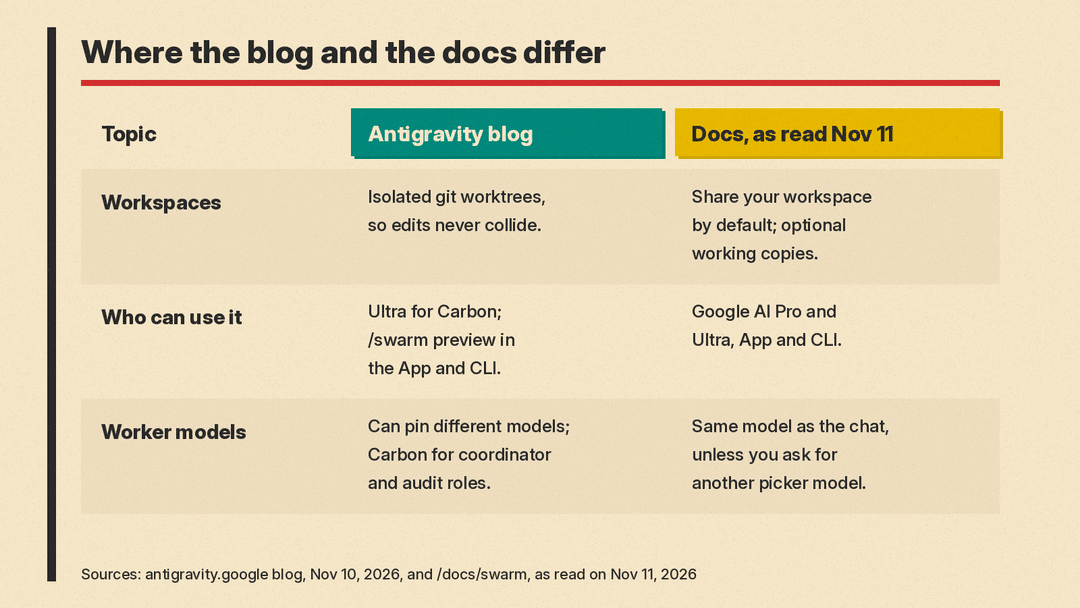
On workspaces, the two pages differ. The blog says a coordinator "spins up specialized parallel workers in isolated git worktrees so edits never collide." The docs, as read on November 11, 2026, say workers "share your workspace by default," and that the coordinator can give each worker its own working copy when several edit at the same time. Removing a worker deletes that copy, so changes need to be landed first. On models, the blog says agents can be pinned to different models, with Gemini 4 Carbon suited to coordinator, architecture, cybersecurity auditing, and adversarial verification roles, and "lighter, faster models" handling parallel file edits. The docs say workers run on the same model as your conversation unless you ask for a different one you can choose in the model picker.
Watching and steering a swarm
The blog says /swarm includes a Swarm UI in Antigravity's side pane, and a full-screen terminal board in the CLI via /swarm board or Alt+S. The docs describe three App views: a Board feed, a Members roster, and a Graph you can replay. In the CLI, a status row appears under the prompt. On macOS, Alt+S works only if Option is sent as Alt, the docs say. You steer the swarm mainly through the coordinator, or message one worker directly, which in the App goes to that worker only, not to the board. In the CLI, you mention a worker with @, for example @verifier. If a member runs out of quota, the docs say it pauses and does not restart on its own when your quota refreshes.
Who can use it, and quota
The docs, as read on November 11, 2026, say /swarm is available on Google AI Pro and Google AI Ultra plans, across the Antigravity App and the Antigravity CLI. The November 10 blog is narrower and does not mention Pro for /swarm. It says Google AI Ultra subscribers can use Gemini 4 Carbon in the Antigravity App, the Antigravity CLI, and Antigravity IDE extensions, and that /swarm is rolling out in preview across the App and CLI, not the IDE extensions.
Both pages warn that a swarm uses quota much faster than a single conversation, even with zero-token idle waits, because every worker is its own agent. The blog also mentions "dynamic model hot-swapping." It says that in five weeks of internal dogfooding, Google engineers used swarms for multi-package migrations, root-cause investigations, and architectural redesigns. Antigravity also recently added voice mode with Gemini Live.
When Google says to use /swarm
The docs compare /swarm with three other multi-agent options:
- Subagents: a single side task, such as research or a test run. The agent delegates on its own. Typical horizon: seconds to minutes.
- /boost: hard bugs, algorithms, and tricky refactors that need deep reasoning. Typical horizon: seconds to hours.
- /swarm: work that "divides cleanly" across independent files, packages, or questions, when you want to watch and steer a team. Typical horizon: minutes to hours.
- /teamwork: repository-scale migrations, long simulations, and research projects, started with a scoping interview. Typical horizon: hours to days.
Why it matters
/swarm is a preview of a named team on a shared board, with a verifier in the loop, rather than one agent in a single thread. It is documented for the App and CLI, not for IDE extensions. The blog and the docs disagree on whether workers start in isolated repo copies or share the workspace by default. Because every worker spends quota, a swarm can cost more than a normal chat, and faster. For our view on when that cost is worth it, see our opinion piece on why AI agent swarms are a budget decision.
Antigravity agents can now also drive the app's built-in browser on personal accounts, as covered in our post on the Antigravity browser agent.
