
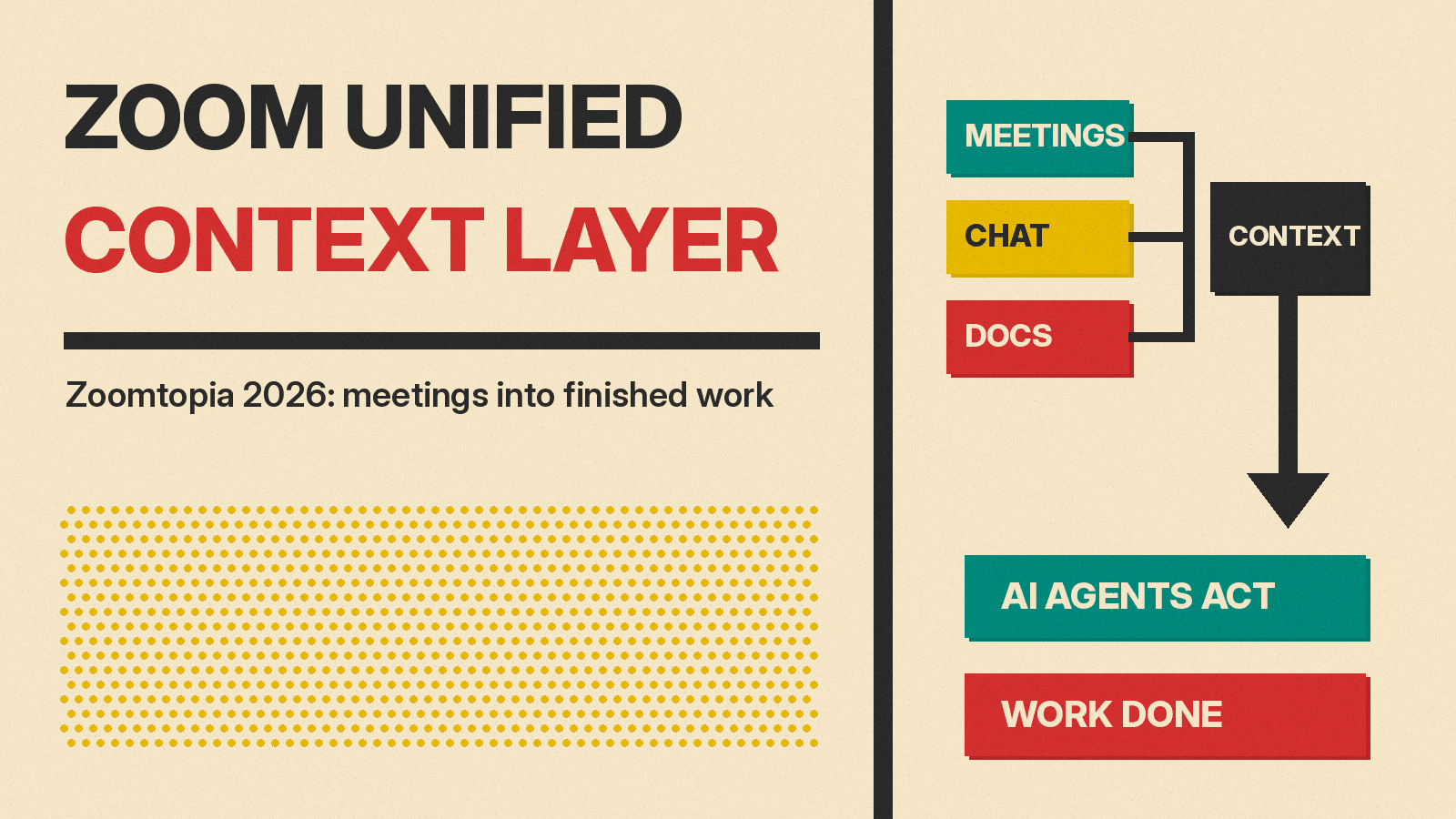
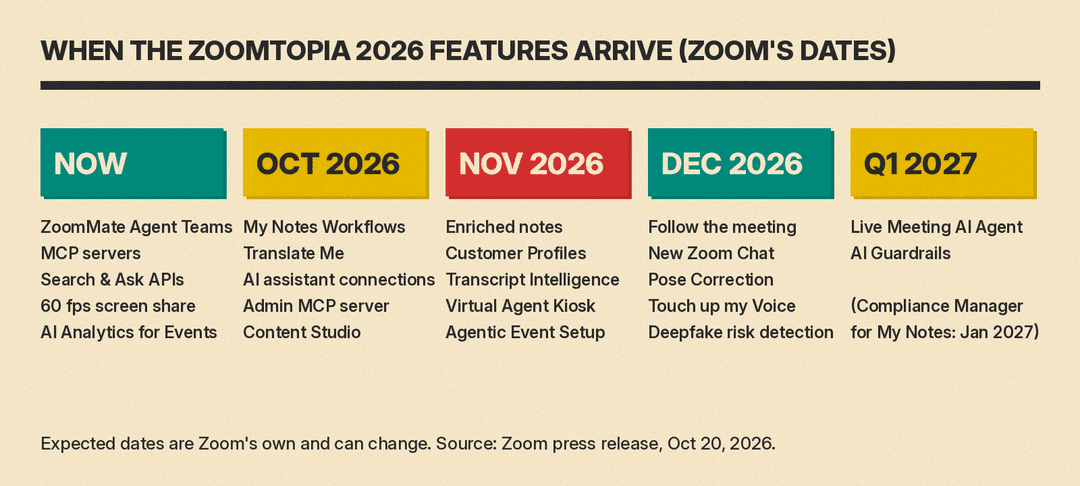
Zoom wants the record of your meetings to do more than sit in a transcript folder. At its Zoomtopia 2026 conference on October 20, the company introduced what it calls a Unified Context Layer, plus a long list of AI features for meetings, chat, customer service and events. Zoom marked some as available now. Most have expected dates between October 2026 and early 2027. Those dates are Zoom's own estimates, and its customer experience release says they are subject to change.
This guide sorts the announcements by what they do for a working team, and by when Zoom says each one will arrive.
What the Unified Context Layer is
Zoom describes the problem plainly: a customer conversation might start in a meeting, continue by phone and carry on in chat, and when that history is spread across apps, "people, and AI agents lose the thread." The Unified Context Layer is Zoom's answer. Per the company, it links conversation history with relevant documents and data, and brings in near real-time activity from Zoom and from connected third-party apps.
Zoom says the layer makes work more efficient when used with the new features below, and its CX release says it gives human and AI agents "a shared memory of the customer." Per Zoom, configurable settings and controls "help manage access," while coordination among AI agents turns business context into "actionable insights." CEO Eric Yuan framed it as groundwork for "a system of action designed to turn conversations into completed work."
For a small business or team lead, the useful question is simpler: which of these features changes what happens after a meeting ends?
Features that act on meeting notes
The most practical items sit around Zoom's My Notes and meeting summaries:
- My Notes Workflows (expected October 2026) turn meeting summaries into follow-up work in tools like Zoom Chat and Salesforce. Zoom says it ships ready-made workflows for sales, marketing and IT, and you can build a custom one by describing what to automate in plain language, with no separate workflow builder needed to start. Parts of it have shipped: Zoom's ZoomMate release notes list workflow creation in plain language from My Notes (a "Describe it" tab) and more summary destinations, including Salesforce, in the October 19, 2026 release.
- Follow the meeting (expected December 2026) lets you send My Notes to attend a Zoom meeting on your behalf. Invited team members who join late, leave early or miss the meeting get a personalized transcript and AI-generated summary.
- Enriched notes (expected November 2026) link shared screens, slides, charts and in-meeting chat to the matching moments in a searchable transcript. Zoom's AI release describes a related feature, Screen Capture in Transcript, which ties mid-meeting screenshots to the transcript, with a December 2026 date.
- My Notes hardware integrations extend notes to in-person conversations through the DTEN Action Card (expected November 2026) and Bota's Leaf and Bean devices (expected Q1 2027).
- ZoomMate Agent Teams, available now, are specialized AI agents that work in parallel on different parts of a project. A team lead agent coordinates them and combines their output into one deliverable for human review.
A refreshed Zoom Chat (December 2026 in the main release, Q1 2027 in Zoom's Workplace release) is meant to surface relevant conversations and bring AI agents into discussions to take actions, within controls an administrator sets. Further out, a Live Meeting AI Agent (expected Q1 2027; the Workplace release calls it Live Meeting Assist) is described as proactive help during meetings: finding answers, keeping the meeting on track and nudging engagement.
Zoom inside other AI tools
The second theme runs the other way: getting Zoom data into the assistants your team already uses. Zoom says developers and AI agents can now reach Zoom capabilities outside the Zoom app through APIs and Model Context Protocol (MCP) servers.
- MCP servers across the Zoom portfolio are available now. Zoom's developer release names Zoom Rooms and Workspace Reservation among the newly covered products. Servers for Zoom Phone, Scheduler, Mail and Calendar, and Marketplace Build are still planned.
- Search and Ask APIs, available now, let you query the Unified Context Layer from Claude, GPT, Codex, Muse, Microsoft Copilot, Gemini and Slackbot, as well as other MCP-compatible agents.
- Connections to AI assistants (expected October 2026, per the main release) bring supported Zoom capabilities into Claude, Codex, Copilot and Muse. The developer release, out the same day, says Claude, Codex and Muse were already supported, Microsoft 365 Copilot is now supported, and Google Gemini support is coming soon. The AI release adds that users can launch Zoom workflows from Claude and Codex starting in November.
- A Zoom Admin MCP server (expected October 2026) lets admins perform admin tasks conversationally.
This matters if your team lives in another assistant. Rather than opening Zoom to find what was decided on last week's call, the pitch is that you ask the assistant you already use. Google made a similar push with its Gemini agent for work, and Slack with its Code API for outside agents.
Meeting quality features
Zoom also announced changes to how people come across on calls:
- Voice Translator ("Translate Me") (October 2026 in the main release, November 2026 in the Workplace release) lets a speaker broadcast translated audio to all participants. The main release says it uses a synthesized version of the speaker's own voice. The Workplace release says it needs the voice translator add-on and that voice cloning is "expected soon."
- Touch up my Voice (expected December 2026) applies real-time accent smoothing to your own voice.
- Pose Correction (expected December 2026) adjusts your video when you glance away from the camera.
- 60 frames per second screen sharing is available now as part of the Enhanced Media add-on, when Ultra HD (2160p) is enabled, per the Workplace release.
Customer service and events
For support teams on Zoom CX, the company announced Customer Profiles with real-time context across channels (expected November 2026), and CX Insights Transcript Intelligence (expected November 2026), which classifies voice, chat and email transcripts and makes them queryable in natural language alongside data such as handle time, queue and outcome. A Zoom Virtual Agent Kiosk (expected November 2026) brings AI self-service to physical retail locations.
On the events side, Content Studio (expected October 2026) turns one recording into a multi-language, multi-format asset library, Agentic Event Setup (expected November 2026) helps configure sessions and registration, and AI Analytics for Events, available now, answers plain-language questions about event data.
Admin controls
Zoom paired the launches with controls for administrators. Sensitivity Labels, which sync with Microsoft Purview labels or use native Zoom labels, are available now for select Zoom Workplace customers. Zoom's security release says the Purview sync covers Zoom Meetings and Whiteboard today, with other Workplace products expected soon. Centralized AI Management and Deepfake Risk Detection are expected in December 2026, AI Guardrails for account-level rules in Q1 2027, and Zoom Compliance Manager support for My Notes and Zoom Canvas in January 2027. Deepfake Risk Detection is meant to flag participant video or audio that may have been altered, with a confidence indicator. That is a different approach from World ID's verified-human badge for Zoom calls. Zoom adds in a footnote that Compliance Manager "is not a substitute for independent legal or compliance review."
The numbers, and where they come from
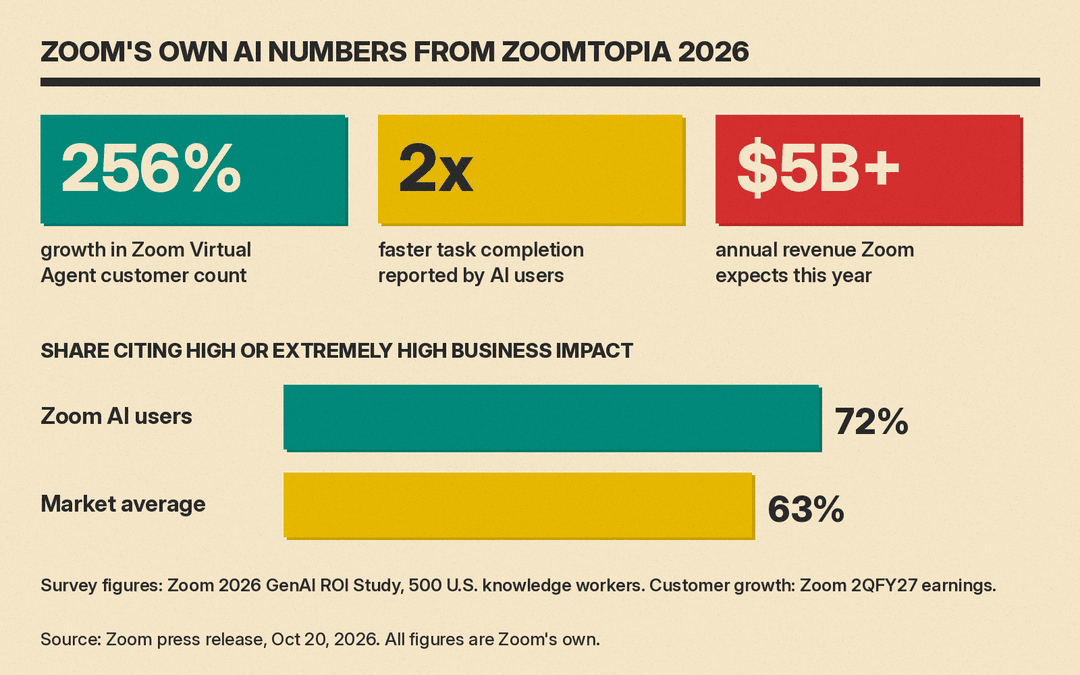
Zoom says Zoom Virtual Agent customer count grew 256%. Its fiscal second-quarter 2027 results put that growth at 256% year over year. It also says users of its AI tools report finishing tasks twice as fast, and that 72% cite high or extremely high business impact against a market average of 63%. Those figures come from Zoom's own 2026 GenAI ROI Study, a survey of 500 U.S.-based knowledge workers, so treat them as vendor research rather than independent measurement. Zoom also says it expects to pass $5 billion in annual revenue this year. Its August guidance for fiscal 2027, which ends January 31, 2027, is $5.085 billion to $5.095 billion.
What to do now
If you use Zoom for sales or support calls, the items Zoom marks available now include ZoomMate Agent Teams, agentic search across Zoom Meetings, Phone, Chat and more than 40 third-party apps, the MCP servers and the Search and Ask APIs. My Notes Workflows is the one to watch first, since it turns meeting summaries into follow-up work in tools like Salesforce and Zoom Chat. Most of the rest carries an "expected" date. The releases do not list prices. Zoom's ZoomMate pricing page lists the paid ZoomMate plan at $20 per user per month billed monthly, or $16.67 per user per month billed annually, with 2,200 AI credits per user per month. Agents, Voice Translator and workflows that reach third-party apps are in that plan, and AI actions consume credits. The free Workplace Basic tier has no agents and 10 workflow runs a month inside Zoom apps. Check what your plan includes before you count on a feature.
Sources
- Zoom: Zoom advances its AI strategy with a new Unified Context Layer (Oct 20, 2026)
- Zoom: Zoom helps teams turn conversations into action with a unified context layer and enhanced My Notes and ZoomMate capabilities (Oct 20, 2026)
- Zoom: Zoomtopia 2026 Zoom Workplace news (Oct 20, 2026)
- Zoom: Zoomtopia 2026 developer platform news (Oct 20, 2026)
- Zoom: Zoom unites conversations, context, and action to help transform customer experiences (Oct 20, 2026)
- Zoom: Zoomtopia 2026 security and AI management news (Oct 20, 2026)
- Zoom Support: Release notes for ZoomMate
- Zoom: ZoomMate pricing
- Zoom: Second quarter fiscal year 2027 results (SEC filing, Aug 25, 2026)
