
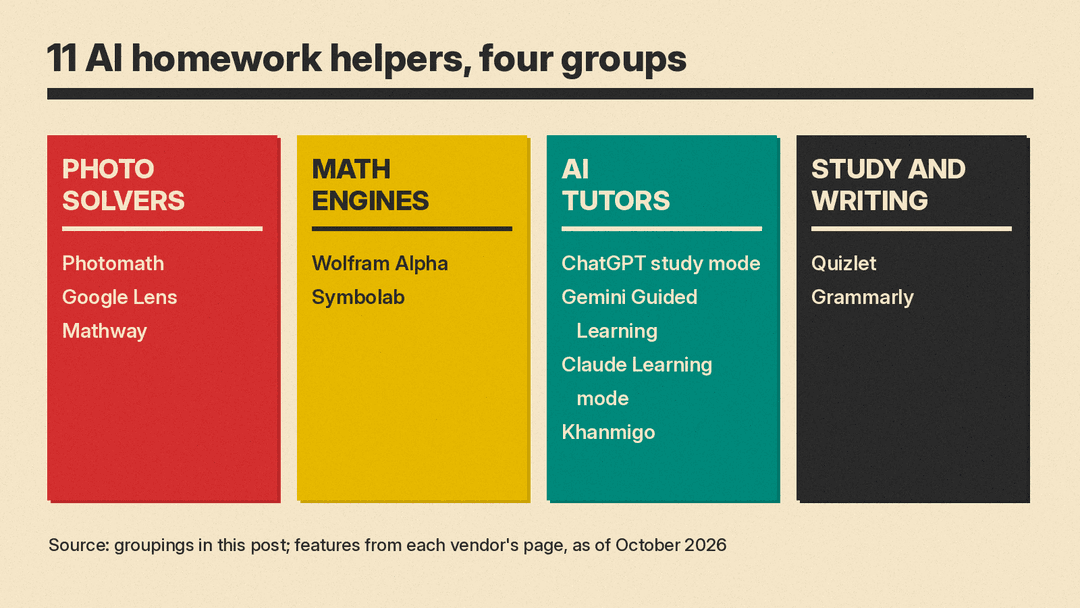
Homework help apps now fall into four groups: photo solvers that read a problem from your camera, math engines that show symbolic steps, general AI chatbots with a tutoring mode, and study or writing tools. They overlap, but each group is good at a different job. This guide lists 11 real tools, says what each does as of October 2026, and gives prices only where we checked them on the vendor's own page today.
The picks are criteria-based, not a ranking. We looked for four things: does the tool show steps rather than just an answer, does it have a free tier, does it accept a photo, and does it have a mode that guides instead of solves. For a broader list that covers research and note-taking, see our Best AI Tools for Students (October 2026).
Quick picks by need
As of October 2026, these are strong options for each job:
- Snap a math problem and see steps for free: Photomath (free Basic tier) or Mathway.
- Look up any homework question from a photo: Google Lens.
- Check calculus, algebra or physics with a symbolic engine: Wolfram Alpha or Symbolab.
- Get hints and questions instead of answers: ChatGPT study mode, Gemini Guided Learning, Claude Learning mode, or Khanmigo.
- Memorize terms before a test: Quizlet.
- Clean up grammar in an essay you wrote: Grammarly.
Photo solvers
These apps are built around the camera. Point it at a printed or handwritten problem and the app returns a worked solution.
Photomath
Photomath lets you scan a problem, including word problems, or type it into a smart calculator. Its site says solutions can show multiple methods and that it covers elementary school through college.
- Free tier: Photomath's App Store listing says basic step-by-step explanations are included at no charge.
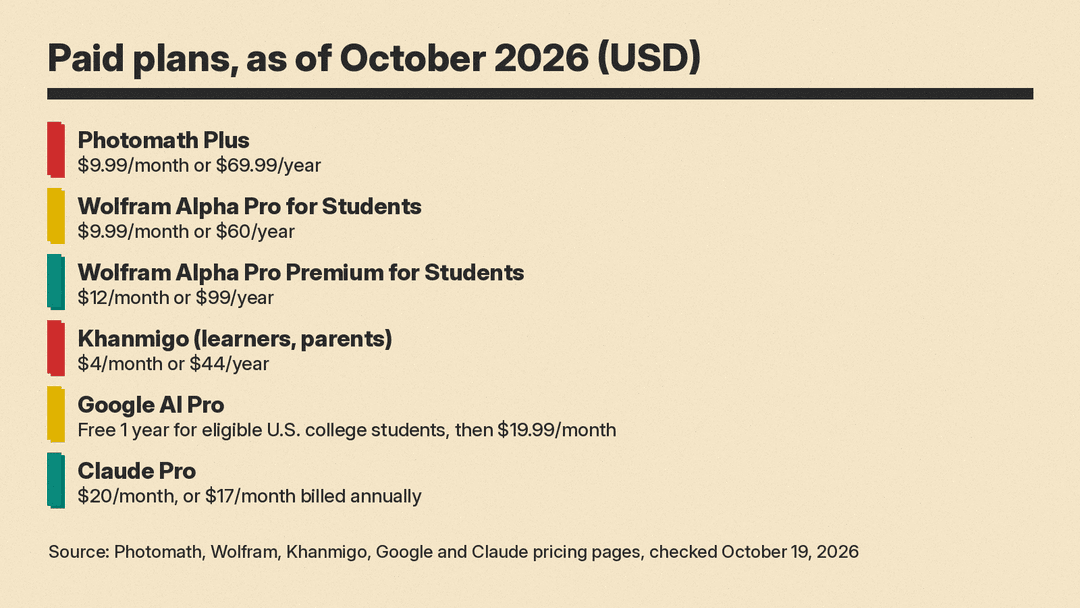
- Paid tier: Photomath Plus is $9.99 USD per month or $69.99 USD per year on photomath.com as of October 2026. The App Store listing says Plus adds animated tutorials and textbook solutions.
- Good fit: middle school and high school math where you want to check each step of your own work.
- Limit: it is a math app. It will not help with a history essay.
Google Lens
Google Lens is Google's visual search tool. Its page lists "step-by-step homework help" that finds explainers, videos and web results for math, history, chemistry, biology and physics. Lens is in the Google app on mobile and in Chrome on desktop.
- Price: the Lens page lists no paid tier.
- Good fit: non-math subjects, or when you want a video explanation rather than a worked solution.
- Limit: Lens returns web results, so quality depends on what it finds. Check the source of any explanation before you rely on it.
Mathway
Mathway accepts a typed problem or a photo of handwritten or printed work. It covers Basic Math through Calculus, Statistics, Linear Algebra, Chemistry and Physics. The site says Mathway is backed by Chegg.
- Free tier: Mathway's FAQ says it is free to use without signing up, and that an optional subscription unlocks the full work shown for every step.
- Paid tier: the Mathway home page does not list a subscription price.
- Good fit: quick checks across many math subjects, including chemistry and physics.
A note on Microsoft Math Solver
Microsoft's Math Solver site no longer offers a solver of its own. math.microsoft.com now lists Math Assistant in OneNote for Microsoft 365 Education and Math Progress in Teams for Education, and Microsoft's Edge policy documentation says Math Solver is deprecated from Microsoft Edge. If your school gives you OneNote through Microsoft 365 Education, Math Assistant is where the step-by-step feature lives now.
Math engines
These tools are strongest when you can type the problem precisely. They show symbolic steps for algebra, calculus and more.
Wolfram Alpha
Wolfram Alpha computes answers from typed input. The free Basic account does not include step-by-step solutions, according to Wolfram's student pricing page.
- Pro for Students: $9.99 per month, or $60.00 billed annually ($5.00 per month), as of October 2026. It adds step-by-step solutions, practice problems with hints, guided calculators, and photo input in the iOS and Android apps.
- Pro Premium for Students: $12.00 per month, or $99.00 billed annually ($8.25 per month).
- Good fit: college calculus, physics and chemistry, or checking a result you worked out by hand.
- Limit: you need to phrase input clearly. It is a calculator first, not a conversation.
Symbolab
Symbolab calls itself an AI math calculator. It shows step-by-step solutions, solves word problems and geometry, graphs functions, and accepts typed, spoken or photographed problems. An AI chat called Symbo answers questions about any step, and the site includes practice problems and quizzes.
- Paid tier: Symbolab Pro is $9.95 per month, or $39.95 per year ($3.33 per month), on Symbolab's registration page as of October 2026. It adds full access to solution steps, full access to AI chat, no ads and unlimited storage. The same page also offers a bundle with QuillBot Premium.
- Good fit: students who want worked steps plus practice sets on the same topic.
AI tutors that guide instead of answer
What turns a general chatbot into a homework helper rather than an answer machine is a dedicated learning mode that asks questions and gives hints.
ChatGPT study mode
ChatGPT has a study mode that OpenAI introduced on July 29, 2025. OpenAI says it uses Socratic questioning, hints and self-reflection prompts "instead of providing answers outright," and adds quizzes and knowledge checks. You turn it on by choosing "Study and learn" from the tools menu.
- Free tier: the ChatGPT pricing page lists study mode on Free, Go, Plus and Pro. Vision (reading photos) is limited on Free.
- Good fit: any subject, including essays, where you want a tutor to quiz you.
- Limit: OpenAI says study mode runs on custom system instructions and can show "some inconsistent behavior and mistakes across conversations."
Gemini Guided Learning
Gemini has a Guided Learning mode that Google announced on August 6, 2025. Google says it breaks problems down step by step and uses images, diagrams, videos and interactive quizzes. A Google Workspace update says Guided Learning is available to Gemini app users of all ages, while quizzes, flashcards and study guides were limited to users 18 and older at launch.
- Student offer: Google's student page offers a free 1-year Google AI Pro plan to eligible U.S. college students ages 18 and up. The offer can be redeemed until December 31, 2026, and the plan then renews at $19.99 per month unless cancelled.
- Good fit: students who already keep notes in Google Drive, since you can upload course materials to build study notebooks.
Claude Learning mode
Claude has a Learning mode that Anthropic introduced with Claude for Education. Anthropic says it guides "students' reasoning process rather than providing answers," asking questions such as "How would you approach this problem?"
- Price: the Claude pricing page lists a Free plan at $0 and Pro at $20 per month billed monthly, or $17 per month with annual billing, as of October 2026.
- Good fit: writing-heavy subjects where you want pushback on an argument.
- Limit: Anthropic's announcement describes Learning mode as working within Projects in Claude for Education. Check Claude's settings for how it is offered on your plan.
Khanmigo
Khanmigo is Khan Academy's AI tutor. It tutors on Khan Academy's own content, offers guided writing and debate prompts, and gives real-time feedback on code. The parent plan adds a view of a child's chat history and moderation alerts.
- Price: free for teachers. Learners and parents pay $4 per month or $44 per year, per the Khanmigo pricing page as of October 2026.
- Good fit: students already using Khan Academy courses, and parents who want to see how the tool is being used.
- Limit: tutoring is built around Khan Academy's own content.
Study and writing tools
Quizlet
Quizlet is a flashcard platform. Its Learn mode builds a study path based on your goals and how well you know a set. Quizlet's help center says Learn is for Quizlet Plus subscribers, that free users can start a free Learn session, and that students in a teacher's class get free Learn and Test access for that class's sets.
- Price: Quizlet sells Plus and Plus Unlimited as monthly or annual subscriptions that renew automatically, per its help center. That page does not list prices.
- Good fit: vocabulary, definitions and anything you need to recall on a test.
Grammarly
Grammarly checks spelling, grammar and tone in your own writing. Its plans page lists a Free tier with 100 AI prompts per month. Pro adds full-sentence rewrites, tone adjustment, plagiarism checks, AI-generated text detection and 2,000 prompts per month.
- Price: the plans page lists Pro at $12 USD for US visitors as of October 2026, and shows local currency elsewhere.
- Good fit: proofreading an essay you drafted yourself before you hand it in.
Free options at a glance
Most tools above have some free use. Here is what each vendor's page says about free access:
- Photomath Basic: step-by-step explanations at no charge.
- Mathway: free solutions without signing up; full step work needs a subscription.
- Google Lens: step-by-step homework help with no paid tier listed.
- Wolfram Alpha Basic: answers, but no step-by-step solutions.
- Symbolab: full solution steps and full AI chat are listed as Pro features, so check what a free account shows.
- ChatGPT Free: study mode included; photo reading is limited.
- Gemini: Guided Learning in the app for all ages; free AI Pro for eligible U.S. college students for one year.
- Claude Free: chat plan at $0.
- Khanmigo: free for teachers; students pay $4 per month.
- Quizlet: a free Learn session, plus free Learn for sets in a teacher's class.
- Grammarly Free: grammar checks and 100 AI prompts per month.
How to use a homework helper without hurting your grade
Many teens already use AI for school. In a Pew Research Center survey of U.S. teens ages 13 to 17, fielded September 25 to October 9, 2025, 54% said they had used chatbots to get help with schoolwork. One in ten said they do all or most of their schoolwork with a chatbot's help. In Pew's 2024 survey, 54% of teens said using ChatGPT to research new topics was acceptable, compared with 29% for solving math problems and 18% for writing essays.
Rules differ by school, teacher and assignment. A few practical habits:
- Read the policy first. Check your syllabus or ask your teacher whether AI is allowed on that assignment, and whether you need to say you used it.
- Attempt the problem before you scan it. Then use the app to find where your steps went wrong. The guided modes in ChatGPT, Gemini, Claude and Khanmigo are built for this.
- Check the answer another way. Solvers and chatbots make mistakes. Plug the result back into the equation, or compare two tools.
- Do not paste AI text into an essay as your own. Grammarly Pro itself includes AI-generated text detection. Use AI to quiz you or critique a draft you wrote.
- Write better prompts. Tell the tool your grade level and ask for one hint at a time. Our beginner's guide to AI prompts covers the basics.
Sources
- Photomath
- Photomath on the App Store
- Google Lens
- Mathway
- Microsoft Math
- Microsoft Edge policy: MathSolverEnabled
- Wolfram Alpha Pro pricing for students
- Symbolab
- Symbolab Pro registration
- ChatGPT pricing
- OpenAI: Introducing study mode
- Gemini for Students
- Google: Guided Learning in Gemini
- Google Workspace Updates: New study tools in the Gemini app
- Anthropic: Introducing Claude for Education
- Claude pricing
- Khanmigo pricing
- Quizlet Help Center: Studying with Learn
- Quizlet Help Center: Subscribing to Quizlet
- Grammarly plans
- Pew Research Center: How Teens Use and View AI
- Pew Research Center: About a quarter of U.S. teens have used ChatGPT for schoolwork
