
Kids and teens can learn how AI works for free, and much of the free material comes from education groups and tech companies: CodeAI (formerly Code.org), MIT, the Raspberry Pi Foundation, Google, Microsoft and Common Sense Media. This list covers 11 free picks as of October 2026, sorted by age, with what each one teaches and what an adult needs to set up. Every pick links to its own page, and every detail below comes from that page.
The timing is good. CodeAI's Hour of AI page says the Hour of Code "is now the Hour of AI," and it promises "a first look at new activities launching November 16" to teachers who sign up. If your child's school runs one, the picks below are a natural next step.
For adults who want the basics first, see our list of the best free AI courses.
How we picked
- Free to use. Where part of a program needs a paid product or an account, we say so.
- Built for young learners, or a clear fit for older teens, with ages or grades taken from each provider's own page where it lists them.
- About understanding AI, not only using chatbots. Most picks have students train a small model, question AI output, or talk about fairness and bias.
- Current. Every page loaded on October 27, 2026.
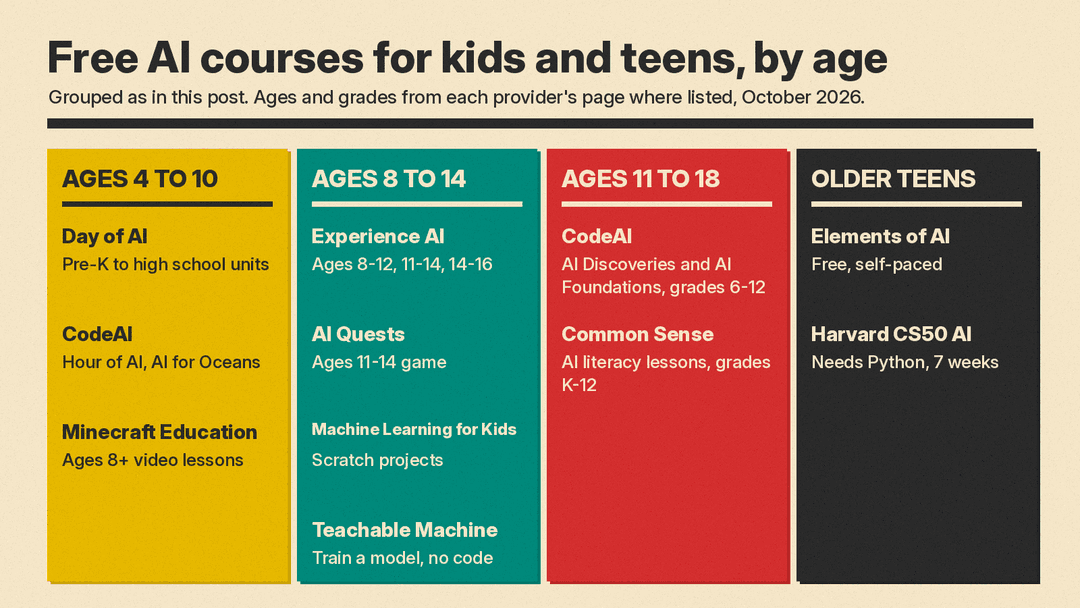
Ages 4 to 10: first steps
1. Day of AI (MIT RAISE)
Day of AI is "Powered by MIT RAISE," the MIT initiative founded by professor Cynthia Breazeal. Its curriculum page offers "free, ready-to-teach units and educator resources" and lets you filter from "Ages 4-5 (Pre-K)" up to "Ages 14-18 (High School)." The home page's news section lists an August 19, 2026 item titled "Day of AI Launches Nation's First Free, Grade-by-Grade PreK-12 AI Literacy Curriculum."
The early grades are gentle. For example, "Grade 1: Learning from Patterns" is a set of unplugged lessons where "students learn that technology is programmed to identify patterns in examples and it uses those patterns to make predictions." Its units start at Pre-K (ages 4-5), the youngest starting age on this list, and some, like the Grade 1 unit, are unplugged.
2. CodeAI Hour of AI and AI for Oceans
CodeAI's Hour of AI lists "250+" activities, described as "Hands-on, one-hour introductions to AI for every grade level and learning context." One pick is AI for Oceans, where "you train a real machine learning model to identify sea creatures and trash in the ocean." The page lists AI for Oceans for grades 3 to 12. Others include Dance Party: AI Edition (grades 3 to 8) and Mix & Move with AI (grades 2 to 12), where students design a dancer, mix music and choreograph a dance routine.
One hour is a low-stakes way to test interest. The AI for Oceans link opens straight into the first level in a browser.
3. Minecraft Education AI Foundations
Minecraft Education's AI literacy page starts with "5 video-based lessons," each marked "Ages 8+ | 15 minutes" and each with a video, educator guide, slides and an offline activity. Topics include "Understand what AI is (and isn't)," "Evaluate AI-generated content" and "Use AI responsibly and safely." The page also lists "Hour of AI tutorials, designed for ages 7-14," such as "Hour of AI: First Night."
A note on access: the deeper in-game worlds, such as "Reed Smart: AI Detective" and "Mini Agent Mission," run inside Minecraft Education, which has its own "How to Buy" page. The five video lessons link to YouTube videos and to downloadable guides, slides and activity files.
Ages 8 to 14: build and train a model
4. Experience AI (Raspberry Pi Foundation and Google DeepMind)
Experience AI is "Developed in collaboration by the Raspberry Pi Foundation and Google DeepMind." Its home page says it offers "a set of free lessons" with "lesson plans, slide decks, worksheets, and videos," and that the lessons are also useful "outside of a school setting, such as in a coding club."
The resources page sorts lessons by age. "Discovering AI (8-12)" is a single lesson that introduces AI "as a set of computer tools created by humans to help solve difficult problems." "Understanding AI (11-14)" is a "4-lesson module," followed by "Solving problems with AI (11-14)." "Discovering AI (14-16)" covers "how AI systems use data to make predictions." The site also lists a lesson on large language models under "AI and critical thinking."
5. AI Quests (Google Research and Stanford)
AI Quests is a game for ages 11 to 14. Google's launch post says it was "Created by Google Research in collaboration with the Stanford Accelerator for Learning," and that students "step into the shoes of Google researchers, applying AI across climate, health and science."
In the first quest, inspired by Google's flood forecasting research, students "collect relevant data sources, like rainfall and river flow, evaluate the quality of the data and train and test their model." Google says "AI Quests is open and available to all educators and organizations," and the Stanford Accelerator for Learning calls it "A new free, gamified learning experience." Stanford says the game draws on story-based learning and in-game characters.
6. Machine Learning for Kids
Machine Learning for Kids was started by Dale Lane. Its GitHub README calls it "a tool aimed at children" that lets them train models "for classifying text, numbers or recognising images" and then use those models in Scratch, so they can "create projects and build games with the machine learning models that they've trained."
An adult sets it up. The sign-up page says "The students in your group won't need to provide email addresses. I just need one contact per class." Projects that recognize numbers, images or sounds "do not require API keys." Only text projects need IBM Cloud API keys, and the page says creating an IBM Cloud account is free, with usage limits on free keys. Because the models plug into Scratch, it suits kids who already know Scratch. The project does not list an age range.
7. Teachable Machine (Google)
Teachable Machine is not a course, and it does not list an age range, but it can be used alongside the courses above. Its community README describes it as "a web-based tool that makes creating machine learning models fast, easy, and accessible for everyone." You "train a computer to recognize your images, sounds, and poses without writing any machine learning code," with "No prerequisite machine learning knowledge required."
One idea: train it to tell a thumbs-up from a thumbs-down on a webcam, then try a sideways thumb, and talk about why the model gets confused by examples it never saw.
Ages 11 to 18: school-style courses
8. CodeAI AI Discoveries and AI Foundations
CodeAI's AI curriculum page lists two full courses. "AI Discoveries," for grades 6 to 8, is "A free, flexible middle school course" so that students leave "knowing not just how to use AI, but how to think about it too." "AI Foundations," for grades 9 to 12, is "A free, flexible high school curriculum where students go from understanding how AI works to building web apps with AI as a creative partner."
The same page lists shorter units, including "Exploring Generative AI," "Coding with AI," "Computer Vision" and a short "How AI Works" video series. Both full courses are listed as school-year courses, and the page says the curriculum is "Free for any teacher."
9. Common Sense Education AI Literacy Lessons
Common Sense Education's AI literacy lessons for grades K-12 are "Quick, grab-and-go lessons to help your students think critically about AI and its impact." Grades 6 to 8 lessons run 20 minutes and include "Understanding AI Bias," "AI Chatbots & Friendship" and "Deepfakes & Consent." Most grades 9 to 12 lessons run 45 minutes, including "How Does AI Learn?" and "Designed to Feel Human," which asks "How are AI chatbots designed to make you feel like 'they' get you?" The grades K to 5 section covers foundational media literacy rather than AI itself.
Several of the older-grade lessons deal with chatbots, bias and deepfakes rather than coding.
Older teens: university-level and self-paced
10. Elements of AI
Elements of AI is "a series of free online courses created by MinnaLearn and the University of Helsinki." An Introduction to AI is for "everyone interested in learning what AI is," with "no complicated math or programming required." Building AI covers "the actual algorithms that make creating AI methods possible," and the site says "Some basic Python programming skills are recommended to get the most out of the course." The courses "can be completed at your own pace." It is aimed at a general audience rather than children, so it suits older teens who read well.
11. CS50's Introduction to Artificial Intelligence with Python (Harvard)
CS50 AI is the stretch pick for a teen who already codes. Its prerequisites are "CS50x or at least one year of experience with Python." The page says anyone can take it "for free via this OpenCourseWare by working your way through the course's seven weeks of material," covering search, knowledge, uncertainty, optimization, learning, neural networks and language. To get feedback on projects you create an edX account, and a verified certificate needs a separate edX enrollment.
Teens who want to train their own models can also read our guide to free GPU time from Colab, Kaggle and student cloud credits.
For parents and teachers
If you want to learn alongside your child, Experience AI also runs a free online course, "Understanding AI for educators." Its home page says the "free, three-week course" is "designed for anyone who helps educate young people," including "a parent or club volunteer."
A simple path by age
- Ages 4 to 7: Day of AI unplugged lessons, then one Hour of AI activity together.
- Ages 8 to 10: AI for Oceans, then Minecraft Education's short video lessons or Experience AI's "Discovering AI (8-12)."
- Ages 11 to 14: AI Quests, then Machine Learning for Kids or Teachable Machine for a first build.
- Ages 14 to 18: Common Sense lessons on chatbots and bias, then Elements of AI, then CS50 AI if they code in Python.
Most of these are written for teachers, so a parent may need a free teacher or group-leader account to unlock the lesson plans. Machine Learning for Kids, for one, says students in a group do not need their own email addresses. For AI tools that older students use for schoolwork, see our list of the best AI tools for students.
Sources
- CodeAI: The Hour of AI
- CodeAI: AI curriculum
- CodeAI: AI for Oceans
- Day of AI home page
- Day of AI curriculum
- Minecraft Education: AI Foundations
- Experience AI home page
- Experience AI resources
- AI Quests
- Google: AI Quests launch post
- Stanford Accelerator for Learning: AI Quests
- Machine Learning for Kids
- Machine Learning for Kids: GitHub README
- Machine Learning for Kids: sign-up page
- Teachable Machine
- Teachable Machine community README
- Common Sense Education: AI Literacy Lessons for Grades K-12
- Elements of AI
- CS50's Introduction to Artificial Intelligence with Python
