
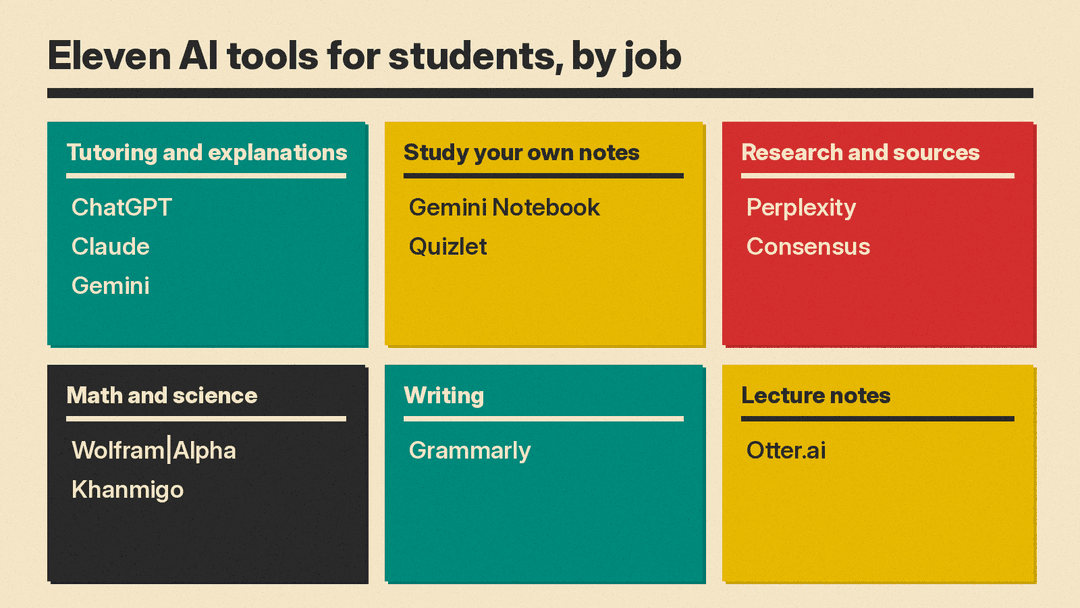
Most students do not need five AI subscriptions. They need help with a few jobs that fill a semester: understanding hard material, turning notes into practice, finding real sources, getting math and science problems right, writing clearly, and capturing lectures. This guide lists 11 real tools across those jobs, with what each one does, who it suits, where it falls short, and pricing only where we read it on the vendor's own page.
All prices, plans, and student offers are as of October 2026. Student deals change often and many need verification, so check the linked page before you pay. For writing outside class or for marketing work, see our guides to the best AI tools for writers and the best AI tools for marketers. For photo and math solvers, see our guide to AI homework helpers.
One rule comes first: follow your school's and your instructor's AI policy. Several tools below have a "guide me, don't tell me" mode for exactly this reason. Use AI to learn the material, not to hand in work you were asked to do yourself.
How we picked
- Real, available products only. Every tool below has a live official site and takes new users today.
- Built for a study job. Each tool had to help with at least one of these: tutoring, studying your own materials, research, math and science, writing, or lecture notes.
- Verified details only. We state a price, free plan, or student offer only when the vendor's own page showed it. Where we could not read it, we left it out.
- A clear limit for each. No tool fits every student, so each entry names a caveat.
AI tutors and general assistants
ChatGPT
ChatGPT is OpenAI's general assistant. For school, the feature to know is study mode. OpenAI describes it as "step by step guidance instead of quick answers": it uses Socratic questions, hints, and knowledge checks, and you can switch it on and off inside a conversation. To start, pick "Study and learn" from the tools menu.
- Who it suits: students who want one assistant for explanations, practice quizzes, and feedback on drafts.
- Limit: OpenAI says study mode runs on custom system instructions, which can lead to "some inconsistent behavior and mistakes across conversations." The free plan also limits uploads and deep research.
- Pricing note: study mode is included on every plan, including Free, per ChatGPT's pricing page as of October 2026. The page we read did not show plan prices, so we have left them out. OpenAI also offers ChatGPT Edu for universities.
Claude
Claude from Anthropic handles long documents, with a context window of up to 1M tokens depending on the model, per its pricing page. Anthropic's education page says Claude's learning mode "asks questions that help you find the answers yourself." When Anthropic introduced it for Claude for Education, it said learning mode works inside Projects, uses Socratic questioning, and offers templates for research papers, study guides, and outlines.
- Who it suits: students who read a lot of long PDFs and want detailed feedback on essays and arguments.
- Limit: the free plan allows up to 5 Projects, and the Research feature is on paid plans only. Usage limits reset in five-hour windows, so long cram sessions can hit a cap.
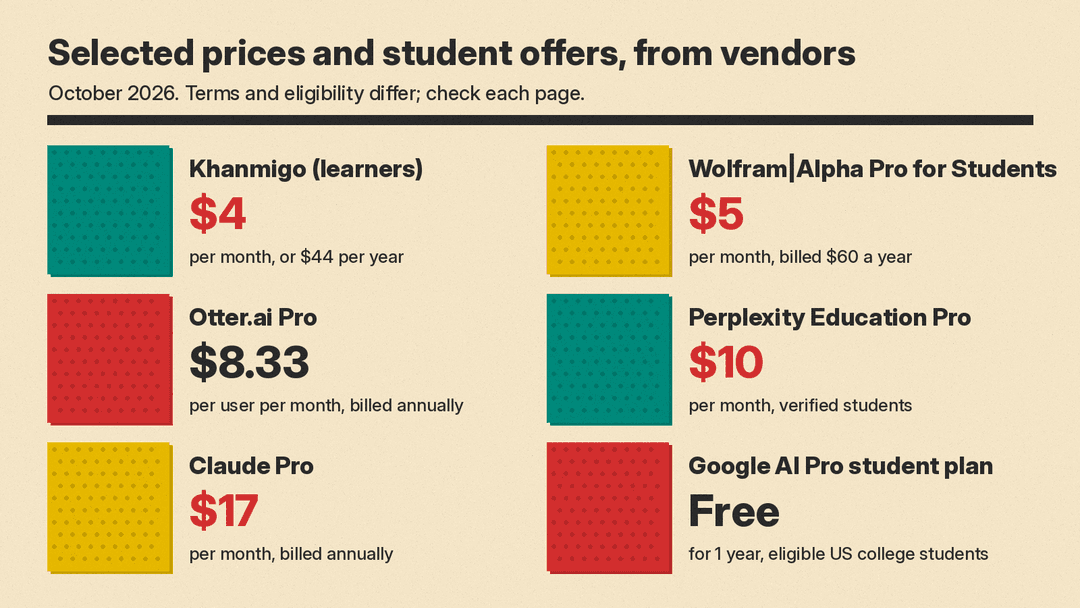
- Pricing note: Free is $0. Pro is $17 per month with annual billing ($200 billed up front) or $20 billed monthly, per Claude's pricing page as of October 2026. Some universities provide Claude for Education accounts, so check with your school first.
Gemini
Gemini from Google has a dedicated student offering. Google's student page lists study notebooks built from your uploaded course materials, a learning plan, personalized quizzes, a performance tracker, interactive visualizations, and Gemini Live for spoken help. It can also connect to Gmail, Drive, and Workspace.
- Who it suits: students already on Google Docs and Drive, and US college students who qualify for the free plan.
- Limit: the free student offer is only for eligible US college students age 18 and up. It needs a valid form of payment at sign-up, eligibility must be verified each year, and the plan renews at a paid price unless you cancel.
- Pricing note: Google offers a free 1-year Google AI Pro student plan with 4x higher usage limits in Gemini and 5 TB of storage. Redeem by December 31, 2026. After the trial, Google AI Pro "will automatically charge $19.99/month" unless cancelled, per Google's Gemini for Students page as of October 2026.
For better results from any of these assistants, see our beginner's guide to writing better AI prompts.
Study from your own notes
Gemini Notebook (formerly NotebookLM)
Gemini Notebook is Google's source-grounded research tool. Google says NotebookLM became Gemini Notebook in July 2026 and that existing notebooks remain accessible. You upload your own sources, such as lecture slides, readings, and notes, and it answers from those sources. It can turn them into Audio Overviews, Video Overviews, mind maps, reports, flashcards, quizzes, data tables, infographics, and slide decks.
- Who it suits: students who want answers tied to their own course materials rather than the open web.
- Limit: answers are only as good as the sources you upload. Google also says there is currently no recovery option for deleted notes, so keep copies of your files.
- Pricing note: we did not verify plan prices, so we have left them out. See the Gemini Notebook site for plans.
Quizlet
Quizlet is a flashcard and study platform with a set of AI tools. Its AI tools page lists AI-generated practice tests, a study guide generator that works from notes, slides, or PDFs, a PDF summarizer, an AI flashcard maker, Smart Assist for building sets, and AI homework help. Its Learn mode builds a personalized study path from how well you know a set.
- Who it suits: students in memorization-heavy courses such as languages, biology, and history.
- Limit: free accounts get limited use of Learn, Test, and AI features. Quizlet's help center says non-subscribers get one practice test per flashcard set.
- Pricing note: Quizlet says you can start with some AI features for free, with more in Quizlet Plus. We could not load its pricing page, so we have left prices out.
Research and sources
Perplexity
Perplexity is an AI search engine that answers with linked sources, which makes it easier to check where a claim came from. Its Education Pro plan is for verified students and educators. Perplexity's help center says it includes everything in Pro plus Learn Mode, unlimited Pro Searches, file and image uploads, and premium models.
- Who it suits: students who need a fast first pass on a topic with links to follow up.
- Limit: a cited answer is not a checked answer. Open the sources and confirm they say what the summary claims. Student pricing needs verification of your student status, which Perplexity runs through SheerID.
- Pricing note: verified students can get Pro for $10 per month, per Perplexity's student page as of October 2026.
Consensus
Consensus is an AI search engine for peer-reviewed research. Consensus says it searches more than 400 million scientific papers and lists features such as Pro Search and Deep Search for synthesized answers, Ask Paper for chatting with a single paper, a Consensus Meter that shows how much studies agree on a yes or no question, and citation export in RIS, BibTeX, and CSV.
- Who it suits: college and graduate students writing papers that need academic sources.
- Limit: it covers scientific literature, so it is less useful for humanities topics that rely on books and primary sources. Read the papers before you cite them.
- Pricing note: Consensus lists a free tier. We could not load its plan prices, so we have left them out. See Consensus pricing.
Math and science
Wolfram|Alpha
Wolfram|Alpha is a computational knowledge engine, not a chatbot. Pro for Students adds step-by-step solutions, practice problems with hints, guided calculators for calculus and algebra, and photo input in the iOS and Android apps.
- Who it suits: students in algebra, calculus, physics, chemistry, and engineering who want to check their work.
- Limit: the free Basic account does not include step-by-step solutions. Seeing the steps is not the same as being able to do them on an exam.
- Pricing note: Basic is free with sign-in. Pro for Students is $5 per month billed $60 a year, and Pro Premium for Students is $8.25 per month billed $99 a year, per Wolfram|Alpha's student pricing page as of October 2026.
Khanmigo
Khanmigo is the AI tutor from the nonprofit Khan Academy. Khan Academy says it guides learners to find answers themselves instead of giving them directly, and that it is built into Khan Academy's content library, which covers math, humanities, coding, social studies, and more. Plans also include writing and debate practice, and the family plan adds college admissions coaching.
- Who it suits: high school students (through a parent account) and adult learners who want a tutor that will not just hand over answers.
- Limit: to sign up as a learner you must be 18 or older, live in the United States, and have a US billing address. Students under 18 need a parent to add them, or access through a partnered school district.
- Pricing note: $4 per month or $44 per year for learners and for families, with sales tax not included, per Khanmigo's pricing page as of October 2026. Khanmigo for teachers is free.
Writing and lecture notes
Grammarly
Grammarly checks spelling and grammar and shows your writing tone. Its plans page lists full-sentence rewrites, tone adjustment, citation consistency checks, plagiarism checks, and AI text detection on Pro.
- Who it suits: students who write essays and reports and want a second pass on clarity and correctness.
- Limit: the free plan includes 100 AI prompts per month, against 2,000 per month on Pro. Plagiarism and AI detection are listed as Pro features, and no detector result is proof either way.
- Pricing note: Grammarly offers a free plan and a free Pro trial, per Grammarly's plans page as of October 2026. The page did not state Pro's billing period clearly, so we have left the price out. It also lists discounts for educational institutions.
Otter.ai
Otter.ai records and transcribes speech live, with speaker identification and AI chat within and across meetings. Otter lists education among its use cases, with lecture transcripts, note organization, and summaries.
- Who it suits: students who want a searchable transcript of lectures, study groups, or interviews for a project.
- Limit: the free Basic plan has 300 monthly transcription minutes and only 3 lifetime audio or video file imports. Ask before you record: many instructors and schools have rules about recording class.
- Pricing note: Basic is free. Pro is $16.99 per user per month billed monthly, or $8.33 per user per month billed annually, per Otter's pricing page as of October 2026.
For a wider look at transcription tools, see our guide to the best AI meeting note takers.
How to choose
Start with the course that costs you the most hours, not the tool with the longest feature list.
- If you need concepts explained: start with the free plan of ChatGPT (study mode), Claude, or Gemini. Pick the one your school already supports, if any.
- If you study from slides and readings: Gemini Notebook keeps answers tied to your sources. Quizlet turns notes into flashcards and practice tests.
- If you write research papers: use Perplexity for a quick overview and Consensus for peer-reviewed sources, then read what you cite.
- If math or science is the bottleneck: Wolfram|Alpha checks computations step by step. Khanmigo tutors without giving the answer away.
- If writing quality is the issue: Grammarly catches errors and tone problems.
- If you miss things in lectures: Otter.ai gives you a transcript, if recording is allowed.
- If budget is tight: ChatGPT, Claude, Wolfram|Alpha Basic, Grammarly, and Otter.ai all have free plans. Eligible US college students can claim Google AI Pro free for a year.
A sensible starting stack is one general assistant, one tool that works from your own notes, and one subject tool for your hardest class. Add more only when a specific task keeps slowing you down.
If you want to learn how these tools work, our list of the best free AI courses is a good next step.
What these tools do not do
None of these tools guarantees a correct answer, and none replaces doing the practice yourself. AI can misread a problem, invent a citation, or summarize a paper wrongly. Check facts and sources before you rely on them, and keep your own notes on what you learned. Read each tool's data settings before you upload graded work or personal information, and follow your school's rules on AI use and on recording.
Sources
- ChatGPT pricing
- OpenAI: Introducing study mode
- Claude pricing
- Claude for higher education
- Anthropic: Introducing Claude for Education
- Gemini for Students
- Gemini Notebook (NotebookLM)
- Quizlet AI study tools
- Quizlet Help Center: Studying on Quizlet
- Perplexity for students
- Perplexity Help Center: subscription plans
- Perplexity Help Center: verify your student status
- Consensus
- Wolfram|Alpha Pro for Students pricing
- Khanmigo
- Khanmigo pricing
- Grammarly plans
- Otter.ai pricing
