
Freelancers do every job in the business. You write the proposal, send the contract, chase the invoice, sit in the client call, plan the week and still have to do the actual work. AI tools now help with most of those jobs, and a few are built for people who work alone.
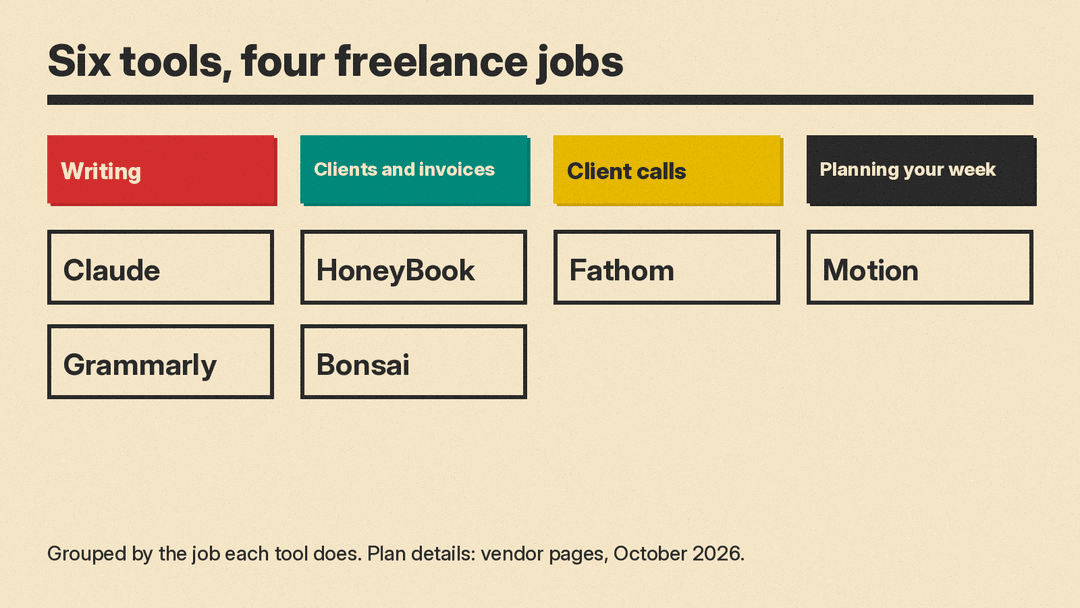
This guide covers six real tools, grouped by the job they do. Features and plan details are copied from each vendor's own pricing page as of October 2026. Plans change often, so check the vendor page before you pay. If you run a small team rather than working solo, see our best AI tools for small business owners guide too. For notes, to-do lists and the AI inside Microsoft 365 and Google apps, see our best AI tools for productivity guide.
How to choose AI tools as a freelancer
Answer three questions before you compare features:
- Where do your hours go? Track one normal week. If proposals and follow-up emails take the most time, start with a writing tool. If admin and invoicing take the most time, start with a client management tool.
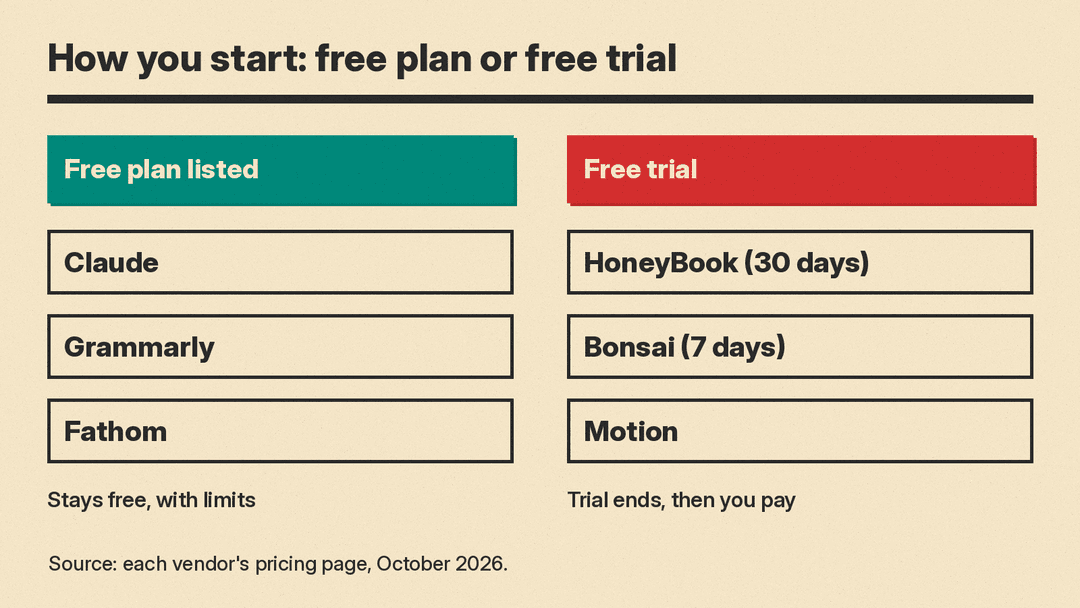
- Do you need a free plan or a free trial? A free plan stays free. A free trial ends, and then you pay. The vendors in this guide use both, and the difference matters when income is uneven.
- Will your clients see it? A client portal, a branded invoice or a meeting recorder that joins calls are all things your clients notice. Ask a client before you record a call.
One rule applies to every tool here: read anything AI writes before it goes to a client. A proposal with a wrong date or a made-up detail costs more than the time the AI saved.
Writing proposals, emails and drafts: Claude
Claude is a general AI assistant from Anthropic. Freelancers use it to draft proposals, rewrite a scope of work in plain language, answer client emails, summarize long briefs and turn rough notes into a first draft.
Its pricing page lists a Free plan at "$0" that includes "Search the web, create files, and run code," "Memory across conversations" and "Connect your apps and tools." The Pro plan is listed at "$17 Per month with annual subscription discount ($200 billed up front)" or "$20 if billed monthly." Pro adds "More usage" and "Hand off and schedule tasks," among other features. Both plans include Projects; the comparison table limits Free to "Up to 5." Projects are useful if you want to keep one client's brief, past work and tone notes in one place. Max starts "From $100 Per month" for people who use Claude all day.
On data use, the plan table's "Model training" row reads "Opt-out" for the individual plans. Read that row and set the option you want before you paste client material into a chat. For more writing tools, see our best AI tools for writers guide.
Good for: first drafts of proposals, emails and client deliverables. You supply the facts and check the result.
Polishing what you send: Grammarly
Grammarly checks and rewrites your writing, with apps for desktop, mobile and the browser. For a freelancer, it is the last pass before a proposal or invoice email goes out.
Its plans page lists a Free plan at "$0" to "Write without spelling and grammar mistakes," "See your writing tone" and "Generate text with 100 AI prompts." The Pro plan, shown at "$12 USD" with a free trial and an "Email reminder 2 days before trial ends," adds "Rewrite full sentences with a click," "Adjust your writing tone with ease," "Detect plagiarism and AI generated text" and "Generate text with 2,000 AI prompts." The comparison table counts prompts as "100 prompts / month" on Free and "2,000 prompts / member / month" on Pro.
Good for: freelancers who write to clients in English every day and want a final check on tone and errors. The free plan covers basic spelling and grammar.
Clients, contracts and invoices: HoneyBook
HoneyBook is a client management platform for small service businesses. It puts proposals, contracts, invoices, payments and scheduling in one place, with AI features on every plan.
With yearly billing, its pricing page lists:
- Starter: "$29 /month (billed yearly)," with "Unlimited clients and projects," "Invoices and payments," "Proposals and contracts," a "Client portal" and "HoneyBook AI."
- Essentials: "$49 /month (billed yearly)," which adds "Scheduler," "Automations," "QuickBooks Online integration" and "Up to 2 team members."
- Premium: "$109 /month (billed yearly)," which adds "Unlimited team members" and "Priority support."
The page also says "All plans start with a free trial. Change or cancel anytime." Its FAQ says you can try "virtually every feature on HoneyBook free for 30 days, no credit card required." The site menu notes that "HoneyBook is now in ChatGPT" and says you can "Connect your account and ask about any client, invoice, or booking." One limit to check first: the page asks if you are based in "the U.S., Canada, UK, or Australia" and says "HoneyBook only supports professionals located in these countries."
Good for: service freelancers such as photographers, designers and coaches who send proposals and contracts to many clients and want one system for the paperwork.
Clients, time tracking and invoices: Bonsai
Bonsai is a client and project management tool for freelancers, agencies and consultancies. It covers time tracking, proposals, contracts, invoices and expenses.
Its pricing page lists four plans per user per month. With yearly billing, it shows Basic at "$9 / month (if paid annually)," Essentials at "$19 / month (if paid annually)," Premium at "$29 / month (if paid annually)" and Elite at "$49 / month (if paid annually)." With monthly billing, the same table shows "$15 / month," "$25 / month," "$39 / month" and "$59 / month." Basic includes "Time tracking," "Task management" and "Unlimited projects." Essentials adds "Invoices & Payments," "Proposals & Contracts," "Scheduling," "Client portal" and "Expense tracking." Elite lists a "3 users minimum." The FAQ says a trial gives "full, unlimited access to Bonsai for 7 days," and then you choose a plan.
The AI part is a new connection. The page says "Introducing Bonsai MCP" and explains: "Connect your AI, whether it's Claude, ChatGPT, or Gemini, to Bonsai. Ask it to update a client, create a project, or draft an invoice, and it gets done." MCP is a standard way for an AI assistant to use another app's data and actions.
Good for: freelancers who bill by the hour and want time tracking and invoicing in one tool, and who already use an AI assistant.
Client calls: Fathom
Fathom is an AI meeting notetaker. It records and transcribes your meetings and writes an AI summary of each call. For a freelancer, that means you can listen to the client instead of typing notes, and send a recap of what was agreed.
Its pricing page lists a Free plan for individuals at "$0" that is "Free forever." The Free plan includes "Unlimited recordings + transcriptions," "Instant AI call summaries" and "Clips, playlists + search across calls." It also offers a "Choice of bot-free (in beta) or bot capture." The Premium plan for individuals costs $20 per month with monthly billing or $16 per month with annual billing, and adds "Advanced call summaries," "AI-generated action items" and a "Conversational meeting assistant." Team plans list a "2 user min."
Tell clients before you record. For more tools in this category, see our best AI meeting note takers guide.
Good for: freelancers with many discovery and check-in calls who want notes and action items without paying at first.
Planning your week: Motion
Motion is an AI calendar and task planner. Its site describes an "AI Calendar" that will "Auto-plan your day with smart scheduling" and an "AI Task Manager" to "Organize and prioritize your tasks."
Its pricing page has a tab for "Individuals" described as "For solo professionals" and a tab for "Teams." On the Individuals tab, Pro AI costs $29 per month billed annually or $49 billed monthly, and Business AI costs $39 billed annually or $69 billed monthly. The Teams tab prices the same plans per seat: $19 and $29 per month billed annually. The Pro AI plan is "For professionals and small teams" and lists "AI Chat," "AI Projects & Tasks," "AI Calendar & Meetings," "AI Task Planner" and "AI Writer & Editor," with "7,500 credits/seat/month." The Business AI plan adds "Time Tracking," "Timeline & Gantt Charts" and "15,000 credits/seat/month." The page says "Start your free trial. Risk free. Cancel anytime." Read the credits line before you pick a plan, because the AI features draw on those credits.
Good for: freelancers who juggle several client deadlines and want the calendar to plan the work for them. For tools that manage larger projects, see our best AI project management tools guide.
A simple setup for most freelancers
- Just starting out: the free plans of Claude, Grammarly and Fathom. That covers writing, checking and call notes for no monthly cost.
- Selling services to many clients: add HoneyBook or Bonsai for proposals, contracts and invoices. Pick HoneyBook if you send many proposals and contracts. Pick Bonsai if you bill by the hour and track time.
- Too many deadlines: add Motion to plan your week around client work.
Start with one tool for the job that costs you the most hours each week. Add a second only when the first is part of your routine.
