
Small business owners now get AI from two places: inside the apps they already pay for, and from separate tools that sit on top of those apps. The first group covers email, documents and meetings. The second covers design, customer records and the busywork that moves data from one app to another. Plans and AI limits differ a lot between vendors, so a feature list alone does not tell you what you will pay.
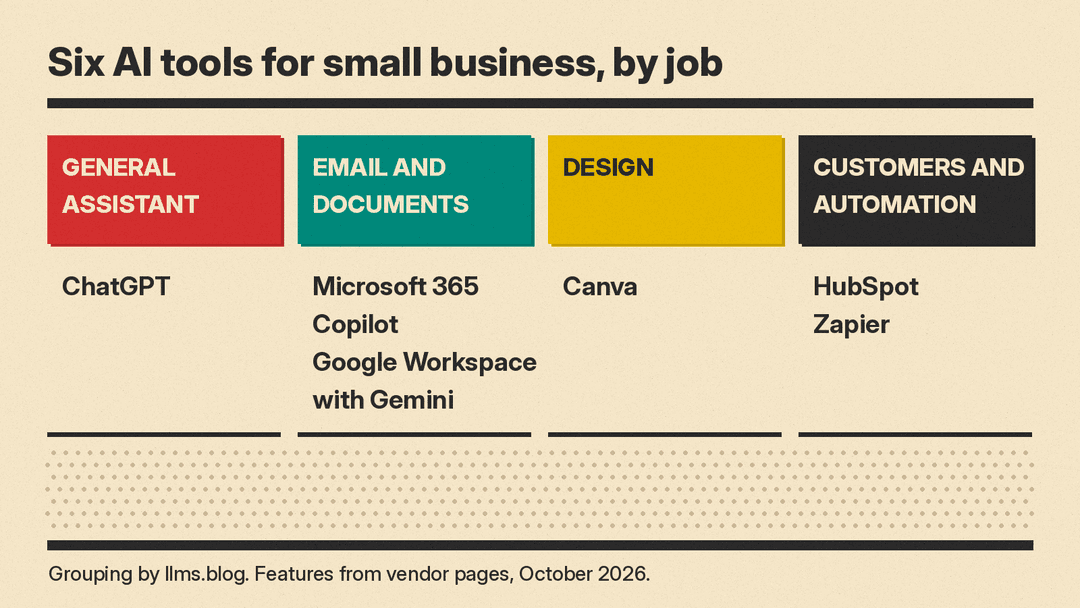
This guide covers six real tools that a small team can buy without a sales call. Each one is grouped by the job it does. Features and prices are copied from each vendor's own pages as of October 2026. Plans, AI credits and promotions change often, so check the vendor's page before you buy. If marketing is your main job, also see our best AI tools for marketers and best AI tools for social media managers guides. If you sell online, see best AI tools for Etsy and Shopify sellers.
How to choose AI tools for a small business
Decide three things before you compare features:
- Where your work already lives. If your email and files are in Microsoft 365 or Google Workspace, the AI in that suite can work on them. A separate tool needs access to that data before it is useful.
- How the AI is counted. Some vendors include AI in the seat price. Others count AI credits or uses per plan, and sell more on top. Read the AI line on the pricing page, not only the seat price.
- Who uses it. A one-person business can start on a free or single-user plan. A team needs admin controls and shared billing, which usually start on a business plan.
A general AI assistant: ChatGPT
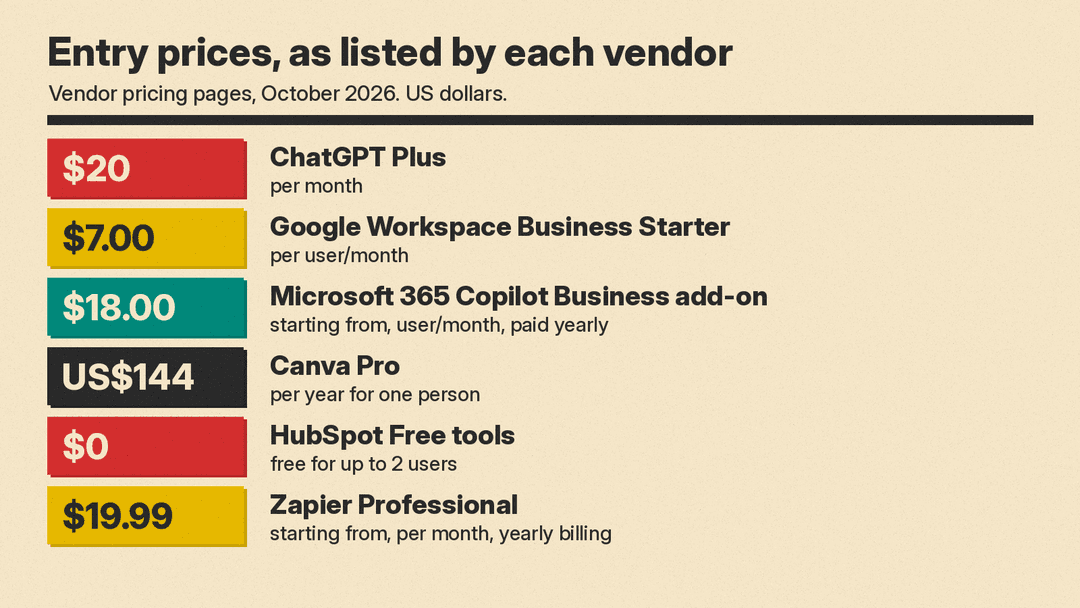
ChatGPT is a general assistant for writing, research, files and images. Its pricing page lists four individual plans: Free at "$0 / month," Go at "$8 / month," Plus at "$20 / month," and Pro "From $100 / month." Plus adds "Projects, scheduled tasks, and custom GPTs," and the page says Go "may include ads."
For a team, the page says "Business and Enterprise are for businesses" and "Business plans are available starting at 2 users." It also says paid plans "are priced per user per month," with monthly plans for Go, Plus and Business and "annual plans for Business and Enterprise."
On data use, the same page's plan table lists "Content is used to train our models" with "Opt-out available" for Free, Go, Plus and Pro. If staff will paste customer details into chats, read that row, and check what applies to the Business plan before you roll it out. For a wider comparison of consumer plans, see our ChatGPT Plus vs Claude Pro vs Google AI Pro guide.
Good for: owners who want one assistant for drafting, research and analysis, separate from their email suite.
Email, documents and meetings: Microsoft 365 Copilot or Google Workspace with Gemini
If your business already runs on one of these suites, start here. The AI works inside the apps your team uses every day.
Microsoft 365 Copilot
Microsoft's Copilot for business page sells Copilot in two ways: built into a Microsoft 365 plan, or as an add-on to a plan you already have. Plan highlights on the page include "Microsoft Copilot in apps such as Word, Excel, PowerPoint, Outlook, and Microsoft Teams," "AI chat grounded in your work data with large language model (LLM) choice," and "Pre-built agents for research and data analysis."
Prices on the page, paid yearly, as of October 2026:
- Microsoft 365 Business Standard with Copilot: "$23.50 user/month, paid yearly."
- Microsoft 365 Business Premium with Copilot: "$32.00 user/month, paid yearly."
- Microsoft 365 Copilot Business (add-on): "Originally starting from $21.00 now starting from $18.00," "user/month, paid yearly."
On monthly billing the page lists $28.20, $38.40 and $25.20 "user/month" for the same three. Each line also says "Usage-based billing for select advanced AI features." The page notes that "To purchase, customers must have a qualifying plan for enterprise or business." For how Copilot works inside Office apps, see our Office in Copilot explainer.
Good for: teams on Outlook, Word, Excel and Teams that want AI on their own files and meetings.
Google Workspace with Gemini
The Google Workspace pricing page puts Gemini in its business plans. Business Starter includes "Gemini AI assistant in Gmail" and "Chat with AI in Gemini, your company data is not used to train models." Business Standard adds "Gemini AI assistant in Gmail, Docs, Meet, and more" and "Gemini Notebook AI research and thinking partner with expanded access."
The page lists Business Starter at $7.00, Business Standard at $14.00 and Business Plus at $22.00, and says "Price is per user/month and does not include tax." It also shows a "50% off for 3 months" offer dated Nov 10, 2026 to Feb 10, 2027, and a footnote says "Offer available to new Google Workspace customers only." The page says "Starter, Standard, and Plus plans can be purchased for a maximum of 300 users." For a side-by-side of the two suites, see our Microsoft 365 Copilot vs Gemini in Google Workspace comparison.
Good for: teams on Gmail and Google Docs that want AI included in the seat price.
Design and marketing content: Canva
Canva covers social posts, flyers, presentations and ads. Its pricing page, as of October 2026, lists:
- Free: "US$0," with "Up to 20 Standard or Premium AI uses."
- Pro: "US$144," "/year for one person." Pro adds "AI tools (resize, translate, remove background, and more)" and "10x more AI than Canva Free (Premium or Ultra AI)."
- Business: "US$250/year per person." Business adds "Collaboration and team admin tools," "100 Brand Kits and approvals" and "20x more AI than Canva Free (Premium or Ultra AI)."
Pro and Business both list "Canva AI 2.0" and "Ad insights and AI ad creation." Pro notes an "AI Pass add-on available (extra cost)," and Business adds "AI top-ups." Canva also shows a Pro free trial.
Good for: owners who make their own marketing graphics and want AI edits in the same editor.
Customers and busywork: HubSpot and Zapier
HubSpot
HubSpot is a customer platform for marketing, sales and service. Its AI page describes "a team of AI agents for marketing, sales, and customer service" that are "Built on your CRM data." Examples on the page include a customer agent that "resolves common questions 24/7," a prospecting agent, and a data agent that "answers custom questions about any contact or company using the signals already in your CRM." The page says agents are "Accessible directly from Breeze Assistant wherever your team works."
On the HubSpot pricing page, the Free tools plan is "$0 /mo" and "Free for up to 2 users. No credit card required." The Starter bundle "Starts at" $7 or $20 "/mo/seat," depending on the billing period you pick on the page.
Good for: businesses that want customer records, email and support in one place, with AI agents working on that data.
Zapier
Zapier connects apps so work moves between them without copy and paste. Its AI page says "Zapier offers 66,000+ triggers and actions across 9,000+ traditional apps" and works "with leading AI tools, whether you use Claude, ChatGPT, Cursor, or something else."
The Zapier pricing page, with yearly billing selected, lists Free at "$0 /month" with "Zaps, Tables, and Forms included (100 tasks per month)," Professional "Starting from $19.99 /month," and Team "Starting from $69 /month." The page says yearly billing saves 33%, and its AI products list includes Zapier Agents, Zapier Chatbots, Zapier Canvas and Zapier MCP.
Good for: owners who spend time moving leads, orders or form entries between apps by hand.
Which one should you try first
- If your email and files live in Microsoft 365 or Google Workspace, test the AI in that suite first. It already has access to your work.
- If you want one assistant for writing and research, try ChatGPT, and read its data-use settings before staff paste in customer details.
- If you make your own marketing graphics, try Canva's free plan and watch how fast you use the AI allowance.
- If customer follow-up slips through the cracks, try HubSpot's free tools.
- If you copy data between apps every week, map one routine task in Zapier's free plan.
Most of these tools have a free plan or a free trial. Pick one real task, run it in two tools for a week, and keep the one your team still uses at the end. For more on how small firms use AI agents, see our Salesforce agentic AI report for small business summary.
