
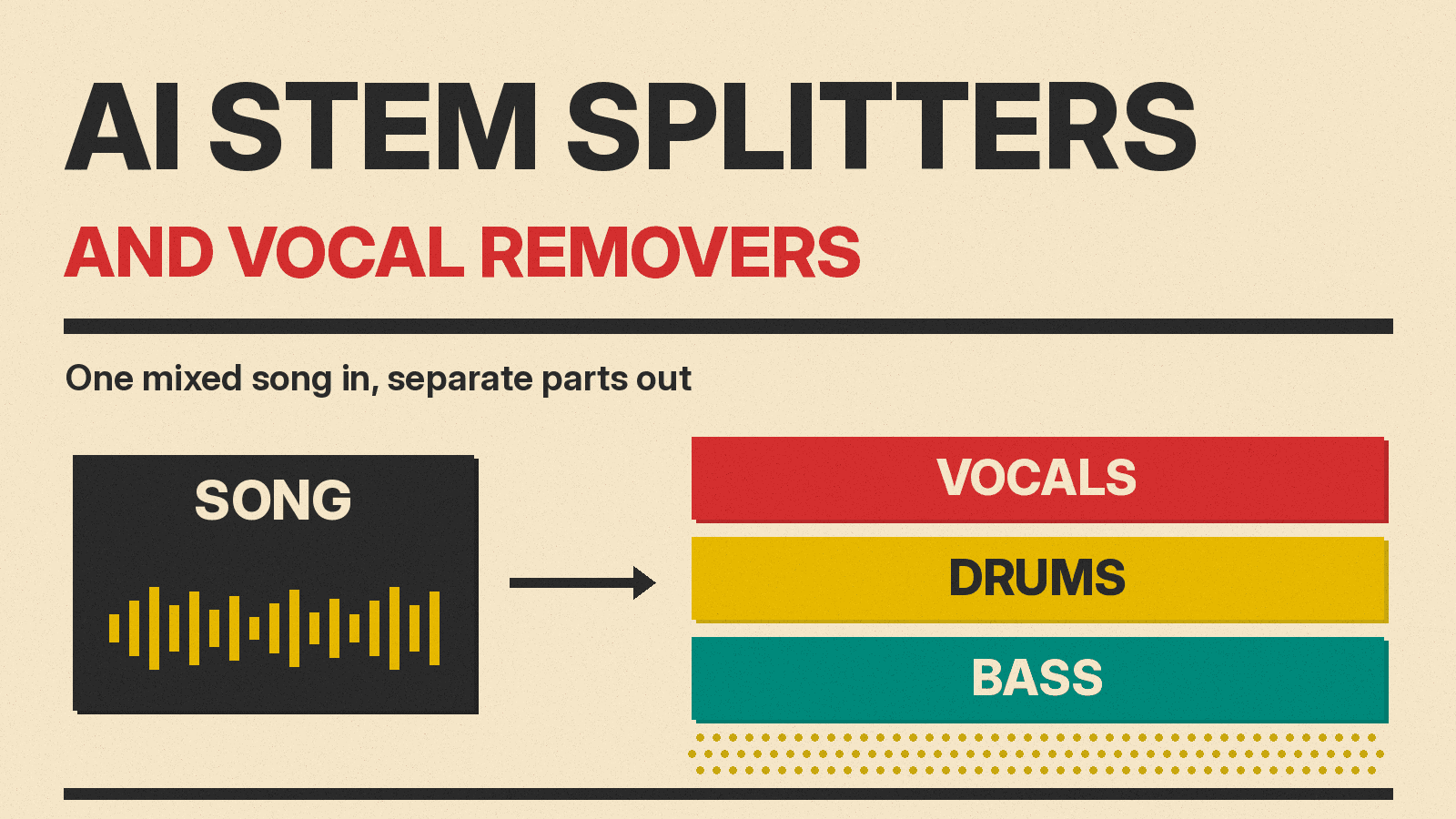
A stem splitter takes a finished, mixed song and pulls it apart into separate tracks, or stems: vocals, drums, bass, guitar, piano and the rest. A vocal remover is the simplest version of that job. It splits a song in two, a vocal track and an instrumental. People use these tools to make karaoke and practice tracks, pull an acapella for a remix, study a bass line, clean speech for a podcast, or take apart a song they generated with an AI music app.
This guide covers nine real tools, as of October 2026: web apps, apps built into music software, free open-source options, and two that are built for businesses and for speech. Each entry says what the tool splits, what it costs where the maker publishes a price, and who it suits. Prices change, so check each link before you pay.
The short answer
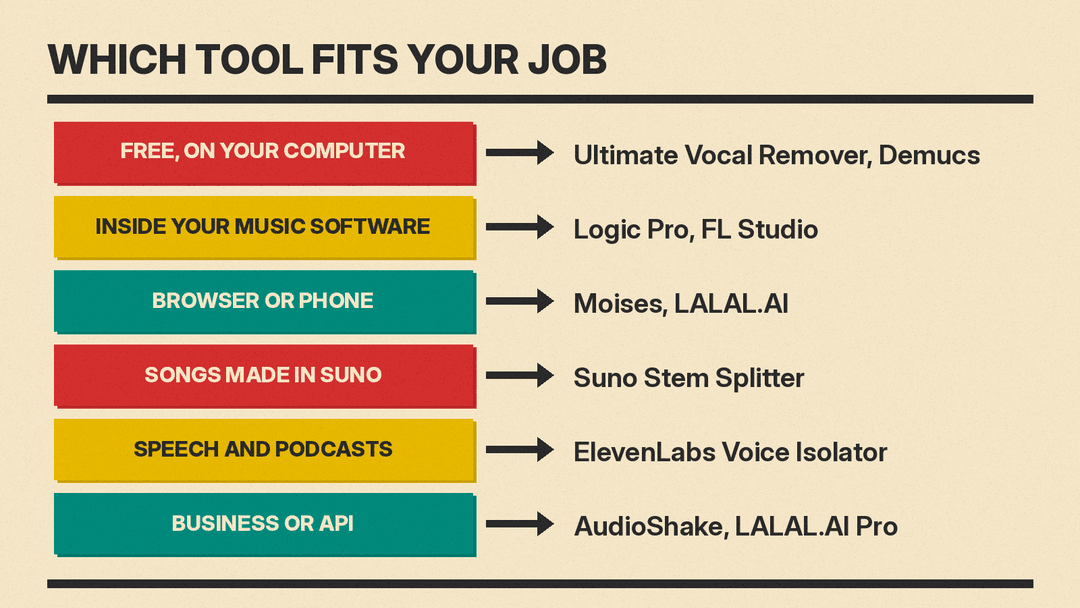
- Free and on your own computer: Ultimate Vocal Remover or Demucs.
- Inside the music software you already use: Logic Pro's Stem Splitter or FL Studio's Stem Separation.
- In a browser or on a phone, with no setup: Moises or LALAL.AI.
- Songs you made in Suno: Suno's own Stem Splitter.
- Speech for podcasts, interviews and video: ElevenLabs Voice Isolator.
- Labels, apps and large volumes: AudioShake, or LALAL.AI's API on its Pro plan.
1. LALAL.AI: the web vocal remover with clear pricing
LALAL.AI started as a single vocal remover and now offers a set of audio tools. Its stem options are Vocal and Instrumental, Drums, Bass, Electric Guitar, Acoustic Guitar, Piano, Synthesizer, Voice and Noise, String Instruments and Wind Instruments. A separate Lead/Back Splitter separates lead vocals from backing vocals and gives four outputs: lead vocal, backing vocal, instrumental, and backing vocals plus instrumental. There is also a de-echo setting and a choice of neural networks if the first result is not clean.
The way it counts time matters. Each separation type gives you a pair of stems, for example drums and a drumless track. LALAL.AI deducts file length times the number of separation types. Its own example: a 5-minute song split for drums, piano and vocals costs 15 minutes.
Pricing, as listed by LALAL.AI:
- Starter: free, 10 minutes in the Relaxed Queue, uploads up to 200 MB, and no full result downloads. It is for testing quality.
- Lite: $9.99 a month, or $90 a year ($7.50 a month), with 90 Fast Queue minutes a month and unlimited Relaxed Queue minutes.
- Pro: $19.99 a month, or $180 a year ($15 a month), with 250 Fast Queue minutes, the VST plugin, local processing in the desktop app and API access.
Both queues give the same quality. The Relaxed Queue is slower when the servers are busy. LALAL.AI works on the web, desktop, iOS and Android, and accepts video files as well as audio.
Best for: people who want a quick vocal or instrument split in a browser and a price they can read before they sign up.
2. Moises: a practice app for musicians
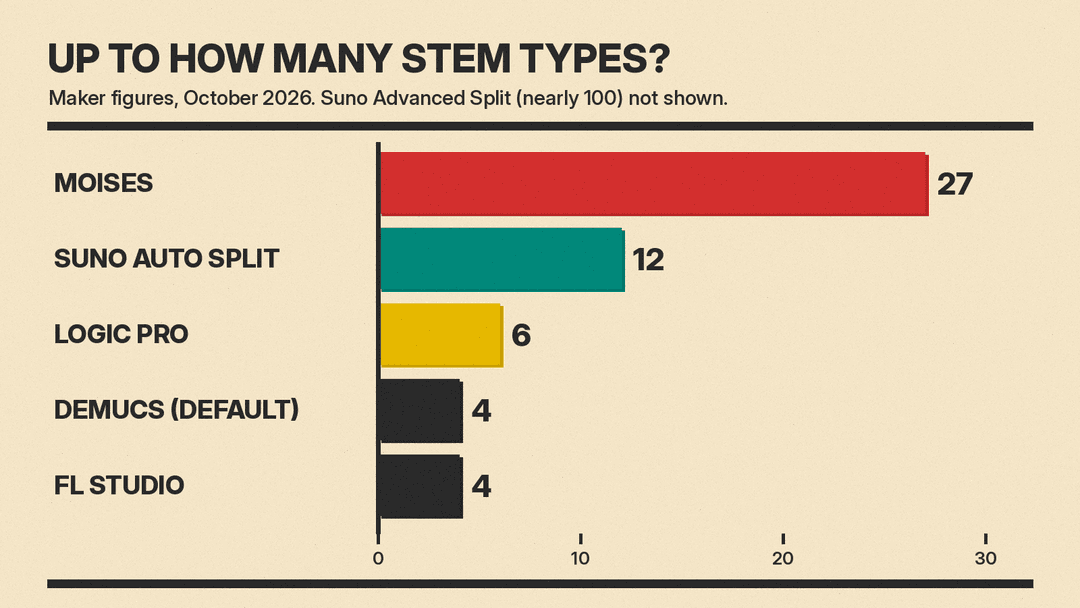
Moises calls itself a creative suite for musicians. It separates songs into 27 stem types, including vocals, guitar, bass, drums, piano, keys, winds and strings. The point is practice: mute the part you play, or solo the one you are learning. The app also includes a chord finder, a speed changer and lyric transcription.
Moises runs in a browser and as an app for desktop, iPhone, iPad and Android. It has a free tier with a limited number of uploads each month. Full pricing is shown after you log in, so we do not list it here. Moises says it trains its models only on licensed material.
Best for: musicians who want to learn, rehearse or play along with songs on a phone or tablet.
3. Suno Stem Splitter: for songs you made in Suno
If you generate songs with Suno, its Stem Splitter is the shortest path from a finished track to separate parts. According to Suno's help page, you open the More Actions menu next to a song, choose Get Stems, pick a split type and extract. In Suno Studio you right-click a clip on the timeline and choose Split Stems.
There are three modes:
- Auto Split: up to 12 stems (lead vocals, backing vocals, drums, bass, percussion, guitar, keyboards, strings, synth, brass, woodwinds and FX). Pro and Premier plans, 50 credits per extraction.
- Split from Mix: one instrument or vocal plus a track with everything else. Pro and Premier, 10 credits per stem.
- Advanced Split: you choose from a list of nearly 100 instruments. Premier only, 10 credits per stem.
Suno's stem separation post calls Auto Split its original option: "reliable but less precise than the updated options." Get Stems is available to Pro and Premier subscribers, and Suno says it works on your own uploaded music as well as songs made in Suno. For more on making the songs in the first place, see our Suno prompts guide and our post on Suno MCP, which brings Suno into Claude and ChatGPT.
Best for: Suno Pro and Premier users who want to remix, rearrange or mix their own generated songs.
4. Logic Pro Stem Splitter: built into Apple's music software
Apple's Logic Pro has a Stem Splitter that extracts vocals, drums, bass, guitar, piano and other instruments from an audio region. You Control-click a region, choose Processing and then Stem Splitter, pick a preset or tick the stems you want, and click Apply. Logic puts the stems in a stack under the original track and mutes the original, so you can hear the result at once. Stems you do not select can be combined into a submix.
Guitar and piano stems arrived in a May 2025 update; the first version in 2024 split four parts. Stem Splitter needs a Mac or iPad with an M1 or later Apple silicon chip. Apple's Logic Pro page lists Logic Pro for Mac as a standalone app at $199.99. Logic Pro for Mac and iPad also comes with Apple Creator Studio, at $12.99 a month or $129 a year after a 30-day free trial.
Best for: Mac and iPad musicians who already work in Logic and want stems on the timeline, not in a separate app.
5. FL Studio Stem Separation: for FL producers
Image-Line added Stem Separation in FL Studio 21.2. It splits a song or track into vocals, music, bass and drums, and it is available in FL Studio Producer Edition and above. Image-Line says FL Studio license owners get lifetime free updates.
Best for: beat makers who work in FL Studio and want quick four-part splits for sampling and remixes.
6. Ultimate Vocal Remover: free, local and flexible
Ultimate Vocal Remover, or UVR, is a free desktop app with a graphical interface, released under the MIT license. Version 5.6 has installers for Windows and macOS, with instructions for Linux. The bundles include Python, PyTorch and the other parts it needs, so you do not have to set anything up first. UVR's core developers trained the models in the package, except the Demucs v3 and v4 4-stem models.
Because it runs on your own computer, nothing is uploaded. The trade-off is speed and setup: the README warns that on a Mac the app can take 5 to 10 minutes to start the first time, and that older or budget Macs are not guaranteed to work. The developers posted a development update on October 6, 2026.
Best for: people who want free, unlimited splits on their own machine and do not mind a desktop app.
7. Demucs: the open model behind many tools
Demucs is the open-source separation model from Meta's research team, under the MIT license. Version 4, Hybrid Transformer Demucs, splits music into four sources (drums, bass, vocals and other). The README reports a signal-to-distortion ratio of 9.00 dB on the MUSDB HQ test set, and 9.20 dB with sparse attention and per-source fine-tuning, though that sparse model is not released. An experimental six-source model adds guitar and piano, but the README says the piano stem has "a lot of bleeding and artifacts."
Demucs runs from the command line, so it suits people who are comfortable with Python. Note that the original repository says it is no longer maintained. Its author made a fork at github.com/adefossez/demucs, which the README says is not actively maintained either and gets only important bug fixes.
Best for: developers and tinkerers who want a free model they can script, or build into their own app.
8. AudioShake: for labels, studios and apps
AudioShake sells stem separation to businesses. It extracts vocals, drums, bass, guitar, piano, winds, strings and more. Its products are AudioShake Live for labels and publishers, AudioShake Indie for independent artists and producers, and an API and SDK for iOS, macOS, Windows, Android and Linux. AudioShake lists Warner, Universal, Sony, Disney Music Group, Paramount, BET and NFL Films among its customers. It also offers dialogue separation, which splits speech from music and effects for dubbing.
Best for: labels, post-production teams and developers who need separation at scale or inside their own product.
9. ElevenLabs Voice Isolator: for speech, not songs
ElevenLabs Voice Isolator removes background noise, music and other voices from spoken audio. It is aimed at podcasts, interviews, film and meetings. The product page shows a music remix example, but its FAQ says Voice Isolator is "not designed or optimized" for music vocals, though it may work on some songs. It takes files up to 500 MB and 1 hour long, and it is available through the API.
The free plan includes 10 minutes of isolated audio a month, for personal use only. Paid plans with commercial use start with Starter at $6 a month (30 minutes), then Creator at $22 a month (121 minutes) and Pro at $99 a month (600 minutes). If you also need captions for the cleaned audio, our explainer on ElevenLabs Cue covers its timing model.
Best for: podcasters and video makers who need clean speech from a noisy recording.
How to get a cleaner split
LALAL.AI's FAQ gives this advice for getting better results from its vocal remover:
- Use a high-quality source file with little noise, clipping, distortion or compression artifacts.
- Upload the full track instead of a heavily compressed excerpt.
- Expect dense mixes with reverb, harmonies and overlapping instruments to separate less cleanly.
- Preview the result before you download it.
- If the result is poor, switch to a different neural network in the settings and check again.
Also count your stems before you start. LALAL.AI charges minutes for each separation type, and Suno's Split from Mix and Advanced Split charge credits for each stem, so a split into many stems costs more than a simple vocal removal.
A note on rights
These tools split audio. They do not give you rights to the music. Before you publish a remix, cover or sample built from someone else's stems, make sure you have permission to use the song. For songs you generated yourself, check the terms of the music app you used. Our AI music generator comparison covers how the main apps differ.
Sources
- LALAL.AI and LALAL.AI pricing
- Moises
- Suno: How do I get stems?, Suno Stem Splitter and Suno: Stem Separation improvements, Suno blog: stem separation updates
- Apple Support: Stem Splitter in Logic Pro for Mac
- Apple: Logic Pro (pricing and Apple Creator Studio)
- Apple Newsroom, May 2025: Logic Pro update and Apple Newsroom, May 2024: Logic Pro 11
- Image-Line: FL Studio 21.2, what's new
- Ultimate Vocal Remover on GitHub
- Demucs on GitHub
- AudioShake: vocal and instrument stem separation and AudioShake dialogue separation docs
- ElevenLabs Voice Isolator
