
You do not need to pay to get real work out of AI. OpenAI, Anthropic and Google all offer a free plan, and those plans cover the jobs most people actually need: answering questions, drafting text, summarizing documents, fixing grammar and taking meeting notes.
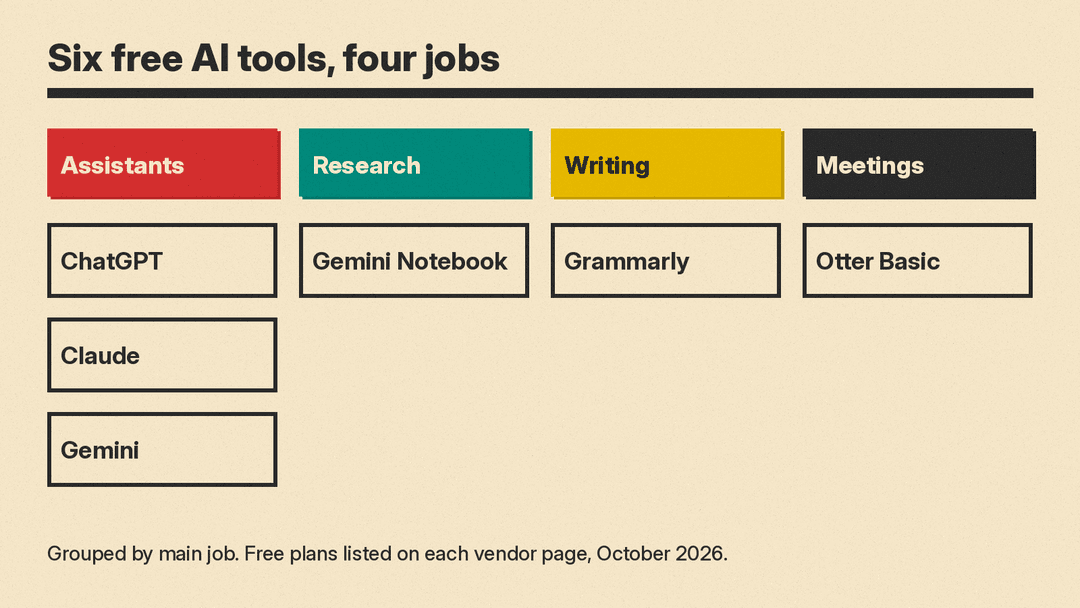
This guide covers six tools with a free plan, grouped by the job they do. Every feature listed comes from the vendor's own pricing or product page as of October 2026. Free plans change often, and several have usage limits that the vendor does not spell out as a number, so check the linked page before you rely on a feature.
How to pick a free AI tool
Free plans differ less in what they can do and more in how much you can do before you hit a limit. Ask three questions first.
- What is the main job? General chat and drafting, research on your own documents, writing cleanup, or meetings.
- Do you already have the account? A Google Account is enough for Gemini. An existing account cuts setup to zero.
- Where do you work? Some tools live in a browser tab. Others plug into the apps where you already write or meet.
Most people get the best result from two tools: one general chat assistant, plus one tool for a specific job, such as meeting notes or grammar.
General AI assistants
ChatGPT Free
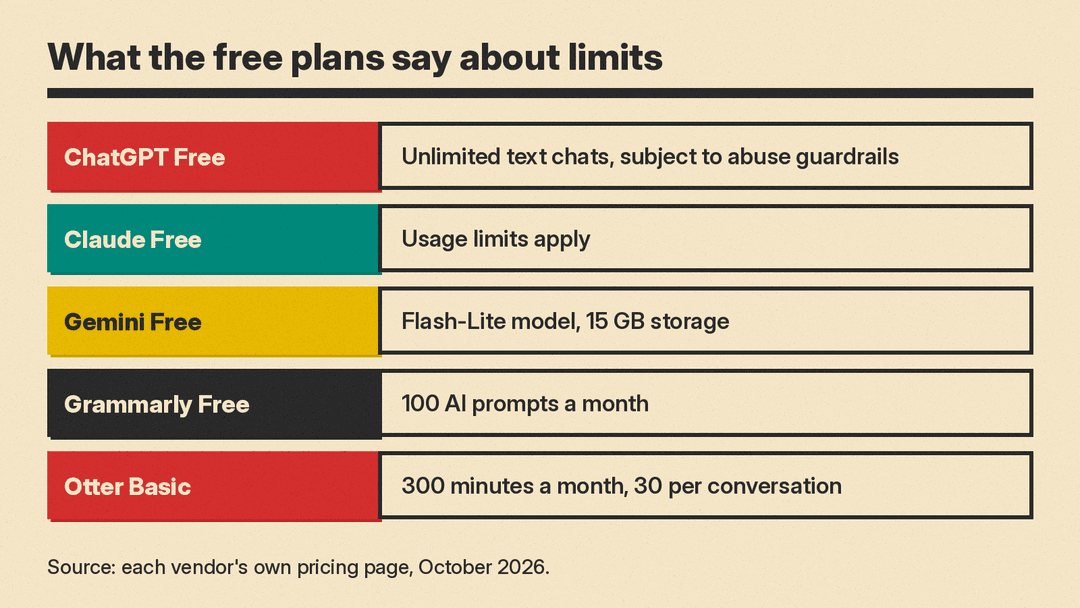
ChatGPT is OpenAI's chat assistant. The pricing page describes the Free plan as "Intelligence for everyday tasks" and lists "Unlimited text chats with GPT-6". A note on the same page says unlimited text chats are "subject to abuse guardrails."
Other features are included with limits. The Free plan lists limited messages with uploads, limited image creation, limited voice chats, limited deep research, limited memory and context, limited Codex access, and limited ChatGPT Work access on desktop. Use it for drafting, explaining a topic, brainstorming, and quick questions where you want an answer in plain words.
Claude Free
Claude is Anthropic's assistant. Its pricing page lists the Free plan as "$0" and "Free for everyone." The Free plan includes chat on web, desktop and mobile, web search, creating files and running code, memory across conversations, connecting your apps and tools, Artifacts, and Claude Design, Slides and Docs.
Some features are for paid plans only. The comparison table on the same page marks Claude Code, Claude in Chrome and Claude for Microsoft 365 as "No" for Free. Anthropic also notes that usage limits apply. The Free plan covers chat, web search and file work.
Google Gemini Free
Gemini is Google's assistant. The subscriptions page lists the Free plan at "$0 / month with a Google Account." It includes access to the Flash-Lite model, image generation and editing, Deep Research, Gemini Live, Canvas and Gems.
The Free plan also includes Google Flow, which the page calls an "AI creative studio," with "limited access to Nano Banana Pro," plus Gemini Notebook and 15 GB of cloud storage across Gmail, Drive and Photos. If you already use Gmail or Google Drive, the Google Account you have is all the Free plan needs.
Research on your own documents
Gemini Notebook (formerly NotebookLM)
Gemini Notebook is Google's research assistant for your own material. Its FAQ says "NotebookLM is now Gemini Notebook as of July 2026" and that existing notebooks stay accessible. The Gemini Free plan lists it as included.
You add sources, and Gemini Notebook answers questions grounded in them. Google calls this being "source-grounded." The product page lists Audio Overviews, Mind Maps, Reports, Flashcards, Quizzes, Video Overviews, Data Tables, Infographics and Slide Decks as outputs. That makes it useful for students, researchers and anyone who has to get through a long stack of reading.
On privacy, the same page says that when you use Gemini Notebook as an individual, "your data is not used for training unless you share feedback." For Workspace users, it says uploads, queries and responses are not used to train generative AI models, even if you submit feedback. Our AI tools for students guide covers more study tools.
Writing cleanup
Grammarly Free
Grammarly checks your writing as you type. Its plans page lists Free at "$0 USD / month" with the line "Write without spelling and grammar mistakes." The Free plan includes writing without mistakes, seeing your writing tone, and generating text with 100 AI prompts a month.
Full-sentence rewrites, tone adjustment and plagiarism and AI text detection are listed under Pro, not Free. Grammarly Free is a good second tool next to a chat assistant: the assistant drafts, and Grammarly catches the small errors. For more writing tools, see our AI tools for writers guide.
Meetings and transcription
Otter Basic
Otter takes notes in meetings. Its pricing page calls the free plan "Basic," for "those who want to give it a try," and lists it as "Free."
Basic works with Zoom, MS Teams and Google Meet. It includes AI Chat within and across meetings, live transcription, speaker identification, audio recording playback, multi-language support, iOS and Android apps, and 300 monthly transcription minutes. File imports are capped at 3 lifetime audio or video file imports, and the plan comparison table caps each conversation at 30 minutes of transcription. That suits short meetings, but not long calls or a large archive of old recordings. Our comparison of AI transcription tools covers more free tiers, such as Rev's 45 AI minutes a month and Descript's 60 media minutes.
What free plans have in common
The pattern is the same across all six tools.
- The basic job is free. Chat, drafting, grammar fixes and note-taking all work on the free plans.
- Limits are vague. ChatGPT writes "limited" and Anthropic writes that usage limits apply, instead of a number. You learn the real cap when you hit it.
- Advanced features are paid. Claude Code, Claude in Chrome and Claude for Microsoft 365 are marked "No" for Free in Claude's table, and full-sentence rewrites are listed under Pro at Grammarly.
- Free does not mean private. Read each vendor's own privacy wording before you paste in work documents, client details or anything personal.
A simple free AI setup
If you want to start today without paying, try this setup.
- One chat assistant: ChatGPT, Claude or Gemini, based on which account you already have.
- Gemini Notebook for long reading, class notes or reports.
- Grammarly Free in your browser for final checks.
- Otter Basic if you are in recorded calls each week.
When you hit a limit often enough that it slows you down, that is the signal to look at a paid plan. Our AI productivity tools guide covers the paid tiers of several of these tools.
