
Most writers do not need ten AI subscriptions. They need one general assistant for drafting and thinking, one editor that catches what they miss, and possibly one specialist tool for the kind of writing they do most: fiction, reported pieces, or long research documents. This guide lists 10 real tools across those jobs, with what each one does, who it suits, where it falls short, and pricing only where we read it on the vendor's own page.
All prices and plan details are as of October 2026. Plans change often, so check the linked pricing page before you pay. If you write for a marketing team or for school, see our guides to the best AI tools for marketers and the best AI tools for students.
How we picked
- Real, available products only. Every tool below has a live official site and accepts new users today. We dropped Lex, a well-liked AI writing editor, because its site now says it is no longer accepting new customers.
- Fit for writing work. Each tool had to help with at least one part of the writing process: research, outlining, drafting, revising, or proofreading.
- Verified details only. We state a price or free tier only when the tool's own pricing page showed it. Where the billing terms were unclear, we left the price out.
- A clear limit for each. No tool is the right answer for everyone, so each entry names a caveat.
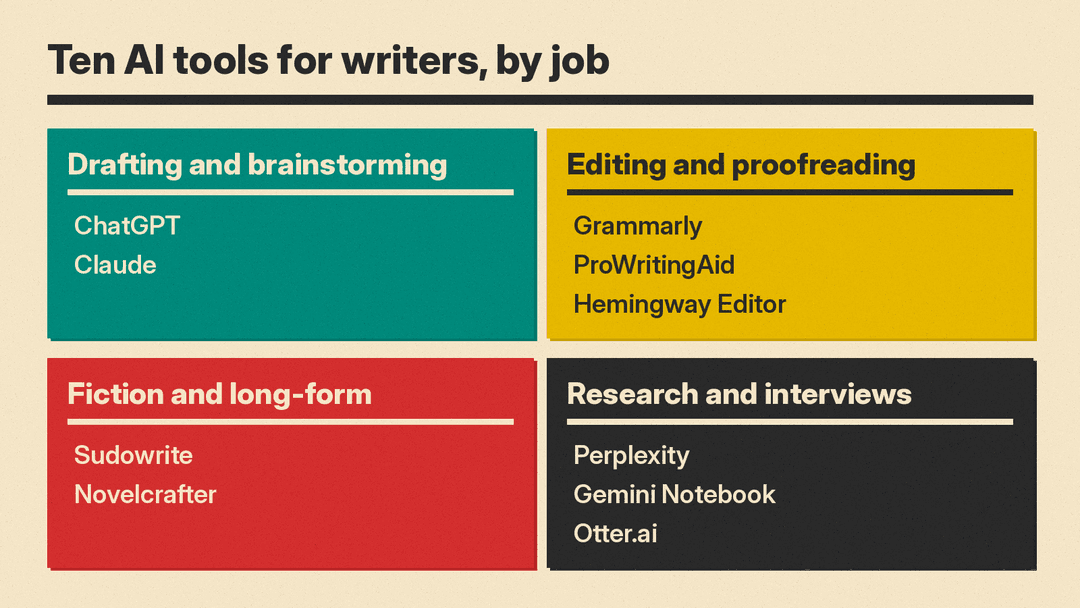
Drafting and brainstorming
ChatGPT
ChatGPT from OpenAI is the most widely used general assistant. Writers use it to outline, generate alternative openings, rephrase stiff paragraphs, summarize source material, and talk through structure. It also has deep research, file uploads, and projects for keeping related chats together.
- Who it suits: writers who want one tool for many small tasks, from headline options to restructuring a messy draft.
- Limit: how much text you can paste at once depends on the plan. OpenAI's pricing page lists an input maximum of roughly 12 pages of text for the free plan's Instant model and roughly 40 pages on Go and Plus, so long manuscripts may need to be split.
- Pricing note: a free plan is available to everyone, with paid Go, Plus, and Pro plans priced per user per month, according to OpenAI's pricing page as of October 2026.
Claude
Claude from Anthropic is a general assistant that many writers prefer for long documents and revision work. It can read uploaded files, keep reference material in Projects, and search the web.
- Who it suits: writers working with long drafts, research packets, or style guides they want the model to follow across sessions.
- Limit: usage limits reset on a rolling five-hour window, with weekly limits on paid plans, so heavy editing sessions can hit a cap. The free plan allows up to 5 Projects. Consumer plans list model training as opt-out, so check your privacy settings if you paste unpublished work.
- Pricing note: free plan available. Pro is $17 per month with annual billing ($200 billed up front) or $20 billed monthly, per Anthropic's pricing page as of October 2026.
Editing and proofreading
Grammarly
Grammarly checks spelling, grammar, and tone in the browser, desktop apps, and many web editors. Paid plans add full-sentence rewrites, tone adjustment, plagiarism checks, and AI text detection.
- Who it suits: anyone who writes across email, documents, and web tools and wants corrections wherever they type.
- Limit: its suggestions push toward a clear, neutral style. Fiction writers and anyone with a deliberate voice should treat rewrites as suggestions, not fixes.
- Pricing note: the free plan includes 100 AI prompts a month, and Pro includes 2,000 prompts per member per month, according to Grammarly's plans page as of October 2026.
ProWritingAid
ProWritingAid combines grammar checking with deeper style reports on things like repetition, pacing, and sentence variety. It also offers chapter critiques and paid manuscript analysis for fiction.
- Who it suits: novelists and long-form writers who want detailed reports rather than inline corrections only.
- Limit: English only. The free plan gives suggestions on 500 words at a time and caps line editing reports at two runs per report per day. Whole-manuscript analysis uses separately purchased Story Credits.
- Pricing note: Premium is $30 per month billed monthly, or $120 per year billed yearly, per ProWritingAid's pricing page as of October 2026. A free plan is available.
Hemingway Editor
Hemingway Editor is known for highlighting dense, hard-to-read sentences. Hemingway Editor Plus adds AI fixes for highlighted issues, grammar checking, and tone adjustment. The site also offers free online readability and grammar checkers.
- Who it suits: writers of web copy, newsletters, and explainers who want shorter, plainer sentences.
- Limit: readability scoring rewards short sentences, which is not always what a piece needs. It is a clarity tool, not a structural editor.
- Pricing note: the site advertises a 2-week free trial of Plus with no credit card required. We did not find a price on a page we could verify, so check the site.
Fiction and long-form
Sudowrite
Sudowrite is built for fiction. It can continue a scene, describe a moment in more sensory detail, expand an outline into a draft, brainstorm characters, and give beta-reader style feedback. It uses its own fiction models, Muse and Ballad, alongside models from other providers.
- Who it suits: novelists, screenwriters, and fan fiction writers who want help generating and reworking prose.
- Limit: plans are metered in monthly credits, so heavy generation on a long book uses them up faster. Its FAQ says it claims no rights over what you write and does not use your writing to train models, but you should still read the terms yourself.
- Pricing note: free trial with no credit card. The pricing page shows plan prices with a monthly or yearly toggle, and we could not confirm which billing terms the figures reflect, so we have left them out. See Sudowrite pricing.
Novelcrafter
Novelcrafter is a novel-planning and writing workspace with a Codex for characters, places, and lore, plus support for series. Its AI features, such as scene summaries, character extraction, and generating prose from scene beats, connect to an AI provider using your own API key.
- Who it suits: writers of long or multi-book projects who want story bible organization and control over which AI model they use.
- Limit: there is no free plan, and the AI features require your own key from a model provider, which means a separate bill for usage.
- Pricing note: Hobbyist, the lowest tier with AI features, is listed at $8 USD monthly, with a 21-day free trial and no credit card required, per Novelcrafter's pricing page as of October 2026.
Research and interviews
Perplexity
Perplexity is an AI search tool that answers questions with cited sources. Writers use it to get oriented on a topic quickly and find primary sources to read.
- Who it suits: journalists, bloggers, and nonfiction writers doing background research.
- Limit: a cited answer is a starting point, not a verified fact. Open the sources and confirm quotes and figures before using them.
- Pricing note: a free tier is available, with paid Pro and Max plans. We could not load the pricing page directly, so we have left out figures. See Perplexity's plans.
Gemini Notebook (formerly NotebookLM)
Gemini Notebook is Google's research notebook. Google says NotebookLM was renamed Gemini Notebook in July 2026 and existing notebooks carried over. You upload your own sources, and it answers questions grounded in them. It can also produce summaries, reports, mind maps, and podcast-style Audio Overviews of your material.
- Who it suits: writers working from a fixed set of documents, such as interview transcripts, reports, or a book's research files.
- Limit: answers are only as good as the sources you load, and Google notes there is no recovery option for deleted notes.
- Pricing note: not stated here. Check the Plans page on the official site.
Otter.ai
Otter.ai records and transcribes conversations live, identifies speakers, and produces summaries. It also imports audio and video files.
- Who it suits: reporters, podcasters, and nonfiction writers who interview people and need searchable transcripts.
- Limit: the free plan allows only 3 lifetime file imports, so it is better for live recording than for transcribing a backlog of existing audio. Always tell interviewees you are recording.
- Pricing note: the free Basic plan includes 300 monthly transcription minutes. Pro is listed at $16.99 per user per month billed monthly, with lower annual pricing, per Otter's pricing page as of October 2026.
How to choose
Start from the part of the work that costs you the most time, not from the tool with the most features.
- If you are stuck at the blank page or the outline: start with a general assistant, either ChatGPT or Claude. Try both free plans on the same task, such as outlining a piece you already know well, and keep the one whose output needs less fixing.
- If your drafts are fine but revision is slow: add an editor. Grammarly fits people who write in many apps. ProWritingAid fits long-form and fiction writers who want reports. Hemingway Editor fits anyone whose main problem is long sentences.
- If you write fiction: Sudowrite is the more guided option, with prose generation built in. Novelcrafter is the more structured option, with a story bible and your choice of model, but you pay a model provider separately.
- If you research or interview: Perplexity helps you find sources, Gemini Notebook helps you work inside sources you already have, and Otter.ai turns interviews into text.
- If you work with unpublished or confidential material: read each tool's privacy and training settings before pasting anything in. Some tools train on consumer data unless you opt out.
- If budget is tight: most tools on this list have a free plan or a free trial. Use them on a real project for a week before paying.
A practical starting stack for most writers is one general assistant plus one editor. Add a specialist tool only when a specific task keeps slowing you down.
What these tools do not do
None of these tools fact-check reliably on their own, and none replaces a human editor's judgment on structure, voice, or argument. Treat AI output as a draft that you are responsible for. If you publish with a client, publisher, or school, check their policy on AI assistance before you start.
