
Zendesk is taking its AI agents inside the company. On October 19, 2026, it introduced Employee Service AI Agents and Advanced Action Flows, aimed at IT, HR and workplace teams that answer requests from their own staff. A separate help center notice sets the general availability rollout for November 3 to December 1, 2026, and spells out what each plan includes and what extra usage costs.
The pitch is that the agent should not stop at an answer. Zendesk says the agents "resolve complex requests end-to-end", from onboarding to offboarding, using workflows that admins build in plain language.
What Zendesk launched
There are two parts, and they work together.
- Employee Service AI Agents. These are AI agents for internal support. Zendesk says they work in the help center, Slack and Microsoft Teams, and can draw on more than 20 knowledge connectors, including Google Drive, SharePoint, Confluence, Notion, Slack, Teams and Box. Answers respect the access permissions on the connected content.
- Advanced Action Flows. This is the automation builder. In Zendesk's words, the agents "understand what employees need and determine how to help", and the flows "give them the skills to do so": admin-built workflows that carry out tasks in line with company policy.
Zendesk lists the kinds of jobs it has in mind: access approvals, laptop lifecycle management, employment verification letters and badge access.
How a request moves through it
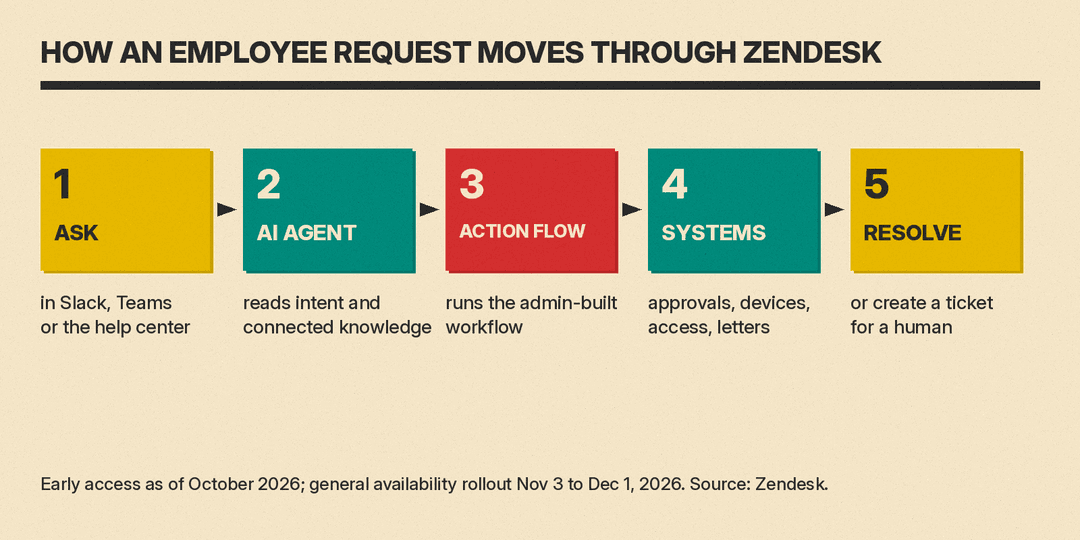
An employee asks for something in a tool they already use, such as Slack or Teams. The AI agent works out what they need. If an admin has connected a matching action flow, the agent runs it and coordinates the work across back-end systems, so the employee does not have to switch apps or chase follow-ups. When the agent cannot finish, the help center notice says it can auto-escalate to a human through a Create ticket action.
The GA notice also says Zendesk will automatically deploy a default AI agent for each brand, and admins can create more custom agents on top.
How Advanced Action Flows work
This is the more interesting part for anyone who has built help desk automations by hand. According to the Advanced Action Flows early access page on Zendesk's community site, an admin describes the workflow in natural language and the builder turns the prompt into JavaScript code plus an auto-generated visual flowchart.
A few design choices stand out on that page:
- AI writes the code once. The AI generates the code at design time, so everyday runs execute as plain code. Zendesk says that makes them auditable and "free of per-run LLM token fees."
- It can wait for people. A flow can pause for up to 30 days to wait for a manager approval or an outside event, for example via Slack or email.
- It reaches other systems. The builder extends to any REST API and to core Zendesk objects such as tickets, custom objects, IT asset (ITAM) records, task lists and approvals. The page names Stripe and Confluence as example connectors.
- It has version history. Admins get console logs, network request traces, execution timelines and Git-style versioning with one-click rollback.
Zendesk's help article on editing flows adds that admins can change a flow by editing the code directly or by asking the AI chat, and must publish a flow before it runs automatically.
The run-as-code approach matters for cost and trust. A flow that grants system access should do the same thing every time, and a security or IT lead can read what it does. The AI helps write it; it does not improvise each run. For a broader look at how work tools are adding event-driven agents, see our piece on Slackbot's event-triggered tasks.
The numbers Zendesk gives
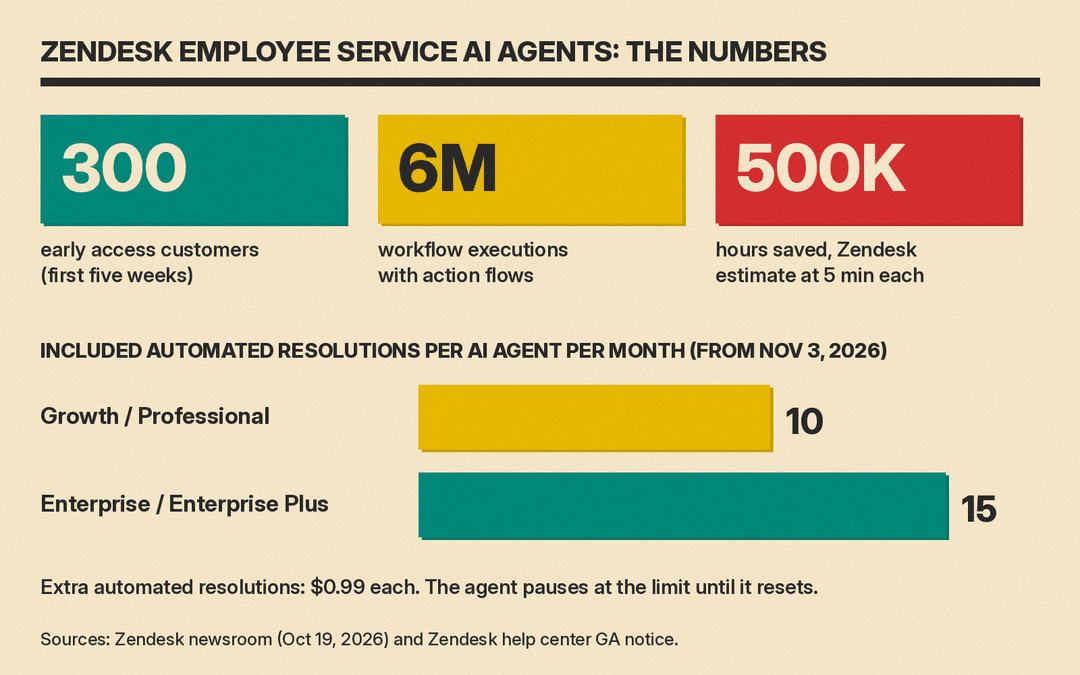
Zendesk says that in the first five weeks of early access, 300 customers ran 6 million workflow executions with Advanced Action Flows. It puts the time saved at an estimated 500,000 hours, and the footnote explains how: a "conservative industry benchmark of five minutes saved per workflow execution." That is Zendesk's own estimate, not a measured figure from customers.
Pricing and plan limits
From November 3, 2026, according to the help center notice, every eligible account gets a monthly allowance of automated resolutions for each employee service AI agent:
- Growth and Professional plans: 10 automated resolutions per AI agent per month.
- Enterprise and Enterprise Plus plans: 15 automated resolutions per AI agent per month.
When an agent uses its allowance, it pauses until the limit resets the next month, unless the account buys more automated resolutions at $0.99 each. Purchases go through the Subscriptions page in Admin Center or a Zendesk account rep.
Those allowances are small. A team that expects an agent to handle routine requests all month should plan on paying per resolution, and should check how the pause would affect staff if the allowance runs out mid-month.
Who gets it
The notice says the rollout covers Employee Service Suite Growth plans and above, plus Customer Service Suite accounts that use Zendesk for employee services. Customer Service Suite accounts will be moved to the employee service version of Launchpad; those that want to opt out must contact Zendesk before the rollout start date.
Until then, both features sit in Zendesk's open early access program. Admins can opt in to Advanced Action Flows in Admin Center under Apps and integrations, then Actions, then Advanced action flows, per Zendesk's setup guide.
Why it matters
Internal help desks are a natural fit for AI agents. Requests repeat, the answers live in a handful of systems, and much of the work is routing approvals. Zendesk is betting that the hard part is not the chat but the doing: getting a laptop shipped or access granted across several tools. Pairing an agent with fixed, reviewable code is a sensible way to let it act without letting it guess.
For small and mid-size teams, the practical questions are simple. Which requests repeat most? Can an admin describe them clearly enough to build a flow? And how many resolutions a month will the agent need once the included allowance runs out? Teams comparing approaches can also read how Salesloft packages AI sales plays and how Notion rebuilt its AI agents.
Sources
- Zendesk newsroom: Zendesk Introduces Employee Service AI Agents
- Zendesk help: Coming soon, the general availability of employee service AI agents
- Zendesk community: Welcome to the Advanced Action Flows EAP
- Zendesk help: Creating advanced action flows (EAP)
- Zendesk help: Editing and managing advanced action flows (EAP)
