
Project management apps used to be places where you typed in tasks and dragged cards across a board. In 2026 most of the big ones also ship AI: assistants that summarize a project, agents that take on routine steps, and automations that sort incoming requests. The names and the billing models differ a lot from one app to the next, so it is hard to compare them on a feature list alone.
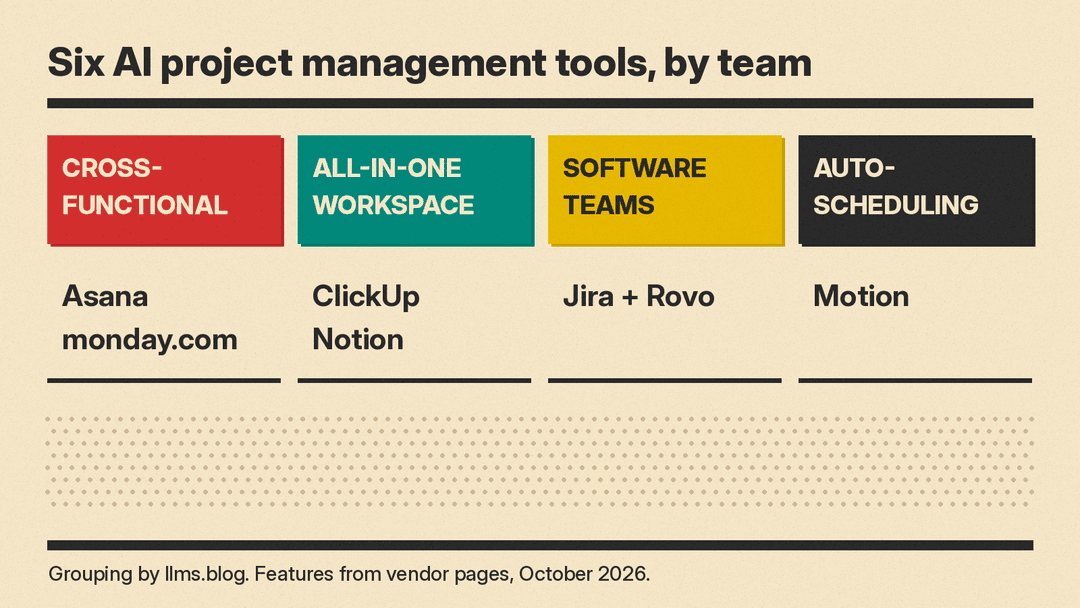
This guide covers six real tools, grouped by the kind of team they suit. Features and prices come from each vendor's own pages when we checked them in October 2026. Plans, AI credits and limits change often, so check the vendor's page before you buy. If you mainly want AI notes from meetings, see our guide to AI meeting note takers, and if your project tracking lives in spreadsheets, our best AI tools for Excel and Google Sheets guide.
How to choose an AI project management tool
Before you compare AI features, decide three things:
- Where your work already lives. AI in a project tool works best on the tasks, docs and comments that are already in it. A tool your team does not use has nothing for the AI to read.
- How the AI is billed. Some vendors include a set number of AI credits or requests in each plan and sell more on top. Others sell AI as a separate add-on. Read the AI line on the pricing page, not only the seat price.
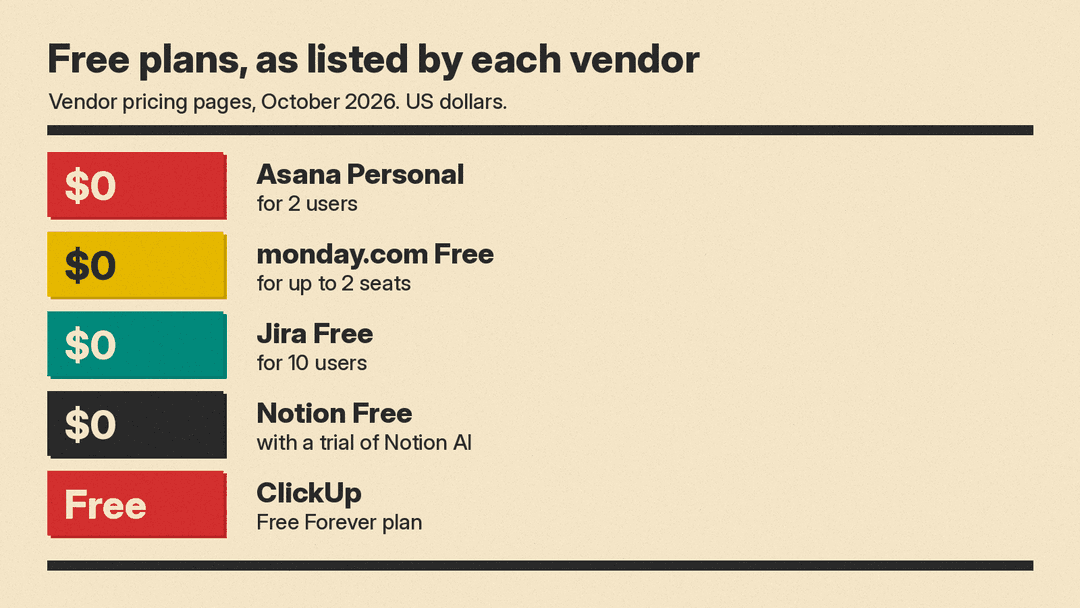
- What the free plan includes. Several free plans below cover two users or a small team, but not every free plan includes the AI features.
For cross-functional teams: Asana and monday.com
These two tools are built for teams outside engineering too, such as marketing, operations and IT, and both now sell AI agents alongside the core task tracker.
Asana
Asana groups its AI under the name Agentic Work Management. Its AI page lists four parts:
- AI Teammates: "More than 30 prebuilt AI Teammates for marketing, ops and IT," plus industry Teammates for manufacturing, retail, professional services and healthcare.
- Asana Dash, which Asana calls "Your AI chief of staff." The page says it "routes work to the right AI Teammate and surfaces your next step from meetings, Slack, and email."
- AI Studio, for "no-code automations that intake requests, classify and route tasks, and send alerts."
- AI Connectors and MCP, so your team can "work directly from ChatGPT, Claude, Gemini, and more."
On the Asana pricing page, the Personal plan is "$0 Free forever" for "2 users," and its feature table does not list AI Teammates or AI Studio for that plan. Starter and Advanced each include AI Teammates and Asana Dash with "5 requests per user per month, up to 50 requests per account." AI Studio on Starter "Includes 50K credits per billing account per month," and on Advanced "Includes 75K credits per billing account per month." Extra AI requests cost "$0.50 per AI request, billed upfront" as prepaid packs, or "$0.60 per AI request, billed monthly" on demand. Starter is "$10.99" per user, per month billed annually ($13.49 billed monthly), and Advanced is "$24.99" per user, per month billed annually ($30.49 billed monthly).
Good for: teams that want ready-made agents for common workflows and a clear per-request price for extra AI use.
monday.com
monday.com builds its AI into boards. Its pricing page describes these AI features:
- Sidekick, which the page calls "an intelligent context-aware AI assistant that understands, connects, and runs your work."
- An AI meeting notetaker that "keeps your team focused during meetings and turns conversations into actionable insights."
- AI columns, which "run your repetitive work directly within your boards."
- An "AI agent workforce," where agents "take on specialized tasks."
The Free plan is "$0 free forever" for "Up to 2 seats," and the page says "AI features Available from Basic." In the page's default view (10 seats, yearly), Basic is "$9 seat / month" with "1,000 AI credits / month," and Standard is "$12 seat / month" with "2,000 AI credits / month." Pro is "$19 seat / month," and its total includes "3,000 credits." Each of these totals is "billed annually." The page also says "Need more? Add credits anytime." For one of monday's newer AI products, see our monday.com Harmony explainer.
Good for: teams that already run work on boards and want AI inside those boards, with AI credits counted in each plan.
All-in-one workspaces: ClickUp and Notion
These tools combine tasks, docs and chat in one app, so the AI can draw on more than the task list.
ClickUp
ClickUp Brain is the AI layer in ClickUp. The ClickUp pricing page lists a Brain AI option with "Unlimited Brain Assistant," "Unlimited @Brain Agent" and "Unlimited AI chat Claude, ChatGPT, Gemini," and an Everything AI option that adds "Unlimited AI Notetaker," "Unlimited AI Fields" and "Unlimited AI Automations & Dashboards." It also sells AI Super Credits at "$10 per 10,000 credits," which "fuel Super Agents, AI Fields, Automations, Image Generation, and more."
The page showed more than one plan layout when we read it. One layout lists Brain AI at "$9 Per user/month" and Everything AI at "$28 Per user/month." Another layout bundles ClickUp Brain² into the plans themselves: Core at $9 and Business at $17 per user per month billed yearly, with "1K credits" and "1.5K credits" per user per month, pooled. Both layouts include a free plan (Free Forever). Because the two layouts differ, confirm the price for your workspace at checkout. ClickUp also says that to upgrade, "you'll need to upgrade your entire Workspace."
Good for: teams that want tasks, docs, chat and AI chat with several model providers in one tool.
Notion
Notion AI works on the pages and databases where many teams keep project plans. On the Notion pricing page, the Free and Plus plans include a "Trial of Notion AI." The Business plan adds "Notion Agent," "AI Meeting Notes" and "Enterprise Search Beta." In the page's default view (billed yearly), Plus is "$10 per member / month" and Business is "$20 per member / month," and the page says "Save up to 20% with yearly." Custom Agents, which "handle repetitive tasks autonomously," are "Free to try, then $10 per 1,000 monthly Notion credits."
Notion's AI page says the Business plan includes, per seat, "1,500 Standard credits / month" for work "where Notion picks the model" and "500 Select credits / month" for work "where you pick the model, plus Custom Agents you own."
On data use, Notion's AI security practices page says: "Notion AI can only ever use content you give it access to," and "By default, your customer data is not used to train models." The same page says the current list of AI providers with access to customer data is kept on Notion's Subprocessor page. Our Notion AI agents explainer covers how the agents and credits changed.
Good for: teams whose plans, specs and meeting notes already live in Notion docs and databases.
For software teams: Jira with Rovo
Jira
Jira is Atlassian's tracker for software and other teams, and its AI comes from Rovo. Atlassian's Rovo page says "Rovo agents keep your workflows moving, handling next steps and keeping everything on track," and that Rovo can "Pull context across people, projects, and code." It also lists ways to use Rovo outside the Jira app: on desktop, on mobile, as a browser extension, via MCPs and in the command line.
The Jira pricing page lists Free as "Free forever for 10 users" at "$0." In the default view when we checked, Standard was "$8.48 per user / month" and includes "Rovo Search, Chat, and Agents, and integrated AI-powered work features." Premium was "$15.56 per user / month." The page says Rovo Search, Chat and Agents are included on every paid plan, and "The Free plan does not include Rovo." The page has a Monthly and Annually toggle and a team-size field, so your price can differ.
Good for: software and product teams that already plan sprints in Jira and keep docs in Confluence.
For auto-scheduling: Motion
Motion
Motion focuses on scheduling. Its site lists an "AI Project Manager" to "Plan and manage projects automatically," an "AI Gantt Chart" to "Visualize projects over time with auto-scheduling," and an "AI Calendar" to "Auto-plan your day with smart scheduling." It also lists an AI Meeting Notetaker and AI Docs.
The Motion pricing page lists two plans, Pro AI and Business AI. In the default view (Teams, billed annually), Pro AI is "$19 /seat /mo" with "7,500 credits/seat/month," and Business AI is "$29 /seat /mo" with "15,000 credits/seat/month." Business AI adds "Team Capacity Planning," "Timeline & Gantt Charts" and "Time Tracking." Extra credits cost 25 cents per 100 on Pro AI and 19 cents per 100 on Business AI. The page lists no free plan; it says "Start your free trial."
Good for: people and small teams who want the tool to place tasks on the calendar for them.
Which one should you try first
- If your team already uses one of these apps, start with the AI inside it. The AI is only as useful as the work it can read.
- If you are choosing from scratch and want ready-made agents, compare Asana's AI Teammates with monday.com's AI agents, and read how each plan counts AI requests or credits.
- If your plans live in docs as much as in tasks, test Notion or ClickUp.
- If you run software sprints, Jira with Rovo keeps the AI next to your issues and Confluence pages.
- If your problem is finding time to do the work, try Motion's auto-scheduling.
Most of these tools have a free plan or a free trial. Run one real project through two of them for a week before you commit, and watch how fast you use the included AI credits.
