
AI meeting note takers record a call, transcribe it, and turn it into a summary with action items a few seconds after you hang up. There are now two kinds: standalone apps that work across Zoom, Google Meet, and Microsoft Teams, and note takers built into the meeting platform or workspace you already pay for. This guide compares nine of them for small and midsize teams. Every price and limit below was checked on the vendor's own pricing or help page on October 19, 2026, in US dollars per user per month. Prices change often, so confirm at checkout.
The short answer
- Already on Google Workspace or Microsoft 365? Start with the built-in option. Google Meet's "Take notes for me" and Copilot in Teams keep notes inside the documents and permissions you already manage.
- Want the best free plan? Fathom's free plan lists unlimited recordings and transcription, and Fireflies lists unlimited transcription with limited AI summaries.
- Hate meeting bots? Granola captures audio from your device, so no bot joins the call. Fathom also offers bot-free capture in beta on Mac.
- Sales team? Fathom Business adds CRM field sync and a deal view. Fireflies includes CRM integrations on its paid plans and adds conversation intelligence on Business. Otter Enterprise adds the Otter Sales Notetaker.
- Notes live in Notion? Notion's AI Meeting Notes is included on its Business and Enterprise plans.
Two ways these tools capture a meeting
Most standalone note takers send a bot into your call. It shows up as a participant, records, and posts notes afterward. This works on any platform and anyone in the call can see it, which is honest but sometimes awkward with clients.
A second group captures device audio instead. The app listens to your computer's microphone and speakers, so no extra participant appears. Granola works this way on all plans, and Notion recommends its desktop app for video calls because it "captures all sides of the conversation," according to its help page.
Whichever you choose, tell people you are taking notes. Recording rules differ by country and by state, and some places require every participant's consent. The same question now applies to wearables that listen all day, such as Amazon's Bee devices. Most of these tools have a setting that announces the note taker, and admins on business plans can often enforce it.
Built-in options
Google Meet: "Take notes for me"
Gemini in Google Meet writes notes into a Google Doc that is saved in the organizer's Drive and attached to the Calendar event, according to Google's help page. Late joiners can ask for a "Summary so far." The notes doc has a Quick notes tab with key takeaways and action items, and a Full notes tab with a summary, decisions, action items, and details.
Limits worth knowing:
- It needs an eligible Google Workspace edition or Google AI plan. In our Copilot vs Gemini comparison, Gemini in Meet appears on Business Standard, which is $14 per user per month with a one-year commitment.
- It supports English, French, German, Italian, Japanese, Korean, Portuguese, and Spanish, but only one language per meeting.
- Google recommends it for meetings of 15 minutes to 8 hours.
- Admins can require participants to give explicit consent before notes start.
Best for: teams already on Workspace who want notes in Docs with no extra vendor.
Microsoft Teams: Copilot
Copilot in Teams gives real-time meeting summaries and insights, and Microsoft's Facilitator agent helps run meetings, according to Microsoft's Copilot for business page. This comes with the paid Microsoft 365 Copilot license, not the free Copilot Chat. For small businesses, Microsoft 365 Copilot Business is $21 per user per month at list, shown at $18 on a first-year annual promotion, on top of a Microsoft 365 business plan. Teams features need a Teams license.
Best for: Microsoft 365 companies that also want Copilot in Outlook, Word, and Excel. If you only want meeting notes, a standalone tool costs less.
Zoom: ZoomMate
Zoom's AI assistant is now called ZoomMate. Its free Basic tier includes meeting summaries for 3 hosted meetings per month, in-meeting questions for 3 hosted meetings per month, and AI note-taking (My Notes) for Zoom and third-party meeting platforms 3 times per month, according to Zoom's ZoomMate page. Paid plans use AI credits and are listed on Zoom's ZoomMate pricing page. We could not confirm the paid price from the page, so check it before you buy.
Best for: teams that run most meetings in Zoom and want to try notes with no new tool.
Notion: AI Meeting Notes
Notion's AI Meeting Notes captures, summarizes, and organizes notes inside a Notion page. It is available on Business and Enterprise plans and on eligible mobile subscriptions that include Notion AI, according to Notion's help page. Starting 15 minutes before a calendar meeting, a "Join and transcribe" option can appear in the event. Notion warns that speaker labels may be unreliable in group meetings or when several people share one microphone. Business is listed at $20 per member per month on Notion's pricing page.
Best for: teams that already plan projects in Notion and want notes next to their tasks.
Standalone note takers
Fathom
Fathom's pricing page lists a free plan with unlimited recordings and transcriptions, instant AI call summaries, and a choice of bot-free (beta, Mac) or bot capture.
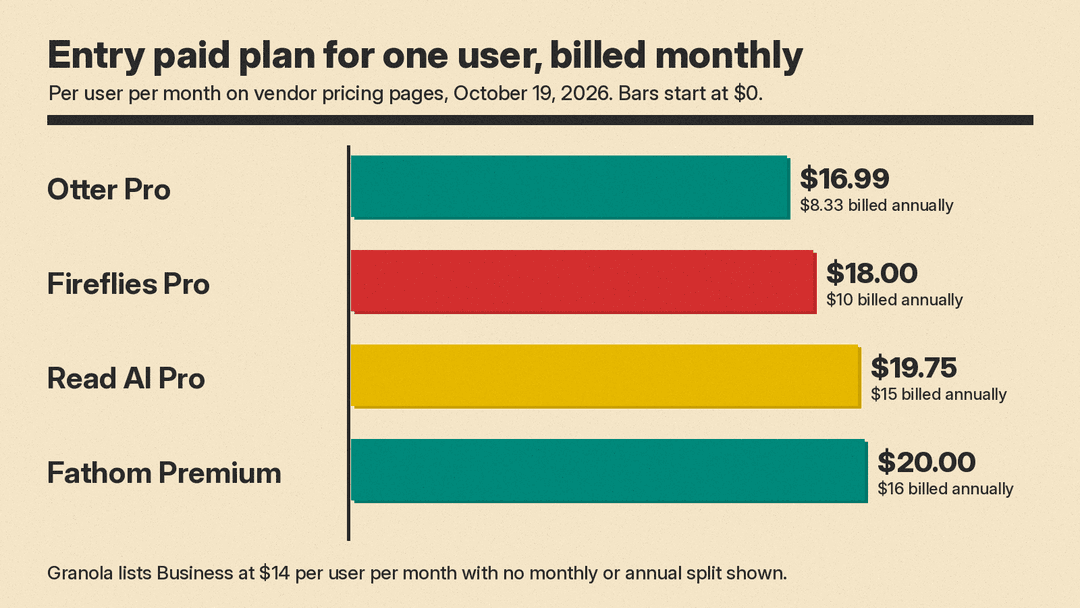
- Premium (individuals): $20 per month billed monthly, $16 billed annually. Adds advanced summaries, AI action items, and a conversational meeting assistant.
- Team: $19 billed monthly, $15 annually, per user, two-user minimum. Adds global search and shared highlight playlists.
- Business: $34 billed monthly, $25 annually, per user. Adds CRM field sync, deal view, coaching metrics, and AI scorecards.
- Enterprise: contact sales, for SSO, SCIM, and custom data retention.
Fathom also lists integrations with Claude and ChatGPT, plus a public API and MCP server. MCP, the Model Context Protocol, lets AI assistants read data from other apps.
Best for: the strongest free tier, and sales teams that want CRM sync.
Fireflies
Fireflies' pricing page lists four plans:
- Free: unlimited transcription, limited AI summaries, 400 minutes of storage per team, and 20 AI credits.
- Pro: $18 per seat billed monthly, $10 billed annually. Unlimited AI summaries and 8,000 minutes of storage.
- Business: $29 billed monthly, $19 annually. Unlimited storage, conversation intelligence, and team analytics.
- Enterprise: $39, annual billing only.
Fireflies supports Zoom, Google Meet, Microsoft Teams, and other platforms, and it can record through a Chrome extension without the bot. It says English is its primary language, with Spanish, French, Portuguese, Italian, and more than 100 other languages in beta.
Best for: low-cost annual plans and teams that want conversation analytics.
Otter
Otter's pricing page lists:
- Basic (free): 300 transcription minutes per month and 3 lifetime file imports.
- Pro: $16.99 per user billed monthly, $8.33 billed annually. 1,200 minutes, meetings up to 90 minutes, and Salesforce, HubSpot, and Zapier integrations.
- Business: $30 billed monthly, $19.99 billed annually. Unlimited meetings, meetings up to 4 hours, and admin features such as activity logs and usage analytics.
- Enterprise: contact sales. Adds the Otter Sales Notetaker, SSO, SCIM, and a HIPAA add-on.
Otter offers live transcription during the meeting, which helps people who rely on captions.
Best for: live transcripts and long meetings on the Business plan.
Granola
Granola's pricing page lists:
- Basic: $0, with 30 days of meeting history.
- Business: $14 per user per month. Unlimited history, integrations with Notion, HubSpot, Attio, Affinity, and Zapier, an API, pre-meeting briefs, and follow-up emails.
- Enterprise: $35 per user per month. Adds SSO, SCIM, HIPAA-compliant workspaces, and admin-enforced notice that Granola is in use.
Granola captures device audio with no bot on every plan and says audio is deleted after transcription. You can write as much or as little as you like during the call, and Granola uses the meeting context to write the notes, according to its homepage. It has desktop, iOS, Android, and Apple Watch apps.
Best for: people who dislike bots in client calls and want notes they can steer.
Read AI
Read AI's pricing page lists:
- Free: 5 meeting transcripts per month.
- Pro: $19.75 per user billed monthly, $15 annually. Unlimited transcripts and integrations with Notion, Salesforce, HubSpot, Jira, Confluence, and Zapier.
- Enterprise: $29.75 billed monthly, $22.50 annually. Adds audio and video playback and video highlights.
- Enterprise+: $39.75 billed monthly, $29.75 annually. Adds HIPAA compliance, SAML, SCIM, and custom data retention.
Read AI also summarizes email and messages, and includes a personal meeting coach.
Best for: people who want one summary tool across meetings, email, and chat.
Free plans compared
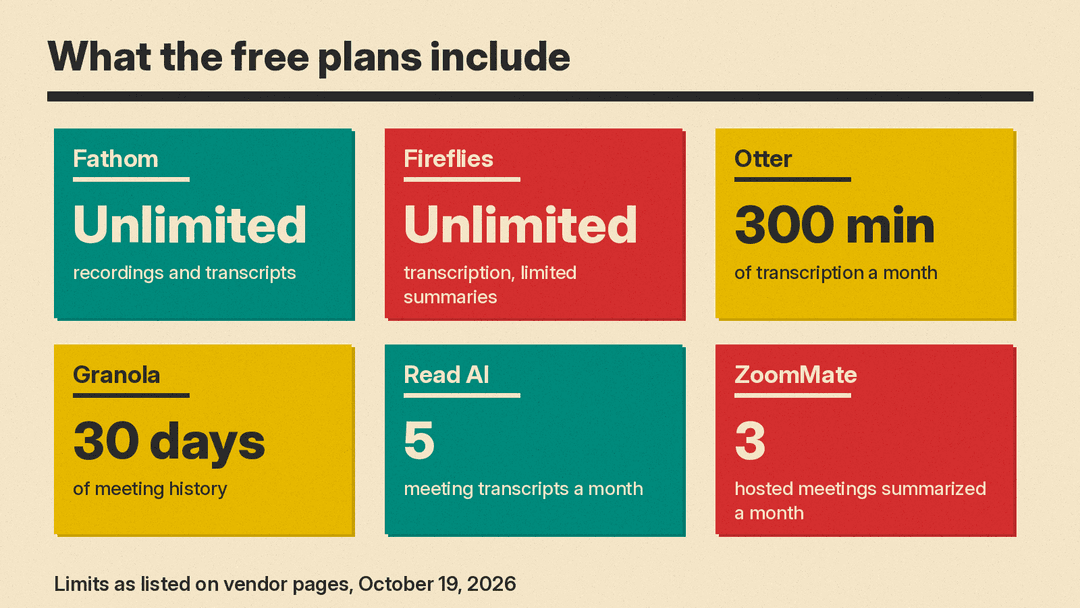
Free plans differ more than paid plans. Fathom and Fireflies are the most generous on recording. Otter caps minutes, Read AI caps meetings, Granola caps how far back you can see, and ZoomMate's free tier caps hosted meetings. If you have more than a few calls a week, the paid tier is where you will end up, so test the free plan mainly for note quality.
How to choose in four steps
- Start with what you pay for. If your company has Google Workspace Business Standard or Microsoft 365 Copilot, try the built-in note taker for two weeks before you buy anything.
- Decide on bots. If clients find a bot off-putting, test Granola or Fathom's bot-free mode. If you want everyone to see that notes are being taken, a bot is the clearer signal.
- Check where notes need to go. Sales teams should test the CRM sync on real deals. Teams in Notion should test Notion's own notes first. Ask whether the tool can push notes to Slack, your CRM, or an AI assistant through MCP.
- Check the admin controls before you roll out. SSO, data retention, consent notices, and HIPAA support often sit on the top plan only. If you handle client or health data, price the plan that has those controls, not the entry plan.
A simple trial plan
Pick two tools. Run both for two weeks with three people: one who leads client calls, one who runs internal standups, and one who joins long planning meetings. After each meeting, ask them to rate the notes on three questions: Were the action items right? Were names and numbers right? Did they still need their own notes? The tool that wins on the second question usually wins overall, because a wrong number in a summary costs more than a missing one.
For more ways to use AI at work, see our guide to ChatGPT Slides for work and our list of the best AI tools for marketers.
Bottom line
As of October 2026, the built-in note takers in Google Meet and Microsoft Teams are the easy first step for companies already paying for those suites. For everyone else, Fathom has the strongest free plan, Fireflies has one of the lowest annual paid prices at $10 per seat, Granola is the pick if you want no bot in the call, and Otter and Read AI suit teams that want live transcripts or summaries beyond meetings. Test note accuracy on your own calls before you commit, and tell people when the AI is listening.
