
An AI image tool turns a short piece of text, the prompt, into a picture. The same tool can give you a flat, generic image or exactly the poster you had in mind. The wording of the prompt is the part you control.
This guide covers the parts of a good image prompt, how to ask for text inside an image, how to edit and iterate, how to use reference images, and common mistakes. At the end there is a set of example prompts you can copy and adapt.
The advice comes from the official prompt guides of three image tools: Google's Gemini image generation guide, OpenAI's image generation guide and Midjourney's Prompt Basics. Where they disagree, this guide says so. For general prompting tips, see our beginner's guide to writing better AI prompts. To choose between the Google and OpenAI models, see our GPT Image 2.5 vs Nano Banana 2.1 comparison.
What a prompt is
Midjourney's docs define a prompt as "the text or phrase you use to tell Midjourney what kind of image or video you want." It can be one word or a complete phrase. A short prompt lets the tool's default style fill in the gaps. In Midjourney's words, "Fewer details mean more variety, but you get less control over the outcome."
Google's guide makes the same trade from the other side: "The more specific you are, the more control you have over the results."
So the first decision is simple. If you want to explore, write less. If you need a specific result, describe the details that matter to you.
The parts of a good image prompt
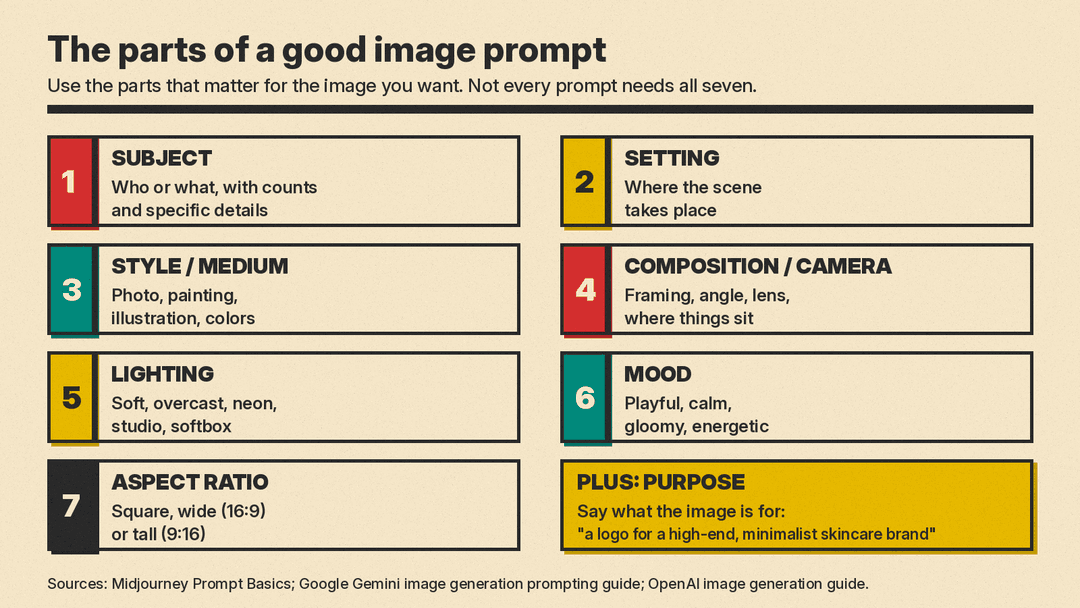
Midjourney's docs list areas to consider when a detail matters to you: subject, medium, environment, lighting, color, mood and composition. Google's templates use the same building blocks. You do not need every part in every prompt. Use the ones that matter for the image you want.
Subject
Who or what is in the picture: a person, an animal, a character, a place or an object. Be precise. Midjourney suggests specific numbers instead of vague plurals, so "three cats" rather than "cats", and collective nouns such as "flock of birds" rather than "birds". It also suggests specific words: "huge", "gigantic" or "enormous" instead of "big".
Google calls this being hyper-specific. Its example: instead of "fantasy armor," write "ornate elven plate armor, etched with silver leaf patterns, with a high collar and pauldrons shaped like falcon wings."
Setting
Where the scene takes place. Midjourney's examples are indoors, outdoors, on the moon, underwater and in the city. Google's photo template puts the subject "in a [setting description]".
Style and medium
What kind of image it is. Midjourney lists photo, painting, illustration, sculpture, doodle and tapestry as mediums. For illustrations and stickers, Google says to describe the style, subject and medium, and to name visual details such as bold lines, cel-shading and colors "for consistent results". Color belongs here too: vibrant, muted, pastel, monochromatic, or black and white.
Composition and camera
How the image is framed. Midjourney's examples are portrait, headshot, closeup and birds-eye view. Google recommends photographic and cinematic language to control composition, with terms such as "wide-angle shot", "macro shot" and "low-angle perspective". Its photo template ends with "Shot from a [camera angle] with a [lens type]."
You can also say where things sit in the frame. Google's minimalist template places "a single [subject] positioned in the [bottom-right/top-left/etc.] of the frame" against an empty background, which leaves room for text to be added later.
Lighting
Midjourney lists soft, ambient, overcast, neon and studio lights. Google's product photo template names a setup and its purpose, for example "a three-point softbox setup designed to create soft, diffused highlights and eliminate harsh shadows." Our guide to AI prompts for product photos builds seven templates on that structure.
Mood
The feeling you want. Midjourney's examples are playful, calm, gloomy and energetic.
Aspect ratio
The shape of the image: square, wide or tall. Google's example prompts state it in the text ("Aspect ratio 16:9", "Square image"). The Gemini API also has an aspect ratio setting, and by default it matches the size of your input image, or otherwise makes a 1:1 square. OpenAI's recommended sizes are square, landscape and portrait. In Midjourney, aspect ratio is one of the parameters that you add to the end of your prompt.
Purpose
Google adds one more part: say what the image is for. Its example: "Create a logo for a high-end, minimalist skincare brand" will give better results than "Create a logo." The model uses that context.
Sentences or keywords?
The guides differ here. Google's templates are full sentences that describe a scene. Midjourney says short, simple prompts "typically generate the best images" in its tool, and warns that long lists or detailed instructions "can confuse the process." Its example swaps a long request for "Colored pencil illustration of bright orange California poppies."
A practical rule: write a clear sentence or two that names the details you care about, and cut the rest. For a busy scene, Google suggests step by step instructions: "First, create a background of a serene, misty forest at dawn. Then, in the foreground, add a moss-covered ancient stone altar. Finally, place a single, glowing sword on top of the altar."
Text in images
Signs, labels, posters and logos need words inside the picture. Google's advice is to be clear about three things: the exact text, the font style (described in words) and the overall design. Its template:
Create a [image type] for [brand/concept] with the text "[text to render]" in a [font style]. The design should be [style description], with a [color scheme].
Put the exact words in quotes. OpenAI's example does the same, asking for a gift basket "labeled 'Relax & Unwind' with a ribbon and handwriting-like font."
Two cautions from the docs. OpenAI says its models "can still struggle with precise text placement and clarity." Google says Gemini works best if you first generate the text and then ask for an image with that text. So decide your wording first, keep it short, and check every letter in the result.
Editing and iterating
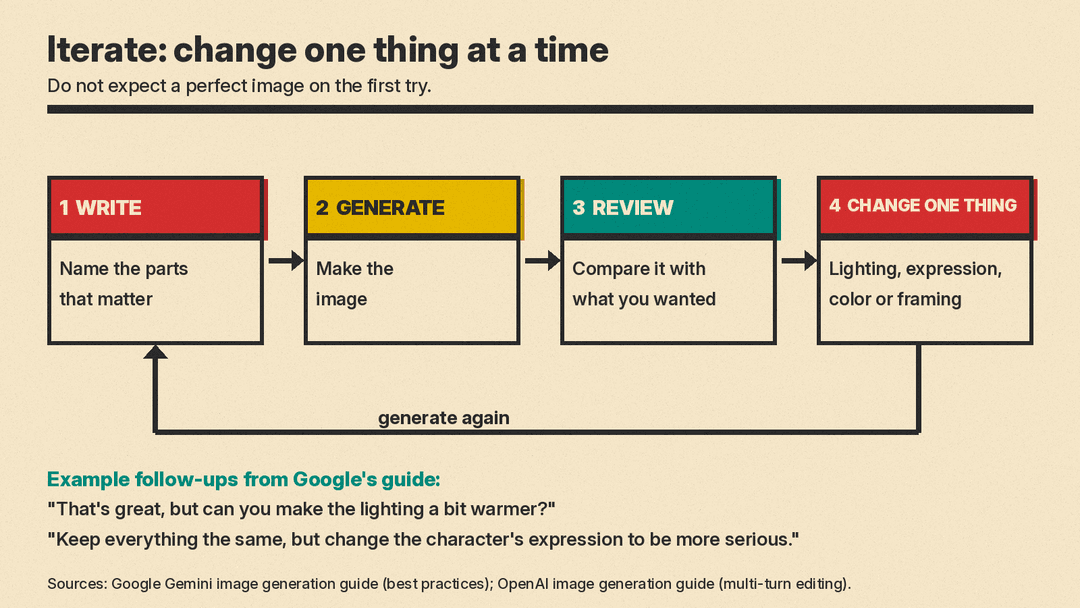
Do not expect a perfect image on the first try. Google says so directly, and calls multi-turn conversation "the recommended way to iterate on images." OpenAI's guide lists multi-turn editing in its Responses API, described as "Iteratively make high fidelity edits to images with prompting." One of its examples is a single follow-up line: "Now make it look realistic."
The loop is simple:
- Write a first prompt with the parts that matter.
- Generate the image.
- Review it against what you wanted.
- Change one thing, such as the lighting, the expression, the color or the framing, and generate again.
Google's sample follow-ups show the style: "That's great, but can you make the lighting a bit warmer?" and "Keep everything the same, but change the character's expression to be more serious."
To change only part of an image, say what to change and what to keep. Google's inpainting template reads: "Using the provided image, change only the [specific element] to [new element/description]. Keep everything else in the image exactly the same, preserving the original style, lighting, and composition." Some tools also accept a mask, a marked area of the image to edit. OpenAI notes that its masking is prompt-based: the model uses the mask as guidance, "but may not follow its exact shape with complete precision."
When developers use OpenAI's image generation tool in its Responses API, the main model automatically revises the prompt "for improved performance." The guide calls this a revised prompt, and developers can read it in the API response.
Reference images
Sometimes a picture explains what you want better than words. All three tools accept images as part of a prompt.
- Combine items. OpenAI's edit tool can make a new image from several reference images. Its example puts the products from four photos into one gift basket.
- Copy a style. Midjourney says adding images to a prompt "influences the style and content" of new images, through Image Prompts, Style References and Edit Model References.
- Restyle a photo. Google's style transfer template asks the model to recreate a photo "into the artistic style of [artist/art style]" while it preserves the original composition.
- Finish a sketch. Google's template: "Turn this rough [medium] sketch of a [subject] into a [style description] photo."
- Keep a character the same. For new angles of one character, Google says to include images you made before in later prompts.
When one detail must not change, such as a face or a logo, Google says to describe it "in great detail along with your edit request."
Common mistakes
Saying what you do not want. Midjourney warns that if you ask for a party with "no cake," a cake might still appear. Describe what you do want instead. Google calls this a semantic negative prompt: instead of "no cars," write "an empty, deserted street with no signs of traffic." Midjourney also has a separate "no" parameter for items to exclude.
Vague counts and sizes. "Cats" and "big" leave the model to guess. Use "three cats" and a precise word.
No purpose. "Create a logo" gives the model nothing to aim at. Say who the logo is for and what the brand is like.
Changing everything at once. Google suggests follow-up prompts that make small changes. If you rewrite the whole prompt after each attempt, it is hard to tell which change helped. Change one thing per round.
Trusting text and layout without checking. OpenAI lists text placement, consistent characters and brand elements across images, and precise placement of elements in structured layouts as known limits. Check these by eye before you use an image.
Expecting the exact number of images you asked for. Google notes its model "won't always follow the exact number of image outputs" a user asks for.
Example prompts to copy
These are examples. They follow the templates in Google's guide and the tips above. Swap the bracketed ideas for your own subject, and expect to iterate.
Example: photo
A photorealistic close-up portrait of an elderly fisherman with a weathered face and a gray wool cap, standing on a wooden dock at dawn. Soft golden light from the low sun on his left. Calm, quiet mood. Shot from eye level with a portrait lens, background softly out of focus. Vertical image, 4:5.
Example: illustration
A flat vector illustration of a fox reading a book under a large oak tree in autumn. The design features clean outlines, simple shapes and a warm palette of orange, mustard and deep green. Cozy, playful mood. White background. Square image.
Example: logo or brand mark
Create a modern, minimalist logo for a neighborhood bakery called "Rise & Crumb". The text should be in a clean, bold, sans-serif font. Use a simple wheat stalk as the only icon. The color scheme is dark brown on cream. Square image.
Example: product shot
A high-resolution, studio-lit product photograph of a glass bottle of olive oil with a plain paper label, on a light oak cutting board. The lighting is a soft three-point setup to show the color of the oil and avoid harsh reflections. The camera angle is a slightly elevated 45-degree shot. Sharp focus on the label. Square image.
Example: background with space for text
A minimalist composition featuring a single green houseplant in a white pot, positioned in the bottom-right of the frame. The background is a vast, empty pale beige wall, creating significant negative space for text. Soft, diffused light from the left. Wide image, 16:9.
Example: UI mockup
A clean mockup of a mobile app screen for a habit tracker, shown on a phone lying flat on a light gray desk. The screen shows a header with the text "Today", a list of three habits with check boxes, and a round progress ring. Simple, modern design with plenty of white space and one teal accent color. Shot from directly above. Vertical image, 9:16.
For the mockup, keep the on-screen words short and few, and check them in the result. Layout-heavy images are one of the areas where OpenAI says models may have difficulty placing elements precisely.
Example: edit request
Using the provided photo of my living room, change only the wall color to a soft sage green. Keep the furniture, the lighting and the camera angle exactly the same.
A short checklist
Before you generate, read your prompt and ask:
- Is the subject specific, with counts and details?
- Did I name the setting, the style or medium, and the framing?
- Did I describe the light and the mood I want?
- Did I state the aspect ratio and the purpose?
- Is any text in quotes, short and spelled the way I want it?
- Did I describe what I want, not what I do not want?
Then generate, review, and change one thing at a time.
