
Microsoft's October 2026 Excel update is mostly about Copilot doing the prep work around analysis, not the analysis itself. The What's New in Excel (October 2026) post lists five Copilot capabilities: a get data skill, a clean data skill, skill builder, skill recorder and an interactive canvas. Microsoft says they range "from bringing in and cleaning data to saving repeatable workflows and sharing the results."
The same post says Microsoft is adding GPT-6.1 Sol and Claude Sonnet 5.5 to Microsoft Copilot, "giving you more model options for how you delegate work to Copilot." There is also one non-AI change: Excel for Windows now lets you name tables as you create them.
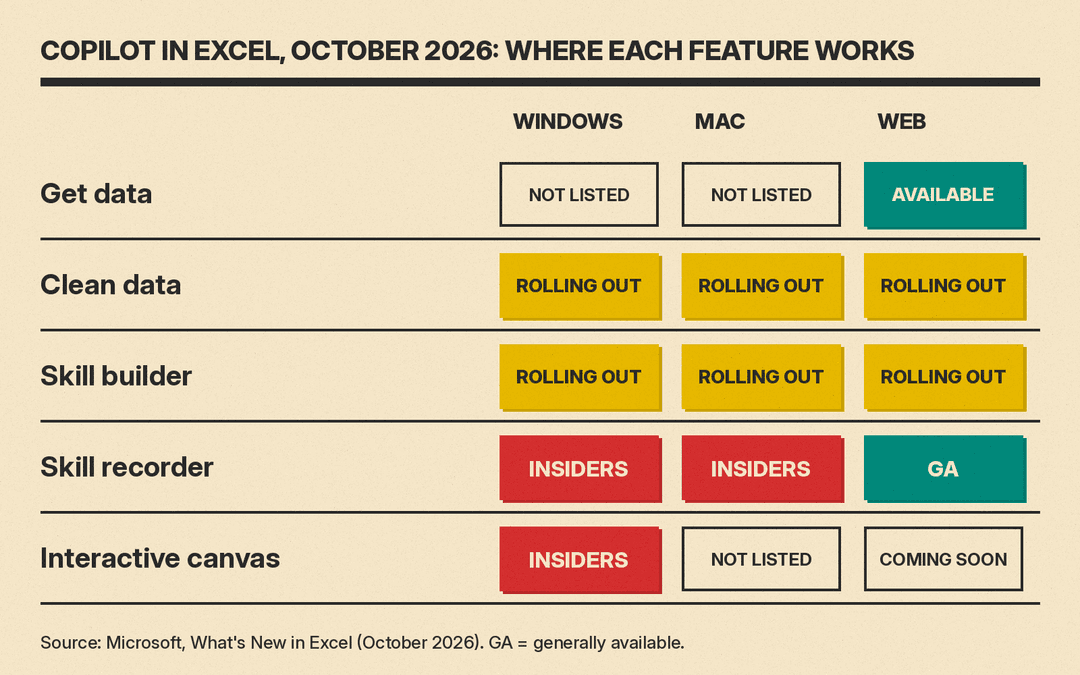
Availability is uneven. Some features are rolling out on all platforms, some are web only, and some are still limited to Insiders. Below is what each one does, where it works today, and what to check before you rely on it.
Get data: Power Query from a plain-language request
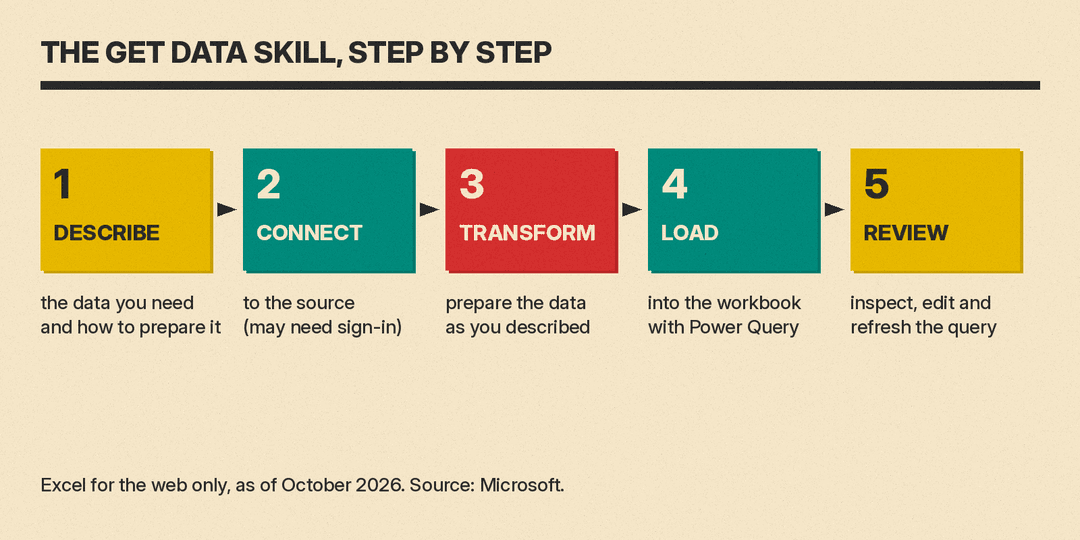
The get data skill is for pulling data into a workbook without building the import by hand. Microsoft's description: "Describe the data you need and how you want it prepared, and the new get data skill handles the rest. It can connect and transform your data, then load the results into your workbook using Power Query."
The important detail is the output. Copilot does not paste a one-off table into your sheet. It builds a Power Query query, which Microsoft says gives you "a query you can inspect, edit, and refresh without having to build it yourself." For anyone who has avoided Power Query because the editor is intimidating, that means the repeatable, refreshable version of an import now starts from a sentence.
Two limits from the post:
- It is currently available to Excel for the web users only.
- "Depending on the data source, authentication may be required."
A Microsoft 365 message center archive lists the related notice as RM577745, "Excel: Get and transform data with Copilot in Excel," dated October 26, 2026 (archive). If you run a Microsoft 365 tenant, that is the item to look for in your own message center.
Clean data: find the problems before they break formulas
The clean data skill inspects data for problems that "can affect formulas, lookups, PivotTables, reports, and AI-generated insights." Microsoft lists the issues it looks for:
- extra spaces
- inconsistent text and number formats
- inconsistent dates
- duplicate values
- values stored as the wrong data type
It explains what it found and why it matters, then proposes corrections. You review the proposed fixes and select which changes to apply. You call it with @clean-data in a Copilot prompt or from the Skills menu. Microsoft says it is "rolling out to general availability on all platforms": Windows, Mac and web.
A lookup that fails because one column stores numbers as text, or a report that double-counts a customer with a trailing space, is the kind of quiet error that clean data is built to catch.
Skill builder and skill recorder: save your process once
Both features turn a recurring task into a reusable Copilot skill. They differ in how you teach it.
- Skill builder works from instructions. You "share your preferred workflow, instructions, previous prompts, or examples of completed work," and Copilot turns that into a skill. It is rolling out to general availability on all platforms.
- Skill recorder works from a demonstration. "As you work, Copilot follows each step and turns it into a reusable skill." It is generally available on Excel for the web, and available to Insiders of Excel for Windows and Mac.
For skill recorder, Microsoft's pitch is that "the next time that task comes up, Copilot is ready," and the task will be "done your way." Good candidates are the weekly jobs that follow the same steps every time: reformatting an export, building the same summary tab, or tidying a report before it goes to a manager. The practical test is whether you can describe the task (use skill builder) or only show it (use skill recorder).
Interactive canvas: reports that stay linked to the workbook
Interactive canvas turns workbook data into what Microsoft calls "a dynamic experience tailored to your audience," for uses such as executive reviews, project updates and status reports. Two details matter:
- It "stays connected to your workbook" and "automatically updates as your data changes."
- You change it by asking Copilot: refine the layout, surface a different insight, or tailor the story for your audience.
This one is the least available. It is limited to Insiders of Excel for Windows, with web "coming soon."
Who should try what first
Based on where each feature is available today:
- If you use Excel for the web: you can try get data, and skill recorder is generally available to you there.
- If you use Excel on Windows or Mac: clean data and skill builder are rolling out to all platforms. Skill recorder and interactive canvas need the Insider program on desktop.
- If you manage Microsoft 365 for a team: check message center item RM577745 for get data. Microsoft notes that some data sources may require authentication.
What to check before trusting the output
These features change your data or build things you will reuse, so a little checking goes a long way.
- Read the query. The get data skill gives you a Power Query query you can inspect. Open it once and confirm the source and the steps match what you asked for before you build a report on it.
- Review fixes one by one. Clean data proposes corrections and lets you choose. Do not accept them all on a sheet you have not looked at; "duplicate values" are sometimes real repeat orders.
- Test a skill on a copy. A recorded or built skill repeats your steps. Run it on a copy of last week's file before you trust it with this week's.
- Expect rollout gaps. "Rolling out" means not everyone has it yet. If a feature is missing, check your platform and channel against the list above before assuming something is broken.
Why it matters
This update aims Copilot at the steps that come before analysis, importing and cleaning data, and, in the get data and skill features, leaves behind something you can open and rerun: a Power Query query or a saved skill. That is easier to check than a one-time AI answer, and it fits how small teams already work in spreadsheets: the same file, refreshed every week.
For background on how Copilot fits into Office more broadly, see our explainer on Office in the Copilot app.
If you are comparing Copilot with other add-ins, our roundup of the best AI tools for Excel and Google Sheets covers the main options, and our ChatGPT prompts for Excel formulas cover formula work outside Copilot.
