
OpenAI and Google now sell the two image models most people will compare first. OpenAI shipped GPT Image 2.5 on September 8, 2026, as ChatGPT Images 2.5 in the app and as two API models, Flare and Sunburst. Google released Nano Banana 2.1 on October 6, 2026, rolling it out to the Gemini app, AI Mode in Search and its developer tools.
The short answer: GPT Image 2.5 wins on quality in independent blind tests, and Nano Banana 2.1 wins on price by a wide margin. Which one you should use depends on whether you are making a few images by hand or thousands through an API, and on what kind of image you need. This guide compares the two on quality, price, features, limits and where you can use them, as of October 2026. Every number comes from the vendors' own pages or from the public leaderboards linked inline. We did not run our own test.
The short version
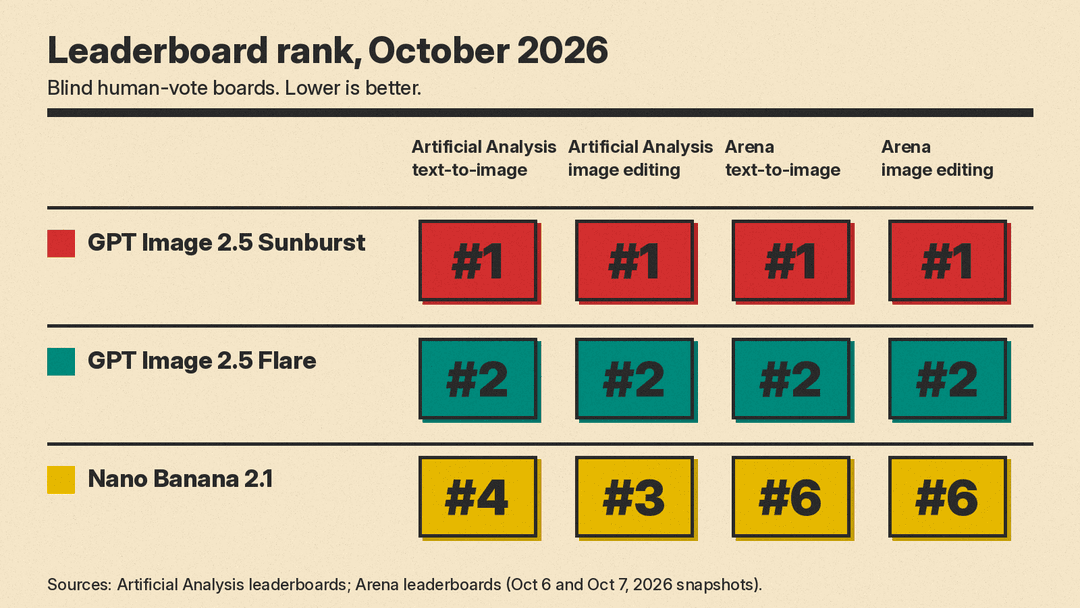
- Best quality: GPT Image 2.5 Sunburst ranks first, and Flare second, on both the Artificial Analysis and Arena leaderboards for text-to-image and for editing. Nano Banana 2.1 ranks between third and sixth on the same four boards.
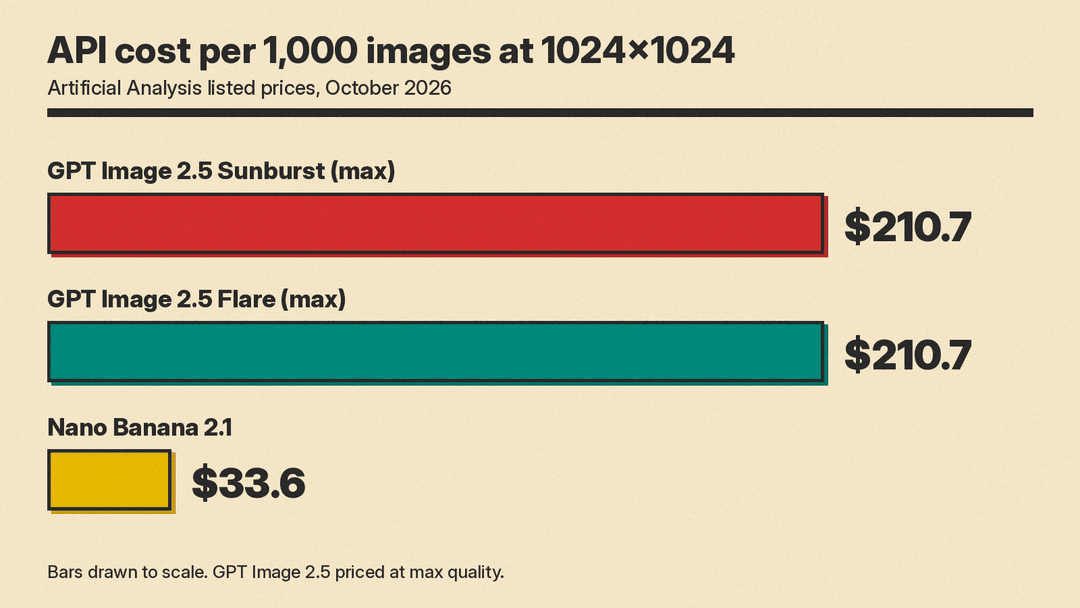
- Best price: Artificial Analysis lists Nano Banana 2.1 at $33.6 per 1,000 images and GPT Image 2.5 at $210.7 per 1,000 images at its max quality setting. That is more than six times the cost.
- Best for facts, infographics and many references: Nano Banana 2.1, which can ground images in Google Search, accepts up to 14 reference images and takes video and PDF input.
- Best for chat-driven edits and transparent assets: GPT Image 2.5, which OpenAI built around precise multi-turn editing and which supports transparent PNG and WebP output.
What each model is
GPT Image 2.5 is OpenAI's current image model family. In ChatGPT it appears as Images 2.5. OpenAI says it produces more natural lighting and richer textures, preserves the subjects in reference photos better, follows edit instructions more reliably across several turns, and cuts generation latency by up to 50% compared with Images 2.0.
In the API there are two models. According to OpenAI's image generation guide, gpt-image-2.5-flare is for fast, high-quality everyday generation, and gpt-image-2.5-sunburst is for workflows where editing precision matters most. OpenAI calls Flare the default choice for most applications and says it delivers higher-quality images than GPT Image 2 at 50% lower latency. Sunburst trades longer generation times for "an extra level of precision," in OpenAI's words.
Nano Banana 2.1 (gemini-nano-banana-2.1) is Google's latest Gemini image generation and editing model. Google's model page describes it as an update to Nano Banana 2 that keeps Flash-level speed and cost while improving visual quality, prompt adherence, multi-turn character consistency and text rendering. Google positions it as the more efficient counterpart to Nano Banana Pro. The model card says it is based on Gemini 3.6 Flash.
Quality: what the leaderboards say
Two public leaderboards rank image models by blind human votes: people compare images from two anonymous models and vote for the one they prefer. Here is where the two models stand.
- Artificial Analysis text-to-image: GPT Image 2.5 Sunburst (max) is first at 1220 Elo, Flare (max) second at 1207, and Nano Banana 2.1 fourth at 1174. GPT Image 2 (high) sits between them at 1186.
- Artificial Analysis image editing: Sunburst (max) is first at 1199, Flare (max) second at 1182, and Nano Banana 2.1 third at 1152, tied with Microsoft's MAI-Image-2.6.
- Arena text-to-image (October 7 snapshot): Sunburst is first at 1425, Flare second at 1398, and Nano Banana 2.1 sixth at 1328.
- Arena image editing (October 6 snapshot): Sunburst is first at 1524, Flare second at 1481, and Nano Banana 2.1 sixth at 1428.
Three caveats. First, Arena marks all three scores as preliminary. Second, Artificial Analysis ran GPT Image 2.5 at its "max" quality setting, the most expensive one. Third, both boards measure general preference. They do not tell you which model is better at your specific job, such as a menu with exact prices or a product shot that must match a real label.
Google's own model card does not compare Nano Banana 2.1 with OpenAI's models. It compares it only with Google's earlier models. In Google's side-by-side human tests, Nano Banana 2.1 with thinking scored 1050 for overall text-to-image preference, against 990 for Nano Banana 2 and 935 for Nano Banana Pro.
Price: the biggest difference
Both companies charge by tokens, but only Google turns that into a per-image price.
Nano Banana 2.1. Google's Gemini API pricing page lists image output at $30 per million tokens, which it says equals $0.0336 per 1K image, $0.0504 per 2K image and $0.113 per 4K image. Input is $1.50 per million tokens. The Batch API halves those rates, to $0.0168 per 1K image. There is no free tier for this model in the API. Search grounding includes 5,000 free requests a month, shared across Gemini 3 and newer models, then costs $14 per 1,000 requests.
GPT Image 2.5. OpenAI's Flare and Sunburst model pages list the same token rates for both models: $30 per million image output tokens ($15 with Batch), $8 per million image input tokens, and $5 per million text input tokens. OpenAI notes these match GPT Image 2's rates. It does not publish a flat per-image price, and its guide warns that "equal token rates don't mean equal cost per image," because token use varies by model, size and quality setting. There are six quality settings: low, medium, high, xhigh, max and auto. OpenAI suggests low for quick drafts and comparing higher settings for final assets to balance detail, latency and cost.
Side by side. Artificial Analysis prices both at 1024x1024 on each vendor's API: $33.6 per 1,000 images for Nano Banana 2.1, and $210.7 per 1,000 images for both GPT Image 2.5 models at max quality. If you generate 10,000 images a month at those settings, that is about $336 against about $2,107. Lower quality settings may cost less, but OpenAI does not publish per-image figures for them, and the leaderboard results above are for max.
For people using the consumer apps, the API price matters less. ChatGPT Images 2.5 is included across ChatGPT tiers, and Nano Banana 2.1 runs inside the Gemini app.
Features compared
Resolution and shape
- Nano Banana 2.1 outputs at 1K, 2K or 4K, with 1K as the default. It supports wide and tall ratios including 1:4, 4:1, 1:8 and 8:1, and Google says it fixed tiling artifacts on those panoramic ratios at 2K and 4K.
- GPT Image 2.5 accepts custom sizes in multiples of 16 pixels, with ratios between 1:3 and 3:1 and a longest edge of 3,840 pixels. OpenAI labels sizes above 2560x1440 as experimental.
References and inputs
- Nano Banana 2.1 accepts up to 14 reference images, with character consistency for up to 4 characters and object fidelity for up to 10 objects. It also takes video and PDF files as input.
- GPT Image 2.5 takes text and images. OpenAI's guide shows several reference images combined into one new image, and OpenAI says the model is better at preserving subjects from reference photos.
Editing
- GPT Image 2.5 is built around targeted edits. OpenAI says it is better at "editing only what you've asked for, while keeping the rest of the details the same," and at staying consistent over many edits in one conversation. In ChatGPT you can place comments on an image to aim an edit, or draw a rough layout with Sketch.
- Nano Banana 2.1 supports conversational, multi-turn editing too. Google's model card lists gains over Nano Banana 2 in mask and ink-based editing, multi-character consistency and multi-reference editing.
Knowledge and reasoning
- Nano Banana 2.1 can ground images in Google Web and Image Search, which helps with real places, products and current information. Google's docs say grounding cannot yet use real-world images of people from search. It also has configurable thinking levels: minimal, medium (the default) and high.
- OpenAI says GPT Image 2.5 produces more accurate content in images that include real-world information. Its image guide does not describe a search grounding option.
Transparent backgrounds
- GPT Image 2.5 supports transparent backgrounds with PNG or WebP output, which is useful for logos, stickers and product cutouts.
- Google's Nano Banana 2.1 pages do not list transparent output.
Provenance
- OpenAI says it uses C2PA metadata and invisible watermarking on images from its tools.
- Google says every Nano Banana image carries a SynthID watermark.
Known limits, in the vendors' own words
Google's model card is unusually direct. It says Nano Banana 2.1 can render small text poorly (often blurry at 1K), struggles with long paragraphs, does not always keep characters consistent between input and output, sometimes follows masked or doodle edits only partly, and can confuse left and right. It also notes occasional slowness or timeouts.
OpenAI's guide lists its own limits for GPT Image models: complex prompts can take up to two minutes, precise text placement can still be hard, and recurring characters or brand elements may drift across separate generations. OpenAI also says some developers may need to complete organization verification before using GPT Image models, and its rate limit table shows no free tier for either 2.5 model.
Where you can use each one
- GPT Image 2.5: ChatGPT (all tiers), ChatGPT Work and Codex on desktop, mobile and web, plus the OpenAI API through the Image API or the image generation tool in the Responses API. In OpenAI's announcement, Adobe says the 2.5 models are now in Firefly.
- Nano Banana 2.1: the Gemini app, AI Mode in Google Search, Google AI Studio, the Gemini API, Google Ads, Flow and Stitch, according to Google's model card.
Which one should you pick?
- You want the best-looking image and cost is not the issue: GPT Image 2.5 Sunburst. It leads every board above.
- You make images in a chat and refine them step by step: GPT Image 2.5 in ChatGPT, for its editing focus and tools like Sketch and image comments.
- You need a logo, icon or sticker with a clear background: GPT Image 2.5, because transparent output is documented.
- You generate at volume through an API: Nano Banana 2.1. At Artificial Analysis' listed prices it costs less than one sixth as much, and Google's Batch API halves its rate again.
- You need accurate real-world detail, infographics or diagrams: Nano Banana 2.1, with Search grounding. Google's model card reports separate scores for infographic design and infographic factuality.
- You combine many reference images or work from a video or PDF: Nano Banana 2.1, with up to 14 references and video and PDF input.
- You need wide banners or tall scrolling graphics: Nano Banana 2.1, which supports ratios up to 8:1 and 1:8. GPT Image 2.5 stops at 3:1.
How to test them yourself
Leaderboards average thousands of prompts. Your own five prompts will tell you more. Run the same set through both models:
- One image with exact text in quotes, such as a poster headline and a date. Check spelling at full size.
- One edit that changes a single element, such as the background, and must keep everything else.
- One image built from three or more reference photos of the same product or person.
- One image that depends on real-world facts, such as a labeled map or a chart.
- One image at your real production size and ratio.
Compare cost per keeper, not cost per image. A cheaper model that needs three tries can cost more than a pricier one that gets it right the first time. If you want to look past these two, our guide to the best AI image generators covers ten tools, and our FLUX 3 Image explainer covers an open-weights option you can run on your own GPU.
Sources
- OpenAI: Introducing ChatGPT Images 2.5
- OpenAI API: Image generation guide
- OpenAI API: GPT-Image-2.5 Flare model page
- OpenAI API: GPT-Image-2.5 Sunburst model page
- Google: Gemini Nano Banana 2.1 model page
- Google: Nano Banana image generation docs
- Google: Gemini API pricing
- Google DeepMind: Nano Banana 2.1 model card
- Android Authority: Google's latest version of Nano Banana ups the visual quality and consistency
- Artificial Analysis: Text-to-image leaderboard
- Artificial Analysis: Image editing leaderboard
- Arena: Text-to-image leaderboard
- Arena: Image edit leaderboard
