
Slack has opened its code channels to any agent. The Slack Code API is now generally available, Slack said on October 28, 2026, "so any developer can have their agent start a code channel, adding the relevant people and files, posting updates as it works, and archiving the channel when the work is done." Until now, only a handful of launch partners had that access.
For teams that run their own coding agent, or build one to sell, this means the agent can work in Slack the same way Claude, Devin, GitHub Copilot and Vercel's agent already do there. Slack says the API is available "on all Slack plans."
What a code channel is
Slack launched Slack Code in August. A code channel is a temporary channel that an agent opens for one task. Per Slack's developer docs, code channels "are meant to be semi-ephemeral: one channel is created per task, and they're archived when the session finishes." After archive, the channel and its history stay viewable and searchable, and someone can reopen it.
The idea is to move agent work out of private chats and terminal tabs, so teammates can watch the agent, add context and approve changes. In the API announcement, Slack says GitHub Copilot "opens a dedicated code channel on 30% of its agent sessions," and that "more than 150 customers and partners asked for access" to build the same experience for their own agents. In the August launch post, Slack said "over 70% of code channels spin up and close within a single day, from idea to merged PR." These are Slack's own figures.
The Slack Code product page lists agents that work with code channels today, including Claude from Anthropic, CodeRabbit, Datadog, Devin from Cognition, Factory, GitHub Copilot, Lovable, Mistral, Snowflake and Vercel agents.
How the API works
Slack's Build with Slack Code guide walks through the full flow. A developer turns on code channels in the app manifest (features.code_channels.enabled: true). When someone mentions the agent, the app gets an app_mention event and decides whether the request needs a code channel or just a reply in place.
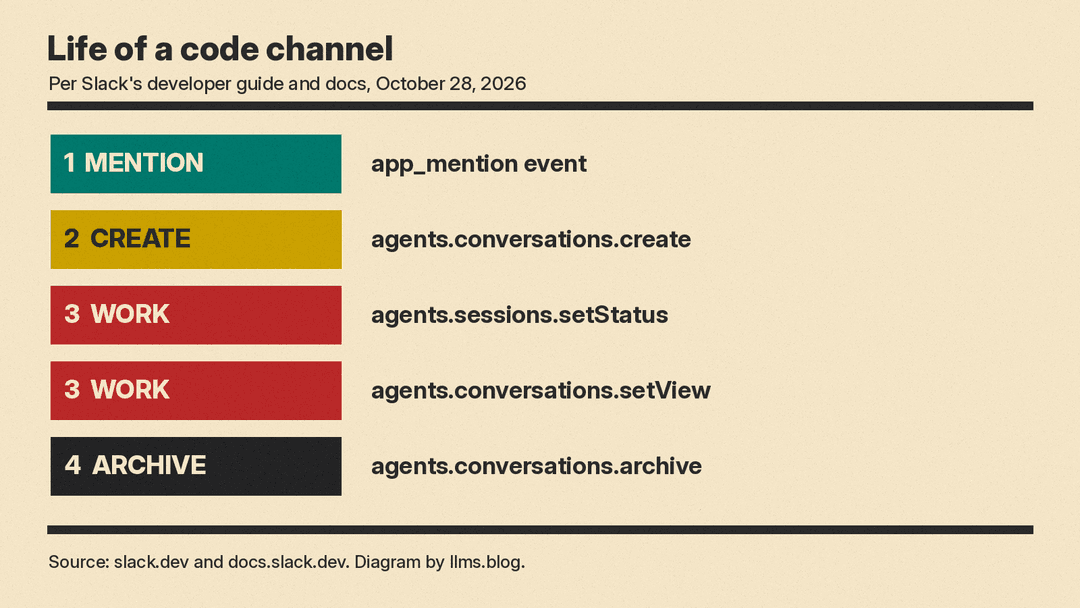
From there, the main steps are:
- Create.
agents.conversations.createopens the channel from the message that started the task. Slack unfurls the new channel in the original conversation and automatically invites the person who wrote that message. - Show status and context.
agents.sessions.setStatusshows whether the agent is processing, andagents.conversations.setPropertiesfills a context bar with items such as the repository, branch or pull request. - Publish work.
agents.conversations.setViewcreates or updates view tabs. The docs list four types: html, diff, block_kit and canvas. Each channel supports a single diff view, and other views use a stableview_keyso later calls update the same tab. - Archive.
agents.conversations.archivecloses the session and can record a summary message.
Agents can also register per-channel slash commands with agents.conversations.setCommands, and edit canvases while keeping teammates' comment anchors in place.
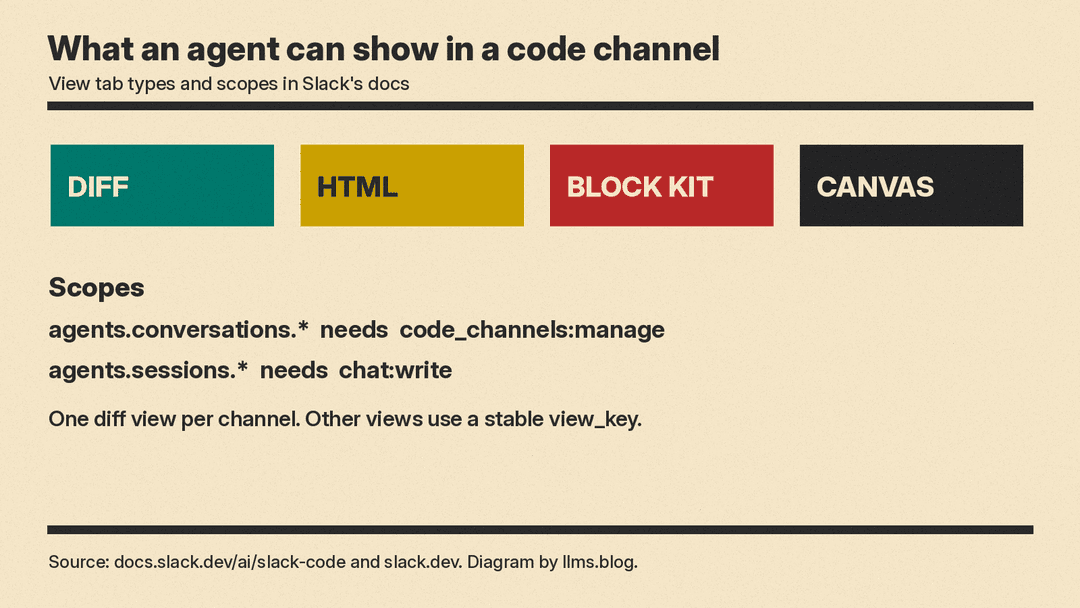
On permissions, the agents.conversations.* methods need the code_channels:manage scope, and the agents.sessions.* methods need chat:write. The docs say every agents.conversations.* method other than create can only be called by the agent bot assigned to the channel or by a channel member. A call from another bot fails with not_authorized.
Governance and what comes next
Slack's pitch to IT is that nothing new needs to be set up. The announcement says the agent "inherits the permissions and admin controls of the channel it works in," and that "message compliance is built in." The product page says messages to agents get the same treatment as other Slack messages, naming EKM, DLP and Discovery APIs.
Two features are not live yet. Slack says an improved pull request experience is "available soon." With it, Slack says GitHub users will be able to "request reviews from people right in Slack," comments will sync both ways between Slack and GitHub, and a prompt to merge will appear in the code channel once a PR is approved and tests pass. An enhanced Agents & Tools tab, which will show all agent conversations and code channels in one place, is also "available soon."
Cost
Slack's announcement says the API is generally available on all Slack plans. It does not list a separate charge for the API, and Slack's posts do not say how usage of the agent or model behind an app is billed.
Why it matters
Other developer platforms made agent news the same day, October 28. Android Studio opened to more than 40 coding agents, including Claude and Codex, and GitHub made Agentic Workflows generally available inside Actions. Slack's pitch is different. Per the announcement, the developer decides what the agent does, and "Slack handles the rest of the interface." The company calls itself "the agent-neutral hub," so a team can swap agents or models later and keep working in the same place.
For developers, the practical win is UI they do not have to build. Per Slack, the APIs show code diffs, HTML previews and thinking steps, so developers can skip building their own UI screens and review steps. For companies with strict security rules that could not use off-the-shelf agents, Slack says a homegrown agent can now get the same code channel experience. It came the same day as Slack's other agent updates, including event-triggered Slackbot tasks and a Skills API.
The open question is adoption outside Slack's partner list. The API is new, and the part aimed at code review, with GitHub review requests, comment sync and the merge prompt, is still marked "available soon."
Sources
- Introducing the Slack Code API: Your agents, your team, one code channel (Slack blog)
- Build with Slack Code: create, review, and archive agent work (Slack Developers blog)
- Slack Code (Slack Developer Docs)
- Slack Code: Where Building is a Team Sport (Slack product page)
- Slack Code: Where Your Team and Agents Build Together (Slack blog, August launch)
