
A vague prompt gets a vague answer. That is not a secret tip; it is the shared starting point in the official prompting guides from OpenAI, Anthropic, and Google. This guide turns those docs into a beginner workflow you can use in ChatGPT, Claude, Gemini, or Grok.
A note on testing: the before-and-after templates below are built from those vendors' published examples and rules. We did not run them against a model for this article, so there are no sample model outputs quoted as "tested." Fill in the brackets, try them in your chat app, and revise based on what fails.
All product details are as of October 2026.
What a good prompt is
OpenAI's ChatGPT Enterprise prompt guide says to treat a prompt like a handoff to a smart intern on their first week. The intern is capable, but they do not know your project, your audience, or what "good" looks like. Anthropic uses a similar test: show your prompt to a colleague with almost no context. If they would be confused, the model will be too.
So a useful prompt is not a clever sentence. It is a short brief that names:
- the job (one deliverable)
- the background the model needs
- the audience, tone, length, and format
- any hard limits (do not invent facts, keep it under 200 words, use only the text below)
Google's Gemini prompting strategies page frames the same idea as clear instructions plus constraints plus examples. The tools differ; the job of the prompt does not.
The five-part checklist
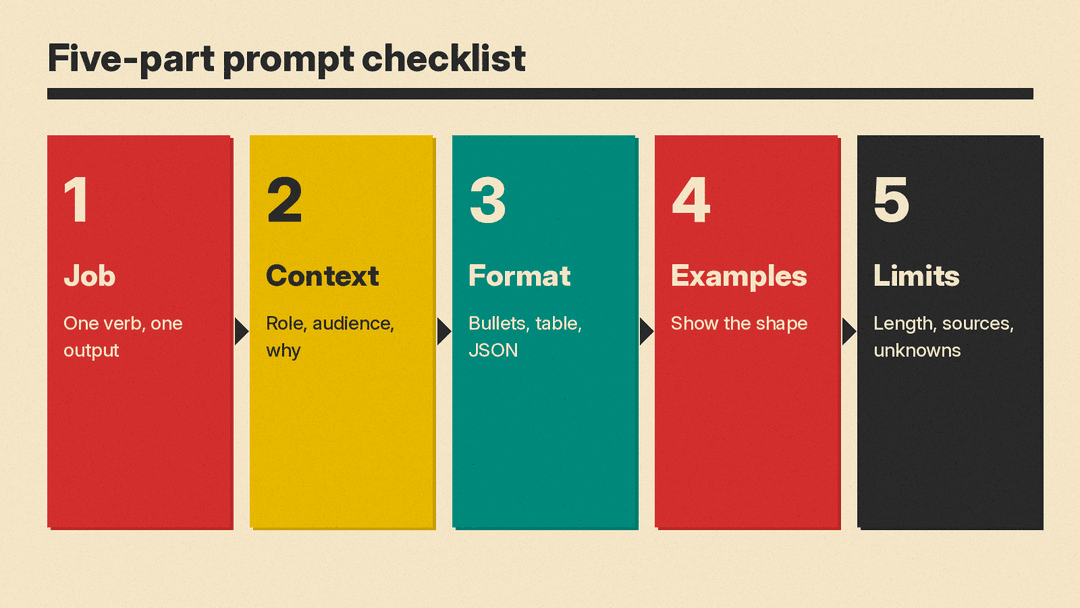
Use this checklist every time. Skip a box only when it truly does not apply.
- Job. One verb and one output. "Write a 150-word email reply," not "help with this email."
- Context. Who you are, who the reader is, and why this matters.
- Format. Bullets, table, numbered steps, JSON, subject line plus body, and so on.
- Examples. One or two samples of the shape you want when the style is hard to describe in words.
- Limits. Word count, sources to use, facts you must not invent, and what to do if information is missing.
OpenAI's everyday-work guide recommends a simple Markdown layout that maps to those five parts:
# Context
What you are working on and any background the model needs.

# Instructions
Exactly what you want the model to do.

# Additional info / Constraints
Tone, length, rules, and acceptance criteria.
You can rename the headings. The point is to separate background, task, and constraints so nothing gets lost in one long paragraph.
Technique 1: Be specific, not fluffy
OpenAI's API prompt guide says to drop vague words like "fairly short" or "not too much more" and replace them with numbers and concrete details. Anthropic's docs say the same: state what you want to see.
Vague
Write something about our product launch that sounds good for LinkedIn.Specific
Write a LinkedIn post announcing the launch of [product] for [audience].
Length: 120 to 160 words.
Tone: calm and concrete, no hype words.
Must include: what it does in one sentence, who it is for, and a soft call to action to [URL].
Do not invent customer quotes or metrics.
Google's Gemini guide also asks you to name constraints on length and format. "Summarize this text in one sentence" beats "summarize this."
Technique 2: Put instructions first, then the source text
OpenAI recommends putting instructions at the beginning and separating them from the material with markers such as ### or triple quotes. Anthropic recommends XML-style tags when a prompt mixes instructions, documents, and examples. Google recommends Markdown headings or XML tags, used consistently in one prompt.
Harder to parse
Summarize the text below as a bullet list of the most important points.
[long pasted article]
Easier to parse
Summarize the text below as a bullet list of the 5 most important points.
Use plain language for a non-expert reader.
If a point is unclear in the source, write "not specified" instead of guessing.

Text:
"""
[paste article here]
"""
For long documents, Anthropic's long-context guidance is to put the documents near the top and the question at the end. Google's Gemini 3 notes say the same: supply large context first, then ask the question, and anchor with a line like "Based on the information above..."
Technique 3: Say what to do, not only what to avoid
OpenAI and Anthropic both warn that "do not" lists work poorly unless you also say the preferred behavior. OpenAI's customer-support example replaces "DO NOT ASK USERNAME OR PASSWORD" with instructions to diagnose the problem and point the user to a help article instead.
Weaker
Rewrite this email. Do not be rude. Do not be long. Do not use jargon.Stronger
Rewrite this email for a customer who is frustrated but still willing to stay.
Tone: calm, direct, and brief.
Length: under 120 words.
Structure: apology for the delay, what you fixed, what happens next, and one clear question.
Use everyday words. If a technical term is required, define it in parentheses.
Anthropic's formatting advice follows the same pattern: instead of "Do not use markdown," say "Your response should be composed of smoothly flowing prose paragraphs."
Technique 4: Show the shape with examples
Few-shot prompting means giving one or more examples of the input and the output you want. OpenAI, Anthropic, and Google all treat examples as one of the most reliable ways to lock format and tone. Google's Gemini page says prompts without examples are often less effective, and that clear examples can even replace some written instructions.
Use this when you care about a rigid shape (labels, JSON fields, a house style).
Extract keywords from each text. Follow the format in the examples.

Text 1: Stripe provides APIs that web developers can use to integrate payment processing into their websites and mobile applications.
Keywords 1: Stripe, payment processing, APIs, web developers, websites, mobile applications

Text 2: OpenAI has trained language models that understand and generate text. Its API can be used for many language tasks.
Keywords 2: OpenAI, language models, text processing, API

Text 3: [your text]
Keywords 3:
Anthropic suggests wrapping examples in tags so the model can tell examples from instructions, and using about three to five varied examples rather than many near-duplicates.
Technique 5: Scope one deliverable per prompt
OpenAI's enterprise guide is blunt: one prompt should do one job. If you ask for biographies of every U.S. president in one shot, you get thin one-liners. If you ask for one president's first year in office, you get depth.
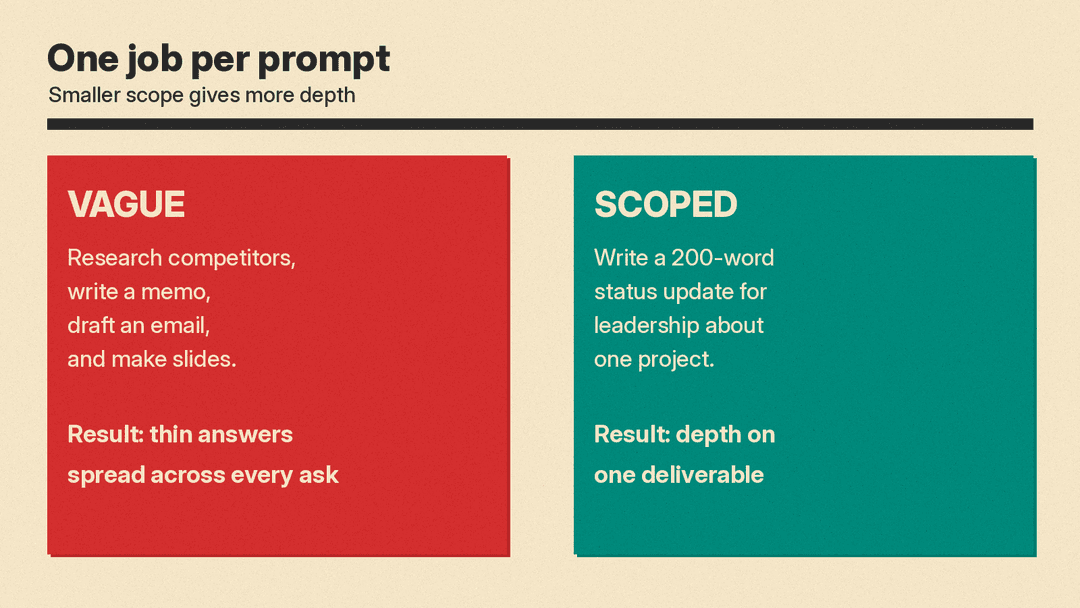
Overloaded
Research our competitors, write a strategy memo, draft the customer email, and make a slide outline.Scoped
# Context
You are helping a product marketer at a B2B SaaS company prepare a Monday status note.

# Instructions
Write a 200-word status update for leadership about [project].
Cover: what shipped last week, what is blocked, and the one decision needed this week.

# Additional info / Constraints
Audience: executives who have 60 seconds.
Do not invent metrics. If a number is missing, write "not specified."
End with exactly three bullet action items.
When the work is bigger, chain prompts: plan first, then draft, then edit against a checklist. Google's Gemini strategies page calls this chaining; Anthropic describes the same pattern for long agent work.
Technique 6: Ask the model to help you prompt
OpenAI calls this meta-prompting. Paste messy notes and ask the model to interview you, then rewrite a clean prompt with Context, Instructions, and Constraints.
Help me build a prompt I can reuse.
I will paste my rough notes below.
Ask me questions one at a time until you know the job, audience, format, and limits.
Then write a clean prompt with three sections: # Context, # Instructions, and # Additional info / Constraints.
Do not answer the original task yet. Only improve the prompt.

Notes:
[paste your rough notes]
Skip meta-prompting when the task is already simple, or when the real gap is a missing document rather than missing wording.
A reusable starter template
Copy this into ChatGPT, Claude, Gemini, or Grok and fill the brackets.
# Context
I am a [role] working on [project].
Audience: [who will read the output].
Goal: [what decision or action this output supports].

# Instructions
[One clear verb + deliverable].
Include: [must-have points].
Ignore: [out of scope].

# Additional info / Constraints
Tone: [tone].
Length: [number or range].
Format: [bullets / paragraphs / table / JSON].
Sources: use only [pasted text / attached file / linked docs].
If information is missing, say "not specified" and list open questions.
Before you finish, check that the output includes [acceptance criteria].
For Claude in particular, Anthropic's docs also recommend giving a short role in the system or project instructions (for example, "You are a careful writing assistant who does not invent facts"). For Gemini 3, Google recommends precise, direct wording and consistent delimiters, and putting essential constraints in the system instructions or at the very start of the prompt.
How to iterate when the answer is wrong
Google's prompt iteration page and OpenAI's accuracy section agree on a simple loop:
- Name what failed (wrong audience, wrong length, invented facts, missing section).
- Change one thing: rephrase, add an example, tighten scope, or move the question after the documents.
- Add a short self-check: "Before finishing, list any assumptions you made" or "Label anything uncertain with (needs verification)."
- For factual work, ask for quotes from the provided text, or turn on search or grounding tools when your product offers them.
Anthropic's golden rule still applies after each edit: if a human colleague could not follow the prompt, keep editing.
What this guide does not cover
This is a beginner guide for chat and everyday work. It does not cover fine-tuning, tool calling for agents, or model-specific effort and thinking settings. Those belong in later how-tos once the basics above are solid.
