
GitHub Copilot can now make pictures. On October 28, 2026, GitHub announced in its changelog that you can generate and edit images with plain-language requests inside Copilot chat. The images come from OpenAI's GPT Image 2.5 Flare model, show up as a preview in the chat, and are saved straight into your project.
It is a small feature on paper, but it moves image generation into a place where a lot of software gets built. Here is what launched, how it works, who can use it, and what GitHub has not said yet.
What GitHub launched
The short version: ask Copilot for an image the same way you would ask it for code. According to GitHub, you can describe an image "conversationally in any Copilot chat session," whether you are starting a new request or are in the middle of a coding task. Copilot then previews the image inline and saves it to your workspace.
You can also edit images with natural language, not only create them. GitHub's post covers both generating and editing, and it applies the optional watermark (more on that below) to images Copilot "generates and edits."
The feature works in three places, per GitHub:
- Copilot chat in VS Code
- The GitHub Copilot app
- Copilot CLI
How it works under the hood
GitHub describes a two-step setup. When you ask for an image, your selected reasoning model (the chat model you already picked in Copilot) does not draw the picture itself. Instead it calls "a dedicated image-generation tool powered by GPT Image 2.5 Flare." That tool makes the image, and Copilot hands it back to you as a preview and a file.
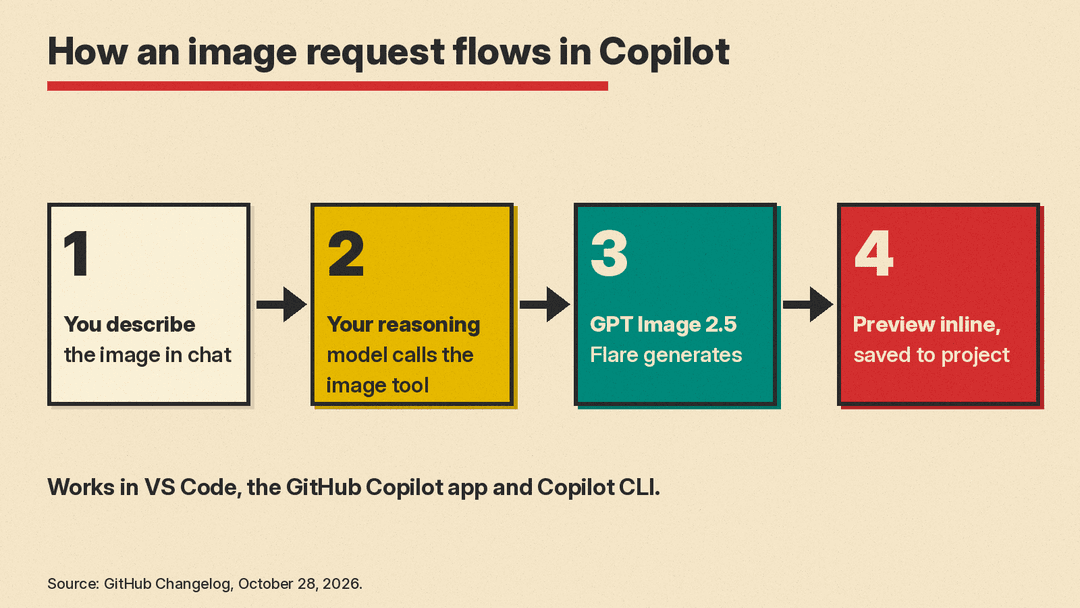
This tool-calling pattern matters for everyday use. You do not need to switch models or open a separate image app. The chat model passes the job to a model built for images.
What GPT Image 2.5 Flare is
GPT Image 2.5 Flare is OpenAI's own model, not a GitHub one. OpenAI's developer page calls it "our fastest model for high-quality, everyday image generation." It takes text and images as input and produces images as output.
OpenAI released it alongside ChatGPT Images 2.5. As 9to5Mac reported, OpenAI said Flare is "the default choice for most applications, delivering higher-quality images than GPT‑Image‑2 at 50% lower latency." OpenAI listed creator and social content, product experiences, visual search, rapid image prototyping and high-volume generation as good fits. A second model, GPT Image 2.5 Sunburst, "is built for premium visual workflows that benefit from tighter control across edits," OpenAI says. GitHub's announcement names only Flare. Our comparison of GPT Image 2.5 and Nano Banana 2.1 covers how Flare and Sunburst rank on public leaderboards.
For developers calling OpenAI directly, the API page lists image output at $30 per million tokens with standard processing. That is OpenAI's API rate. GitHub bills Copilot image use in AI credits, described next.
Who can use it and how it is billed
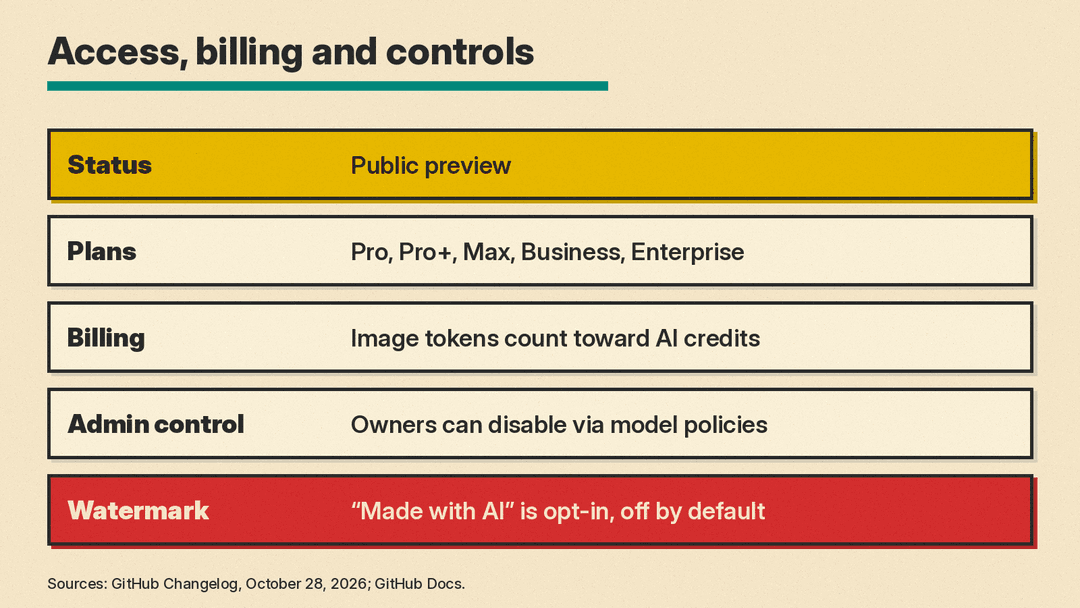
Image generation is in public preview. GitHub's changelog lists four plans that get it: Copilot Pro, Copilot Pro+, Copilot Business and Copilot Enterprise. GitHub's docs page for the feature also lists Copilot Max, and says image generation is not available on Copilot Free or Copilot Student.
Billing is separate from your chat model. GitHub says image generation is "billed separately from your chat model, based on image tokens that count toward your plan's AI credits." GitHub does not give a per-image cost. Its models and pricing page lists per-token rates instead: $5 per million text input tokens, $8 per million image input tokens and $30 per million image output tokens, the same as OpenAI's API prices. One AI credit is worth $0.01. Check your plan's usage page after a few test images before you lean on it. The same credits pay for chat models, including Copilot Fusion, the model router GitHub launched the same day.
Controls for companies
Two settings will matter most to teams:
- Admin off switch. Organization and enterprise owners can turn off image generation by disabling the image generation model in Copilot model policies.
- Watermark. Users can opt in to a visible "Made with AI" watermark on images Copilot generates and edits. It is a per-user setting and off by default. GitHub's docs say organizations and enterprises cannot require it yet.
Why it matters
Most AI image tools live in their own apps: ChatGPT, design tools or dedicated generators. GitHub's pitch is about removing the trip out of the editor. In its words, getting a visual asset "meant stepping away to a separate tool, describing what you needed again, generating it there, and manually bringing it back into your project."
For people building websites and apps, that covers the small images every project needs and nobody wants to stop for. Because the file lands in the project, it can be used right away in the code you are writing. The tradeoff is cost and oversight. Images count toward your plan's AI credits, and the watermark is not on unless each user turns it on.
How to try it
GitHub's instructions are short: open a Copilot chat in VS Code, the GitHub Copilot app or Copilot CLI, and describe the image you want. If nothing happens on a Business or Enterprise plan, an owner may have disabled the image model in Copilot model policies.
A few practical tips that follow from how the feature is built:
- Be specific about size, style and where the image will be used, as you would with any image model. Our beginner's guide to AI image prompts has more tips.
- Ask for an edit in the same chat if the first result is close. The feature supports editing as well as generation.
- Check where the file was saved before you commit it, so you do not ship a draft image by mistake.
What we do not know yet
GitHub leaves some questions open. It does not say how many AI credits a typical image uses, when the preview will end, or whether Copilot will add GPT Image 2.5 Sunburst or other image models later. We will update this post if GitHub publishes those details.
