
ChatGPT can turn one idea into a week of posts for LinkedIn, Instagram, X and Facebook. The problem is that each platform wants a different shape, and a model left to guess may pad, add hashtags everywhere and sometimes invent facts. This guide gives you 30 copy-paste prompts sorted by platform, built on OpenAI's own prompting advice, plus a small local test that shows where prompts like these go wrong. As of October 2026.
Fill in the [brackets] with your real details. Read every draft before it goes out under your name.
The rules behind these prompts
OpenAI's prompt engineering guide gives three ideas that matter most for social posts.
- Structure the prompt. The guide says a developer message usually has four sections: identity (the purpose, communication style and goals), instructions (what to do and what never to do), examples of inputs with the output you want, and context the model would not otherwise have.
- Show examples. It calls this few-shot learning: you include a handful of input and output examples, and the model "picks up" the pattern. For social media, that means pasting two or three of your past posts that did well.
- Expect variation. The guide notes that model output is non-deterministic, so prompting is "a mix of art and science." Ask for several options and pick one.
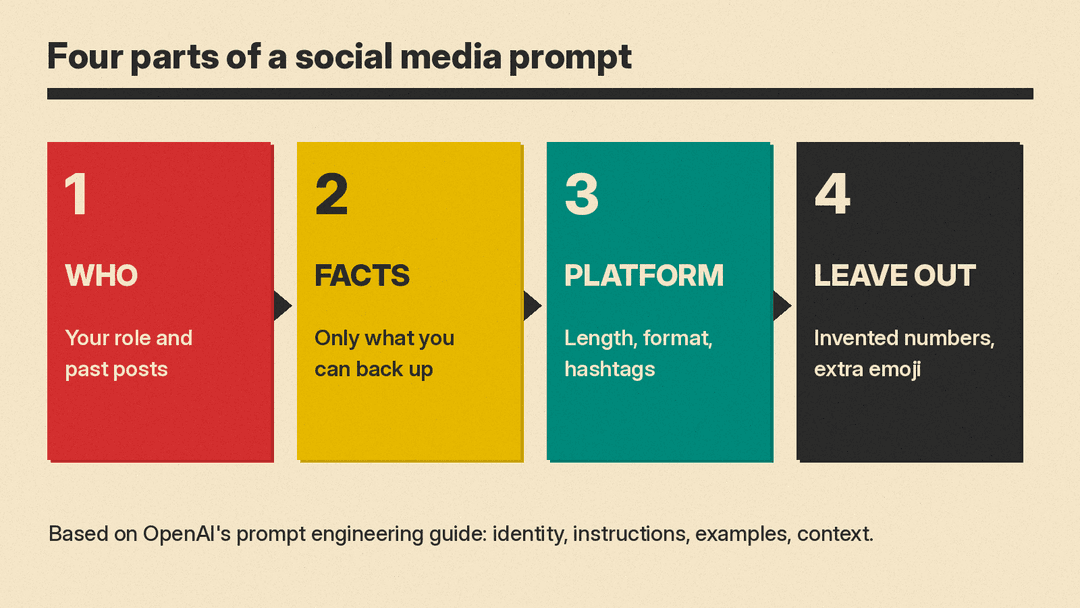
Every template below follows that shape: who you are, the facts the model may use, the platform, the length, and what to leave out.
How to use these templates
- Give it the facts. ChatGPT does not know your opening hours, prices or results. Paste them in. Anything you leave out, it may guess.
- Add a "use only these facts" line. In our test, the model still broke it in some posts, so check each claim anyway.
- Paste your own voice. Two or three of your past posts show the model your tone. That is the few-shot method from OpenAI's guide, and it gives the model more to work with than adjectives like "witty" or "professional."
- Set the hashtag and emoji rules yourself. In our test below, the model added both even when the prompt limited them.
- Disclose sponsored posts. If a brand paid you or gave you something, the disclosure is your job, not the model's. More on that below.
Looking for apps rather than prompts? See our list of AI tools for social media managers. New to prompting? Start with how to write better AI prompts.
Setup prompts (use these first)
1. Teach it your voice
Here are 3 of my past social posts that got good responses:
[paste post 1]
[paste post 2]
[paste post 3]
Describe my voice in 5 short rules (sentence length, words I use, words I avoid, humor, how I open posts). I will paste these rules into future prompts.
2. Build a content pillar list
I am a [role or business] posting for [audience].
List 5 content pillars I could rotate through each week. For each, give one sentence on why this audience would care and 3 post ideas. Use only these facts about my work: [facts].
3. Plan a week of posts
Make a 5-day posting plan for [platforms].
Topic this week: [topic]. Facts I can use: [facts].
For each day: platform, format (text, image, carousel, short video), the hook in one line, and the main point. No hashtags yet. Do not add facts I did not give you.
4. Write a style card
Turn these voice rules into a short style card I can paste at the top of any prompt:
[paste rules from prompt 1]
Keep it under 80 words. Include one "never do" line for emoji and one for hashtags.
LinkedIn prompts
5. Lesson post
Write a LinkedIn post for me.
Who I am: [role].
Point: [one lesson, with the real facts behind it].
Rules: first line is a plain statement, not a question. 120 to 180 words. Short paragraphs. At most 3 hashtags at the end. Use only the facts above. No made-up numbers. No sign-off.
6. Announcement
Write a LinkedIn post announcing [news: new job, product, hire, milestone].
Facts: [who, what, when, where to learn more].
Rules: lead with the news in the first sentence. Under 120 words. Thank [people or team] by role. No buzzwords such as "thrilled" or "humbled."
7. Opinion with a reason
I believe [opinion] about [topic] because [reason or experience].
Write a LinkedIn post that states the view in the first line, gives the reason in 2 to 3 short paragraphs, and names one fair counterpoint. Under 200 words. Do not exaggerate my claim.
8. Hiring post
Write a LinkedIn post saying we are hiring a [role].
Facts: [location or remote, schedule, pay if public, how to apply].
Rules: under 120 words, plain language, include every fact exactly, no perks I did not list.
9. Comment replies
Here is a comment on my LinkedIn post: "[paste comment]".
Write 3 short reply options (under 40 words each): one thankful, one that adds a detail from these facts [facts], and one that asks a follow-up question.
Instagram prompts
10. Captions in three tones
Write 3 Instagram captions for a photo of [what is in the photo].
Facts: [facts, including allergens or safety details].
Rules: each under 40 words, at most one emoji, end with one call to action. Do not invent prices. Repeat any allergy fact exactly as written.
11. Carousel outline
Turn this topic into a 7-slide Instagram carousel: [topic].
Facts: [facts or steps].
Slide 1 is a hook under 8 words. Slides 2 to 6 each give one point in under 20 words. Slide 7 is a call to action. Use only the facts given.
12. Reel script
Write a script for a 30-second Instagram Reel about [topic].
Format: on-screen text and voiceover, in 4 to 5 beats. Hook in the first beat. Use only these facts: [facts]. End with [call to action].
13. Story poll ideas
Give me 5 Instagram Story poll or quiz ideas for [audience] about [topic]. Each must have a question under 10 words and 2 answer options. Keep them light and on topic.14. Alt text
Write alt text for this image for people using screen readers: [describe the image].
One or two plain sentences. Describe what is in the picture, not the marketing message.
X prompts
15. Single post
Write 5 versions of an X post about [point].
Facts: [facts].
Rules: each under 240 characters, no hashtags, no emoji, different opening words for each. Use only the facts given.
16. Thread from notes
Turn these notes into a [number]-post thread for X.
Notes: [paste notes].
Rules: number each post like 1/5. Each post under 260 characters. One idea per post. Use only the facts in the notes. Do not repeat a fact in two posts. No hashtags unless I say so.
17. Reply to a question
Someone asked me on X: "[paste question]".
Write a reply under 200 characters that answers it from these facts: [facts]. If the facts do not answer it, say so plainly and suggest where to look.
18. Event or launch countdown
Write 3 X posts for [event or launch] on [date]: one a week before, one the day before, one on the day.
Facts: [time, place or link, what people get]. Under 240 characters each. No invented details.
Facebook prompts
19. Community update
Write a Facebook post for our [business or group] page.
News: [update]. Facts: [facts].
Rules: friendly, under 80 words, one clear next step for readers, no hashtags.
20. Event post
Write a Facebook event description for [event].
Facts: date, time, place, cost, who it is for, what to bring: [facts].
Rules: open with what people will do there, list the practical details on separate lines, under 120 words.
21. Group discussion starter
Write 3 discussion questions for a Facebook group about [topic] for [audience]. Each under 25 words, open-ended, and easy to answer from personal experience.22. Customer win, with permission
A customer gave permission to share this: "[paste their words]".
Write a short Facebook post that quotes them exactly, says what we did in one sentence from these facts [facts], and thanks them. Do not change their words.
TikTok and short video prompts
23. Hook list
Give me 10 opening lines for a short video about [topic] for [audience]. Each under 10 words. Mix questions, bold statements and "here is how" openers. Nothing I cannot back up with these facts: [facts].24. Short video script
Write a script for a short vertical video about [topic].
Beats: hook, 3 quick points, call to action. Include on-screen text for each beat. Use only these facts: [facts]. Keep the whole voiceover under 90 words.
25. Caption and cover text
For this short video [describe it], write 3 caption options under 30 words and 3 cover text options under 6 words. No hashtags in the cover text.Repurposing and editing prompts
26. One post, every platform
Repurpose this paragraph into a LinkedIn post, an Instagram caption and a Facebook post.
Paragraph: "[paste]".
Rules: LinkedIn professional, under 110 words. Instagram under 40 words. Facebook friendly, under 70 words. Label each. Do not add results or numbers that are not in the paragraph.
27. Blog post to social posts
Here is my blog post: [paste].
Pull out the 5 most useful points. For each, write one X post under 240 characters and one LinkedIn opener under 30 words. Quote only what the post says.
28. Fact check my own draft
Here is my draft post: "[paste draft]".
And here are my facts: [facts].
List every claim in the draft and mark each as "in the facts" or "not in the facts." Do not rewrite the post.
29. Cut it down
Shorten this post to under [number] words without losing the main point or any fact: "[paste]". Show the new version only.30. Sponsored post with a clear disclosure
Write an Instagram caption for a sponsored post. [Brand] [paid me / sent me a free product] to post about [product].
My honest view: [good points] [drawbacks].
Rules: put a clear disclosure such as "Ad" or "Sponsored" in the first line, not hidden in hashtags. Include the drawback. Under 60 words. Do not add praise I did not give.
What our small test showed
We ran early versions of five of these templates (5, 10, 16, 26 and 30, with sample facts filled in) on Gemma 3 1B, a small open model, running locally at temperature 0 on October 28, 2026. We tightened some rules after the test. This was not a test of ChatGPT, and larger models may do better. But the failures below are the kinds of mistakes to look for in any model's draft.
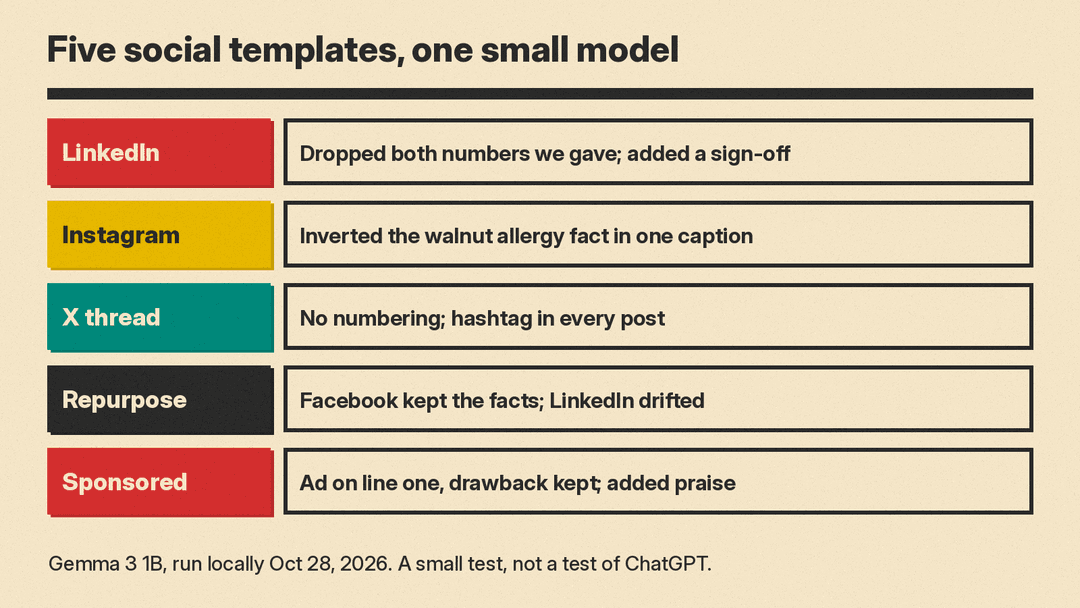
- LinkedIn lesson post (template 5). The draft dropped both numbers we gave it (three clients, 30 minutes) and kept only a vague "weekly review process." It ended with "Sincerely" and a name placeholder, which is why template 5 now says "No sign-off." It did keep hashtags out of the body.
- Instagram captions (template 10). All three mentioned the walnuts. But one caption called walnuts "a perfect addition for those with nut allergies," which inverts the safety fact. Another added "warm spices," which we never mentioned. Every caption used more than one emoji and added hashtags. This is why template 10 now says to repeat allergy facts exactly as written.
- X thread (template 16). It made five posts but did not number them, put #library in every post instead of only the last, and turned "late returns pause your borrowing for 7 days" into the garbled "Borrowing is limited to 7 days late."
- Repurposing (template 26; our test version asked for Facebook and LinkedIn only). The Facebook version kept all four facts from the paragraph but added "a more personalized experience," which the paragraph did not say. The LinkedIn version drifted into general phrases such as "continuous improvement" that were not in the paragraph.
- Sponsored caption (template 30). It put "Ad" on the first line and included the drawback, which is what we asked. It also added "Overall, a great value," which was not part of the honest view we gave it.
The pattern: the model followed format rules (a label, a word limit) more often than content rules (only these facts, only one hashtag). So check every fact, and treat safety and legal details as yours to verify.
Before you post
Disclose brand relationships. The FTC's Disclosures 101 for Social Media Influencers says to disclose any financial, employment, personal or family relationship with a brand, and that free or discounted products count. It says to place the disclosure with the endorsement, not only on a profile page or behind a "more" click, and not mixed into a group of hashtags. Terms such as "advertisement," "ad" and "sponsored" work. For video, the disclosure should be in the video itself, not only in the description. A model will not know your brand deals, so add this yourself.
Know how platforms label AI content. Meta says it adds "AI info" labels on Facebook, Instagram and Threads when it detects industry standard AI image indicators or when people disclose that they are uploading AI-generated content. If you post AI images or video, it may get a label, so decide how you want to describe it.
Read it as your follower would. Check every name, date, price and claim against your facts. Remove anything the model added.
For more templates, see our ChatGPT prompts for YouTubers and ChatGPT prompts for small business.
