
ChatGPT can give you ten title ideas in a few seconds. The hard part is getting titles, scripts and thumbnails that match your actual video, fit where YouTube shows them, and do not promise something the video never delivers. This guide gives you 30 copy-paste prompts for each step of making a video, built on YouTube's own creator advice and OpenAI's prompting tips. As of October 2026.
Fill in the [brackets], paste your notes where the prompt asks, and check every result before you upload. We also ran close versions of five of the templates on a small local model to see where prompts like these break. That was a small test, not a test of ChatGPT. The results are near the end.
The rules behind these prompts
Two sources shape every template below.
The first is YouTube Help. Its thumbnail and title tips say to be accurate, because if a title does not represent the video, "viewers may stop watching, which can impact discoverability." It says to be succinct, since viewers "may only see part of your title," so put the most important words near the beginning and save episode numbers and branding for the end. It also says to limit ALL CAPS and emoji. Its description tips say the first few lines are what viewers see first, that each video should have a unique description, and that you should pick 1 to 2 main words and feature them in both the title and the description.
The second is OpenAI's prompt engineering best practices. Three of its tips matter most here:
- Be specific about "context, outcome, length, format, style."
- Replace fuzzy words with numbers. Its example swaps "fairly short" for "Use a 3 to 5 sentence paragraph to describe this product."
- Say what to do, not only what not to do.
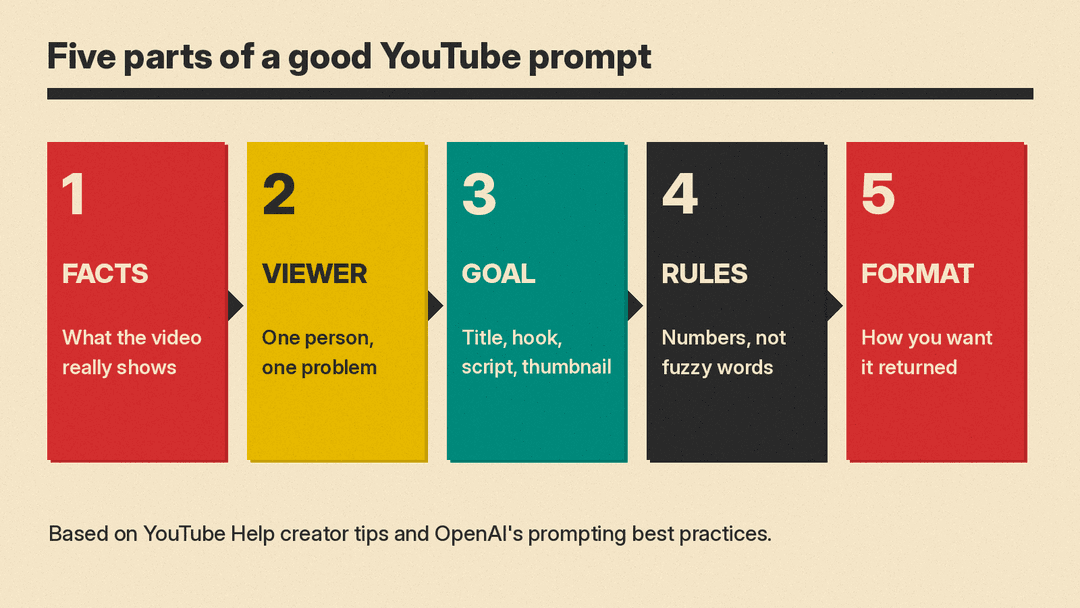
So every prompt below tells ChatGPT who the viewer is, what the video really contains, how long the result should be, and what format you want back. Our beginner's guide to better AI prompts explains the same rules for any chatbot.
How to use these templates
- Give it the facts first. ChatGPT does not know what is in your video. Paste your notes, your outline, or a rough transcript. The more real detail it has, the less it guesses.
- Name one viewer. "Beginners who just bought their first camera" gets better results than "everyone."
- Ask for options, then pick. Ten titles you can choose from beat one title you have to accept.
- Check what it adds. In our test, the model added facts that were not in the prompt. You are the one who knows what the video shows.
Title prompts
1. Ten title options
Video: [what happens in the video, in 2-3 sentences]
Viewer: [who it is for]
Write 10 title options. Each must be under 60 characters, describe what the video really shows, and put the most important words first. Do not promise anything the video does not deliver.
2. Searchable vs curious titles YouTube Help describes two types of titles: searchable ones that "clearly outline what to expect," and intriguing ones that "spark curiosity."
Video: [summary]
Write 5 searchable titles that say exactly what the viewer will learn, and 5 curiosity titles that make a casual viewer want to click. Every title must still be true to the video. Label each one.
3. Main keyword check
Here is my video summary: [summary]
Suggest 3 main keywords a viewer might type into YouTube search to find this video. For each, write one title that starts with or contains that keyword in the first 4 words.
4. Fix my title
My draft title: [title]
My video: [summary]
Give 5 shorter versions that keep the main point in the first few words. Move any episode number or series name to the end. Explain each change in one line.
5. Clickbait check
Title: [title]
Thumbnail text: [text]
Video summary: [summary]
Does the title or thumbnail promise anything the video does not show? List each mismatch, then suggest an honest version that is still interesting.
6. A/B test pairs YouTube's A/B test help page warns that versions "too similar to each other can cause tests to run for longer."
Video: [summary]
Current title: [title]
Write 3 title options that are clearly different from each other in angle (for example: the result, the process, the mistake to avoid). One line each, under 60 characters.
Hook and intro prompts
7. First 20 seconds
Write the first 20 seconds of a YouTube script (about 50 words) for this video: [topic].
Viewer: [who, and the problem they have].
Open with the viewer's problem, then say what they will learn. No greeting, no "welcome back," no "in this video." Return only the spoken words.
8. Three hook styles
Topic: [topic]
Write 3 different openings under 40 words each: one that starts with a surprising fact I give you here: [fact], one that starts with a question, and one that starts with the end result. Label each.
9. Payoff promise
Video: [summary]
Write one sentence I can say in the first 15 seconds that tells the viewer exactly what they will be able to do by the end. Make it specific and true to the video.
10. Cut the slow start
Here is my intro script: [paste]
Rewrite it so the main point arrives in the first two sentences. Cut any greeting, channel plug or "before we start" line. Keep my words where you can.
Script prompts
11. Outline first
Make an outline for a [length]-minute YouTube video: [title].
Use [number] sections. For each: a heading, the main point in one sentence, and one thing to show on screen. Do not write the full script yet.
12. Script from my notes
Here are my notes: [paste]
Turn them into a spoken script for a [length]-minute video. Use short sentences I can say out loud. Use only facts in my notes. If something is missing, write [CHECK] instead of guessing.
13. Talk like me
Here is a transcript of one of my past videos: [paste 300-500 words]
Describe how I talk in 5 bullet points (sentence length, words I use, jokes, how I explain steps). Then rewrite this new script in that style: [paste].
14. Tutorial steps
Topic: [task]
List the steps a beginner must follow, in order, with one line each. Mark any step where beginners often get stuck, and add one sentence I can say there to help.
15. B-roll list
Here is my script: [paste]
For each paragraph, suggest one shot or screen recording I could show. Keep it to things I can film or record myself.
16. Mid-video retention check
Here is my script: [paste]
Point out any part longer than 60 seconds where nothing new happens. For each, suggest a cut or a way to show progress.
Description and chapter prompts
17. Description that leads with the point
Write a YouTube description for this video.
Title: [title]
Facts: [list]
The first two sentences must say what the video covers, in plain words, and use the keyword "[keyword]". Then add the chapters below exactly as given. Do not add links, prices or facts that are not in this list. Under 150 words.
Chapters: [paste]
18. Chapters from a transcript YouTube's chapters help page says the first timestamp must start with 00:00, a video needs at least three timestamps in ascending order, and each chapter must be at least 10 seconds long.
Here is my transcript with timestamps: [paste]
Suggest chapter titles. Start the first chapter at 00:00, list at least 3 chapters in ascending order, keep each chapter at least 10 seconds long, and keep each title under 6 words. Use only timestamps that appear in the transcript.
19. Default channel footer YouTube Help notes you can create a default description that fills in basic channel information on upload.
My channel: [what it covers, how often I post]
Write a 3-line footer I can reuse under every video: what the channel is about, when new videos come out, and one line inviting viewers to subscribe. No hype words.
20. Unique description check
Here are descriptions from 3 of my videos: [paste]
Point out sentences that repeat across them. Suggest a unique first sentence for each, based on what each video covers.
Thumbnail prompts
YouTube Help suggests the rule of thirds, easy-to-read text, a design that is not too complex, and a thumbnail image as large as possible, since thumbnails show up differently across devices. Its thumbnail upload page recommends 3840 x 2160 pixels for videos (at least 640 pixels wide), a 16:9 ratio, JPG or PNG, and a file under 2 MB when you upload from a phone (50 MB from a computer).
21. Five thumbnail concepts
Video title: [title]
Video summary: [summary]
Give me 5 thumbnail ideas. For each: what is in the picture, up to 4 words of text on the image, and the main color. The thumbnail must match what the video really shows. One line per idea.
22. Thumbnail text that adds to the title
Title: [title]
Write 5 options for thumbnail text, 2 to 4 words each, that add something the title does not already say. Do not repeat the title's words.
23. Image prompt for a background
Thumbnail idea: [idea]
Write a prompt for an image generator that creates the background only, 16:9, simple, with empty space on the left third for my text. No text in the image.
24. Old video refresh YouTube Help suggests "experimenting with updating older thumbnails" to reach new viewers.
Here are the titles and current thumbnail descriptions of my 5 oldest videos: [paste]
For each, suggest one new thumbnail idea and one updated title that a new viewer would understand.
Shorts, posts and repurposing
25. Shorts from a long video YouTube's three-minute Shorts help page says square or vertical videos up to three minutes long, uploaded on or after October 15, 2024, count as Shorts.
Here is the transcript of my long video: [paste]
Find 3 moments that work on their own as a Short of [length, up to 3 minutes]. For each, give the start and end lines, and a one-line caption.
26. Community post
My new video: [title and summary]
Write a short community post (under 50 words) that tells subscribers what the video is about and asks one simple question they can answer in the comments.
27. Pinned comment
Video: [summary]
Write a pinned comment under 40 words that adds one useful tip not in the video, from this list: [tips], and asks viewers what they would add.
Ideas and analytics prompts
ChatGPT cannot see your YouTube Analytics. Paste the numbers in yourself. YouTube Help points to the Research tab and the Audience tab in YouTube Analytics for title and thumbnail ideas. YouTube's Ask Studio assistant, built into YouTube Studio, can give channel insights and analyze performance; our guide to AI tools for YouTubers covers it and 10 other tools.
28. Ideas from my best videos
Here are my 10 most-viewed videos with views and average view duration: [paste]
Find 3 patterns in topic or format. Suggest 5 new video ideas that follow those patterns. Do not invent numbers.
29. Ideas from viewer searches
Here are search terms from my YouTube Analytics Research tab: [paste]
Group them into 3 to 5 themes and suggest one video title for each theme.
30. Comment mining
Here are 30 comments from my last video: [paste]
List the questions viewers asked more than once. Suggest a follow-up video for the top 3, with a title under 60 characters.
What our small test showed
We ran close versions of five of the templates (1, 7, 11, 17 and 21, with sample videos about budget keyboards, repotting a houseplant and cold brew coffee) on Gemma 3 1B, a small open model, on our own computer at temperature 0. A 1-billion-parameter model is much weaker than ChatGPT, so treat this as a stress test of the prompts, not a review of any product.
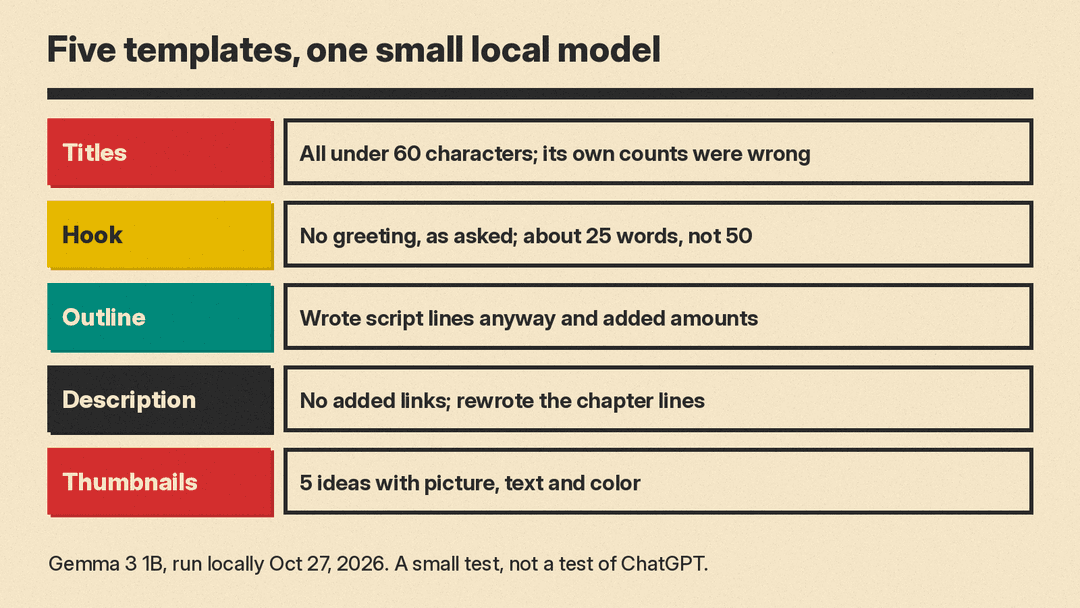
- Titles (template 1). All 10 titles were under 60 characters. Our test version also asked for a character count after each title, and the counts the model wrote were wrong every time. It claimed 41 to 49 characters for titles that were 30 to 42 characters long. One title added a "$100" price that was not in the prompt, and one was a "don't buy" style title the video did not support. Lesson: count characters yourself and run the clickbait check (template 5).
- Hook (template 7). It skipped the greeting and opened with the viewer's problem, as asked. It came in at about 25 words, half the requested length.
- Outline (template 11). It ignored "do not write the full script" and wrote script lines anyway. It also added specific brewing amounts and times that we never gave it. Lesson: when you need only an outline, say so twice, and check any number the model adds.
- Description (template 17). It kept the facts and added no links, as asked. But it opened with a hype line we would cut, and it rewrote the chapters as "Intro: 0:00" with the time after the title, instead of copying them exactly. Lesson: paste chapters in yourself.
- Thumbnails (template 21). It gave 5 ideas, each with a picture, short text and a color. It then asked follow-up questions about tone and keyboard type, which is a useful nudge to give more detail up front.
In this small test, rules with numbers mostly held (the hook length was the exception), and the model filled any gap with its own guesses.
Before you upload
- Read the title on a phone screen. Is the main point in the first few words?
- Does the thumbnail show something that is really in the video?
- Do the first two lines of the description say what the video covers?
- Do the chapters start at 00:00 and go in order?
- Did ChatGPT add any fact, number or claim you did not give it? Check it or cut it. Our 5-minute fact-check routine shows how.
