
An agent skill is a folder with one Markdown file in it, SKILL.md, that teaches an AI agent how to do one job your way. Write it once and the same folder works in Claude Code, OpenAI Codex and ChatGPT, and GitHub Copilot in VS Code, because they all read the open Agent Skills format.
This guide walks through writing one from scratch: the folder, the two required fields, the instructions, where to put the folder for each tool, and how to check that the agent actually picks it up. We also ran a small test of how descriptions decide whether a skill fires. The results are below, with their limits.
Anthropic created the format, and in October 2026 the Agentic AI Foundation, which also hosts MCP, took Agent Skills on as one of four new projects.
What a skill is, in plain terms
A skill is a saved procedure. Think of the checklist you would hand a new coworker: "when someone sends receipts, read each one, list the vendor and amount, total by category, and flag anything missing." A skill stores that checklist so the agent can follow it whenever the task comes up, without you pasting it into every chat.
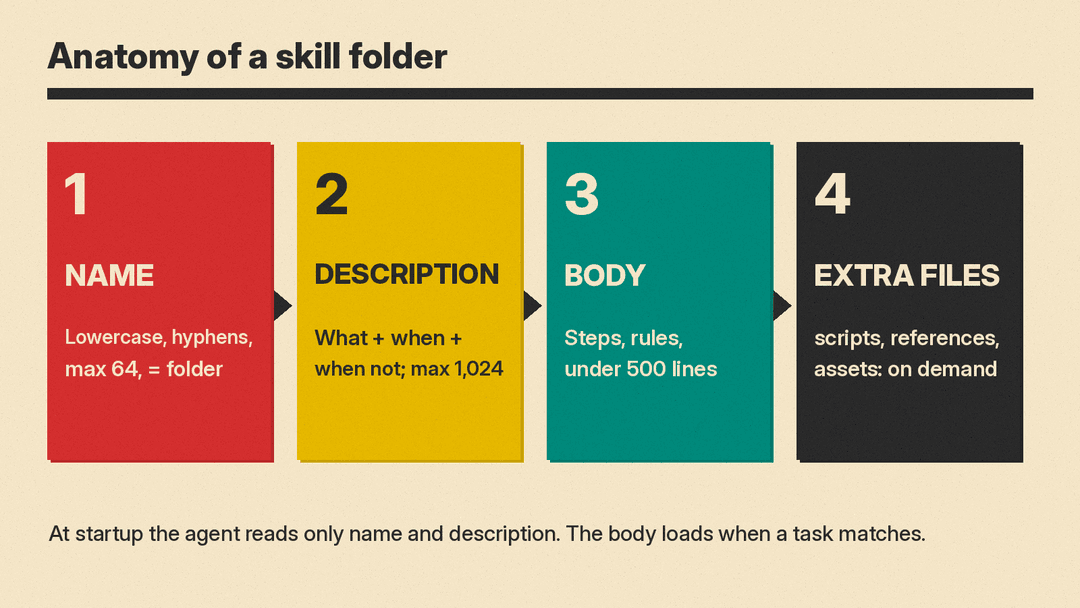
The trick that makes skills cheap is what the spec calls progressive disclosure. At startup, the agent loads only each skill's name and description, about 100 tokens per skill. It reads the full SKILL.md only when a task matches, and it opens extra files in the folder only when the task needs them. So you can install dozens of skills without filling the agent's memory.
Our explainer on how Agent Skills work covers this loading design, the research on why skills help and the security risks of shared skills.
That design has one big consequence: the description decides everything. If the description does not match what the user asks, the agent never opens the rest of the file. Agent Skills' own guide says the description "carries the entire burden of triggering."
Step 1: Make the folder
A skill is a directory containing, at minimum, a SKILL.md file. Everything else is optional:
expense-reports/
  SKILL.md        required: metadata and instructions
  scripts/        optional: code the agent can run
  references/     optional: longer docs the agent reads on demand
  assets/         optional: templates, images, data files
The folder name matters. The spec says the name field must match the parent directory name, so a skill named expense-reports lives in a folder called expense-reports.
Step 2: Write the frontmatter
SKILL.md starts with a short YAML block between two --- lines. Only two fields are required:
- name: 1 to 64 characters, lowercase letters, numbers and hyphens only. It cannot start or end with a hyphen or contain two hyphens in a row.
- description: 1 to 1,024 characters. It should say what the skill does and when to use it.
The spec also defines optional fields: license, compatibility (environment needs, up to 500 characters), metadata (free key-value pairs such as author and version) and allowed-tools, which it marks as experimental with support that varies by agent. Most skills need none of them.
We checked six candidate names against the spec's naming rules with a short script:
expense-reports: validExpense-Reports: invalid, uppercase-expenses: invalid, starts with a hyphenexpense--reports: invalid, double hyphenexpense_reports: invalid, underscores are not allowedprocessing-expense-reports-and-receipts-for-finance-team-monthly-close: invalid, 70 characters
Anthropic's skill authoring guide suggests naming skills by activity, often in gerund form (verb plus -ing), so a name says what the skill does.
Step 3: Write a description that triggers
This is the step most people rush. A good description answers two questions: what does the skill do, and when should the agent reach for it?
The spec gives this pair:
- Good: "Extracts text and tables from PDF files, fills PDF forms, and merges multiple PDFs. Use when working with PDF documents or when the user mentions PDFs, forms, or document extraction."
- Poor: "Helps with PDFs."
Guidance from the three main sources lines up on most points:
- Name the triggers. List the words and situations a user would actually bring up. Agent Skills suggests being "pushy" and covering cases where the user does not name the domain, "even if they don't explicitly mention" it.
- Front-load the main use case. OpenAI's skills docs say to put the key use case and trigger words first "so a host can still match the skill if descriptions are shortened."
- Say when not to use it. OpenAI's template description reads: "Explain exactly when this skill should and should not trigger."
- Keep it short. A few sentences to a short paragraph, well under the 1,024 character cap.
One point differs. Anthropic says to write descriptions in third person ("Processes Excel files and generates reports") because the text is injected into the system prompt, and to avoid "I can help you" or "You can use this." Agent Skills suggests imperative phrasing such as "Use this skill when..." Both styles avoid first and second person chatter, and a common pattern satisfies both: a third-person sentence about what it does, then a "Use when..." sentence about triggers.
Step 4: Write the instructions
Below the frontmatter, write the instructions in plain Markdown. The spec sets no format rules. It recommends step-by-step instructions, examples of inputs and outputs, and common edge cases.
Three habits from Anthropic's guide keep skills sharp:
- Be concise. Once the skill loads, "every token competes with conversation history and other context." Skip what the model already knows, such as what a PDF is.
- Stay under 500 lines. Both the spec and Anthropic recommend keeping
SKILL.mdunder 500 lines and moving detail into separate files. The spec suggests the body stay under about 5,000 tokens. - Link one level deep. Point to extra files with relative paths, such as
references/policy.md, and avoid chains where one reference file points to another.
Here is a complete skill you can copy and adapt:
---
name: expense-reports
description: Builds an expense report from receipts. Reads each receipt, lists date, vendor, amount and category, totals by category and flags missing receipts. Use when the user shares receipts, asks to file or submit expenses, or needs a reimbursement total, even if they never say "expense report". Not for filling in PDF forms or planning a budget.
---

# Expense reports

## Steps
1. Read every receipt the user provides. For each one, record date, vendor, amount, currency and category (travel, meals, lodging, supplies, other).
2. If a receipt is unreadable or missing a total, list it under "Needs attention". Never guess an amount.
3. Total the amounts by category, then give a grand total.
4. Output a table with one row per receipt, then the totals, then "Needs attention".

## Rules
- Use the company categories in references/categories.md if that file exists.
- Ask before converting currencies.
- Do not submit anything. Produce the report for the user to review.
The description is a lightly edited version of the one we tested later in this guide. The last rule is worth copying into any skill that touches money, email or accounts: tell the agent where its job ends.
Step 5: Put the folder where each tool looks
The format is shared, but each product scans its own folders. This is the part that trips people up.
- OpenAI Codex: project skills go in
.agents/skills/. Codex scans that folder in every directory from where you launch it up to the repository root. Personal skills go in~/.agents/skills/, and admins can use/etc/codex/skills. Codex follows symlinked skill folders. (OpenAI) - Claude Code: project skills go in
.claude/skills/<skill-name>/SKILL.md; personal skills in~/.claude/skills/. It also loads skills enabled on your claude.ai account. Its docs do not list.agents/skills/. (Claude Code docs) - GitHub Copilot in VS Code: the Copilot harness uses
.github/skills/in a project and~/.copilot/skills/for personal skills. VS Code's local sessions also read.claude/skills/and.agents/skills/. (VS Code docs) - ChatGPT: OpenAI's docs say ChatGPT can use skills too, chosen automatically when a task matches the description, or picked by typing @ in the chat. Standalone skill folders work in the ChatGPT desktop app; on the web and mobile, ChatGPT uses skills that come bundled in plugins.
To use one skill everywhere in a repository, keep a single copy, for example in .agents/skills/expense-reports/, and copy or symlink it into .claude/skills/ and .github/skills/. Then you edit one file instead of three.
Step 6: Check that it loads and fires
First confirm the agent can see the skill:
- In Codex CLI or the IDE extension, run
/skills, or type$to mention a skill by name. - In Claude Code, a skill becomes a slash command, so
expense-reportsis available as/expense-reports. - In VS Code, the Agent Skills quickstart has you open Copilot Chat in Agent mode and type
/skillsto see the list. VS Code's own docs say /skills works when Local is selected in the Chat view; with the Copilot harness, use Open Customizations instead.
Then check that it fires on its own. Agent Skills recommends writing about 20 test prompts: 8 to 10 that should trigger the skill and 8 to 10 that should not. The most useful "should not" prompts are near misses that share words with your skill but need something else. Because models are not deterministic, it suggests running each prompt about 3 times and counting how often the skill loads.
One caveat from the same guide: agents tend to consult skills only for tasks they cannot handle alone. A simple one-step request may skip your skill even with a perfect description. Claude Code also offers disable-model-invocation: true in frontmatter for skills you only ever want to run by hand.
What our small test showed
We wanted to see how much the description matters, so we ran a small selection test on a local model, Google's Gemma 3 1B, at temperature 0, one run per prompt. We gave it a list of skill names and descriptions, the same way an agent sees them at startup, plus one user request, and asked which skill to load, or none. This is a tiny model and a simplified setup, not a test of Claude, ChatGPT or Copilot, so treat it as an illustration.
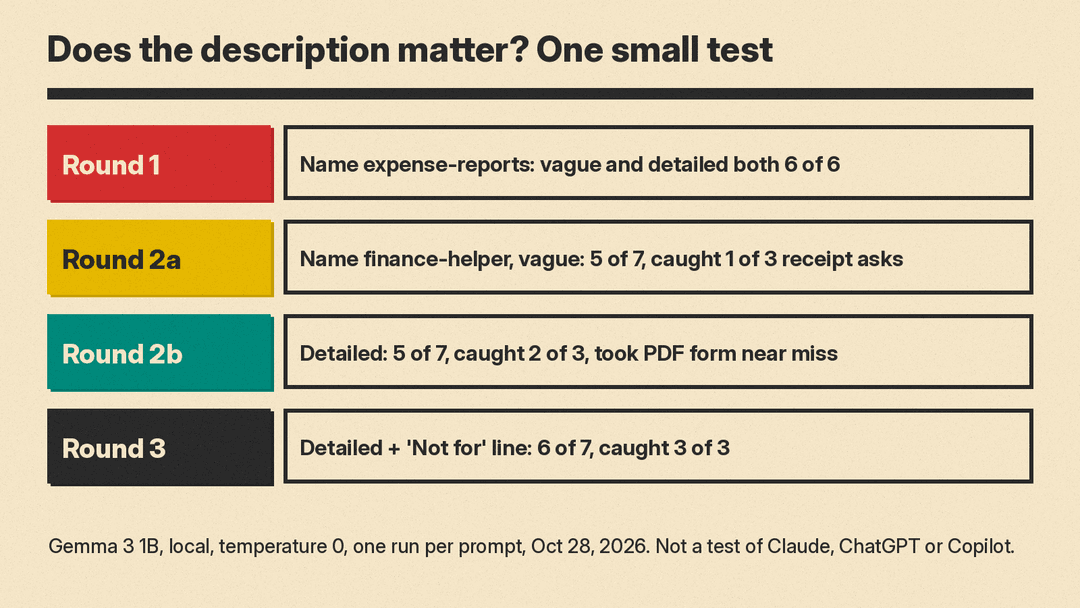
- Round 1, helpful name. With the skill named
expense-reportsand three unrelated skills nearby, the vague description ("Helps with expenses.") and the detailed one both scored 6 out of 6. The name did the work. - Round 2, generic name and a neighbor. We renamed it
finance-helperand added abudget-plannerskill. The vague description caught 1 of 3 receipt requests; the model sent the other two tobudget-planner. The detailed description caught 2 of 3, but it also grabbed a near miss, "Fill out this PDF reimbursement form," which belonged to the PDF skill. Both scored 5 out of 7. - Round 3, add a boundary. We added "Not for filling in PDF forms or planning a budget." It caught all 3 receipt requests and kept the budget request away, for 6 out of 7. It still took the PDF form request.
The takeaways match the official advice. A clear name helps a lot. Specific trigger words raise hits but can pull in near misses. A "not for" line helps, though it is not a guarantee, which is why the near-miss tests in Step 6 matter.
Common mistakes
- A description that only says what, not when. "Expense helper" tells the agent nothing about which requests should load it.
- Folder name and
namefield that differ. The spec requires them to match. - Uppercase or underscores in the name. Only lowercase letters, numbers and single hyphens are allowed.
- Putting the skill in the wrong folder for your tool. Claude Code does not document
.agents/skills/, and the Copilot harness looks in.github/skills/. - One giant file. Move long reference material into
references/so it loads only when needed. - No stopping point. Say what the agent must not do on its own, such as submitting, sending or deleting.
The short version
- Make a folder named after the skill, lowercase with hyphens.
- Add
SKILL.mdwithnameand a description that says what it does, when to use it and when not to. - Write short steps, rules and an example in the body. Keep it under 500 lines.
- Put the folder where your tool looks, and symlink it for the others.
- Test with prompts that should and should not trigger it, including near misses.
