
ChatGPT can draft a review reply, a product description or a job post in seconds. The catch for a small business is that every one of those goes out under your name, to real customers. This guide gives you 30 copy-paste prompts for the jobs small business owners do every week, built on the U.S. Small Business Administration's advice and OpenAI's prompting tips. As of October 2026.
Fill in the [brackets] with your real details and read every result before you use it. We also ran five of the templates on a small local model to see where prompts like these break. That was a small test, not a test of ChatGPT. The results are near the end.
The rules behind these prompts
Two sources shape every template below.
The first is the SBA's business guide. Its section on AI tools for small businesses (the page calls them SI) says to start small, and lists uses such as drafting a business plan, writing job postings and blogs, writing product descriptions from your own marketing content, and writing "courteous, thoughtful replies to online reviews." It also lists the risks. If you use free tools, it says to "have another person review all SI products." It says to try not to feed in sensitive data or proprietary information, and to "make sure a person assesses all the messages and outreach campaigns" the tool generates.
The second is OpenAI's prompt engineering best practices. Three of its tips matter most here:
- Be specific about "context, outcome, length, format, style."
- Replace fuzzy words with numbers. Its example swaps "fairly short" for "Use a 3 to 5 sentence paragraph."
- Say what to do, not only what not to do.
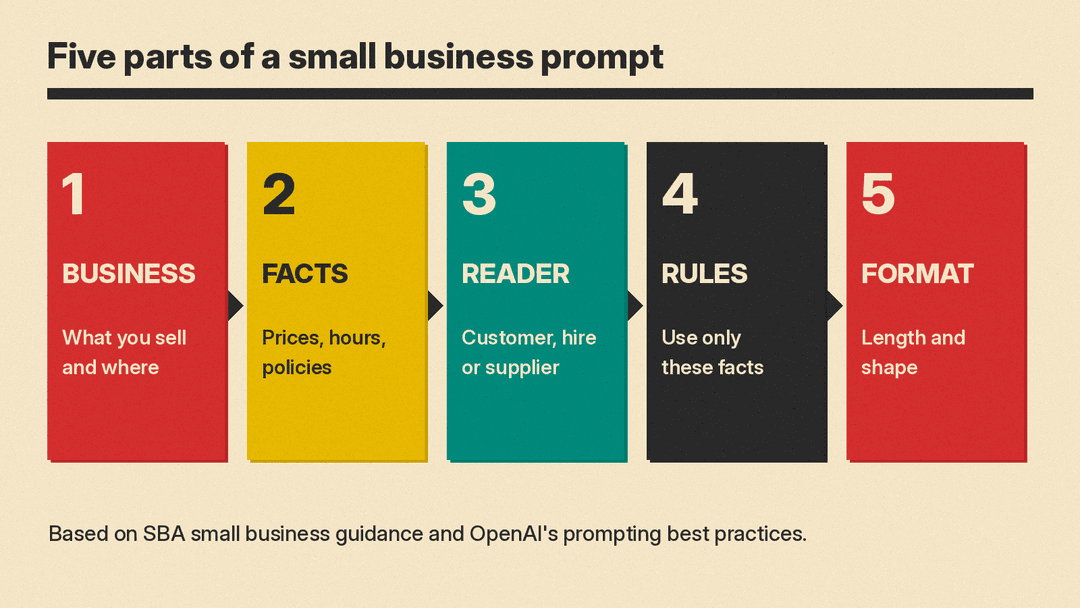
So every prompt below gives ChatGPT your business, the facts it may use, the reader, a length and a format. Most also tell it what not to add, because that is where our test showed models go wrong.
How to use these templates
- Give it the facts. ChatGPT does not know your prices, hours or policies. Paste them in. Anything you leave out, it may guess.
- Add a "use only these facts" line. It is the single most useful rule in this guide. Our test model still broke it sometimes, so check anyway.
- Leave out private data. Do not paste customer names, card numbers or anything you would not want stored. The SBA page gives the same warning.
- Keep a human check. Read it as your customer would before it goes out.
If you are still picking which apps to use, start with our list of AI tools for small business owners. New to prompting in general? Read how to write better AI prompts first.
Customer service prompts
1. Reply to a bad review
I own a [type of business]. Write a reply to this [star rating]-star review.
Review: "[paste review]"
Facts: [what really happened, and anything you have changed since]
Rules: thank them, apologize without making excuses, mention only the facts above, invite them back. Under 80 words. Do not offer discounts or refunds.
2. Thank a good review
Write a short reply to this 5-star review of my [type of business]: "[paste review]".
Mention one specific thing they praised. Under 40 words. Sound like a person, not a brand. No emoji.
3. Answer an upset customer email
A customer emailed my [type of business]: "[paste email]"
Facts: [what went wrong] [what you can offer, with dates or times]
Write a reply email. Rules: apologize first, explain in one sentence, make the offer, ask them to confirm. Under 100 words. Do not promise anything not in the facts.
4. Turn your policies into an FAQ
Here are my business policies: [paste hours, returns, booking, payment, delivery].
Write 8 FAQ questions customers would really ask, each with a 1 to 2 sentence answer taken only from these policies. If a policy does not answer a likely question, list that question at the end under "Gaps".
5. Write saved replies
Write 5 short saved replies for my [type of business] for these messages: [list, for example "are you open Sunday", "do you deliver", "how much is X"].
Use only these facts: [paste]. Under 50 words each. Put [CHECK] where you need a fact I did not give.
6. Say no politely
A customer asked for [request] and we cannot do it because [reason]. Write a friendly 3-sentence reply that says no clearly, gives the reason, and offers [alternative, if any].Marketing and sales prompts
The SBA says most marketing plans cover a target market, competitive advantage, sales plan, goals, an action plan and a budget, and that you should compare marketing costs to the revenue they bring in. These prompts follow that outline.
For posts shaped to each platform, see our ChatGPT prompts for social media, with templates for LinkedIn, Instagram, X, Facebook and short video.
7. Product description
Write a product description for my online shop.
Product: [name, size, materials, key facts]
Customer: [who buys it and why]
Rules: 60 to 90 words, plain friendly tone, use only the facts above, end with one line on who it suits.
8. Target market section
Help me write the "Target market" section of a marketing plan for my [business].
Facts: [where you are, who your customers are, how often they buy, what data you have]
Rules: one paragraph, under 120 words. Use only these facts. Where data is missing, write [NEED DATA] instead of guessing a number.
9. Competitive advantage
My business: [describe]. My main competitors: [names and what they offer, as I know it].
List 3 ways I could stand out, based only on what I told you. For each, give one sentence I could use on my website. Mark anything you are unsure about.
10. Monthly social posts
Write 8 social media posts for my [business] for [month].
Facts I can use: [events, new products, hours, offers]
Platform: [Instagram / Facebook / LinkedIn]. Under 50 words each. Vary the opening line. No hashtags except [your 1 to 2 tags].
11. Email newsletter
Write a short email newsletter for my customers.
News: [3 to 4 updates]
Rules: subject line under 50 characters, 150 words max, one clear call to action: [action]. Plain text, no made-up offers.
12. One offer, five versions
Here is my offer: [details]. Write it 5 ways: a 1-line text message, a 2-sentence Facebook post, a sign for the counter (under 10 words), an email subject line, and a Google Business Profile update under 80 words. Same facts in every version.13. Measure what worked
Here are my marketing costs and results for last month: [channel, cost, sales or leads for each].
Make a simple list of cost per sale for each channel, show your math, and tell me which one to test more next month. Do not assume numbers I did not give.
Hiring and team prompts
14. Job posting
Write a job posting for a [role] at my [business].
Facts: [hours, schedule, pay, experience needed, training]
Rules: under 150 words, plain language, list duties as 4 bullets, include every fact above exactly, do not add benefits that are not listed.
15. Interview questions
Give me 8 interview questions for a [role] at a [business]. Focus on [skills that matter, for example handling rush hours, cash, upset customers]. For each, add one line on what a good answer shows.16. New hire checklist
Turn these notes into a first-week checklist for a new [role]: [paste notes].
Group by day (Day 1 to Day 5). Keep it to what is in my notes. Put questions for me at the end.
17. Staff schedule note
Rewrite this schedule change as a short, friendly message to my team: [paste change]. Under 60 words. Keep every date and time exactly as written.18. Turn a task into steps
Here is how I [task, for example close the register]: [rough notes]. Write it as numbered steps a new employee can follow. Keep my order. Flag any step that seems to be missing.Planning and money prompts
19. Business plan outline
I am writing a business plan for [business idea]. Give me an outline with the standard sections and, under each, 3 questions I need to answer. Do not fill in answers for me.20. Market research questions
I want to test demand for [product or service] in [area]. Write a 6-question customer survey. Mix multiple choice and one open question. Include one question on what people pay now for alternatives.21. Find hidden costs
Here is my plan for [project, for example opening a second location or a pop-up]: [details].
List hidden costs and risks I may have missed, as a checklist. Do not give dollar estimates; just name each cost.
22. Explain my numbers
Here are my monthly figures: [revenue, main costs]. Explain in plain words what changed from last month and list 3 questions I should ask my accountant. Show any math you do.For spreadsheet help, see our ChatGPT prompts for Excel formulas. For search work such as title tags, schema and your Google Business Profile, see our SEO prompts for ChatGPT and Claude.
23. Pricing check
I sell [product or service] for [price]. My costs per unit are [costs]. Competitors charge about [prices, as I know them].
Lay out my margin at my current price and at 2 other prices I choose: [price A], [price B]. Show the math. Do not tell me what customers will pay.
24. Weekly plan
Here is everything on my plate this week: [list]. Sort it into must do, should do and can wait. Then give me a day-by-day plan for [days you work], with no more than 4 tasks a day.Admin and writing prompts
25. Meeting notes to actions
Here are my notes from a meeting with [who]: [paste]. List the decisions, then the action items with owner and due date. If an owner or date is missing, write [MISSING].26. Polite payment reminder
Write a polite payment reminder to a customer. Invoice: [number], amount: [amount], due: [date], now [X] days late. Under 80 words. Friendly but clear. Include how to pay: [method].27. Supplier email
Write an email to my supplier [name] asking [question, for example about a late order or a price change]. Facts: [order details]. Under 100 words. Ask for a reply by [date].28. About page
Write an "About us" section for my website.
Facts: [when you started, why, who runs it, what you do, where you are]
Rules: 120 to 160 words, first person plural, warm and plain, use only these facts.
29. Disclose how you use AI
The SBA notes there are currently no federal or state laws that require businesses to disclose AI use, but says it is becoming an expected best practice and suggests a public statement.
Write a short statement for my website on how my [business] uses AI tools. We use them for: [list]. A person reviews: [what]. We do not use them for: [list]. Under 100 words, plain language.30. Check before it goes out
Review the text below before I send it to customers. List: (1) any fact, price, date or promise that is not in my notes, (2) anything that sounds rude or pushy, (3) anything unclear. Do not rewrite it.
My notes: [paste facts]
Text: [paste draft]
What our small test showed
We ran five of the templates (1, 3, 7, 8 and 14, with a sample bakery, landscaper, candle shop, dog groomer and coffee shop) on Gemma 3 1B, a small open model, on our own computer at temperature 0. A 1-billion-parameter model is much weaker than ChatGPT, so treat this as a stress test of the prompts, not a review of any product.
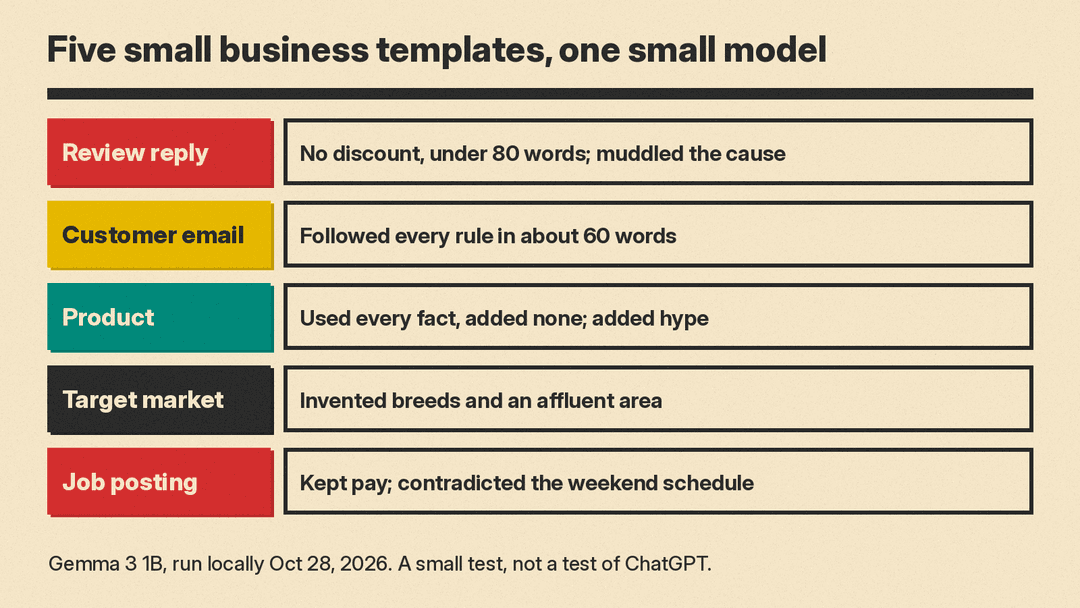
- Bad review reply (template 1). It apologized and offered no discount, as asked, and stayed under 80 words. But it wrote that the new second cashier "unfortunately impacted service times," which reads as if the fix caused the wait. Lesson: read replies for meaning, not just tone.
- Upset customer email (template 3). This was the cleanest result. It apologized first, gave the reason in one sentence, offered Thursday at 9 am and asked the customer to confirm, in about 60 words.
- Product description (template 7). It used every fact (8 oz, cedar and orange, about 40 hours) and added none. It did add a bold headline and exclamation points we did not ask for.
- Target market (template 8). This one broke the "use only these facts" rule the most. We said customers mostly own small dogs. It named breeds and called the area "affluent," with "disposable income." It used [NEED DATA] once, for the service radius. Lesson: the more a section asks for description, the more a model fills in.
- Job posting (template 14). It listed the pay, hours and training. But we said weekend mornings were required, and its schedule line said "Weekend mornings only" and then "Tuesdays through Saturdays," which contradicts itself. Lesson: check every schedule, date and number against your notes.
The pattern matches the SBA's advice: the drafts saved time, and every one needed a person to read it before it went out.
Before you send or post
- Is every price, date, time and policy one you gave it?
- Did it add a promise, discount or claim you do not offer?
- Is there any private customer data in what you pasted or what it wrote?
- Would you say this to the customer's face?
- For anything legal, tax or HR related, check with a professional. The SBA suggests a lawyer consultation if you have one.
