
ChatGPT and Claude can speed up the slow parts of SEO: sorting keywords, drafting title tags, checking a page for keyword stuffing and writing schema markup. They can also invent search volumes, stuff keywords and make up facts about your business. This guide gives you 30 copy-paste SEO prompts sorted by task, with notes on what Google's own documentation says, plus a small local test that shows where prompts like these break. As of October 2026.
Fill in the [brackets] with your real details. Every template is plain text you can paste into ChatGPT or Claude.
What Google says about AI and SEO
Google's guidance on generative AI content says generative AI "can be particularly useful when researching a topic, and to add structure to original content." The same page sets three limits that shape every prompt below.
- No pages in bulk without value. Using AI "to generate many pages without adding value for users" may violate Google's spam policy on scaled content abuse. That policy describes large amounts of unoriginal content that provides little to no value to users, "no matter how it's created."
- Check every fact. Google says generative models "don't retrieve facts, but predict a likely sequence of words," and that it is "critical to manually factcheck and review all AI-generated content" before publishing.
- Check the metadata too. That review, Google says, "also applies to metadata like <title> elements, meta description elements, structured data, and alternate texts for images."
The SEO Starter Guide also lists things Google believes you shouldn't focus on. Google Search does not use the keywords meta tag. Keyword stuffing is against its spam policies. And "there's no magical word count target, minimum or maximum." So none of the prompts below ask for a meta keywords tag or a set word count.
How to prompt for SEO work
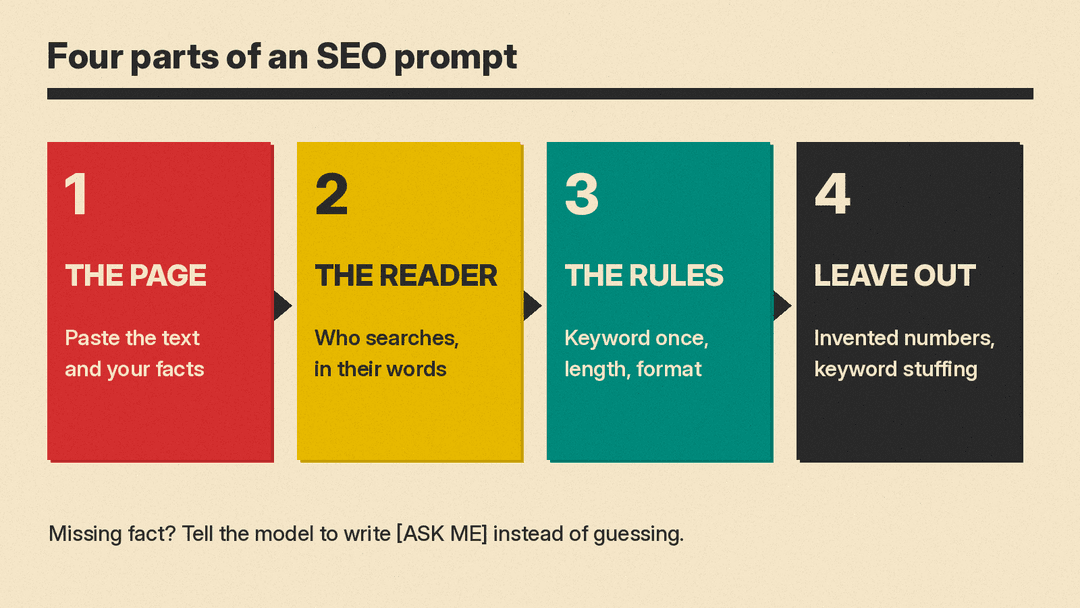
OpenAI's prompt engineering guide says a developer message generally has four parts: identity (purpose, communication style and goals), instructions (what to do and what never to do), examples and context. Anthropic's guide to reducing hallucinations adds two habits that matter for SEO: give the model permission to say it does not know, and tell it to use only the documents you provide.
In practice, that means:
- Paste your facts. The model does not know your prices, service area or results. Anything you leave out, it may guess.
- Paste the page. For audits and rewrites, paste the current text so the model works from what is live.
- Do not trust its numbers. A chat model is not a keyword tool. Unless you paste in data, treat any search volume or ranking it gives you as unchecked. Use it to sort and draft. Get numbers from your own tools, such as Search Console.
- Ask for an "[ASK ME]" gap. When it needs a fact you did not give, it should mark the gap, not fill it.
New to prompting? Start with how to write better AI prompts.
Setup prompts (use these first)
1. Site brief
I run [site or business] for [audience]. We offer [products or services] in [area or online].
Our facts: [facts you can prove: years in business, credentials, prices, policies].
Summarize this as a 100-word brief I can paste at the top of future SEO prompts. Use only these facts. If something important is missing, list it as [ASK ME].
2. Reader's words
My page is about [topic]. My readers are [beginners / experts / both].
List 15 ways a person might phrase a search for this topic. Group them into words a beginner would use and words an expert would use. Do not give search volumes.
3. House rules
For all SEO writing in this chat, follow these rules: use only facts I give you; mark any missing fact as [ASK ME]; never repeat a keyword just to fit it in; no claims about rankings or traffic; plain sentences. Reply "OK" and wait for my first task.Keyword research prompts
4. Seed keyword list
Topic: [topic]. Audience: [audience].
List 30 search phrases people might use, from broad to specific. Mark each as "short" (1 to 2 words) or "long" (3 or more words). Do not estimate search volume or difficulty. I will check those in my own tools.
5. Question keywords
List 20 questions a [audience] might type into a search engine about [topic]. Group them by stage: just learning, comparing options, ready to buy or act. Only include questions my page could honestly answer from these facts: [facts].6. Keyword clusters
Here is my keyword list: [paste list].
Group these into clusters where one page could answer every phrase in the cluster. Name each cluster, pick the clearest phrase as the main keyword, and flag any phrase that does not fit anywhere.
7. Keyword to page map
Here are my site's pages and their main topics: [paste page list].
Here are my keyword clusters: [paste clusters].
Match each cluster to one existing page, or mark it "new page needed." Flag any two pages that seem to target the same cluster.
Search intent prompts
8. Classify intent
For each search phrase below, say what the searcher most likely wants: to learn something, to find a specific site, to compare options, or to buy or book. Give a one-line reason for each. If it could be more than one, say so.
Phrases: [paste list]
9. What the searcher needs
Someone searches "[phrase]". List the 5 things they most likely need to see on the page to feel their question is answered, in order. Then list what my page already covers, based on this text: [paste page]. Mark the gaps.Outline and brief prompts
10. Outline with proof slots
Write an H2 and H3 outline for a page targeting "[main keyword]" for [audience].
Under each heading, note what original material I should add, such as a photo, a real example, our own data or a quote from our team. Do not write the page.
11. Content brief for a writer
Create a one-page brief for a writer covering "[topic]".
Include: the reader, the main question to answer, 5 to 7 subtopics, facts the writer must get from me [facts], and 3 things to avoid. No word count target.
12. Beyond the obvious
Here is my draft outline: [paste outline].
Which parts would every other page on this topic also say? Which parts add something only we can offer, based on these facts about us: [facts]? Suggest 3 sections that would add original value.
Title tag and meta description prompts
Google's title link guide asks for a title on every page that is "descriptive and concise," with no keyword stuffing and no vague labels like "Home." Its snippet guide says there is no length limit for meta descriptions, but snippets get cut to fit the screen, and each page should have its own description. The character limits below are common habits, not Google rules.
13. Title tags
Write 5 title tags for this page: [paste page summary].
Main keyword: "[keyword]". Rules: under 60 characters each, descriptive, keyword used once, brand name "[brand]" at the end of at most 2 versions. No vague words such as "Home" or "Welcome".
14. Meta descriptions
Write 3 meta descriptions for this page: [paste page summary].
Rules: under 155 characters each, one or two sentences, a plain summary of what the page offers, main keyword "[keyword]" used once. Use only facts in the summary.
15. Duplicate title audit
Here are the title tags and meta descriptions for my pages: [paste list of URL, title, description].
Flag any that are duplicates or near-duplicates, any that are vague, and any that repeat a keyword. Suggest a fix for each flagged item.
On-page optimization prompts
16. Keyword stuffing check
Here is my page text: [paste text].
Main keyword: "[keyword]".
Find sentences where the keyword or close variants repeat in a way a reader would find tiring. Quote each one and suggest a natural rewrite. Do not add new facts.
17. Heading check
Here are my page's headings in order: [paste H1, H2, H3 list].
Does the order make sense to a first-time reader? Flag headings that are vague, that repeat the same keyword, or that promise something the page does not cover based on this summary: [summary].
18. Image alt text
Write alt text for these images on my page about [topic]:
[image 1: describe what is in it]
[image 2: describe what is in it]
One short sentence each. Describe what is in the picture and how it relates to the page. No keyword lists.
19. URL slug
Suggest 3 short URL slugs for a page titled "[title]". Lowercase words joined by hyphens, no dates, no filler words. Keep the main topic words.Internal linking prompts
The Starter Guide says link text "tells users and Google something about the page you're linking to." These prompts help you write it.
20. Find link spots
Here is my new page: [paste text].
Here is a list of my other pages, with titles and URLs: [paste list].
Suggest up to 5 places in the new page where a link to another page would help the reader. For each, quote the sentence, name the target page and suggest the anchor text.
21. Fix weak anchor text
Here are links from my site with their anchor text: [paste list of anchor text and target page].
Flag any anchors such as "click here" or "read more" that do not describe the target page. Suggest a short, descriptive replacement for each.
Schema and FAQ prompts
Google's structured data intro recommends JSON-LD in most cases, says not to mark up information that is not visible to the user, and points to the Rich Results Test to validate. One change matters here: Google's Search Central updates log says the FAQ rich result feature is no longer shown in Google Search, starting May 7, 2026. An FAQ section can still help readers. Just do not expect FAQ results in Google.
22. LocalBusiness JSON-LD
Write JSON-LD structured data (schema.org LocalBusiness) for my business using only these facts: [name, address, phone, hours, website].
Do not add any property I did not give you. If a common property is missing, list it under the code as [ASK ME] instead of guessing.
23. Article JSON-LD
Write JSON-LD (schema.org Article) for this page using only these details: headline [title], author [name], date published [date], image URL [url].
Do not add ratings, reviews or any field I did not give. Return only the code.
24. FAQ section for readers
Write 5 questions and short answers for the bottom of my page about [topic], using only these facts: [facts].
If an answer needs a fact I have not given, write [ASK ME] instead of guessing.
Content refresh prompts
25. Find what is out of date
Here is a page I published on [date]: [paste text].
List every statement that could have changed since then, such as prices, versions, dates, laws or statistics. Mark each as "check." Do not rewrite the page and do not guess the new values.
26. People-first check
Review my page against these questions from Google's helpful content guidance:
Does the content provide original information, reporting, research, or analysis? Does the content provide a substantial, complete, or comprehensive description of the topic? Does the content provide insightful analysis or interesting information that is beyond the obvious?
Page: [paste text].
For each question, answer yes, partly or no, with a quote from the page as evidence. Then suggest 3 concrete additions.
The three questions in template 26 come from Google's guide to creating helpful, reliable, people-first content, which also suggests asking "Who, How, and Why" about each page.
Local SEO prompts
Google's tips to improve your local ranking say local results are mainly based on relevance, distance and popularity. They say that businesses with complete and accurate info are more likely to show up, and that replying to reviews shows you value feedback. They also say there is no way to request or pay for a better local ranking.
27. Business Profile description
Write a Google Business Profile description for [business].
Facts: [what you do, area served, hours, what makes you different, any credentials].
Rules: plain language, under 120 words, no keyword lists, no prices or claims I did not give you, no links.
28. Review reply
A customer left this review: "[paste review]". Star rating: [rating].
Write a reply from [owner name] under 60 words. Thank them, respond to the specific point they raised, and if the review is negative, offer a way to follow up at [contact]. Do not admit fault or promise refunds unless I say so.
29. Service area page
Write an outline for a page about our [service] in [city].
Use only these local facts: [real jobs done there, staff, travel time, local rules or permits that apply].
Do not invent landmarks, customers or neighborhoods. If I have not given enough local facts for a useful page, say so.
Final check prompt
30. Pre-publish fact check
Here is my page, with its title tag, meta description, image alt text and schema: [paste all].
Here are my facts: [facts].
List every claim in all of these parts and mark each as "in the facts" or "not in the facts." Do not rewrite anything.
What our small test showed
We ran five of these templates (8, 13, 16, 22 and 28, exactly as printed above with sample details filled in) on Gemma 3 1B, a small open model, running locally at temperature 0. This was not a test of ChatGPT or Claude. Larger models usually follow rules better. But the failures below are the kinds of mistakes to look for in any model's SEO drafts.
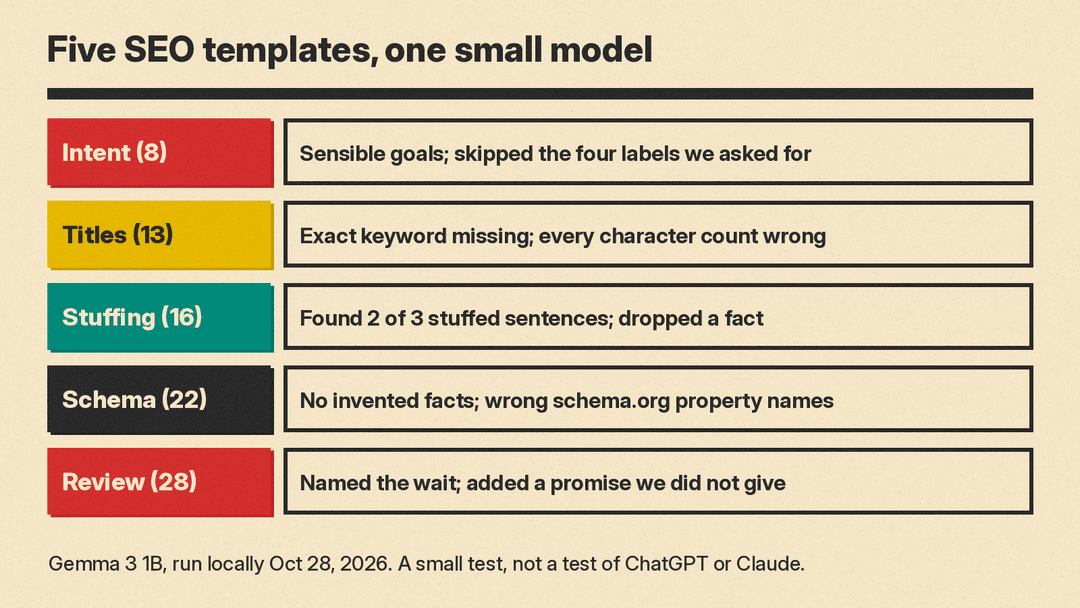
- Search intent (template 8). It gave a sensible goal for all five phrases, for example "to compare and contrast" for "brooks vs hoka" and "to locate a physical store" for "running shoe store near me." But it wrote goals in its own words instead of picking from the four labels we asked for, and it did not flag any phrase as mixed intent.
- Title tags (template 13). All five titles were under 60 characters. None used the exact keyword "how to repot a snake plant." The brand name appeared in three titles, not at most two, and at the start of two of them, not the end. It also printed a character count after each title, and every count was wrong: it said 29 for a title that is 44 characters long. Count characters yourself.
- Keyword stuffing check (template 16). It found two of the three stuffed sentences and missed "Book dog grooming Fresno today." Its rewrite of the second sentence dropped "baths, nail trims and haircuts," which was the only useful fact in it.
- LocalBusiness schema (template 22). It added no invented facts, which is what we asked. But it used property names that are not the schema.org names: "phone" instead of "telephone," "website" instead of "url," and "city" and "state" instead of "addressLocality" and "addressRegion." It put the hours in a made-up structure instead of "openingHoursSpecification." It did not list any [ASK ME] items. Code like this looks correct at a glance. Run it through the Rich Results Test.
- Review reply (template 28). The 52-word reply thanked the customer, named the 20-minute wait and gave the email address. It also said "we're looking into this," a promise we did not give it.
The pattern: the model was good at format and tone, and weak on exact rules (keyword use, counts, property names) and on keeping facts. So check every count, every fact and every line of code before it goes live.
Before you publish
Check the numbers yourself. Chat models can produce search volumes, ranking positions and traffic estimates that look precise. Unless you pasted that data in, treat every number as unchecked.
Do not scale up. Prompts like template 29 make it easy to create one page per city. Google lists "Creating many pages where the content makes little or no sense to a reader but contains search keywords" as an example of scaled content abuse. Write a local page only when you have real local facts for it.
Say how you made it, when it helps. If you generate content automatically, Google suggests you consider adding information on how it was created, in a way that makes sense for your audience.
Validate schema. Run every JSON-LD block through the Rich Results Test before it goes live, and make sure each value is visible on the page.
For more templates, see our ChatGPT prompts for small business and Claude prompts for writing that sounds like you.
Sources
- Google Search Central: Search Engine Optimization (SEO) Starter Guide
- Google Search Central: Google Search's guidance on using generative AI content on your website
- Google Search Central: Spam policies for Google web search
- Google Search Central: Creating helpful, reliable, people-first content
- Google Search Central: Influencing your title links in search results
- Google Search Central: Control your snippets in search results
- Google Search Central: Introduction to structured data markup in Google Search
- Google Search Central: Latest documentation updates
- Google Business Profile Help: Tips to improve your local ranking on Google
- OpenAI: Prompt engineering
- Schema.org: LocalBusiness
- Anthropic: Reduce hallucinations
