
OpenAI has added iCloud Mail and iCloud Calendar plugins to ChatGPT. In its release notes dated October 27, the company says iCloud users "can now connect Mail and Calendar to ChatGPT to find emails, catch up on your inbox, check your schedule, and update calendar events." The plugins are available on all ChatGPT plans on the web, the desktop app and iOS.
For people who live in Apple's ecosystem, this closes a gap. OpenAI's help center already listed connections for services such as Google Drive, Outlook Email and Calendar, and Slack. iCloud now joins that list. The setup is also a little different from most ChatGPT connections, because it uses an Apple app-specific password instead of a normal sign-in screen. Here is what the plugins do, how to connect them, and what to know about the password.
What the iCloud plugins can do
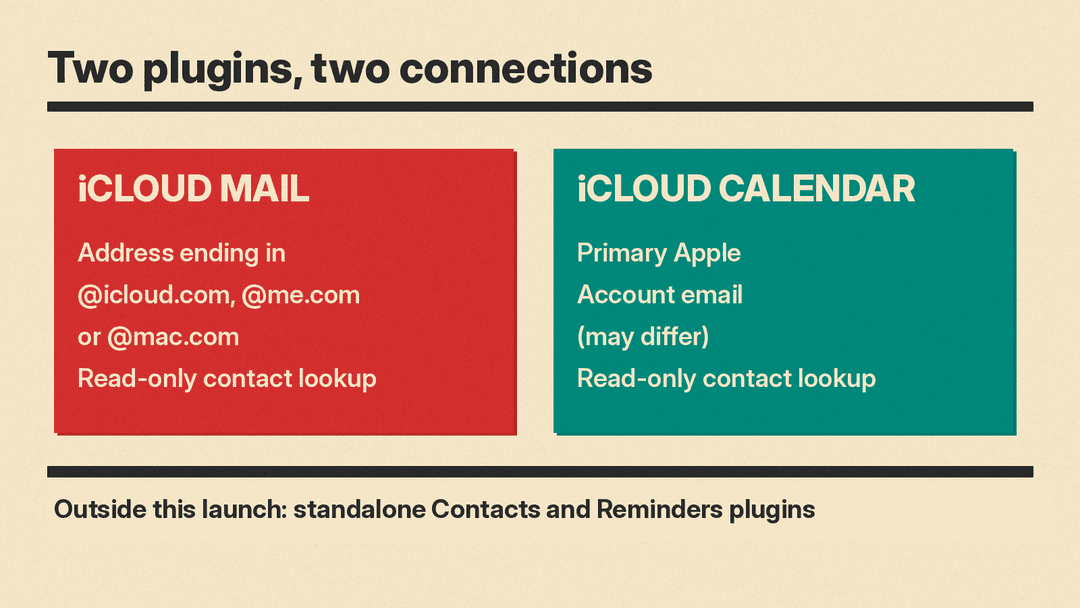
OpenAI's own description is short: find emails, catch up on your inbox, check your schedule, and update calendar events. Its help article on connected apps adds that iCloud Mail and iCloud Calendar are separate plugins, and that both include read-only contact lookup.
MacRumors reports more detail on each side:
- Calendar: ChatGPT can read, schedule, and update events that show up on your iPhone's Calendar app or any third-party app that uses iCloud Calendar, according to MacRumors.
- Mail: MacRumors says the integration lets ChatGPT search and read iCloud Mail, manage messages and drafts, send email, and look up iCloud contacts.
There are limits. MacRumors notes that ChatGPT can only see your iCloud Mail, not other accounts in the iOS Mail app such as Gmail or Outlook. OpenAI says standalone Contacts and Reminders plugins are outside this launch, so Apple Reminders is not part of this release.
MacRumors also reports that iCloud access can be used for Dots, the proactive AI agent OpenAI launched last month. We covered how dots now work over text messages in How to Text Your ChatGPT Dot Over iMessage or RCS.
Who can use it
OpenAI's help center says the iCloud plugins "are rolling out globally to all ChatGPT plans on web, desktop, and iOS, subject to workspace app controls." Because it is a rollout, the plugins may not appear for everyone at the same time.
If you use ChatGPT through a work or school workspace, the rules are tighter. OpenAI's guide to connecting app accounts says an app must be available for your plan, region, account, supported surface, and workspace, and that in managed workspaces an administrator may also need to enable the app or approve the account.
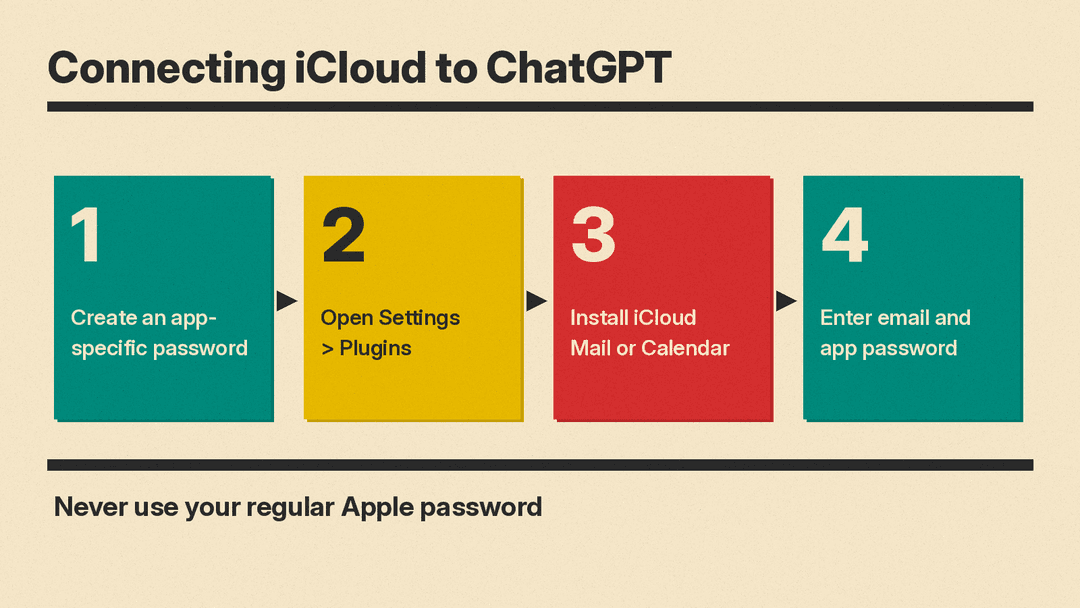
Step 1: Create an Apple app-specific password
ChatGPT does not ask for your regular Apple password. OpenAI says iCloud uses an Apple app-specific password in its connection form, and it is explicit: do not use your regular Apple password, and do not paste a password into the conversation.
An app-specific password is a separate password that Apple lets you create for one outside app. According to Apple Support, its purpose is to help make sure your Apple Account password cannot be stored or collected by the app. Your Apple Account must be protected with two-factor authentication to create one.
Apple's steps:
- Sign in to your Apple Account on account.apple.com.
- In the Sign-In and Security section, select App-Specific Passwords.
- Select Generate an app-specific password, then follow the steps on your screen.
Step 2: Install and connect the plugin in ChatGPT
OpenAI's general steps for connecting an app account are:
- Open Settings > Plugins. Select the app or the plugin that includes it.
- Select Install plugin if shown. This may also start the app's connection or setup flow.
- If prompted, select Connect or continue the app's setup flow.
- Review the requested services and permissions, then complete any required authorization.
For iCloud, the connection form asks for an email address and the app-specific password. The address depends on which plugin you are connecting:
- iCloud Mail: enter your iCloud Mail address ending in @icloud.com, @me.com, or @mac.com.
- iCloud Calendar: enter your primary Apple Account email address, which OpenAI notes may differ from your iCloud Mail address.
This is the easiest place to trip up. If your Apple Account email is not your iCloud mailbox, the two forms take different addresses: Mail wants the iCloud mailbox address, and Calendar wants the Apple Account address.
Step 3: Connect Mail and Calendar separately
OpenAI says to connect iCloud Mail and iCloud Calendar separately if you want both services, and that a plugin installation does not authorize the other service. In practice that means two installs and two connection forms.
Reconnecting and revoking access
Two details in OpenAI's help pages are worth knowing before you set this up.
Reconnecting. If a connection stops working, OpenAI says to reconnect the affected Mail or Calendar connection using a valid app-specific password, and that reconnecting one does not update the other. If Apple revoked the password, or you changed or reset your main Apple password, create a replacement app-specific password first.
Revoking. Disconnecting an iCloud connection in ChatGPT does not revoke its password at Apple. To fully cut off access, revoke the password in Apple's app-specific password controls as well. OpenAI warns that other connections using that password may also stop working, which is a good reason to create a dedicated password just for ChatGPT.
Apps vs plugins, briefly
OpenAI now uses two words here. In its help center, an app connects ChatGPT to an external service so it can access information or perform supported actions. A plugin packages capabilities into a workflow and can include one or more apps, skills, or both. The iCloud plugins include apps that link an outside account. Installing a plugin does not bypass an app's authorization requirements or workspace permissions.
Plugins are also where OpenAI is pointing other work. Custom GPT owners are being moved there too, as we explained in Custom GPTs Are Retiring: How to Move Your GPT to a ChatGPT Plugin, and business partners are building on it, as in OpenAI and ServiceNow Bring Workflows Into ChatGPT.
Why it matters
Email and calendars hold a lot of personal information. MacRumors frames the change this way: iCloud plugins give ChatGPT some of the same access that Siri AI has to personal data. For iPhone users who already ask ChatGPT for help planning their week or drafting replies, this lets it work with the real inbox and calendar instead of pasted text.
The trade is access. Before you connect, decide whether you want ChatGPT able to change calendar events and work with your mail, use a dedicated app-specific password, and remember that removing access fully takes a step on Apple's side as well as in ChatGPT.
Sources
- OpenAI release notes: iCloud Mail and Calendar plugins in ChatGPT
- OpenAI Help Center: Connected apps in ChatGPT
- OpenAI Help Center: Connecting and managing app accounts in ChatGPT
- OpenAI Help Center: Plugins in ChatGPT
- Apple Support: Sign in to apps with your Apple Account using app-specific passwords
- MacRumors: ChatGPT Can Now Access Your iCloud Mail and Calendar
