

Running social media for a brand means doing five jobs at once: planning, writing, making visuals and video, publishing, and reporting. All seven tools in this guide now build AI into the product, so the useful question is not "should I use AI" but "which tool's AI fits the part of the job that eats my week."
This guide covers seven real tools, grouped by the job they help with most. Features below are as described on each vendor's own pages when we checked them in October 2026. Plans, credits and features change often, so check the vendor's site before you sign up. We do not list prices here. If you also run paid campaigns, email or SEO, our best AI tools for marketers guide covers the wider marketing stack, and our best AI tools for YouTubers guide goes deeper on long-form video.
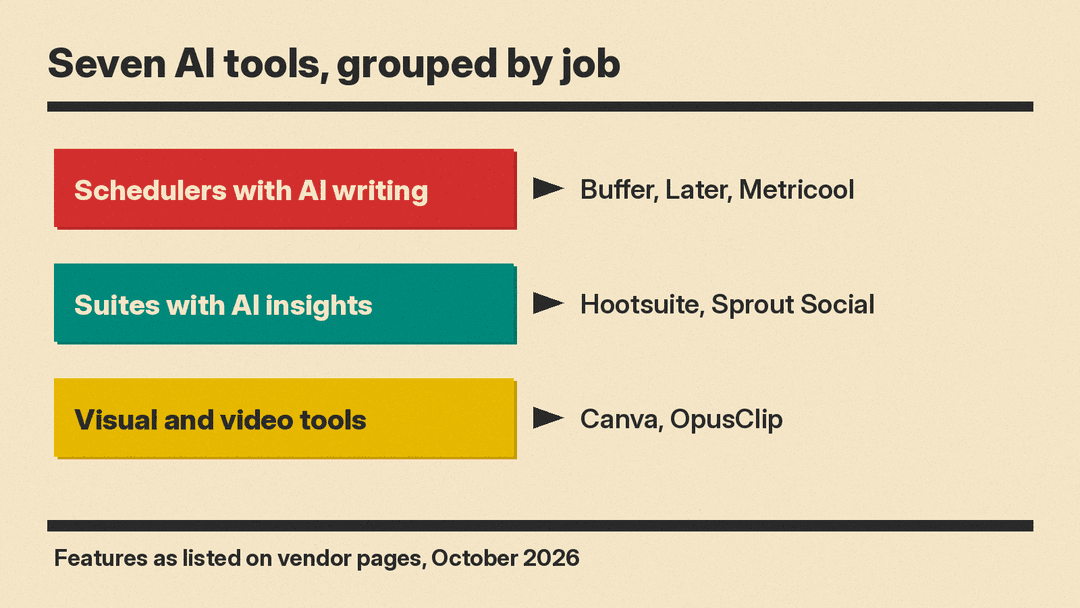
Schedulers with an AI writing assistant
These are planning and publishing tools first. The AI helps you write and adapt posts inside the same composer you use to schedule them, which saves the copy and paste step between a chatbot and your calendar.
Buffer
Buffer's AI Assistant lives in the Buffer post composer. Buffer says it helps you brainstorm ideas, rewrite content and "craft platform-specific posts." It can turn one post into versions for different networks, and Buffer names LinkedIn, Threads, X, Instagram and Bluesky as examples. You can make a draft more casual or formal, shorten or expand it, and change its structure.
Two details matter for managers. First, Buffer's FAQ says you can use the AI Assistant "without any limits" with a free Buffer account. Second, Buffer says the AI is optional: your posts are not changed by AI unless you open the assistant yourself.
On data: Buffer's FAQ says it uses OpenAI's large language models, and that the text you enter into the assistant is shared with OpenAI. Read that FAQ before you paste anything confidential, such as an unannounced launch.
Good for: solo managers, creators and small teams who want a simple scheduler with AI writing help built in.
Later
Later's AI social media tools cover three steps. Caption Writer generates captions from a few keywords about your post, and Later says it "learns your brand's tone from your past posts." Ideas gives you post ideas and content pillars, so you can plan weeks of content at once. Best Time to Post looks at your past post data, follower activity and industry trends, and shows recommended times on your calendar.
Later's FAQ says these AI tools run on paid plans and use a shared monthly credit pool that resets on the first of each month. It also says every plan includes a 14-day free trial, so you can test them first. Later also sells an influencer marketing platform, which helps if your brand works with creators.
Good for: Instagram and TikTok heavy brands, and teams that work with influencers.
Metricool
Metricool combines a planner, analytics and reporting. In the planner you drag and drop content into a calendar, find the best times to post, and schedule across your networks, with an AI social media assistant to spark ideas. On the reporting side, Metricool lists automated reports, AI analysis, campaign dashboards and a Data Studio connection.
Metricool treats each brand as its own workspace. For Google Business Profile, it says each brand matches one location, so a business with several locations needs a separate brand for each.
Good for: freelancers and agencies who report to clients every month and want analytics and scheduling in one place.
Enterprise suites with AI insights
These platforms do much more than scheduling: a shared inbox for comments and messages, social listening, and reporting for larger teams. Their AI leans toward insights as much as writing.
Hootsuite
Hootsuite's AI centers on Wisdom, which Hootsuite describes as a social AI assistant "trained on real-time social conversations." Hootsuite says you can use it to spot trends, draft on-brand posts and plan strategy. Beyond writing, Hootsuite lists AI social listening, brand monitoring and reputation alerts, AI that sorts incoming messages by intent, sentiment and urgency, and a generative AI chatbot that answers common questions on your website, Messenger, Instagram, X and WhatsApp, then hands off to a person when needed.
Hootsuite now groups its products into a suite: Perch for content, Nest for the social inbox, Lumen for insights and listening, Wisdom for AI, and Parliament for employee advocacy.
Good for: brand and comms teams that need listening, crisis alerts and customer care alongside publishing.
Sprout Social
Sprout AI is built into Sprout Social's publishing, engagement, analytics, listening, advocacy and influencer tools. For publishing, Sprout lists AI Assist to "generate and refine copy," Optimal Send Times to publish when your audience is most active, and Trellis, which Sprout calls a "strategic AI teammate," to summarize viral trends and competitor themes. Sprout says Sprout AI is built with "rigorous privacy and compliance," but check its own policy pages and your contract terms if your company has strict data rules.
Good for: mid-size and large teams that live in reports and need AI to turn a lot of social data into clear answers.
Visual and video tools
Many social posts need an image or a short video. These two tools focus on that side of the job.
Canva
Canva AI puts several AI tools inside the design editor. Magic Write drafts text, Magic Resize changes a design's format, language and dimensions, Magic Background makes backgrounds, and the list also includes Magic Animate and Translate. Canva says its AI can learn your brand's fonts, colors and rules so designs stay on brand, and it lists brand templates and other brand management tools.
For social media managers, resizing alone saves time: one design can become a square feed post, a vertical story and a wide banner without starting over. Buffer also lists Canva as an integration, so you can move designs into a scheduler. For Canva's new design image model, see our Canva Craft explainer.
Good for: anyone who makes their own graphics, from solo managers to in-house teams.
OpusClip
OpusClip turns long videos into short clips. Its pitch is "1 long video, 10 viral clips." OpusClip lists animated captions, AI Reframe to resize video for each platform, AI B-Roll, brand templates, a thumbnail generator, speech enhancement and AI dubbing. It also has a social scheduler, so you can publish clips to your platforms from the same app. OpusClip says its ClipAnything model works on many kinds of video, including vlogs, gaming, sports, interviews and explainers.
Good for: brands that record webinars, podcasts, interviews or events and need a steady supply of short-form video.
How to choose
Start with the part of the job that takes the most time each week, not the longest feature list.
- If writing and scheduling take most of your week, try a scheduler with built-in AI: Buffer, Later or Metricool.
- If you report to bosses or clients every month, look at Metricool for simple reports, or Sprout Social and Hootsuite for larger teams.
- If you handle a busy inbox or brand risk, Hootsuite and Sprout Social both list social listening, and Hootsuite lists AI that sorts incoming messages.
- If visuals are the bottleneck, add Canva. If video is the bottleneck, add OpusClip.
You may need only one scheduler plus one or two creative tools. Use free plans and trials to test a real week of work before you commit.
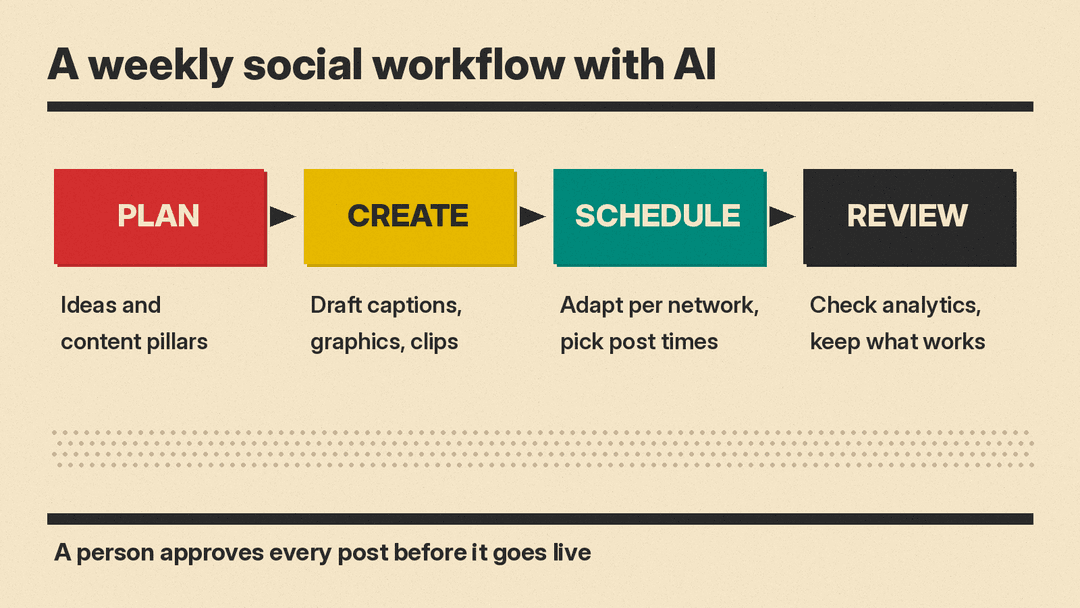
Tips for using AI on social without losing your voice
AI drafts are a starting point. These habits keep the output useful and safe.
- Feed it your voice. Tools like Later's Caption Writer learn from your past posts. In other tools, paste two or three of your best posts as examples before you ask for new ones.
- Write for each network. Ask for a separate version per platform instead of posting one caption everywhere. Buffer and other schedulers can do this from one draft.
- Check every fact. AI can get dates, prices, product names and links wrong. Read every draft before it goes into the queue.
- Keep secrets out. Read each tool's data policy before you paste unannounced launches, customer details or internal numbers. Buffer, for example, says text you enter into its assistant is shared with OpenAI.
- Keep a human on replies. AI can sort and suggest replies, but a person should approve anything sensitive, such as complaints, refunds or crisis responses.
- Review results weekly. Use the analytics in your scheduler to see which AI-assisted posts actually worked, and feed those back in as examples.
Bottom line
As of October 2026, all seven tools in this guide have AI built in. For most managers, the best setup is a scheduler whose AI writes and adapts posts (Buffer, Later or Metricool), a design tool for visuals (Canva), and a clip tool for video (OpusClip). Larger teams that need listening, a shared inbox and deep reporting should compare Hootsuite and Sprout Social. Whatever you pick, let AI do the first draft and keep a person in charge of the final post.
