
This guide collects 50 copy and paste Midjourney prompts for photo-like images, grouped by category: portraits, products, food, interiors, landscapes, street scenes, animals, and macro shots. Every prompt describes a fictional subject, never a real person or a brand, and ends with parameters.
To use one, copy it, run it once, then change the subject to fit your needs and keep the rest of the structure at first. Parameters such as --ar and --raw always go at the end of the prompt, after a space, never mixed into the description. If you are new to prompting in general, start with how to write AI image prompts.
What makes a Midjourney prompt look like a photo?
Midjourney can produce painterly, illustrated, and photographic images from the same tool. A few choices in the prompt push the result toward a photo.
Say "photo"
Midjourney's Prompt Basics page lists Medium as one area to consider, with examples like photo, painting, and illustration. Putting the word "photo" or "photograph" near the start tells Midjourney what kind of image you want. Most prompts below begin this way.
Name the light
The docs list lighting examples such as soft, ambient, overcast, neon, and studio lights. A useful habit is to pick one light condition and name it once: "soft window light", "overcast daylight", "hard afternoon sun".
Add camera and composition words
The docs list composition examples such as portrait, headshot, closeup, and birds-eye view. Terms photographers use, like lens length (35mm, 85mm), shallow depth of field, golden hour, film grain, candid, and documentary photo, describe how real photos look. The Prompt Basics page does not list these, so treat them as words to test rather than settings with fixed meanings.
Keep prompts short
Prompt Basics says short, simple prompts typically generate the best images, and long lists or detailed instructions can confuse the process. Instead of "Show me a picture of lots of blooming California poppies, make them bright, vibrant orange, and draw them in an illustrated style with colored pencils", write "Colored pencil illustration of bright orange California poppies". Other tips from the same doc: use specific synonyms like huge or gigantic instead of big, use specific numbers like "three cats" or collective nouns like "flock of birds", and describe what you want rather than what you do not want, because a party with "no cake" may still show a cake. Fewer details mean more variety but less control.
Parameters that shape the result
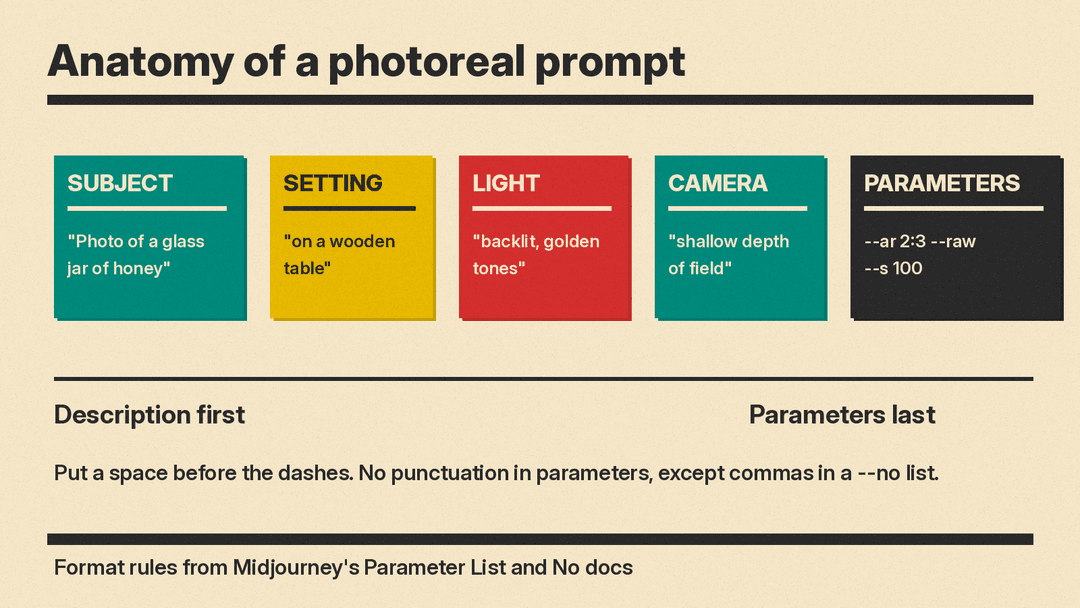
Parameters go at the end of the prompt, after the description. Put a space between the prompt text and the dashes, and do not use commas, periods, or other punctuation in parameters. The one exception in the docs is the --no list, which separates its items with commas. The Parameter List page shows four formatting mistakes, including vibrant California poppies--ar 2:3 (missing space), --ar 2:3, (trailing punctuation), and vibrant California --ar 2:3 poppies (prompt text after parameters). The fourth puts an extra space between the two dashes.
--ar or --aspect sets the aspect ratio. The default is a 1:1 square. A bigger first number gives a wide image, a bigger second number gives a tall one. Common choices from the docs: 1:1 for social posts, 4:3, 2:3 which is common in printed photography and picture frames, 16:9 widescreen for HD video and TVs, and 9:16 vertical for mobile social content. Ratios cannot contain decimals, so write 139:100 instead of 1.39:1. Pixel sizes such as 1920:1080 are simplified to 16:9. Very wide or tall ratios are experimental and may give unpredictable results, and aspect ratio is not the same as image dimensions. See AI image settings like seed and aspect ratio for the wider picture.
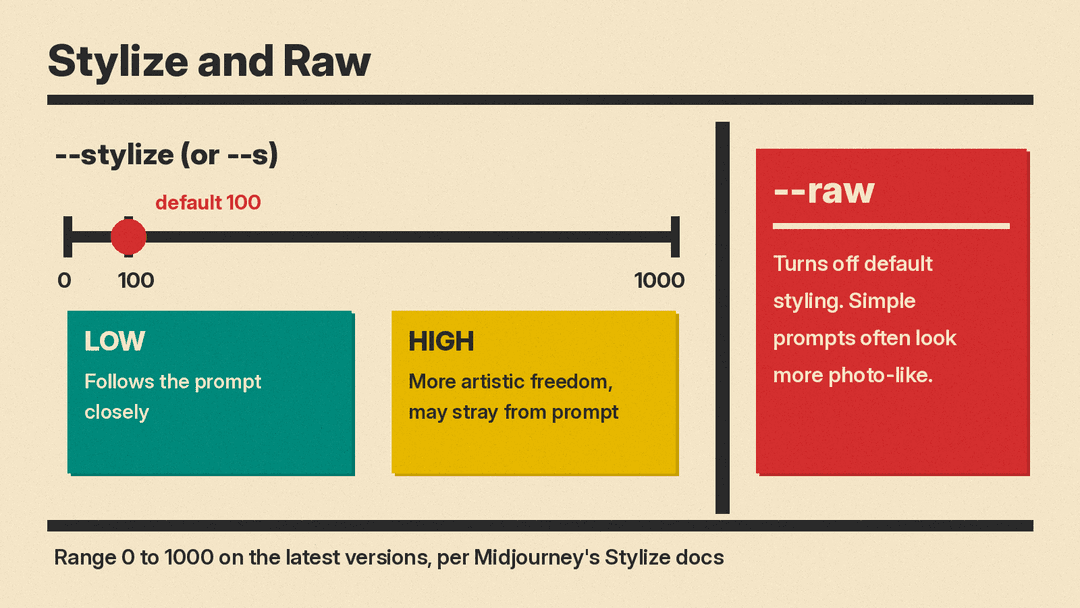
In Standard mode, Midjourney adds its own creative touch to images. --raw turns off that auto-pilot. The Raw page says simple prompts often give more realistic, photo-like images with Raw, and detailed style prompts get more control over the final look. Add --raw at the end of a prompt, or turn Raw on in settings for all future prompts. Older guides write --style raw. Midjourney's Legacy Features page lists raw as a style value for older versions, while the current Raw page uses --raw.
--stylize or --s sets how much artistic freedom Midjourney takes. Low values follow the prompt closely with little extra flair. Higher values may look more artistic but can stray from what you wrote. The default is 100, and the range on the latest versions is 0 to 1000. For literal, photographic results, lower values are worth testing first.
--no lists things to leave out, separated by commas, as in still life gouache painting --no fruit, apple, pear. Moderation reads each word after --no separately, so --no modern clothing is read as "no modern" and "no clothing" and can trigger a warning. Describe the clothing you want instead, and keep --no items to single words such as --no text, watermark.
--v or --version selects a model version, and you can set a default in settings. Each version may handle prompts differently and have its own style, so a prompt that reads as a photo on one version may not on another. Test prompts on the version you actually use.
In short: subject, setting, light, camera and composition words, then parameters at the end.
How to use these prompts
- Copy a prompt into Midjourney as-is and generate once to see the baseline.
- Swap the subject and keep the structure: subject, setting, light, camera words, parameters.
- Change one thing at a time so you know what caused a difference.
- Set
--arto fit where the image will appear: 1:1 for social posts, 16:9 for widescreen, 9:16 for mobile, 2:3 for printed frames. - If results look too stylized, add
--rawor lower--stylize.
Portrait prompts
Seven prompts for fictional people. Adjust age, clothing, work, and light. For the same face across images, see how to create consistent characters.
Photo of an older fisherman mending a net, overcast coastal light, weathered skin, calm expression --ar 2:3 --raw --s 50Change the person's work and the weather.
Candid portrait of a young woman in a wool coat at a bus stop, soft daylight, 85mm lens look --ar 4:5 --rawChange the coat, season, and location.
Documentary photo of a baker dusting flour from her hands, warm morning window light --ar 3:2 --raw --s 100Swap the trade and the time of day.
Headshot of a middle-aged man in a plain shirt, neutral gray background, soft studio lights --ar 1:1 --raw --s 50Change the background and shirt colors.
Environmental portrait of a farmer inside a greenhouse, humid air, muted greens, 35mm lens look --ar 4:3 --rawMove the person to a different workplace.
Portrait of a teenage boy with freckles, golden hour backlight, slight film grain --ar 4:5 --s 150Change the age and the light direction.
Black and white photo of a street musician holding a violin, hard side light, deep shadows --ar 2:3 --raw --s 50Swap the instrument and the lighting.
Product prompts
Seven setups for generic items with no branding. For readable words on labels or packaging, compare tools in Flux vs Midjourney vs Ideogram for text in images.
Product photo of a ceramic mug on a linen cloth, soft morning light, plain background --ar 1:1 --raw --s 50Replace the mug with your item.
Studio photo of a brown leather wallet, three softbox lights, dark gray seamless backdrop --ar 4:5 --rawChange the material and backdrop tone.
Photo of a glass jar of honey on a wooden table, backlit, golden tones, shallow depth of field --ar 2:3 --raw --s 100Swap the jar contents and surface.
Overhead photo of handmade soap bars in a row, muted pastel colors, even soft light --ar 4:3 --raw --no text, watermarkChange the arrangement and palette.
Product photo of a knitted scarf on a wooden hanger, neutral wall, overcast daylight --ar 9:16 --raw --s 50Change the garment and wall color.
Closeup of a steel water bottle with condensation, hard studio light, black background --ar 3:2 --rawSwap the finish and the background.
Photo of a lit candle on a shelf, warm glow, dim room, calm mood --ar 16:9 --raw --s 100Change the room and time of day.
Food and drink prompts
Six prompts for dishes and drinks. Swap in your own recipe and keep the light description.
Photo of a sourdough loaf torn open on a cutting board, soft window light, visible crumbs --ar 3:2 --raw --s 50Swap the bread and the surface.
Overhead photo of a bowl of noodle soup with steam, chopsticks on a dark table --ar 1:1 --rawChange the dish and table color.
Candid photo of hands pouring coffee into a cup, morning light, muted colors --ar 4:5 --raw --s 100Swap the drink and the setting.
Photo of a lemon tart slice on white porcelain, bright daylight, shallow depth of field --ar 4:3 --raw --s 50Change the dessert and the plate.
Documentary photo of a market stall with crates of oranges, overcast light, busy background --ar 16:9 --rawSwap the produce and the weather.
Photo of iced tea with mint on a porch railing, golden hour light, film grain --ar 9:16 --s 200Change the drink and time of day.
Interior and architecture prompts
Six prompts for rooms and buildings. Change materials, hour, and mood.
Interior photo of a small reading nook, tall window, soft daylight, muted palette --ar 3:2 --raw --s 50Change the room type and colors.
Photo of an empty concrete stairwell, hard shadows from a skylight, minimal mood --ar 9:16 --rawSwap the building material and light.
Wide interior photo of a bakery just after opening, warm lights, wooden shelves --ar 16:9 --raw --s 100Change the type of shop.
Photo of a brick house facade at dusk, lit windows, quiet street --ar 4:3 --raw --s 50Swap the building style and hour.
Interior photo of a cabin bedroom, low morning sun, wool blankets, calm mood --ar 2:3 --rawChange the season and furnishings.
Photo of a library reading room, tall arched windows, rows of wooden desks --ar 4:5 --raw --no peopleAdjust the room size and light.
Landscape prompts
Six outdoor prompts. Adjust terrain, weather, and season.
Photo of a foggy pine forest at sunrise, low mist, muted greens --ar 16:9 --raw --s 50Change the tree type and weather.
Photo of a rocky coastline at low tide, overcast light, smooth water, long exposure look --ar 3:2 --rawSwap the coast type and sky.
Landscape photo of a wheat field under storm clouds, one dirt road, dramatic light --ar 2:3 --raw --s 100Change the crop and the sky.
Photo of desert dune ridges at golden hour, sharp shadows, warm tones --ar 4:3 --raw --s 50Swap the terrain and time of day.
Photo of a mountain lake with still water, snow on the peaks, clear cold light --ar 16:9 --rawChange the season and weather.
Aerial photo of patchwork farmland in morning haze, muted colors, soft light --ar 1:1 --raw --s 50Swap the landscape pattern and palette.
Street and travel prompts
Six prompts for public places. These lean on candid and documentary wording.
Candid street photo of a cyclist crossing a rainy square, wet reflections, neon signs --ar 3:2 --raw --s 50Change the weather and the subject.
Documentary photo of a covered market aisle, shoppers, hanging lamps, warm light --ar 16:9 --rawSwap the market goods and crowd.
Photo of a traveler with a backpack on an empty train platform, overcast morning --ar 9:16 --raw --s 100Change the station and the light.
Street photo of an old town alley with laundry lines, hard afternoon sun --ar 2:3 --rawSwap the architecture and the hour.
Photo of a night bus stop with one waiting passenger, cold fluorescent light, film grain --ar 4:5 --s 150Change the city and weather.
Travel photo of a ferry crossing a gray strait, gulls, wind, muted tones --ar 4:3 --raw --no text, watermarkSwap the vessel and the water.
Animal prompts
Six prompts for wildlife, pets, and working animals. Change species and habitat.
Photo of a barn owl in flight at dusk, wings spread, soft low light --ar 3:2 --raw --s 50Change the bird and time of day.
Closeup photo of a gray cat sleeping on a windowsill, warm afternoon sun --ar 4:5 --rawSwap the animal and the light.
Wildlife photo of a red fox standing in fresh snow, early morning, muted tones --ar 16:9 --raw --s 100Change the animal and season.
Photo of a working sheepdog in a green field, overcast light, alert posture --ar 4:3 --raw --s 50Swap the breed and terrain.
Underwater photo of a sea turtle above a reef, clear blue water, natural light --ar 3:2 --rawChange the species and water clarity.
Photo of a flock of starlings above rooftops at dusk, high contrast sky --ar 9:16 --raw --s 50Swap the birds and background.
Macro and close-up prompts
Six close-up prompts. These rely on texture and shallow depth of field wording.
Macro photo of a bee on a lavender flower, shallow depth of field, bright daylight --ar 1:1 --raw --s 50Change the flower and insect.
Closeup photo of raindrops on a spider web, backlit, soft green background --ar 4:5 --rawSwap the subject and light direction.
Macro photo of cracked dry earth, deep texture, hard midday light --ar 3:2 --raw --s 100Change the surface and contrast.
Extreme closeup of a human eye, fine iris detail, soft studio light --ar 16:9 --raw --s 50Change the eye color and lighting.
Macro photo of frost crystals on a window pane, cool blue tones, dim indoor light --ar 9:16 --rawSwap the crystal type and palette.
Closeup photo of coffee beans spilling from a burlap sack, warm tones, film grain --ar 4:3 --s 150Change the product and surface.
Common mistakes with photorealistic prompts
- Writing long, instruction-style prompts. The docs advise avoiding long lists and detailed instructions because they can confuse the process. Keep a short description of what you want to see.
- Writing "no X" inside the prompt text. A party with "no cake" may still show a cake. Describe what should be there, and use
--nowith single-word items for omissions. - Parameter formatting errors: no space before the dashes, a space between the two dashes, punctuation inside parameters, prompt text after parameters, or decimals in
--ar. - Very high
--stylizewhen you want a literal result. Higher values give Midjourney more freedom and may stray from the prompt. - Very extreme aspect ratios, which the docs call experimental and say may produce unpredictable results.
- Stacking conflicting style words. "Oil painting" plus "photo" pulls the image in two directions, so pick one medium.
- Prompting real or famous people. Describe fictional people instead: age, role, clothing, expression.
- Sharing photoreal results without saying they are AI generated. Realistic images can be hard to tell from camera photos, so learn how to spot an AI-generated image and label your own work when you post it.
Quick checklist
- Does the prompt name the medium, such as "photo"?
- Is it short, with one subject, one setting, and one light?
- Are you changing only one thing between generations?
- Do parameters sit at the end, with a space before the dashes, no punctuation (except commas between --no items), and integer ratios?
- Have you tried
--rawand a lower--stylizeif the image looks artificial? - Are you testing on the model version you plan to keep using?
Sources
- Midjourney docs, Prompt Basics
- Midjourney docs, Parameter List
- Midjourney docs, Aspect Ratio
- Midjourney docs, Raw
- Midjourney docs, Legacy Features
- Midjourney docs, Stylize
- Midjourney docs, No
- Midjourney docs, Version
- llms.blog, How to write AI image prompts
- llms.blog, AI image settings like seed and aspect ratio
- llms.blog, How to create consistent characters
- llms.blog, How to spot an AI-generated image
- llms.blog, Flux vs Midjourney vs Ideogram for text in images
