
An AI coloring page is a black and white line drawing on a plain white background, generated from a written description. You describe a subject, such as a cartoon elephant or a mandala, and the image model returns a page you can print and color with markers, pencils, or crayons.
The prompt matters because an image model asked only for a subject can return a finished illustration, with color or gray shading that does not belong on a coloring page. A prompt that names the line style, the level of detail, and the intended age group produces a page that is actually usable. If you are new to writing image prompts, start with How to Write AI Image Prompts: A Beginner's Guide.
What makes a good AI coloring page?
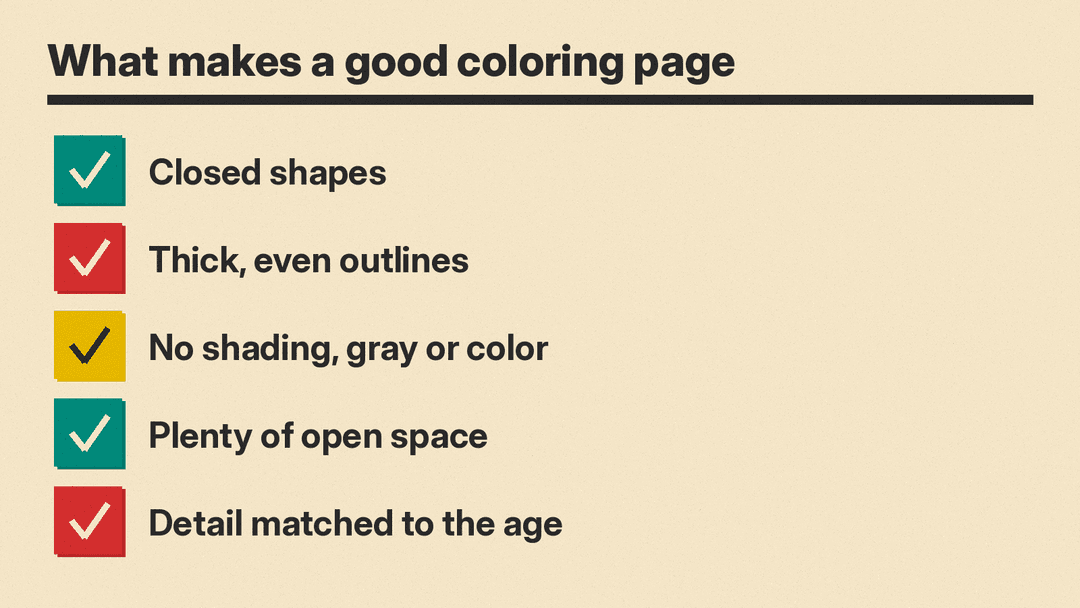
Judge every generated page against the same checklist:
- Closed shapes. Outlines should connect so color stays inside the lines.
- Thick, even outlines. Hairline strokes print poorly and are hard to color against.
- No shading, no gray, no color. Only black lines on white.
- Plenty of open space. Large areas are easier for children to fill in.
- Detail matched to the audience. Simple pages for kids, intricate pages for adults.
Adobe's guidance matches this split. It says bold cartoon animals, fairy tale scenes, and simple holiday themes work well for younger audiences, while botanical illustrations, geometric patterns, mandalas, and architectural line drawings work well for adult coloring books. Adobe adds that describing line weight, level of detail, and subject matter helps the generator produce the most accurate output (Adobe Firefly coloring page generator).
How do you make a coloring page in Adobe Firefly?
Adobe describes Firefly as a way to turn an idea into a printable coloring page by describing it, from animals to mandalas to holiday scenes, producing clean line art. Adobe says you can explore the generator for free: a free account gets free daily generations, and a paid plan is available for higher-volume generation (source).
The steps, per Adobe:
- Sign in with an Adobe ID or create a free account.
- Select Generate Image.
- Describe the page, being specific about subject, style, and level of detail. Adobe's example prompt is "bold line art of a cartoon elephant, simple outlines, suitable for young children".
- Choose effects like Line Drawing, Ink, or Sketch in the Effects panel for clean printable outlines.
- Click Generate, then adjust the prompt and regenerate until you like the result.
- Download the page as a high resolution file for printing, or open it in Adobe Express to build a printable PDF layout or a multi page coloring book.
How do you generate coloring pages in Adobe Express?
Adobe Express works through templates instead of a plain image prompt box. The steps, per the Adobe Express help page:
- On the Adobe Express homepage, select the plus icon.
- Type Drawing, then select Drawing worksheet.
- In the Templates panel, select Generate coloring page.
- Describe the page in the prompt and press enter.
- Review the generated variants and pick one to add to the canvas.
Adobe notes that outputs may occasionally be misleading, incorrect, or biased, so review every page before you hand it to a child or a class. The help page also states that you agree to only create content you have a legal right to use. Express is a convenient place to arrange generated pages into a worksheet or booklet layout for printing.
Can ChatGPT make a coloring page?
Yes. An OpenAI Academy video demonstrates creating an original black and white coloring page from a simple description. It notes that details like thick outlines, no shading, and plenty of open space produce a coloring friendly image, and that a follow up request can change one part without starting over. It also recommends requesting original ideas rather than famous characters or copies of someone else's artwork.
A first request can be short:
Draw a coloring page of a friendly lighthouse on a small island. Black outlines only, no shading, no color, white background.
Then refine one element with a follow up:
Keep everything the same, but make the lighthouse taller and remove the birds.
The follow up approach saves time because you do not regenerate the whole composition to fix one detail. If you need many pages at once, developers can generate images with code through OpenAI's image generation API.
What should a coloring page prompt say?
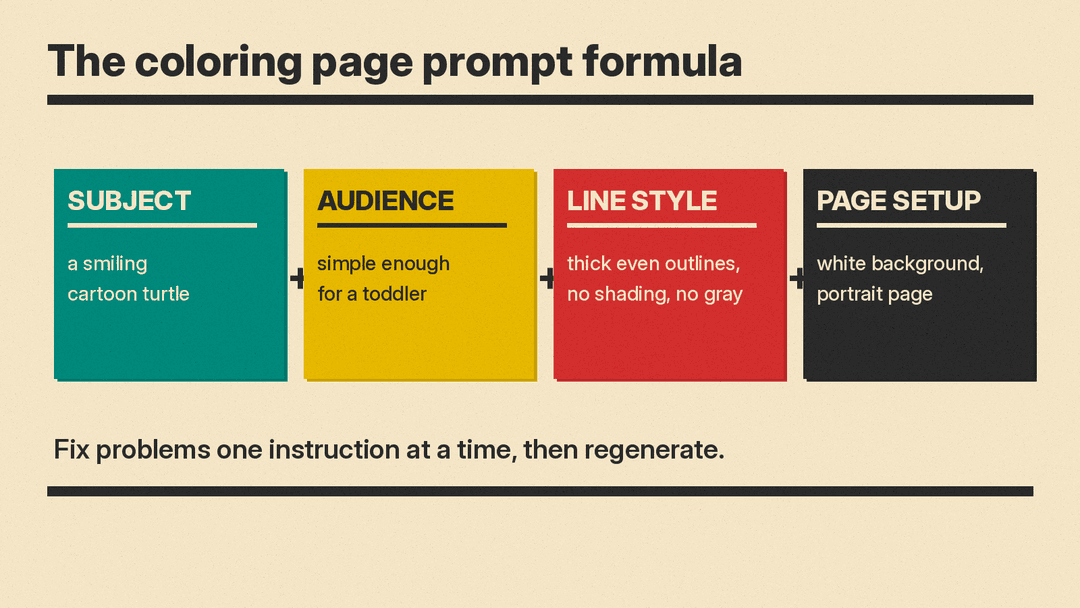
A reusable template covers four parts: subject, audience, line style, and page setup. Fill in the brackets:
[subject], black and white line art, thick even outlines, closed shapes, no shading, no gray, no color, white background, [detail level and age group], portrait page
Eight example prompts across age groups:
Toddler
- A smiling cartoon turtle, bold thick outlines, closed shapes, very few elements, no shading, no gray, white background, simple enough for a toddler, portrait page.
- A simple holiday scene with one small tree and three round ornaments, thick even lines, large open areas, no shading, no color, white background, toddler coloring page.
Kids
- Bold line art of a cartoon elephant, simple outlines, suitable for young children, no shading, no gray fills, white background, portrait page.
- A fairy tale castle with two towers and a small friendly dragon, clean thick outlines, closed shapes, medium detail for children, no shading, white background.
Teens
- A geometric pattern of interlocking triangles and hexagons, fine even line weight, clean outlines, no shading, no gray, no color, white background, portrait page for teens.
- An architectural line drawing of a small storefront with an awning and a bicycle outside, minimalist ink, clean outlines, no shading, white background.
Adults
- An intricate mandala with layered rings of petals, fine line weight, clean outlines, no shading, no gray, no color, white background, detailed adult coloring page, portrait.
- A botanical illustration of ferns and wildflowers in a vase, fine detailed line art, clean outlines, no shading, no gray, white background, adult coloring page.
Can you turn a photo into a coloring page?
Yes, in Firefly. Adobe says you can upload a reference photo in Generate Image and use a prompt like "turn reference image into a fine line drawing". Line art keywords Adobe suggests include "clean outlines", "minimalist ink", and "fine line weight". Firefly also offers partner models such as Gemini and GPT Image, FLUX, and Ideogram in its Model dropdown, so you can try the same photo with more than one model (Adobe Firefly line art generator).
Start with a photo that has one clear subject and a plain background, so there is less to trace. Review the result for stray gray tones before printing.
How should you prepare an AI coloring page for printing?
- Choose a portrait aspect ratio where the tool offers the setting, since most coloring pages print on vertical paper. Ratio controls vary by tool, and AI Image Settings: Seed, Aspect Ratio, Guidance explains how they behave.
- Download the high resolution file. Adobe specifically points to downloading a high resolution file for printing from Firefly.
- If your download is small or you want a larger print, upscale the image first. See the AI image upscaling guide for the options.
- Check the lines before printing. Zoom in and look for gray shading, broken outlines, hairline strokes, and solid black fills. Fix them by editing the prompt and regenerating, not by printing anyway.
- Print one test page first and confirm the outlines stay crisp at full size.
Can you use AI coloring pages in a book or a classroom?
Adobe says Firefly models are trained on Adobe Stock, licensed content, and public domain materials, and that you can use AI coloring pages in published coloring books or classroom materials if you follow the Adobe Generative AI User Guidelines and use the commercially released version of Firefly (source). The Adobe Express help page states that you agree to only create content you have a legal right to use. The OpenAI Academy video recommends requesting original ideas rather than famous characters or copies of someone else's artwork.
In practice: avoid trademarked characters, logos, and recognizable artwork, keep your subjects original, and review the usage guidelines of whichever tool produced the page before you publish or distribute it.
Why does my AI coloring page look wrong?
Most failures fall into four categories, and each has a prompt level fix:
- Gray shading or color appears. The model treated the request as an illustration. Restate the constraint: "no shading, no gray, no color, black lines only on a white background", then regenerate.
- Lines are broken, thin, or sketchy. Add "thick even outlines, closed shapes, clean line art" and, in Firefly, select an effect such as Line Drawing or Ink for cleaner printable outlines.
- Too much detail for the age group. Ask for "fewer elements, large open areas, simple for young children". Detail level is a prompt instruction, not a fixed property of the tool.
- Solid black areas fill in parts of the image. Add "no solid black fills, outline only" so the model keeps every region colorable.
Regenerate after each change rather than stacking many edits at once. That way you know which instruction fixed the problem.
What else should you know about AI coloring pages?
Is the Adobe Firefly coloring page generator free?
Adobe says you can try it for free. A free account gets free daily generations, a paid plan is available for higher-volume generation, and the steps begin with signing in with an Adobe ID or creating a free account (Adobe).
Can I sell a coloring book made with AI pages?
Adobe says you can use AI coloring pages in published coloring books or classroom materials if you follow the Adobe Generative AI User Guidelines and use the commercially released version of Firefly. Every tool has its own terms, so review the guidelines for whichever service generated your pages before you sell them.
Can I turn a photo of my dog into a coloring page?
Yes. Upload the photo as a reference in Firefly's Generate Image and prompt it with Adobe's example, "turn reference image into a fine line drawing", adding line art keywords such as "clean outlines" or "fine line weight" (Adobe).
