
Few-shot prompting means putting a few worked examples in your prompt so the model can copy the pattern. Instead of only describing what you want, you show it: here is an input, here is the output I want, now do the same for this new input. The technique goes back to the 2020 GPT-3 paper, and OpenAI, Anthropic and Google all still recommend it in their current guides.
This guide explains zero-shot, one-shot and few-shot prompts, what the vendor guides and the research say, how to write good examples, and when to skip them. It ends with copy-paste templates. We also ran two of the templates on a small local model to see where examples help and where they backfire.
Zero-shot, one-shot and few-shot
For prompts, the three settings are defined in the 2020 GPT-3 paper, Language Models are Few-Shot Learners (Brown et al.). The paper tested GPT-3 "without any gradient updates or fine-tuning, with tasks and few-shot demonstrations specified purely via text interaction with the model." In plain terms: no retraining, just examples typed into the prompt.
- Zero-shot: instructions only, no examples. "Label this message as Billing, Bug, Feature request or Other."
- One-shot: instructions plus one example.
- Few-shot: instructions plus a handful of examples. Anthropic also calls this multishot prompting.
Google's prompt design guide gives the same split: "Prompts that contain a few examples are called few-shot prompts, while prompts that provide no examples are called zero-shot prompts."
Few-shot is not the same as fine-tuning. Fine-tuning changes the model's weights with training data. Few-shot changes nothing in the model. The examples only live in that one prompt, so you can edit them in seconds and they cost nothing beyond the extra input tokens.
If you are new to prompting in general, start with our beginner's guide to writing better AI prompts, then come back here.
What OpenAI, Anthropic and Google recommend
All three labs treat examples as a core technique, but each guide stresses something different.
OpenAI. The prompt engineering guide says few-shot learning lets you "steer a large language model toward a new task by including a handful of input/output examples in the prompt, rather than fine-tuning the model." Its advice on choosing examples: "try to show a diverse range of possible inputs with the desired outputs." OpenAI suggests putting examples in the developer message, in a section called Examples that usually comes after Identity and Instructions and before Context, though it says the best order can vary by model. Its sample prompt labels product reviews as Positive, Negative or Neutral, with each example wrapped in XML-style tags.
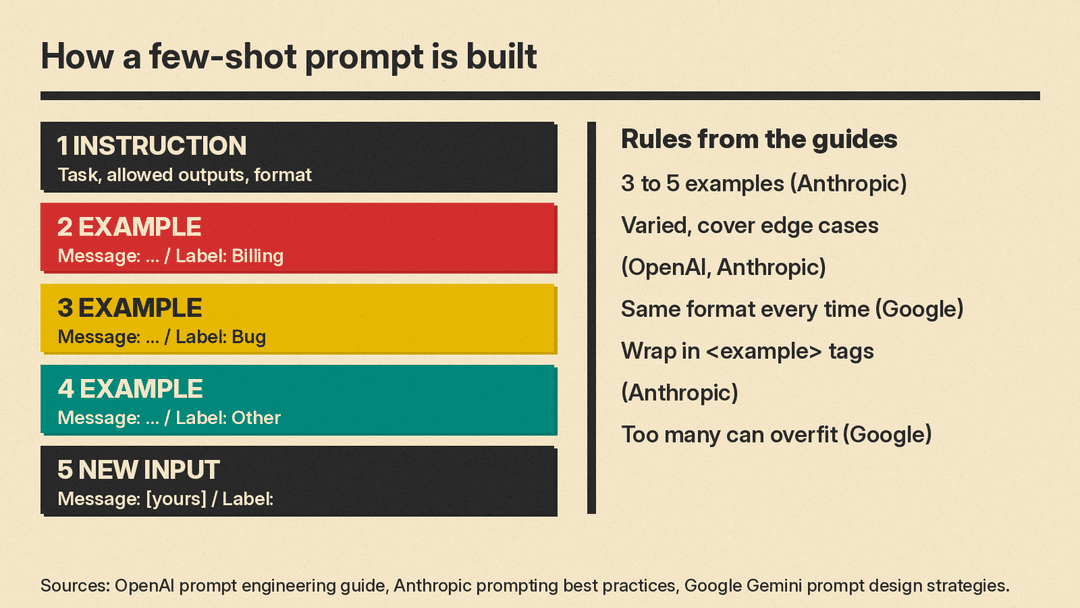
Anthropic. Claude's prompting best practices call examples "one of the most reliable ways to steer Claude's output format, tone, and structure." It asks for examples that are relevant (mirror your real use case), diverse (cover edge cases so Claude "doesn't pick up unintended patterns") and structured (wrapped in <example> tags, with several inside <examples> tags). It suggests 3 to 5 examples for best results, and says you can ask Claude to check your examples or write more of them. The same page notes that multishot examples also work with Claude's thinking: present each example as a problem, the method to apply and the expected answer.
Google. The Gemini guide goes furthest: "We recommend to always include few-shot examples in your prompts." It also says "you can remove instructions from your prompt if your examples are clear enough in showing the task at hand." It adds two warnings. Too many examples can make the model "overfit the response to the examples," and the examples must share one format, "especially paying attention to XML tags, white spaces, newlines, and example splitters."
The shared advice is short: use a few examples, make them look like your real inputs, vary them, and format them the same way every time.
What the research says
Two well-cited papers explain why examples work and why they can mislead.
Rethinking the Role of Demonstrations (Min et al., 2022) found that "randomly replacing labels in the demonstrations barely hurts performance" on a range of classification and multiple-choice tasks, across 12 models including GPT-3. The authors say the examples mainly show the model three things: the label space, the kind of input text to expect, and "the overall format of the sequence." The practical lesson: your examples teach format and scope more than they teach facts. A wrong-but-well-formatted example can still be copied.
Calibrate Before Use (Zhao et al., 2021) found that few-shot prompts on GPT-3 "can be unstable." The choice of format, examples "and even the order of the training examples can cause accuracy to vary from near chance to near state-of-the-art." The authors trace this to a bias toward answers "placed near the end of the prompt or are common in the pre-training data." Their fix is a calibration method for developers, but the everyday lesson is simpler: if results look odd, shuffle or rebalance your examples and test again.
Both papers studied 2020 to 2022 models. Models have changed a lot since then, so treat these as reasons to test your prompts, not as fixed numbers for today's apps.
What we tested
We ran two few-shot templates on Gemma 3 1B, a small open model, locally with llama.cpp at temperature 0. A 1B model is far weaker than ChatGPT, Claude or Gemini, so this is a stress test of the prompt pattern, not a test of those apps. Each case was one run.
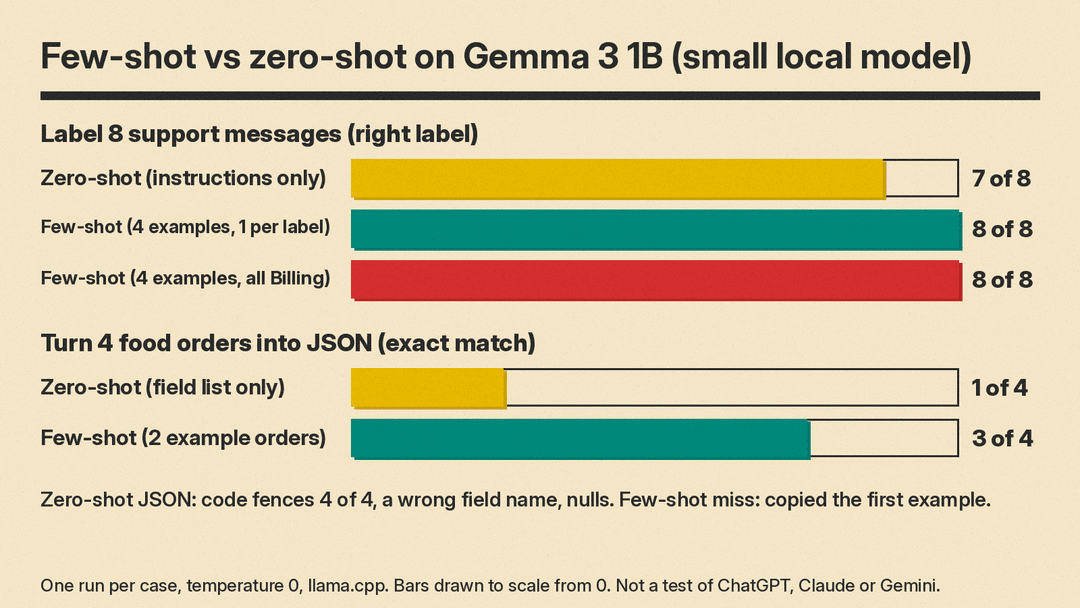
Test 1: labeling support messages. We asked the model to label 8 customer messages as Billing, Bug, Feature request or Other, first with instructions only, then with four examples (one per label) in <example> tags. Zero-shot got 7 of 8 right. It labeled "My card got billed but my account still says Free." as Bug, not Billing. The few-shot version got 8 of 8. Both versions replied with the label only, every time.
We then tried a lopsided set: four examples, all labeled Billing. We expected the model to lean toward Billing, as the Zhao et al. paper would predict. It did not. It still got 8 of 8 on our short, clear messages. That does not prove skewed examples are safe; our test set was small and easy. Balanced examples are still the safer default.
Test 2: turning a food order into JSON. This is adapted from the order example in Google's guide. The zero-shot prompt gave the four field names and asked for quantities of only the items ordered. It matched the right answer on 1 of 4 orders. It wrapped every answer in a Markdown code fence, used a field name we did not allow ("drinks"), filled unordered items with null, and turned "two burgers" into 2 cheeseburgers plus 1 hamburger.
The few-shot version showed two example orders and their JSON. It matched 3 of 4, with bare JSON and no code fence each time. The one miss shows the main risk of few-shot prompting: for "I want two burgers, a drink, and fries," the model returned {"cheeseburger": 1, "fries": 1, "drink": 1}. That is close to our first example, "Give me a cheeseburger and fries," which it partly copied.
How to write a few-shot prompt in 7 steps
These steps combine the vendor guides above with what our test showed. Where a step is our own suggestion rather than a vendor rule, it says so.
- Write the instruction first. Say the task, the allowed outputs and the format in one or two sentences. Examples support instructions; they do not replace a missing goal. Google says clear examples can let you drop some instructions, but start with both.
- Pick 3 to 5 examples. That is Anthropic's suggested range. Google says to experiment with the count and warns that too many can cause overfitting.
- Cover every case once. For labels, give at least one example per label. For extraction, include an input with a missing field and one with an unusual phrase. This follows OpenAI's "diverse range of possible inputs" advice and Anthropic's edge-case advice.
- Make examples look like real inputs. Use the same length, tone and messiness as the messages you will actually paste in. Anthropic calls this "relevant."
- Keep one exact format. Same labels ("Message:", "Label:"), same tags, same line breaks in every example. Google calls this out directly.
- Separate examples from the task. Wrap each example in
<example>tags, or use a clear "Examples" heading, so the model does not treat your examples as the input to answer. Then end with the new input and an open slot, such as "Label:". - Test with inputs that differ from your examples. Our JSON miss happened on an order that looked a lot like an example. Our suggestion: try a few inputs that are close to an example but need a different answer. If the model copies, add a contrasting example or reword the close one.
When to skip few-shot examples
- Strict JSON in an app. Google says prompts can set the format of simple JSON, but for a more complex JSON schema it recommends the Gemini API's structured output feature. Anthropic points to structured outputs, or tools with an enum field, for classification. Examples still help with tone and edge cases, but a schema enforces the shape.
- Open-ended writing where you want variety. Examples pull outputs toward their length and wording. If you show one blog intro, you may get ten intros that sound like it. Our suggestion: describe the qualities you want, or show two or three very different examples.
- Private data. Anything you paste as an example goes to the model like any other input. Use made-up names and numbers.
For long instruction blocks that you reuse across chats, our guide to writing a system prompt covers where examples sit in that structure. Developers who pick examples automatically per request can read our deeper piece on dynamic few-shot example selection.
Few-shot prompt templates
Templates 1 and 2 are close versions of the prompts we ran on Gemma 3 1B (results above). Templates 3 to 6 are untested templates: adapt them and check the output yourself. Replace everything in square brackets. You can paste them into a new chat in ChatGPT, Claude or Gemini.
1. Label messages (tested, 8 of 8 on Gemma 3 1B)
Label each customer message with one label: Billing, Bug, Feature request, or Other. Reply with the label only.

<example>
Message: I was charged twice for my October plan.
Label: Billing
</example>
<example>
Message: The export button does nothing when I click it.
Label: Bug
</example>
<example>
Message: Could you add a dark mode to the dashboard?
Label: Feature request
</example>
<example>
Message: What are your office hours?
Label: Other
</example>

Message: [paste message]
Label:
2. Pull fields into JSON (tested, 3 of 4 on Gemma 3 1B)
Valid fields are cheeseburger, hamburger, fries, and drink.
Order: Give me a cheeseburger and fries
Output:
{"cheeseburger": 1, "fries": 1}
Order: Just two drinks please
Output:
{"drink": 2}
Order: [paste order]
Output:
To reduce copying, add a third example whose answer looks nothing like the first, such as an order for two hamburgers.
3. Rewrite in your brand voice (untested template)
Rewrite the draft in our brand voice. Match the length and tone of the examples. Do not reuse their wording or facts.

<examples>
<example>
Draft: [plain version of a past post]
Our voice: [the version you published]
</example>
<example>
Draft: [a second, different past post]
Our voice: [its published version]
</example>
<example>
Draft: [a third, different past post]
Our voice: [its published version]
</example>
</examples>

Draft: [new draft]
Our voice:
4. Reply to customer emails (untested template)
Write a reply to the customer email. Use 3 sentences or fewer, a friendly tone, and end with one clear next step. Follow the pattern in the examples.

<example>
Email: [real past email, names removed]
Reply: [the reply you liked]
</example>
<example>
Email: [a different kind of email, for example a complaint]
Reply: [the reply you liked]
</example>
<example>
Email: [an email you had to say no to]
Reply: [the reply you liked]
</example>

Email: [new email]
Reply:
5. Turn notes into a fixed format (untested template)
Turn the meeting notes into this format: Decision, Owner, Due date. Write "none" if the notes do not say. Follow the examples.

<example>
Notes: [short real notes]
Decision: [..]
Owner: [..]
Due date: [..]
</example>
<example>
Notes: [notes with no due date]
Decision: [..]
Owner: [..]
Due date: none
</example>

Notes: [new notes]
6. Let the AI improve your examples (untested template)
Anthropic's guide says you can ask Claude to evaluate your examples or generate more. This prompt does that in any chat app.
Here is a few-shot prompt I use. Check my examples for two problems: (1) cases they do not cover, and (2) patterns the model might copy by mistake, such as the same length, word or answer every time. Then suggest 2 new examples in exactly the same format.

[paste your prompt]
The short version
Show the model what a right answer looks like, in the exact format you want, with a few varied examples. Keep the format identical across examples, cover each case once, and test on inputs that do not match your examples. In our small test, examples fixed the output format and one labeling error, and they caused one copied answer. Check for that before you trust a few-shot prompt.
Sources
- OpenAI: Prompt engineering guide (Few-shot learning)
- Anthropic: Prompting best practices (Use examples effectively)
- Google: Gemini API prompt design strategies (Zero-shot vs few-shot prompts)
- Brown et al., Language Models are Few-Shot Learners (arXiv 2005.14165)
- Min et al., Rethinking the Role of Demonstrations: What Makes In-Context Learning Work? (arXiv 2202.12837)
- Zhao et al., Calibrate Before Use: Improving Few-Shot Performance of Language Models (arXiv 2102.09690)
- llama.cpp
