
Misspelled signs and garbled labels are a common problem with AI images. Three image tools, Midjourney, FLUX from Black Forest Labs, and Ideogram, now all document how to put real words into a picture. They agree on the basics, but they differ on the controls you get and on how you fix a typo once it happens. This guide compares the three using only what each company's own documentation says, as of October 2026, so you can pick the right one for a poster, a sign, a thumbnail or a product mockup.
If you want a broader look at picture quality, see our Midjourney vs GPT Image comparison. This piece is only about text.
The one rule all three share: quote the words
Every tool here treats words inside quotation marks as the text to draw.
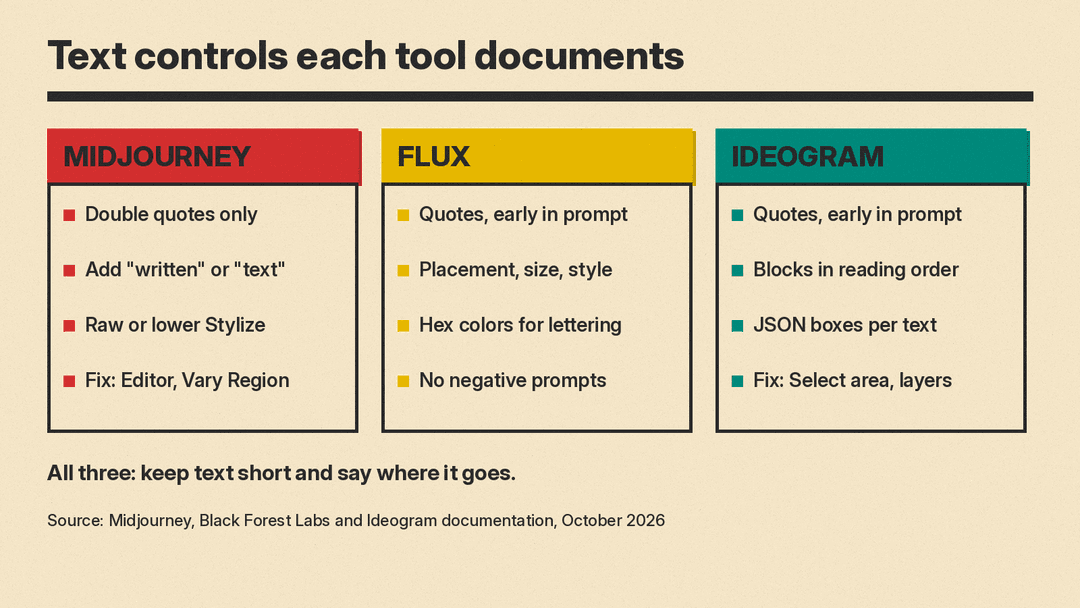
- Midjourney says that in versions 6 and later, words or phrases inside double quotation marks show up in the image. It is strict about the mark: its Text Generation page says single quotes or apostrophes will not work.
- FLUX guides tell you to enclose the exact text in quotation marks, then describe placement and font style.
- Ideogram says that anything inside quotation marks is text to render, so you should keep the spelling and capitals exactly as you want them to appear.
So the first habit is the same everywhere. Write a bakery window with a sign reading "FRESH BREAD", not a bakery window with a sign that says fresh bread.
Shared advice: short, early, and placed
The three sets of documentation repeat the same four tips, almost word for word.
- Keep it short. Midjourney says shorter words or phrases give you a better chance of getting them right. Ideogram says each extra word raises the odds of a typo or a dropped letter. Black Forest Labs says long strings are harder to render accurately.
- Put the text early in the prompt. FLUX's guide says to front-load text descriptions. Ideogram says text named near the start of the prompt comes out more reliably than text added at the end.
- Say where it goes. FLUX and Ideogram both ask you to describe placement, such as "above the door" or "curving along the bottom".
- Stick to the Latin alphabet when you can. Midjourney says text works best with standard Latin letters. Ideogram says non-Latin scripts such as Arabic or Chinese render less reliably than English.
These overlaps matter more than any brand difference. If your text is long, buried at the end of a busy prompt, and has no stated position, none of the three is likely to get it right.
Midjourney: quotes plus a few helper words
Midjourney's guidance is the shortest of the three. Beyond the double quotes, its documentation recommends adding words such as "with the words", "text" or "written" to the prompt. Its good examples are simple: a pastel watercolor landscape with "imagine" written in the clouds, or a cartoon manual with the words "read the docs" in big text.
Midjourney names two levers for when the lettering keeps coming out wrong:
- Use Raw mode or lower the Stylize value, which reduces how much Midjourney adds its own artistic flair.
- Fix small glitches after the fact with the Editor on the web, or with Vary Region in Discord.
What Midjourney does not document is a way to pin each line of text to a set spot or to name a typeface. You describe the scene and let the model lay it out. That suits images where the words are part of the scene, like a neon sign or a painted mural, more than strict layouts.
FLUX: typography described like a design brief
Black Forest Labs gives the most detailed text advice. Its FLUX.2 prompting guide lists five things to describe for text: quotation marks, placement, style, font size, and color.
- Style: phrases like "elegant serif typography", "bold industrial lettering" or "handwritten script".
- Size: "large headline text", "small body copy", "medium subheading". The company's typography rules show size hierarchy as a headline above smaller subtext.
- Color: hex codes for brand text, for example the logo text "ACME" in color #FF5733.
Two details stand out. First, the FLUX.2 guide says the model does not support negative prompts, so you describe what you want rather than what to avoid. Second, Black Forest Labs' own best-practice rules recommend FLUX.2 [flex] for the best typography results, and say that higher step counts (30 to 50) give better text quality than lower ones, at the cost of speed.
FLUX's documentation also lists text effects it handles, such as neon signs, metallic 3D letters, embossed leather, and text carved into stone. If you are making a product ad, a magazine cover or a poster, the Typography and Design page says FLUX.2 is built to generate those layouts.
Ideogram: layout control and editable text layers
Ideogram's own guide says it excels at generating text inside images, and its documentation offers the most ways to control and fix that text.
- Several text blocks in reading order. Its text guide tells you to give each block its own words, style and place, described from the top of the image down. Its example is a jazz poster with a gold serif headline, an italic tagline, and a small venue name at the bottom.
- JSON prompts. On Ideogram 4.5 and 4.0, a JSON prompt can make each piece of text its own element, with its own wording, style description, color palette and bounding box for placement. Ideogram says these guide the composition and that you should still inspect the spelling and placement.
- Fixing mistakes. The troubleshooting page says you can fix a wrong letter with Select area in Ideogram Studio (on paid plans), or add long copy as a text layer in Studio instead of generating it.
Ideogram is also clear about limits. Its typography page says the model is not designed for complete, text-heavy documents, and that you cannot name a typeface. You describe the weight, shape and mood of the letters instead, such as "bold sans-serif" or "thin and refined formal script with flourishes". In a Studio text layer, by contrast, you can choose a font and edit the words directly.
If you need text as editable vector shapes rather than pixels, we covered Ideogram Vector separately.
Which one fits which job
Based on what each company documents, here is a practical way to choose.
- Words inside a scene (a shop sign, graffiti, a label on a bottle): all three handle this. Midjourney is a good fit if you already use it for the look of the image and the text is one or two words.
- Brand graphics with exact colors (a headline in your brand red): FLUX's text guide shows hex color codes written straight into a plain prompt for lettering. Ideogram's JSON prompts also accept hex colors per element, which Ideogram says steer the colors but do not lock every pixel. Midjourney's text page does not cover color codes.
- Multi-line layouts (posters, flyers, thumbnails with a title and a subtitle): Ideogram's reading-order prompts and JSON bounding boxes give the most documented control over where each line lands.
- Long copy (a paragraph, a menu, fine print): none of the three recommend it. Ideogram's own advice is to add long text as an editable layer afterward, and the same approach works with any tool: generate the image, then set the copy in a design app.
A workflow that works in any of them
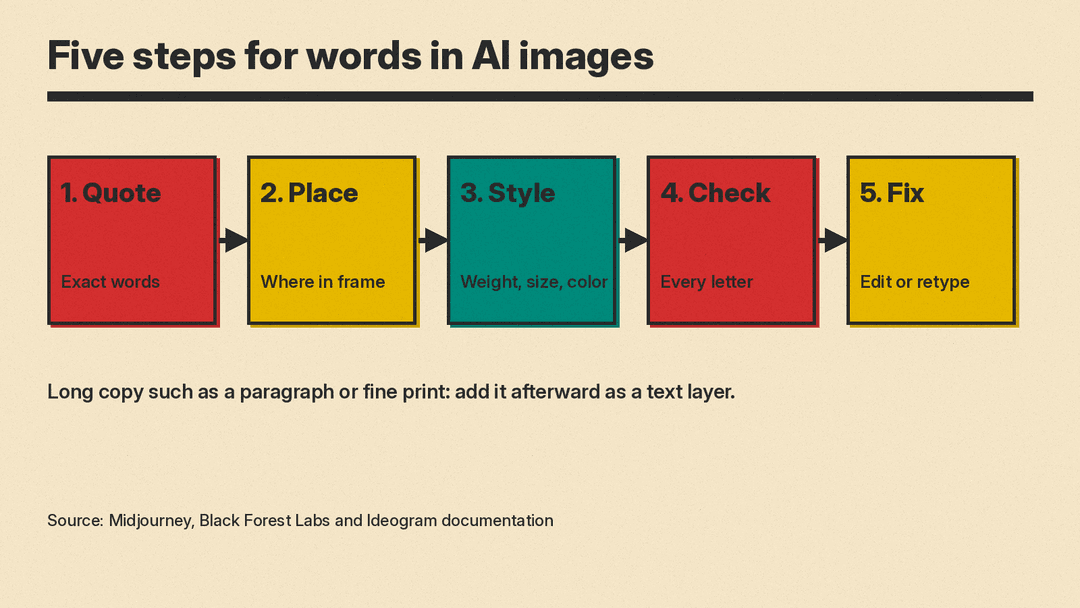
The documentation points to the same five steps, whichever tool you use:
- Quote the exact words, with the spelling and capitals you want. In Midjourney, use double quotes.
- Place them: say what surface they sit on and where in the frame.
- Style them: describe weight, shape and mood (serif, script, bold sans-serif), plus size and color.
- Check every letter at full size. A word that looks right in a thumbnail can hide a swapped letter.
- Fix small errors with an edit tool (Midjourney's Editor or Vary Region, Ideogram's Select area) instead of rerolling the whole image, or set the text yourself in a design app.
Ideogram adds one useful habit that applies everywhere: change one thing at a time between generations, so you can tell what made the difference.
Why this matters
A poster with a misspelled date or a product shot with garbled packaging is unusable, however good the lighting is. The good news is that the three leading tools now publish clear, similar rules for getting words right. Following them, and keeping the text short, does more for your results than switching tools. When the copy runs longer than a short headline, the honest answer from the vendors themselves is to add it by hand.
For a related tool built for design work, see our explainer on Canva Craft, Canva's image model.
Sources
- Midjourney: Text Generation
- [Black Forest Labs: Prompting Guide, FLUX.2 [pro] and [max]](https://docs.bfl.ai/guides/prompting_guide_flux2)
- Black Forest Labs: Style, Aesthetics and Text
- Black Forest Labs: Typography and Design
- Black Forest Labs skills: Typography and Text Prompting
- Ideogram: Text in Images
- Ideogram: Text and Typography
- Ideogram: JSON Prompting
- Ideogram: Fix Common Problems
- Ideogram: Prompting Basics
