
Google Chrome's autofill can now suggest details it finds in your Gmail inbox, such as an order number, a package tracking number or a flight booking code. Google announced the change on October 28 and said it is "beginning to roll out" in the U.S. on desktop, Android and iOS.
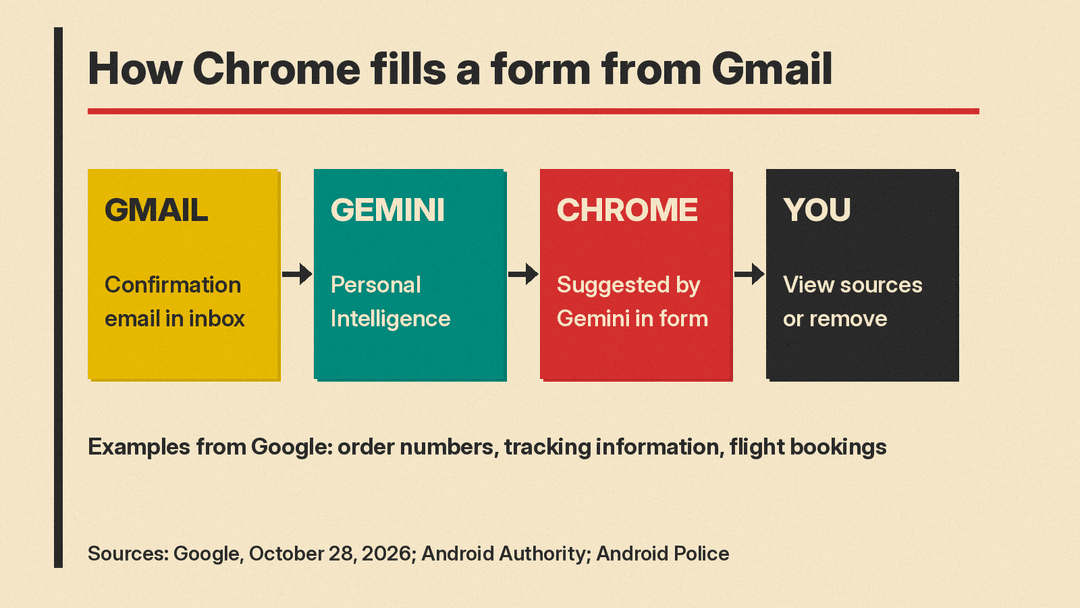
The feature runs on Gemini with Personal Intelligence, the setting that lets Gemini read data from your connected Google apps. It only works for people who use Gemini in Chrome and have Personal Intelligence turned on.
What changed
Chrome autofill has long handled the basics: your name, address and card number. According to The Verge, an earlier update added details such as passport number, email address and physical addresses from your Google Account and services like Google Wallet.
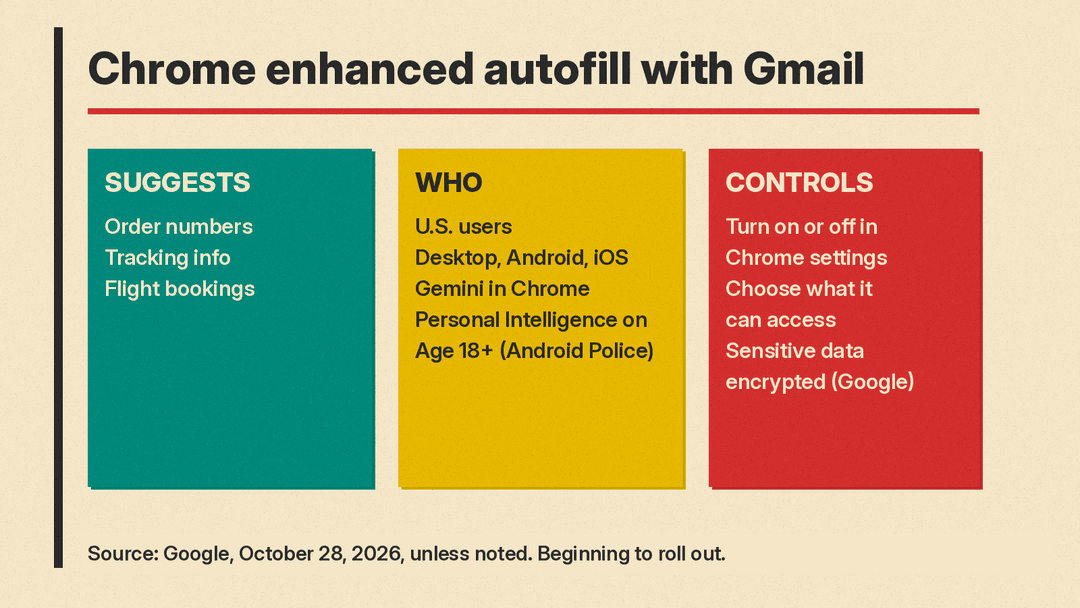
The new step is Gmail. In Google's words, Chrome's enhanced autofill "can automatically suggest information pulled directly from Gmail as you fill out online forms." Google's examples are order numbers, tracking information and flight bookings. The Verge also lists hotel reservations, and TechCrunch lists membership IDs among the details Chrome could suggest.
A typical case: you check in for a flight online, and instead of searching your inbox for the booking code, Chrome offers it in the form field. Android Police gives that example, and Android Authority gives a similar one for a FedEx tracking number.
Who gets it
Per Google's post, these are the conditions:
- You are in the U.S.
- You use Chrome on desktop, Android or iOS.
- You use Gemini in Chrome.
- You have Personal Intelligence turned on.
Google's Chrome Help page adds that you must be 18 or older, and the Gemini Apps Help page says Personal Intelligence needs a personal Google Account, not a work, school or supervised one. Google says the feature is "beginning to roll out", so it may not appear for every eligible user yet. Android Authority said it had not received the feature at the time of its report.
How the suggestions look
Android Authority reports that when a suggestion is available, it appears under a "Suggested by Gemini" section when you tap a text field. Tapping it shows where the information came from.
Android Police describes the Android version in more detail. Suggestions from Gmail carry a Gemini icon. A long press on a suggestion above the keyboard opens a menu with "View sources", which opens the original email in a new tab, and "Remove suggestion", which dismisses it. Removing a suggestion does not delete the email. Per Android Police, the suggestion goes away for good only when you delete the email it came from.
The "View sources" step matters. An inbox often holds several confirmation emails for the same trip or store, and a wrong booking code is easy to miss in a form. Checking the source email is the quick way to confirm Chrome picked the right one.
Gmail only, for now
Chrome tested this idea earlier in the year. Android Police says Google was spotted testing a "Find and Fill with Gemini" feature in July. Android Authority says that in its first Chrome Canary version, the feature could pull information from Gmail, Google Photos and "other connected apps."
Android Police says the public version is limited to Gmail, and Android Authority says it "appears to be limited" to Gmail. Android Authority notes that the source view suggests the feature "could extend beyond Gmail" later. Google has not announced that.
Privacy and control
Google's post makes two privacy statements: "sensitive data is encrypted and you remain in control," and you can manage whether enhanced autofill is on and what it can access in Chrome settings. The Verge and TechCrunch report the same, and The Verge notes you can turn it off completely.
Android Authority said Google did not show how those controls work. Google's Chrome Help page does name the switch: in Chrome settings, open Autofill and passwords, then Enhanced autofill, and turn "Find and fill with Gemini" on or off. Android Authority also tied the launch to a recent change in Google's privacy policy, which says Google can use data shared through Personal Intelligence to personalize ads. We covered that change in Google's privacy policy now lets connected Gmail and Photos data shape ads. Android Authority said this "doesn't necessarily mean" autofill data will be used for ads, but that it raises questions. Google has not said whether it does.
Why it matters
The change is small, but it shows where Google is taking Personal Intelligence. The same setting already powers Gemini features in other places, such as Personal Intelligence on Android Auto. Autofill moves it into one of the most common things people do in a browser: typing details into forms.
TechCrunch frames the update as a reason for users to stay in Chrome and in Google's AI ecosystem, and compares it to Apple's feature that detects verification codes in text messages and offers them above the keyboard. It also fits Google's wider push to connect its apps to Gemini, which we covered in Google opening Gemini and Search to developer apps.
For users, the trade is clear. The feature saves a trip to the inbox on every form that asks for an order or booking number, which matters most on phones. In return, Chrome reads your Gmail to find those details. If you already use Personal Intelligence, it is worth checking Chrome's enhanced autofill settings once the update arrives, and using "View sources" until you trust the suggestions.
Sources
- Google: Chrome's enhanced autofill helps you fill out forms with suggestions pulled from Gmail
- The Verge: Chrome's enhanced autofill can now pull info from Gmail
- TechCrunch: Chrome's AI-powered Autofill can now dig through your Gmail
- Android Authority: Chrome's Gemini-powered autofill can now pull data from Gmail
- Android Police: Chrome's smarter autofill goes beyond passwords and reads your Gmail
- Google Chrome Help: Fill out forms automatically in Chrome (Use enhanced autofill)
- Gemini Apps Help: Connect your Google apps to personalize your Gemini experience
