
Google's privacy policy now spells out that what you let Google Search read from Gmail, Drive and Google Photos can also shape the ads you see. The change sits in the policy that took effect on October 16, 2026, and it is tied to Personal Intelligence, the feature that lets AI Mode in Search draw on your own email and photos to tailor answers.
The default has not changed. Google says it does not show personalized ads based on your Drive, Gmail or Photos content unless you make that data available to other Google services that support personalized ads, such as Search. But if you do connect them, the trade covers both better answers and more targeted ads. Here is what the policy and Google's help pages say, and how to switch it off.
What the policy now says
The Google Privacy Policy, listed as effective October 16, 2026, keeps its long-standing promise with a new condition attached: "We don't show you personalized ads based on your content from Drive, Gmail, or Google Photos, unless you choose to make data from these services available to other Google services that support personalized ads."
The policy also gives the example that links the two. It says users may let services such as Search or Gemini Apps access Google Photos and Workspace apps like Gmail and Drive. Then it adds: "For example, Search may process some of the data that you allow Search to access to personalize content, including ads."
Android Authority flagged the wording on October 23, describing it as an exception for users who explicitly connect that information to Google services that offer personalized advertising. The outlet also notes that this does not mean Google automatically scans private emails and photos to serve ads.
How Personal Intelligence uses your Gmail and Photos
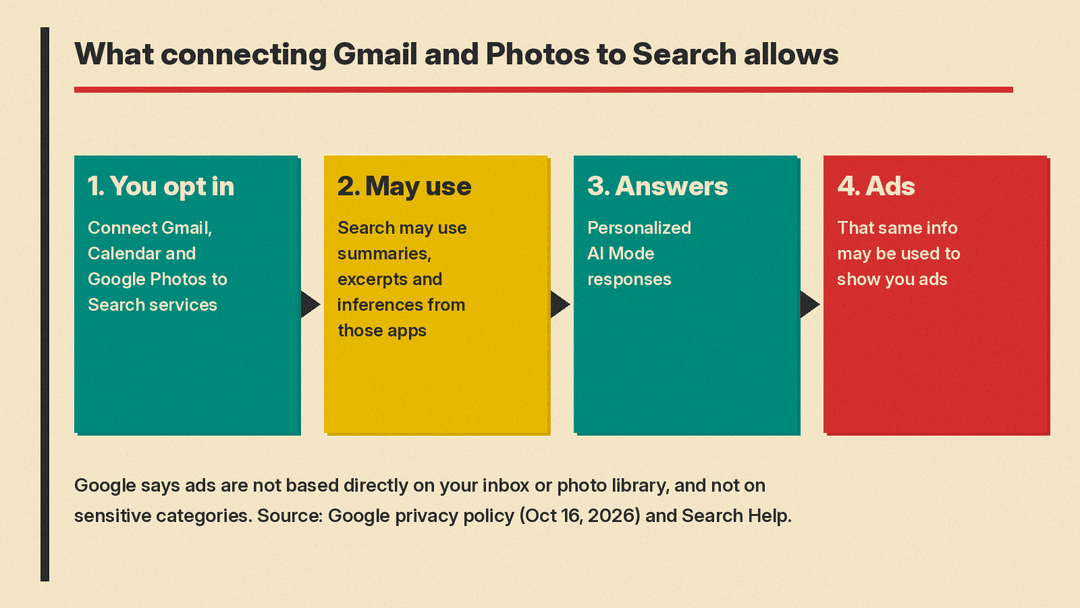
Personal Intelligence is Google's name for personalization that draws on your own Google data, and Android Authority notes that both Gemini and Google Search use it. In AI Mode, according to Google's Personal Intelligence help page, it starts with your previous searches and activity saved in Search Services History. You can then connect Google content apps, starting with Gmail, Google Calendar and Google Photos, so AI Mode can reference insights from your emails and photos. The feature is for users 18 or older.
Google's own example in the privacy policy: if you ask Search about a recent hotel booking, Search may use booking details from an email to suggest things to do near your hotel.
The consent is broader than AI Mode. Google's help page on connecting content apps says connecting means "all Search services will be permitted to access Workspace (currently Gmail and Google Calendar) and Google Photos." Google lists those Search services as Google Search (including AI Mode and Discover), Maps (including Ask Maps), Shopping, Flights, Hotel, Translate and News. For how AI Mode answers show their links, see our explainer on Google AI Mode link changes.
Will Google read my inbox to pick ads?
Google's answer on the same help page is careful. "Ads will not be based directly on your Gmail inbox or your Google Photos library," it says. It then explains what can happen instead: "If you connect your content apps to Search Services, Search may reference summaries, excerpts and inferences from these sources to personalize your experience and do things for you. That same info may be used to show you ads, so they are even more helpful for you."
So the line Google draws is between the raw inbox and what Search derives from it. Summaries, excerpts and inferences pulled from your mail and photos can feed ads. The full library itself is not the stated input.
Google lists three limits:
- No sensitive categories. The policy says Google does not show personalized ads based on sensitive categories "such as race, religion, sexual orientation, or health," and the help page repeats this.
- No identity to advertisers. The policy says Google does not share information that personally identifies you with advertisers, "such as your name or email, unless you ask us to."
- Your choice. The help page says connecting content apps is optional and that you can disconnect them at any time.
How to turn it off
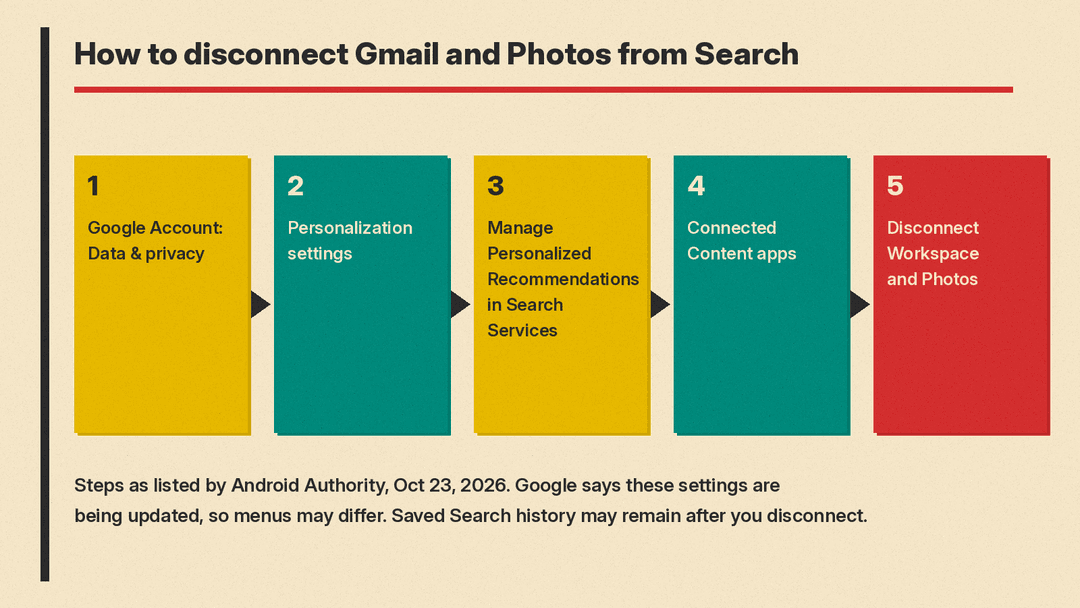
Android Authority lists these steps to stop Search from reading your connected apps:
- Open your Google Account and go to Data & privacy.
- Under Personalization & activity, select Personalization settings.
- Choose Manage Personalized Recommendations in Search Services.
- Find Connected Content apps under Additional Personal Intelligence.
- Disconnect Google Workspace and Google Photos.
You can also turn off Personalized Recommendations entirely from the Search Services personalization page, the outlet says. Separately, Google's privacy policy points to My Ad Center as the place to control what information Google uses to show you ads.
One catch: Android Authority reports that disconnecting an app does not necessarily erase what Google has already saved. Data stored in Search Services History may remain even after you disconnect the app or delete the original email or photo. Google's help page on connecting content apps says the same: disconnecting an app or deleting data in it "doesn't delete any data from your Search Services History," and that data can still be used for product improvement, including training generative AI models. Google's Personal Intelligence page says you can manage or delete Search activity at any time from myactivity.google.com.
Google also notes on that page that its Search services settings are being updated, so the menus described may not match what you see yet.
The bottom line
The October 16 policy makes plain that, at Google, the same opt-in that powers personal answers in AI Mode can also power ads. If you connect Gmail or Photos to get better answers, that is the deal you are accepting. For more on where Personal Intelligence shows up, see our explainer on Gemini in your car.
For another Google feature with a privacy trade-off, see our explainer on Gemini scam checks in Google Messages.
Sources
- Google Privacy Policy, effective October 16, 2026
- Google Search Help: Connect your Google content apps to Search services
- Google Search Help: Personal Intelligence in AI Mode
- My Ad Center Help: Control what data Google uses to show you ads
- Android Authority: Google makes a privacy policy exception to use your Gmail and Photos data for ads
