
Lawyers spend much of the day on research, drafting, contract review and document review. A new group of AI tools now targets each of those jobs. Some are built on large legal research libraries. Some sit inside Microsoft Word. Some are general AI assistants with legal templates on top.
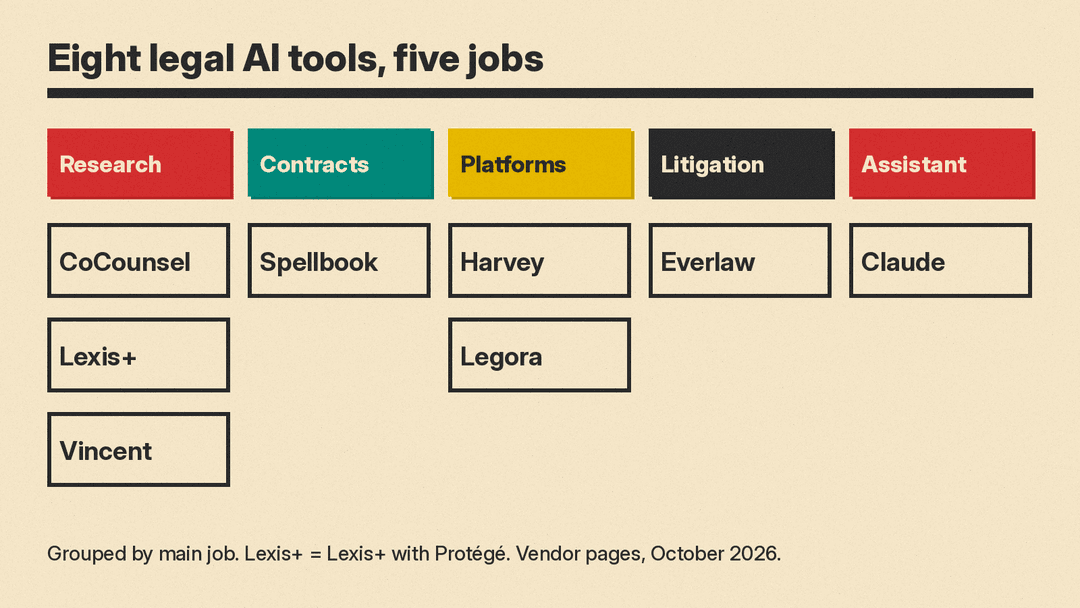
This guide covers eight real tools, grouped by the job they do. Each description is based on the vendor's own website as of October 2026. Most legal AI vendors do not post prices. They ask you to book a demo or request a trial, so we list prices only where a vendor page states them, and we say so when it does not. Check each vendor page before you buy.
How to choose an AI tool for legal work
Answer four questions before you compare features.
- What is the main job? Research, contract drafting, document review in litigation, or general drafting help.
- Which legal content do you need? Tools from Thomson Reuters, LexisNexis and vLex are tied to their own research libraries.
- Where does your team work? Several tools run inside Word or connect to document management systems such as iManage and NetDocuments.
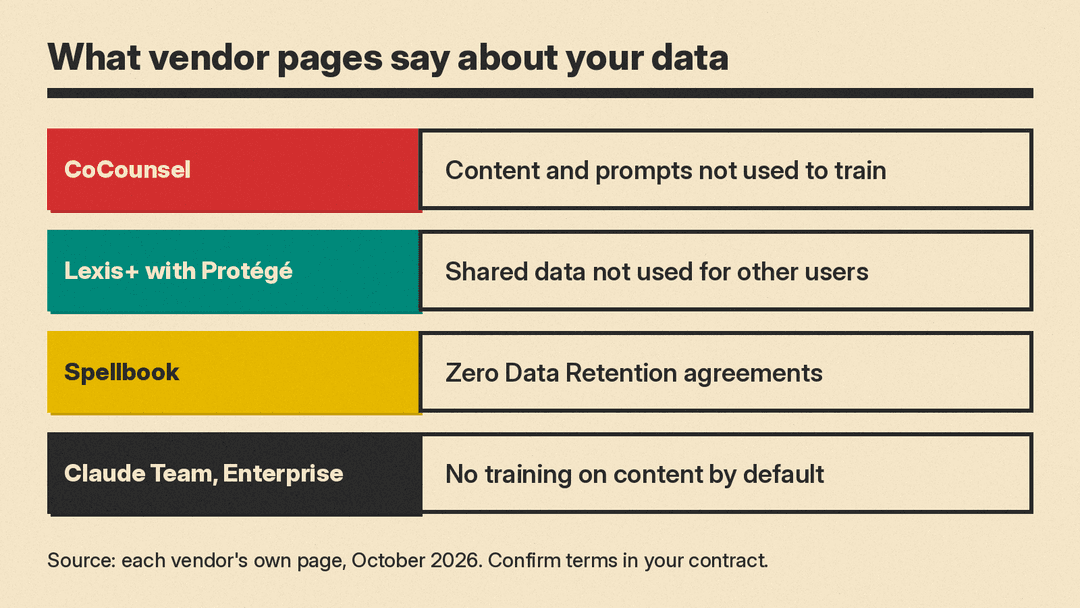
- What does the vendor say about your data? Read the vendor's own privacy and security wording, and confirm it in your contract.
One rule applies to every tool here: a lawyer must check every citation and every draft before it goes to a client or a court. The Thomson Reuters CoCounsel FAQ says its Fiduciary-Grade AI "is designed to support human judgment, not replace it."
Legal research with a large law library
CoCounsel (Thomson Reuters)
CoCounsel is Thomson Reuters' AI assistant for legal, tax, audit, compliance and drafting work. The product page says it connects to Westlaw, Practical Law, Checkpoint, Microsoft 365 and document management system partners, and that answers are "grounded in authoritative content and expert-validated sources." The old Casetext site now redirects to the CoCounsel page.
Data: the CoCounsel FAQ says user content and prompts are not used to train CoCounsel or the underlying models, and that partners such as OpenAI and Google are "contractually prohibited from using any customer data to train their models." Retention is set at the organization account level.
Price: not listed on the product page.
Good for: firms that already use Westlaw or Practical Law.
Lexis+ with Protégé (LexisNexis)
Lexis+ with Protégé is the LexisNexis legal AI product for research, analysis and drafting. Its FAQ says Lexis+ AI was renamed Lexis+ with Protégé as of February 2026, and that past Lexis+ AI users now have access to it. The page lists drafting of contracts, motions, briefs and complaints; research grounded in LexisNexis content; Shepard's citation checks; and connections to iManage, SharePoint and NetDocuments.
Data: the FAQ says users control personalization and that data they share "is not used to inform performance for other users."
Price: not listed; the page offers a free trial request.
Good for: firms that already rely on Lexis research and Shepard's.
Vincent (vLex, part of Clio)
Vincent is vLex's AI legal assistant. The page title says vLex is now part of Clio. Vincent combines vLex's global legal database with AI workflows, including research questions, 50-state surveys, jurisdiction comparisons, complaint and pleading analysis, contract analysis, redline analysis, and profiles of judges, lawyers, firms and parties.
Price: not listed; the page offers a free trial and demos.
Good for: research across many jurisdictions and litigation preparation.
Contract drafting and review in Word
Spellbook
Spellbook is a legal AI suite with a Word add-in (Review, Draft, Ask, Benchmarks, Playbooks) and Associate, which its pricing page calls a "multi-document agent." Playbooks let you save instructions for how Spellbook should review a document.
Price: the pricing page says pricing is based on the number of team members on a license, with custom quotes after a demo. It lists a free 7-day trial and free access for academic institutions.
Data: the pricing page says Spellbook uses Zero Data Retention agreements, "preventing data use for training," and lists SOC 2 (Type II), GDPR and CCPA compliance.
Good for: individual lawyers, small firms and in-house teams that draft and redline in Word.
Platforms for firms and in-house teams
Harvey
Harvey is an AI platform for law firms and in-house legal teams. Its home page lists Agents, Spaces (shared workspaces with clients and co-counsel), Vault (to store, organize and bulk-analyze legal documents), Contract Intelligence and a Command Center for analytics and benchmarking. Harvey says more than 3,500 legal organizations and more than 200,000 professionals use it. It lists SAML SSO, audit logs and IP allow-listing among its default controls.
Price: not listed.
Good for: large firms and legal departments that want one shared platform.
Legora
Legora calls itself "collaborative AI for exceptional lawyers." Its home page describes the Legora aOS, an "agentic operating system for legal work," with an Agent that plans and runs legal tasks, Monitors that scan regulatory change, and Lists that organize work. It names use cases in M&A, litigation, banking, tax and insurance.
Price: not listed; the site offers demos.
Good for: firms and in-house teams that want agent workflows across practice areas.
Some large firms license more than one platform. In October, Hogan Lovells Cadwalader signed agreements with both Harvey and Legora.
Litigation and ediscovery
Everlaw
Everlaw is an ediscovery and litigation platform with AI tools. Its site lists ediscovery, early case assessment, legal holds, depositions, internal investigations, FOIA and public records requests, and trial preparation. Its AI suite includes Coding Suggestions, a Writing Assistant, a Review Assistant, predictive coding and clustering. The home page announces Everlaw Omni, which it describes as "agentic AI designed for complex, high-stakes legal matters."
Price: not listed; Everlaw's pricing page is a contact form, and it marks some AI features as using credits.
Good for: litigation teams with large evidence sets.
General AI assistant with legal templates
Claude for legal teams (Anthropic)
Claude for legal teams is Anthropic's page for legal work in Claude. It lists ready-made legal artifacts for tabular contract review, regulatory tracking, legal intake, jurisdiction surveys, playbook review and matter tracking, plus legal plugins and Claude in Word and Outlook. It lists connectors to tools such as iManage, NetDocuments, Ironclad and Bloomberg Law. We covered the launch in Claude for Legal adds artifacts for contract review.
Data: the page says that on Team and Enterprise plans, Anthropic does not train on your content by default, and Enterprise admins set retention. Anthropic also publishes guidance on privilege and confidentiality.
Price: not listed on the legal page; see the Claude pricing page.
Good for: in-house teams and small firms that want one general assistant with legal templates.
A simple way to start
- Individual lawyer or small firm: start a free trial of one drafting tool, such as Spellbook, and a research tool tied to the library you already pay for.
- In-house team: test a general assistant with legal templates, such as Claude, next to a contract tool, on a set of past contracts with known answers.
- Large firm: compare platforms such as Harvey and Legora on the same matters, with your security team in the room.
- Litigation: run an ediscovery trial on a closed matter before you use it on a live one.
In every case, read the vendor's data terms, keep client data out of consumer accounts, and check each citation against the source.
For broader lists, see our best AI tools for small business owners and best AI tools for freelancers guides.
