
Answering new leads, writing listing copy, fixing photos and keeping a contact database warm all take time away from selling. The AI tools in this guide cover parts of those jobs. Some are built only for real estate. Others are general tools that agents adapt.
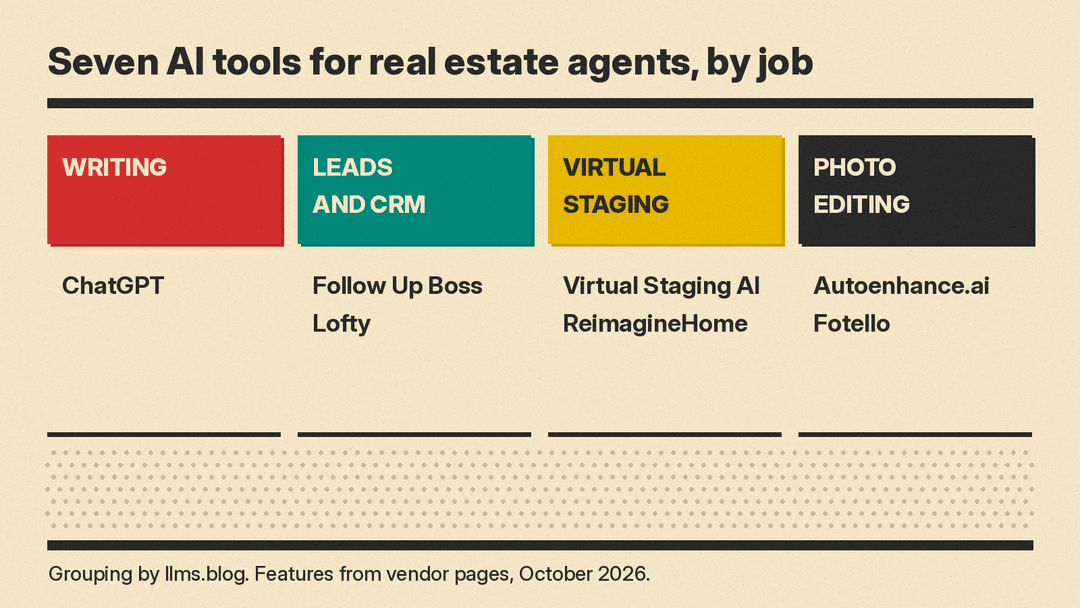
This guide covers seven real tools, grouped by the job they do. Features and plan details are copied from each vendor's own pages as of October 2026. Where a vendor page did not show a price we could check, we left the price out. Plans and limits change often, so check the vendor page before you buy. For tools outside real estate, see our best AI tools for small business owners and best AI tools for social media managers guides.
How to choose AI tools as an agent
Answer three questions before you compare features:
- Where do your leads live? If you already use a CRM, check its AI features first. A second tool that cannot see your contacts adds work instead of saving it.
- Who edits your photos? If a photographer delivers your listing photos, the photo tools in this guide may be their tools, not yours. Ask what they use before you pay twice.
- How is AI counted? Some vendors include AI in the plan price. Others count photos or designs per month. Read the limit line on the pricing page, not only the headline price.
One rule applies to every tool here: read anything AI writes or edits before it goes public. Check listing copy against fair housing rules, and check your MLS rules on how to label virtually staged or edited photos.
Writing listings and client messages: ChatGPT
ChatGPT is a general assistant. Agents can use it to draft listing descriptions, open house posts, market update emails and replies to common buyer questions. You give it the facts (beds, baths, square footage, features, neighborhood), and it gives you a first draft to edit.
Its pricing page lists four plans for individuals: Free at "$0 / month," Go at "$8 / month," Plus at "$20 / month" and Pro "From $100 / month." Plus adds "Projects, scheduled tasks, and custom GPTs," which help if you want to save your brand voice and reuse it. The page says the Go plan "may include ads." For a team, it says "Business plans are available starting at 2 users."
On data use, the plan table's privacy row reads "Content is used to train our models" with "Opt-out available" for the Free, Go, Plus and Pro plans. Do not paste client details into a chat until you have read that row and set the option you want. For a comparison of consumer AI plans, see our ChatGPT Plus vs Claude Pro vs Google AI Pro guide.
Good for: first drafts of listing copy, emails and social captions. Not built for real estate, so you supply every fact.
Leads and CRM: Follow Up Boss
Follow Up Boss is a real estate CRM. Its pricing page lists three plans. With monthly billing:
- Grow: "$69 month/per user + tax, where applicable." Calling is an add-on: "Add calling for $39/user."
- Pro: "$499 month/includes 10 users + tax, where applicable," with "Additional users $49/month." Pro adds "Unlimited calling & texting for all users."
- Platform: "$1000 month/includes 30 users + tax, where applicable," with "Additional users $20/month."
With yearly billing, Grow shows "$58 month/per user" with calling at $33 per user, Pro shows $416 and Platform $833 a month, and the page says yearly plans are "Billed annually, includes 2 months free."
Pro and Platform list "AI features like smart summaries, smart messages, suggested tasks, and predictive lead prioritization." The page also says: "There's no additional charge for AI features in FUB, but many of the features rely on data produced by the FUB Calling, which is an added charge on the Grow plan." On the Grow card, Follow Up Boss says it recommends "adding Calling for better AI results." Every plan includes a "Free trial, no contract, cancel any time."
Good for: agents and teams who want a real estate CRM with AI summaries and lead prioritization included in the price.
Leads and CRM: Lofty
Lofty combines a CRM, IDX websites, lead generation and automation. Its home page describes it as "an agentic AI Operating System built for agents, teams, and brokers." It lists several AI agents inside the CRM:
- Sales Agent: "Captures & qualifies leads, nurtures your database, and books appointments 24/7."
- Homeowner Agent: "Surfaces hidden sellers in your database, flagging the ones showing real intent to move."
- Social Agent: "Plans your posts, writes captions that convert, and keeps every channel active."
It also offers Cowork, which the page describes this way: "Give Cowork a task, once or scheduled, and it runs inside Lofty until it's done." The FAQ says Lofty offers "more than 33 different lead generation methods."
Its price packages page lists four plans (Lofty Agent, Lofty Team, Lofty Broker and Lofty Enterprise), each marked "Request Pricing." That page lists the Sales Agent, Social Agent and Homeowner Agent as add-ons on every plan, so budget for them on top of the CRM. The FAQ says: "We don't currently offer a free trial," and offers a one-on-one demo instead.
Good for: agents and teams who want lead generation, a website and AI follow-up from one vendor and are fine with a sales demo first.
Virtual staging: Virtual Staging AI
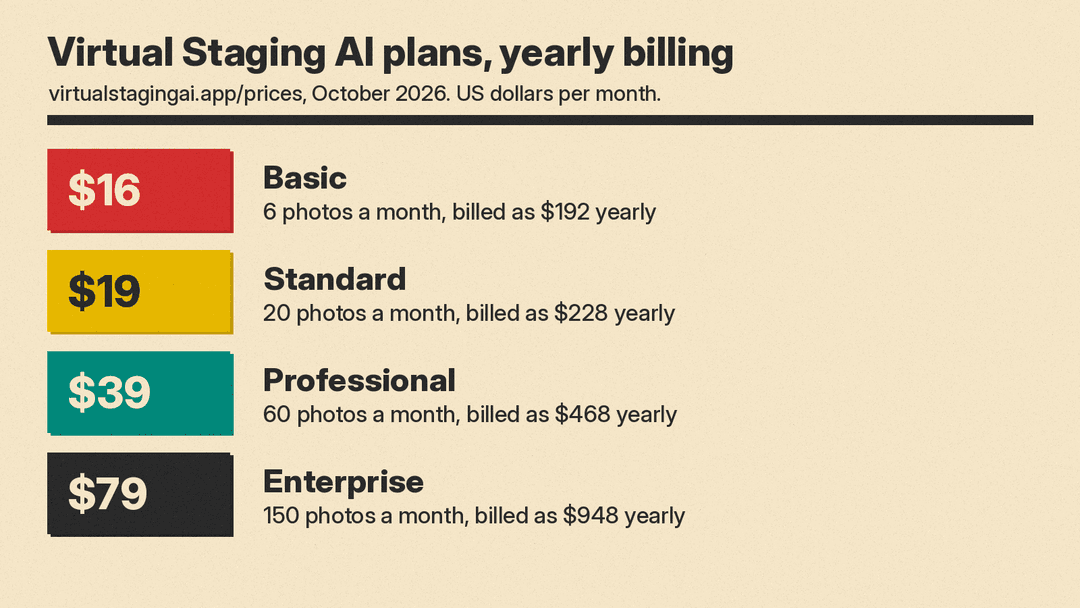
Virtual Staging AI adds furniture to photos of empty rooms. Its pricing page, with yearly billing selected, lists four plans:
- Basic: 6 photos a month, "$16 per month," "Billed as $192 yearly."
- Standard ("For agents"): 20 photos a month, "$19 per month," "Billed as $228 yearly."
- Professional ("For top producers"): 60 photos a month, "$39 per month," "Billed as $468 yearly."
- Enterprise ("For teams, brokerages and photographers"): 150 photos a month, "$79 per month," "Billed as $948 yearly."
Every plan lists "Unlimited renders and downloads," "Furniture removal included" and a "10 seconds turnaround." Enterprise adds "API access." The page also has a monthly billing option; the prices above are the yearly-billing figures.
Good for: agents who stage a few vacant listings each month and want results in seconds.
Virtual staging and photo fixes: ReimagineHome
ReimagineHome does virtual staging, decluttering and redesign of room photos. For real estate professionals and teams, its home page says you can "Upload up to 50 photos in one pass" and that it will "sort by room, flag compliance, apply fixes and enhancements, then export a market-ready gallery," with a stated turnaround of 2 to 5 minutes. Use cases on the page include day to dusk, snow removal and decluttering.
By default, the FAQ says, "it works within your existing layout, focusing on staging, finishes, lighting, and objects." The "First 5 designs are free," with "No credit card required." After that, its pricing page lists four monthly plans by credits: Essential (30 credits a month), Pro (200), Advanced (400) and Agency (900), and one generated design uses one credit. Listing batch processing for real estate is a Pro feature, so the 50-photo workflow above needs Pro or higher. ReimagineHome also suggests real furniture to buy and says that "as an Amazon Associate ReimagineHome earns a commission on qualifying purchases."
Good for: agents who want to stage, declutter and fix a full listing set in one pass, and to test it free first.
Photo editing: Autoenhance.ai
Autoenhance.ai is AI photo editing for real estate photos. Its home page lists HDR merging, window pulls, sky replacement, color correction, perspective correction and camera removal (taking the camera out of mirror reflections). It says full property shoots are "edited in 5 to 10 minutes."
Its pricing page says you can try it free with no account: you "preview watermarked enhancements," and to download clean high-resolution images you "choose a monthly subscription or pay per image." The subscription tab lists an Essential plan at "$29 / month" with "100 images included" and "Additional images for $0.29." The $29 is a discount from a struck $58: the page says "Lock in 50% off the Essential Plan for a limited time" and gives no end date.
Good for: agents who shoot their own listing photos and want them corrected fast. The site is aimed at real estate photographers, so it also suits agents who run their own media team.
For the photographer you hire: Fotello
Fotello is a platform for real estate photographers, not agents. We include it because it shows what to ask your photographer for. Its home page shows AI staging and twilight edits, branded delivery pages for photos, video and 3D tours, and a way for agents to "review, request changes and even buy more."
On disclosure, Fotello says its "edits never alter the property itself, and every staged photo ships with its original plus a clear disclosure." That is the vendor's own claim; your MLS rules still decide what you must label.
Good for: photographers who serve agents. Agents can point their photographer to it, or ask how their current photographer handles staged-photo disclosure. For more photo tools, see our best AI tools for photographers guide.
A simple setup for most agents
- Solo agent on a budget: ChatGPT for writing, plus one staging tool for vacant listings: ReimagineHome's 5 free designs, or Virtual Staging AI Basic at $16 a month billed yearly.
- Agent with steady lead flow: a real estate CRM with AI included (Follow Up Boss) or an all-in-one platform with AI agents (Lofty), plus one staging tool.
- Team or brokerage: compare Follow Up Boss Pro or Platform with a Lofty demo, and ask your photographers which editing and staging tools they already use.
Start with one tool for the job that costs you the most hours each week. Add a second only when the first is part of your routine.
